Minimap Teleports - Fast Travel Menu & Hearthstone Manager
- By
Access all your teleports from one minimap button - Hearthstones, mage portals, wormholes, teleport items, and travel abilities automatically detected and organized for faster gameplay.
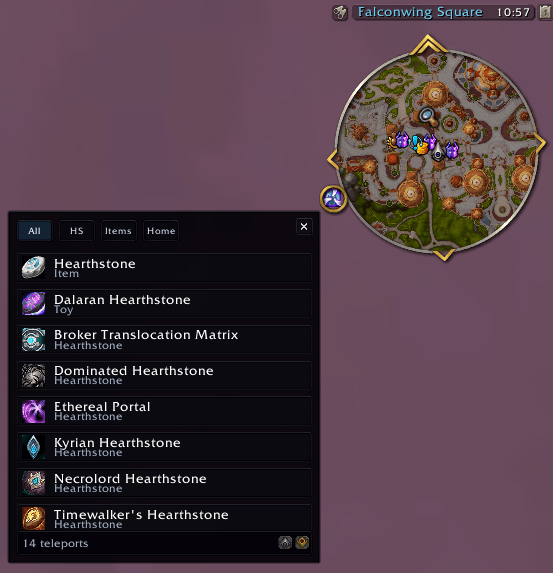
Access all your teleports instantly from a minimap button. Manage Hearthstones, portals, and travel items in one fast, clean menu for World of Warcraft.
Description
Spend less time searching through your bags and spellbook. Minimap Teleports is a lightweight World of Warcraft Retail addon that puts your Hearthstones, portals, dungeon and raid teleports, wormholes, travel toys, and housing options into one compact minimap menu.
The addon automatically detects the travel options available to your character and organizes them into clear categories. Open the menu, find your destination, and teleport-no setup required.
Features
- One minimap button for all your available teleports
- Automatic detection of known spells, owned toys, carried items, and unlocked travel options
- Separate tabs for Hearthstones, class teleports, Hero's Path teleports, items, engineering wormholes, and housing travel
- Instant search from the All tab
- Favorites that keep your most-used teleports near the top
- Cooldown tracking with an option to hide teleports that are on cooldown
- A Season filter for current Mythic+ dungeon teleports
- Automatic updates when your spells, bags, toys, unlocks, or world state change
- Combat-safe behavior: the menu closes in combat and refreshes after combat ends
- Automatic anchoring to the minimap button, including buttons collected by MBB or MinimapButtonButton
- Optional free-anchor mode for placing the menu anywhere on your screen
- Localized menus, tooltips, filters, messages, and addon metadata for every WoW Retail client language
Supported Travel Options
Minimap Teleports can bring together:
- Hearthstone and Hearthstone-style toys
- Mage portals, class teleports, and racial travel abilities
- Hero's Path dungeon and raid teleport flyouts
- Teleport items and toys, including Mycomancer's Hearthspore and the Lightveil Recall Beacon when available
- Engineering wormholes
- Midnight housing return and home teleport options
Only travel options your character knows, owns, carries, or has unlocked are shown. Some entries depend on your class, race, faction, profession, quest progress, or expansion access.
Menu Categories
- All - every detected travel option, with instant search
- HS - Hearthstones and similar teleports
- Class - class and racial travel abilities
- Paths - Hero's Path dungeon and raid teleports
- Items - teleport items and toys
- Eng - engineering wormholes
- Home - housing-related travel
Categories with no available teleports stay hidden, keeping the menu compact and relevant to your character.
How to Use
- Left-click the minimap button to open or close the teleport menu
- Click a travel option to use it
- Shift-click a travel option to add or remove it from your favorites
- Drag the minimap button to reposition it around the minimap
- Use the search box in the All tab to find a teleport instantly
- Enable Hide CD to hide travel options that are currently on cooldown
- Enable Season in the Paths tab to show only current-season Mythic+ teleports
The menu automatically anchors to the minimap button. If another addon collects the button through MBB or MinimapButtonButton, the menu follows the collected button instead.
For complete placement freedom, enable free-anchor mode and drag the menu anywhere on your screen. Its position is saved between sessions.
Slash Commands
/mtp,/minimapteleports, or/minimaptp- open or close the teleport menu/mtp minimap- show or hide the minimap button/mtp refresh- rebuild the detected teleport list/mtp reset- reset the minimap button, menu position, filters, search, and anchor mode
Menu Anchor Commands
/mtp anchor- show the current anchor mode/mtp anchor free- detach the menu and make it draggable/mtp anchor auto- attach the menu to the minimap button again/mtp anchor reset- reset the free-anchor position to the center of the screen
Localization
The interface automatically follows your game client language. Minimap Teleports supports all 11 WoW Retail locales:
- English
- German
- European Spanish and Latin American Spanish
- French
- Italian
- Korean
- Brazilian Portuguese
- Russian
- Simplified Chinese and Traditional Chinese
Teleport spell and item names come from Blizzard's localized game data whenever available.
Compatibility
- Game: World of Warcraft Retail
- Expansion: Midnight
- Interface: 12.0.7+
Housing entries appear only when the Midnight housing APIs are available and your character has access.
Why Minimap Teleports?
Minimap Teleports keeps travel simple: one small button, one organized menu, and all your character's teleport options in one place. Whether you are heading to a Mythic+ dungeon, using a mage portal, returning home, or searching for the right wormhole, your fastest route is always close at hand.
Support & Feedback
Join the community on Discord: https://discord.gg/GH9KGcgKQz
The Minimap Teleports - Fast Travel Menu & Hearthstone Manager Team


Owner