Minimap Expand
- By
A button for your action bars that enlarges the minimap, at the size and place you choose.
Capture dâécran 2026-11-19 030209.png
Description
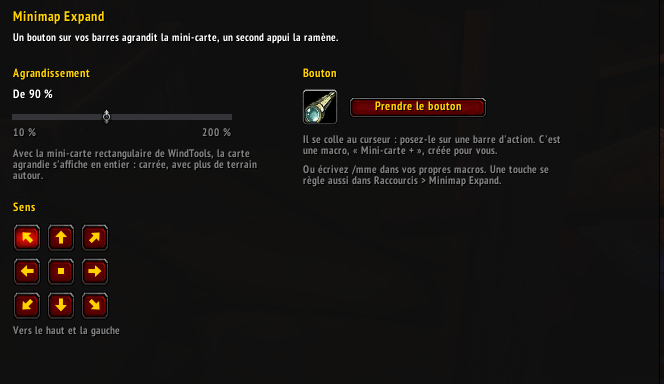
Left-click the button and the minimap grows; left-click again and it is back to normal. Right-click it for the options.
- A real button: the options page hands you a macro, ready to drop on any action bar. Left-click enlarges or restores, right-click opens the options. Or use
/mmein your own macros, or set a key in Key Bindings. - Your size: a width and a height slider, from 100 px up to the height of your screen.
- Your place: show the preview, drag the enlarged map where you want it, then hide the preview. A new size grows away from the nearest edge of your screen.
- Over or under: choose the strata and level of the enlarged map, to show it over or under your other windows.
- See through it: set the opacity of the enlarged map.
- The small map's place: the game has only one minimap. While it is enlarged elsewhere, its normal place keeps a frame with a drawing of the zone from the world map, centred on you with your arrow (it can be turned off).
- ElvUI WindTools' rectangular minimap: the enlarged map can be a rectangle, up to as tall as it is wide; your own rectangle comes back afterwards.
- A clear map: while enlarged, the mail, tracking and calendar icons are hidden; they come back with the normal size.
- Works with ElvUI or the default minimap (square there). Settings changed while enlarged apply at once.
Options: Options > AddOns > Minimap Expand, a right-click on the button, or /mme options. /mme preview shows or hides the preview.
Français
Un bouton pour vos barres d'action agrandit la mini-carte : clic gauche pour l'agrandir ou la ramener, clic droit pour les options. La largeur et la hauteur se règlent avec deux curseurs, la place en faisant glisser l'aperçu, et la strate et le niveau choisissent si la carte agrandie passe par-dessus ou sous vos autres fenêtres. Son opacité se règle aussi. Quand elle est agrandie ailleurs, la place de la petite carte garde un dessin de la zone, centré sur vous avec votre flèche. Avec la mini-carte rectangulaire d'ElvUI WindTools, la carte agrandie peut être un rectangle. Pendant l'agrandissement, les icônes du courrier, du pistage et du calendrier sont masquées. Options : Options > AddOns > Minimap Expand, clic droit sur le bouton, ou /mme options.
Minimap Expand Team