MikScrollingBattleText
Last Updated: Jul 19, 2018 Game Version: 8.0.1
Announcements:
- Version 5.7.134 is updated to work with Warlord of Draenor Patch 6.0.2 and fixes the font preview issues.
- If you are having issues with the fonts "resetting" on initial game load, update to Version 5.7.137.
- Version 5.7.138 corrects issues with several triggers like Kill Shot and Hammer of Wrath.
Frequently Asked Questions:
Before posting a question, please see the FAQ list at MSBT's portal site. http://mikord.wowinterface.com/portal.php?id=156&a=faq
Description:
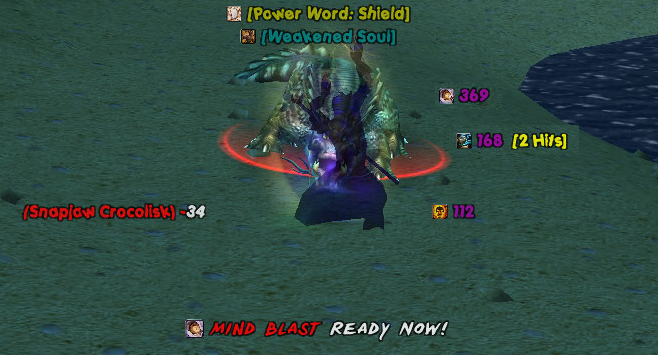
MSBT is designed to be an extremely lightweight, efficient, and highly configurable mod that makes it easier to see combat information by scrolling the information on the screen in separate, dynamically creatable scroll areas. It is a replacement for Blizzard's Floating Combat Text and Damage output.
Features:
- Lightweight and efficient design.
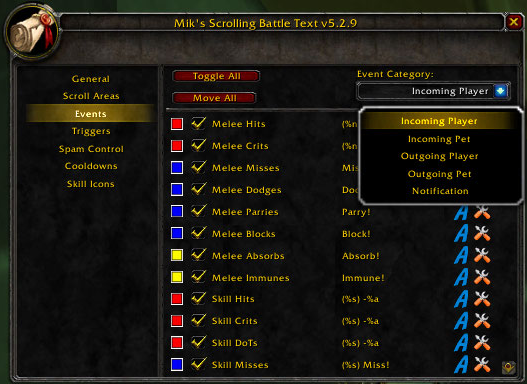
- Scroll incoming damage/heals, outgoing damage/heals, and notifications in separate configurable scroll areas on the playing field.
- Display player and pet cooldown completion alerts.
- Display loot alerts with a total of how many are now in inventory.
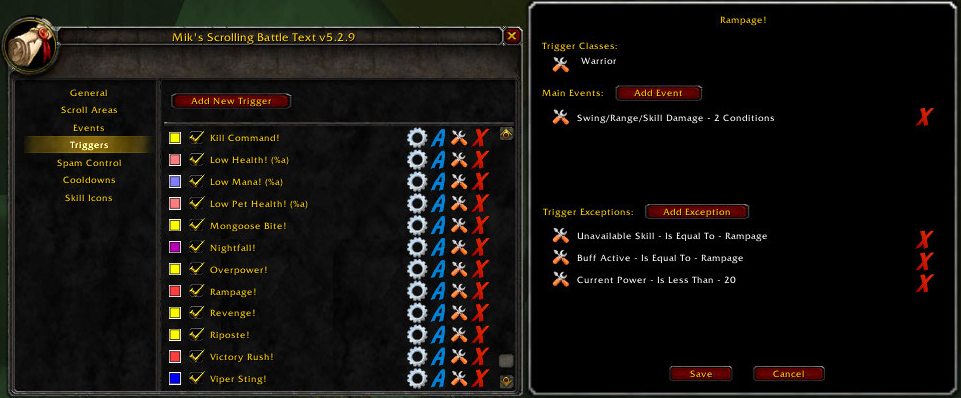
- Add triggers that will allow you to show notifications based on a variety of conditions.
- Assign a sound file to play for events/triggers.
- Dynamically create new scroll areas and assign any event/trigger to them.
- Customize the position, size, animation style, enabled state, font style, font size, font outline, and opacity for each of the scroll areas.
- Customize each individual event's color, font style, font size, font outline, opacity, output message, enabled state, and scroll area.
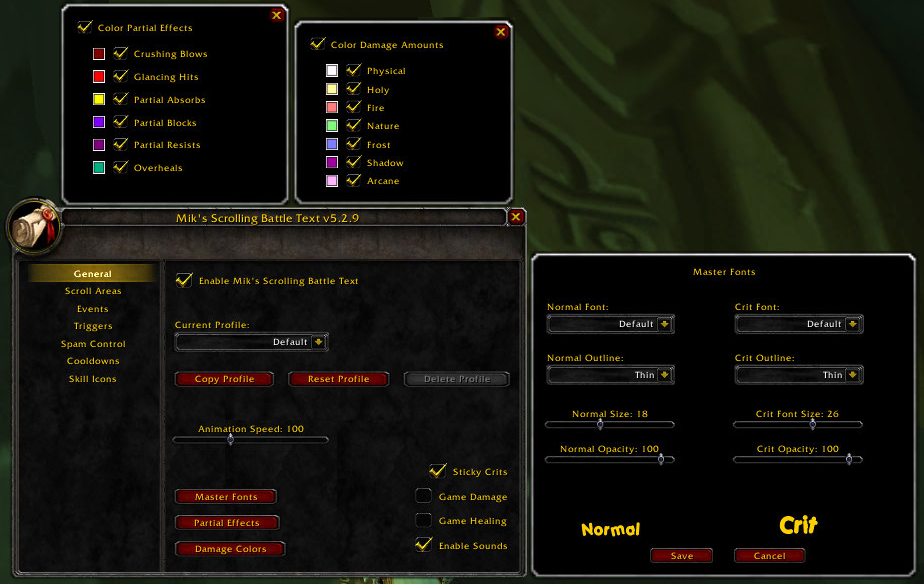
- Set "Master Font" settings that will be inherited by all of the scroll areas and the events in them unless they are overridden at the scroll area or event level.
- Merge AoE data into one event with cumulative damage/healing done with number of normal and crits specified.
- Show overhealing amounts against yourself or party/raid members.
- Color unit names according to their class.
- Color damage amounts according to damage type.
- Show partial effects (resists, absorbs, vulnerabilities, etc) colored according to type.
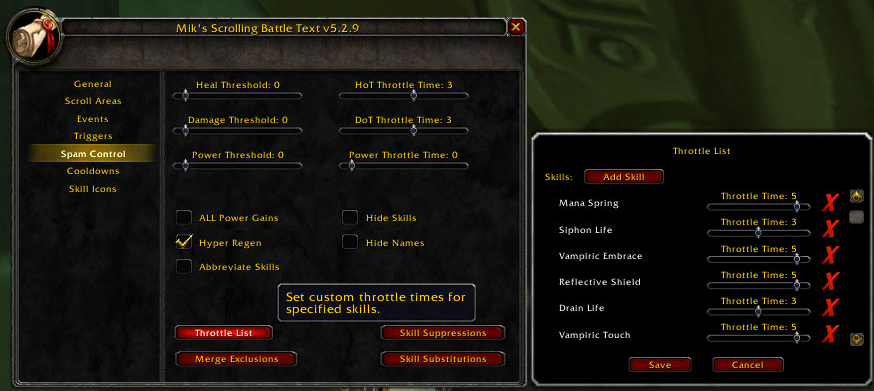
- Filter output information with a full suite of spam controls.
- Load on demand options.
- For mod developers:
- Output your own scrolling messages with the MikSBT.DisplayMessage function instead of having to create your own frame and animation code. You can also use your own font by first registering it with MSBT via the MikSBT.RegisterFont function.
- Create custom animation styles.
- See the included API.html file for reference information.
Supported Events:
- Incoming:
- Melee Damage, Misses, Dodges, Parries, Blocks, Deflects, Absorbs, and Immunes
- Skill Damage, Damage Over Time (DoTs), Misses, Dodges, Parries, Blocks, Deflects, Absorbs, Immunes, Reflects, and Interrupts
- Spell Resists
- Heals and Heals Over Time (HoTs)
- Pet Melee Damage, Misses, Dodges, Parries, Blocks, Deflects, Absorbs, and Immunes
- Pet Skill Damage, Damage Over Time (DoTs), Misses, Dodges, Parries, Blocks, Deflects, Absorbs, and Immunes
- Pet Spell Resists
- Pet Heals and Heals Over Time (HoTs)
- Environmental Damage
- Outgoing:
- Melee Damage, Misses, Dodges, Parries, Blocks, Deflects, Absorbs, Immunes, and Evades
- Skill Damage, Damage Over Time (DoTs), Misses, Dodges, Parries, Blocks, Deflects, Absorbs, Immunes, Reflects, Interrupts, and Evades
- Spell Resists and Buff Dispels
- Heals and Heals Over Time (HoTs)
- Pet Melee Damage, Misses, Dodges, Parries, Blocks, Deflects, Absorbs, Immunes, and Evades
- Pet Skill Damage, Damage Over Time (DoTs), Misses, Dodges, Parries, Blocks, Deflects, Absorbs, Immunes, and Evades
- Pet Spell Resists and Buff Dispels
- Pet Heals and Heals Over Time (HoTs)
- Notification:
- Buffs / Buff Stacks / Buff Fades
- Debuffs / Debuff Stacks / Debuff Fades
- Item Buffs / Item Buff Fades
- Enter/Leave Combat
- Power Gains and Losses
- Alternate Power Gains and Losses
- Chi Gains and Chi Full
- Combo Point Gains and Combo Points Full
- Holy Power Changes and Holy Power Full
- Honor Gains
- Reputation Gains and Losses
- Skill Gains
- Experience Gains
- Killing Blows (Player and NPC)
- Extra Attacks
- Soul Shard Creation
- Enemy Buff Gains
- Monster Emotes
- Player, Pet, and Item Cooldown Completions
- Loot
- Looted Items
- Money Gains
- Default Triggers:
- All Relevant Classes - Low Health, Low Mana, Low Pet Health
- Death Knight - Killing Machine, Rime, Shadow Infusion x5
- Druid - Berserk, Clearcasting, Predator's Swiftness, Shooting Stars
- Hunter - Kill Shot, Lock and Load
- Mage - Brain Freeze, Clearcasting, Fingers of Frost, Missile Barrage
- Monk- Elusive Brew x5, x10, x15, Mana Tea x20, Vital Mists x5
- Paladin - Hammer of Wrath, The Art of War
- Priest - Clearcasting, Shadow Orb x3
- Rogue - Blindside
- Shaman - Clearcasting, Lava Surge, Maelstrom Weapon x5, Tidal Waves
- Warlock - Decimation, Molten Core, Nightfall
- Warrior - Bloodsurge, Execute, Revenge, Sudden Death, Taste for Blood, Victory Rush
Commands:
| /msbt | Shows the options interface. |
| /msbt reset | Resets the current profile to the default settings. |
| /msbt disable | Disables the mod. |
| /msbt enable | Enables the mod. |
| /msbt version | Shows the current version. |
| /msbt help | Shows the command usage. |
Version History:
See version history as MSBT's portal site. http://www.wowinterface.com/portal.php?&id=156&pageid=147
-
View User Profile
-
Send Message
Posted Sep 20, 2018First german:
Kann man die Zeit der Sticky Crits erhöhen? Und zwar nur der Crits. Ich meine nicht die Animationsgeschwindigkeitz.
Kann man die Schriftgröße noch weiter vergrößern? 38 ist mir zu klein
Second English:
How can i change the uptime of the Stiky Crits? Only the crits..not he normal hits. And i mean not the animation speed.
How can ich get the font sice bigger than 38?
-
View User Profile
-
Send Message
Posted Sep 20, 2018I really love the cooldown alerts that come with this mod, but I'd like to suggest putting them on their own volume slider. I hate loud combat noises and even when I turn the volume up I can't always here the alert tone over the game. (Or if this is already a feature please point me to where I can change it, I didn't see it in the options!)
-
View User Profile
-
Send Message
Posted Aug 23, 2018I'm not sure why my comment get removed.
I found you can change the precision in MSBTProfile.lua but there's no option for it in game!
I suggest adding a setting/scrollbar for how many decimal points you want and if it's zero, calculate them via this function (that's what i use: it shows 1.23k 12.3k 123k etc)
local function ShortenNumber(number, precision) if (type(number) ~= "number") then number = tonumber(number) end if not number then return end local affixes = { "", "k", "M", "G", "T", "P", } local affix = 1 local dec = 0 local num1 = math.abs(number) while num1 >= 1000 and affix < #affixes do num1 = num1 / 1000 affix = affix + 1 end if (affix > 1) or (precision ~= 0) then dec = 2 local num2 = num1 while num2 >= 10 do num2 = num2 / 10 dec = dec - 1 end end local decimals = (precision == 0 and dec) or precision --[[ local decimals if (precision == 0) then decimals = dec else decimals = precision end ]]-- local formatter = ("%%.%df"..affixes[affix]):format(decimals) return formatter:format(num1) endLemme know if you find it useful
-
View User Profile
-
Send Message
Posted Aug 21, 2018I love using the Transformer font, however I recently got a name change and had to use an alt code (alt+0248 which makes ø) however this symbol (ø) doesn't work with Transformer font and just shows up as a "?" :( Is there a way to fix this?
-
View User Profile
-
Send Message
Posted Aug 21, 2018As of today this still isn't working for me. Nothing is showing up on screen though I can access the menu and have enabled the addon and configured the values. Hope this can be updated soon as I have been using this addon for years and I absolutely love it! Thanks for your hard work!
-
View User Profile
-
Send Message
Posted Aug 18, 2018Maybe I've borked something in the setting but as a shadow priest whenever I get Insanity gain they come up as crazy number strings, something like 7.134515437. I have looked through the settings and can't seem to find a way to just truncate that number to say 7.1 or 7.
-
View User Profile
-
Send Message
Posted Sep 2, 2018In reply to Baurge:
same
-
View User Profile
-
Send Message
Posted Aug 16, 20181x [ADDON_ACTION_BLOCKED] AddOn 'MikScrollingBattleText' hat versucht die geschützte Funktion 'MainMenuBar:ClearAllPoints()' aufzurufen.
!BugGrabber\BugGrabber.lua:519: in function <!BugGrabber\BugGrabber.lua:519>
[C]: in function `ClearAllPoints'
FrameXML\MainMenuBar.lua:43: in function `SetPositionForStatusBars'
FrameXML\MainMenuBar.lua:8: in function `OnStatusBarsUpdated'
FrameXML\StatusTrackingManager.lua:179: in function `LayoutBars'
FrameXML\StatusTrackingManager.lua:84: in function `UpdateBarsShown'
[string "*:OnEvent"]:4: in function <[string "*:OnEvent"]:1>
Locals:
InCombatSkipped
-
View User Profile
-
Send Message
Posted Aug 14, 2018Right now both addon and blizzard shows my xp gains. How do I turn off Blizzard xp?
-
View User Profile
-
Send Message
Posted Aug 8, 2018message deleted
-
View User Profile
-
Send Message
Posted Aug 2, 2018It seems I cant change the static text size if I do it wont change no matter how big/small i set the text size
-
View User Profile
-
Send Message
Posted Jul 30, 20181x [ADDON_ACTION_BLOCKED] AddOn 'MikScrollingBattleText' tried to call the protected function 'SetTargetClampingInsets()'.
!BugGrabber\BugGrabber.lua:519: in function <!BugGrabber\BugGrabber.lua:519>
[C]: in function `SetTargetClampingInsets'
...eBlizzard_NamePlates\Blizzard_NamePlates.lua:242: in function `SetupClassNameplateBars'
...eBlizzard_NamePlates\Blizzard_NamePlates.lua:87: in function `OnNamePlateAdded'
...eBlizzard_NamePlates\Blizzard_NamePlates.lua:44: in function <...eBlizzard_NamePlates\Blizzard_NamePlates.lua:35>
Locals:
InCombatSkipped
-
View User Profile
-
Send Message
Posted Jul 29, 2018I've used MSBT for years and I'm not considering to switch to other Addons but nowadays with the addition of DH and Legion, Chaos damage acted as a damage type/school in itself but yet in MSBT I still can't change color or modify the said school without changing general options.
My only request is that u make "local DAMAGETYPE_CHAOS" to a single damage type and added it to the damage type options.
-
View User Profile
-
Send Message
Posted Jul 28, 2018Sorry of this has already been addressed, but is there a way to add custom triggers for things like grand crusader procs?
-
View User Profile
-
Send Message
Posted Jul 28, 2018Is there a way to add coma to large numbers (i.e. 1,500,000)?
-
View User Profile
-
Send Message
Posted Jul 19, 2018Saw that this was updated, however Incoming and outgoing damage + heals aren't showing up for me. Just and update for you guys, thanks a ton for this addon, it's so useful :)
-
View User Profile
-
Send Message
Posted Jul 29, 2018In reply to Xalmor:
-
View User Profile
-
Send Message
Posted Jul 29, 2018In reply to duvu:
-
View User Profile
-
Send Message
Posted Jul 19, 2018I get the following error in combat:
85x ...rfaceMikScrollingBattleText\MSBTTriggers.lua:531: bad argument #1 to 'string_find' (string expected, got nil)
[C]: ?
...rfaceMikScrollingBattleText\MSBTTriggers.lua:531: in function <...rfaceMikScrollingBattleText\MSBTTriggers.lua:507>
...rfaceMikScrollingBattleText\MSBTTriggers.lua:657: in function <...rfaceMikScrollingBattleText\MSBTTriggers.lua:604>
...rfaceMikScrollingBattleText\MSBTTriggers.lua:810: in function <...rfaceMikScrollingBattleText\MSBTTriggers.lua:805>
Locals:
InCombatSkipped
-
View User Profile
-
Send Message
Posted Jul 18, 2018Nothing appears for me now after pre-patch. Using 7.3.5