![Metamap 2.3 [Update by Mac] logo](/images/flame.svg)
Resize, set opacity, record npc and mob locations
Description
{{{
All credits for the 2.3 update go to the author of macreiben.net
The project page can be found here: http://macreiben.net/?Metamap
And of course to Metahawk for the original
I am NOT the author of this fix to the mod, I merely uploaded it for others to find
- !html
ORIGINAL DESCRIPTION:
============
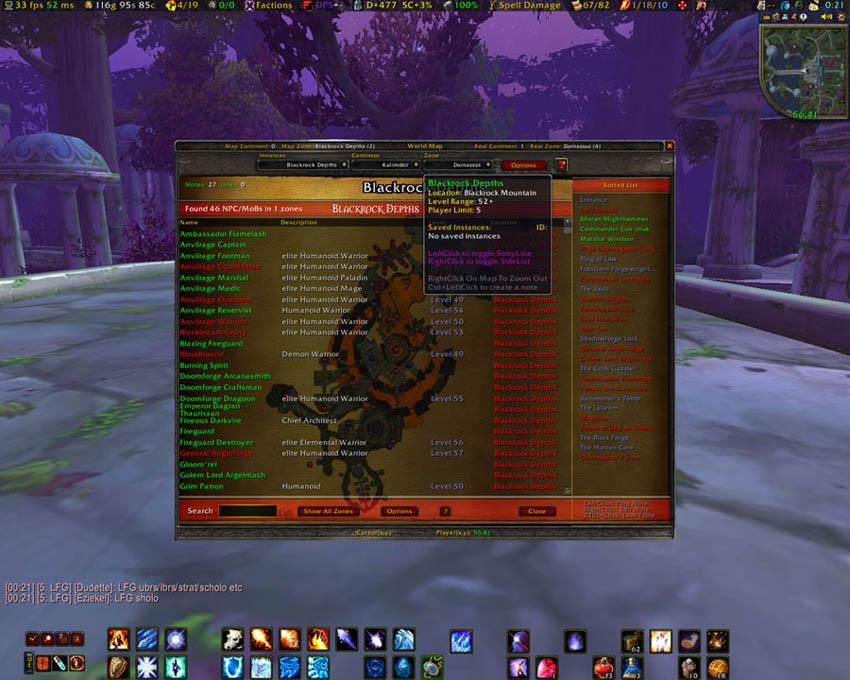
MetaMap adds features to the WoW world map, keeping all mapping type features in a single place.
Some features are:
Adjust the map window size.
Move the map anywhere on the screen.
Adjust the opacity of the window & maps.
Saved sets for toggling between 2 map modes.
Allows full player movement, messaging, etc. with map open.
Adds coords to the main map and the Minimap
Adds Instance maps which open to the correct instance you enter.
Default data included for all bosses & locations etc.
User editable notes for all maps, including instance maps.
NPC/Mob database collectable by mouseover or keypress.
Toggling on/off display of unexplored areas of the map.
Boss Loot Tables displays all the loot dropped by bosses, and more.
Waypoint system to guide you to any set point.
Complete Quest logger with optional history database.
NoteBook module for additional notes, linked to Tooltips.
Inbuilt Import and export facilities for various data formats.
Inbuilt Backup and Restore facilities.
Button on Minimap to open or close the World Map or display MetaMap options.
Key bindings for various MetaMap functions.
Full support for Titan Bar.
INSTALLATION:
=============
Extract ALL folders in the archive to the Interface\AddOns\ location.
If you wish the Instance maps to be populated with default information,
then on first installation you will need to select 'Extended Options' from the MetaMap menu.
Select the 'Imports' tab, then click 'Load Imports'. This will enable the default
import button, 'Import Instance Notes'. Click on the import button
to import the data.
ISSUES/COMPATIBILITIES:
=======================
Some addons may reset the map to gather location data.
If your map continuously jumps back to your current location when selecting another map,
it will be due to another addon resetting it. In most cases the authors have made changes
to correct this so, download the latest version of any conflicting addon.
CREDITS:
========
Author: Urshurak - aka MetaHawk - Realm: Aggramar
Maps created by Niflheim.
Original MapNotes code by Sir.Bender.
Original WoWKB code by ciphersimian.
Original FullWorldMap code by Mozz.
Original MetaMapBLT code by Daviesh.
Original MetaMapBWP code by Noraj.
French localisation by Sparrows.
German localisation by oneofamillion.
Spanish localisation by Fili.
*****NOTE*****
MapNotes, WoWKB, MozzFullWorldMap, and BetterWaypoints have been INTEGRATED into MetaMap.
This means the original addons are no longer required. Remove them to avoid conflicts!
}}}
The Metamap 2.3 [Update by Mac] Team