Merchant's Favor Cost
- By
1-crates-ranking.png
2-recipes-planner.png
3-auctionator-shopping-list.png
4-crate-tooltip.png
Description
Merchant's Favor Cost
Find the cheapest way to farm Merchant's Favor. (Formerly Merchant's Favor Finder.)
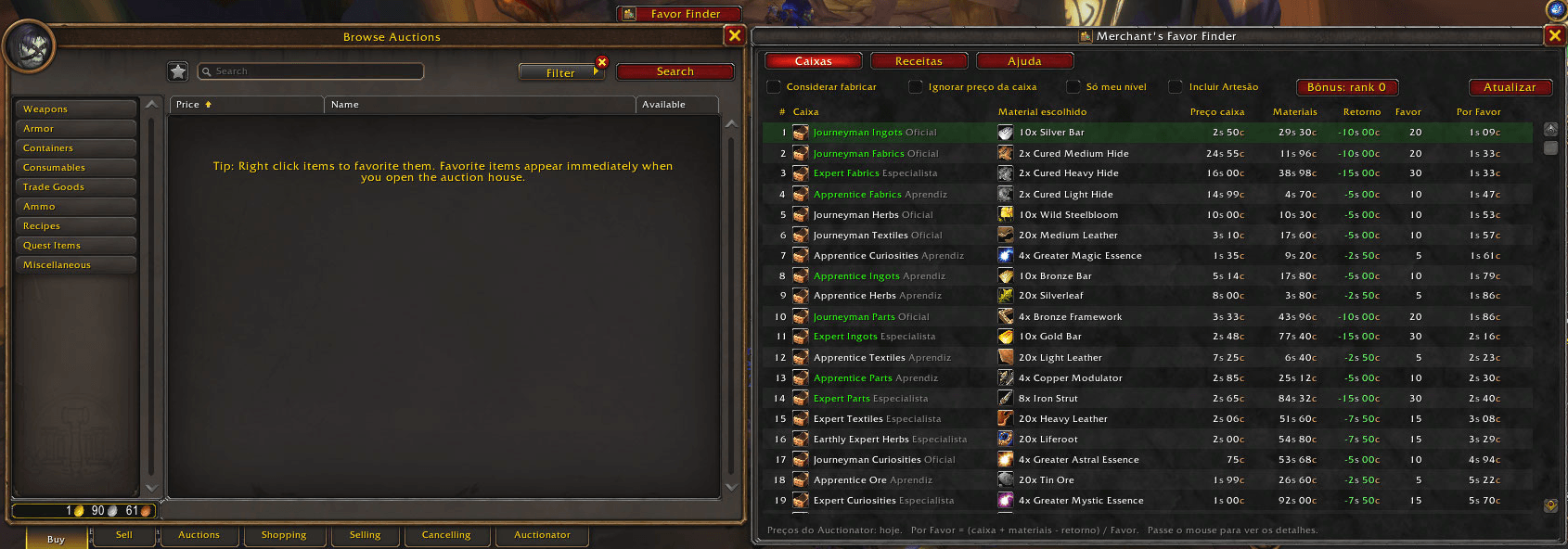
Merchant's Favor Cost reads your latest Auctionator scan and ranks every Waylaid Crate by how much each point of Merchant's Favor actually costs you. It covers the crate price, the cheapest material option, and the silver you get back on turn-in.
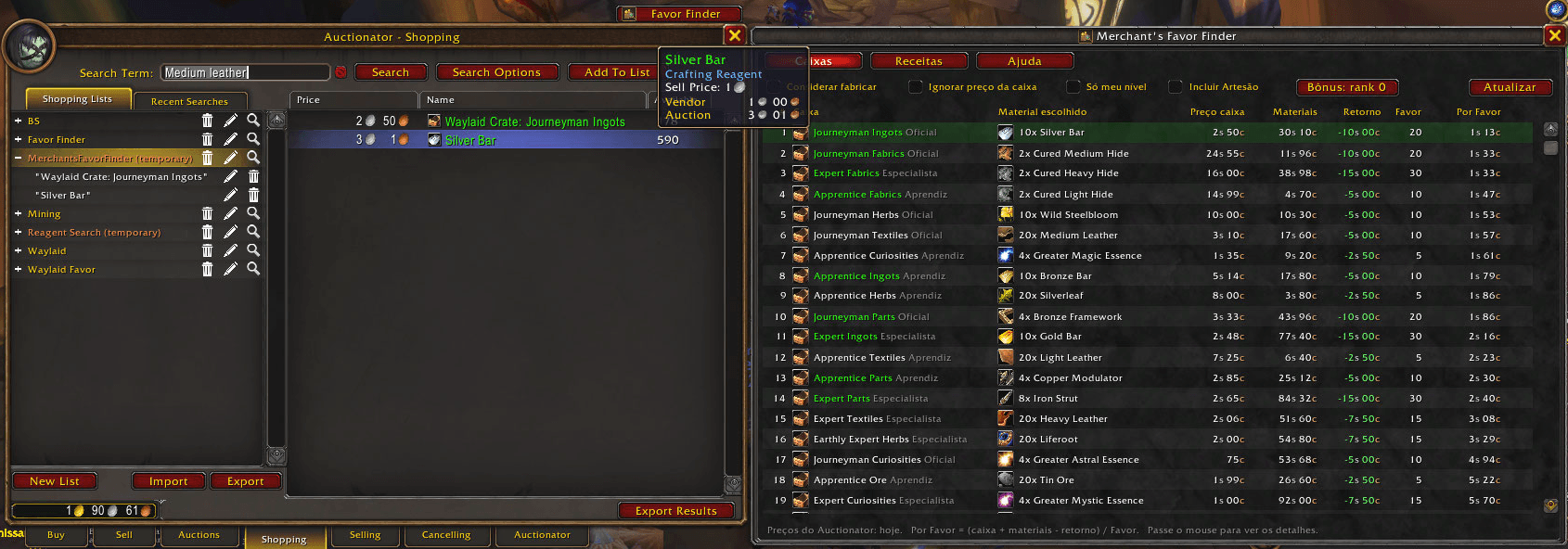
Click a crate and a ready-to-buy shopping list opens in Auctionator.
Features
- Ranking by cost per Favor: every Apprentice, Journeyman and Expert crate, white and green, sorted from cheapest to most expensive.
- Picks the cheapest material: each crate accepts any one of several bundles, and the addon compares all of them and chooses the cheapest.
- Real net cost:
(crate + materials − silver refund) / Favor. - One-click shopping: clicking a row creates the "Favor Cost" list in Auctionator's Shopping tab with the right quantities. If the Auction House is open, it searches right away.
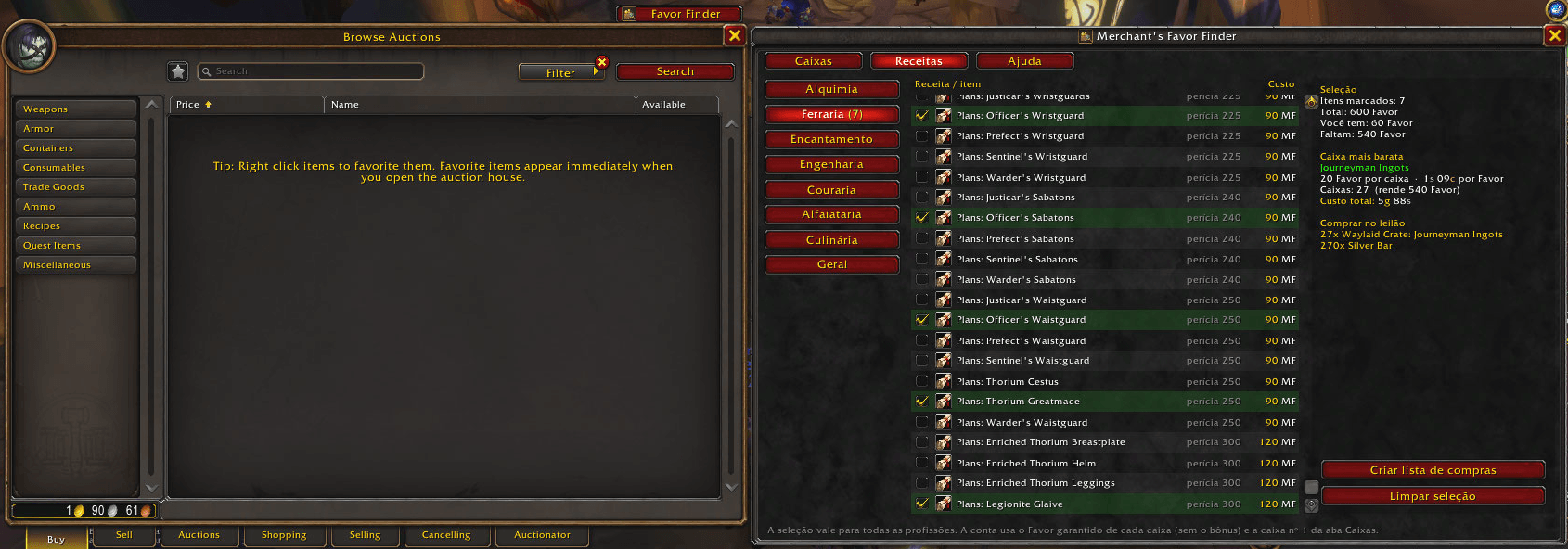
- Recipe planner (new in 1.1.0): pick a profession, tick the recipes you want to buy with Merchant's Favor (all 320 vendor items, with their Favor cost), and see the total Favor, how much you still need, how many of the cheapest crate to fill and the total gold cost. One click builds the Auctionator shopping list for all of it.
- Auction House tab: open the addon from its own Favor Cost tab on the Auction House window.
- Lightweight: nothing loads at login; the addon only works while its window is open.
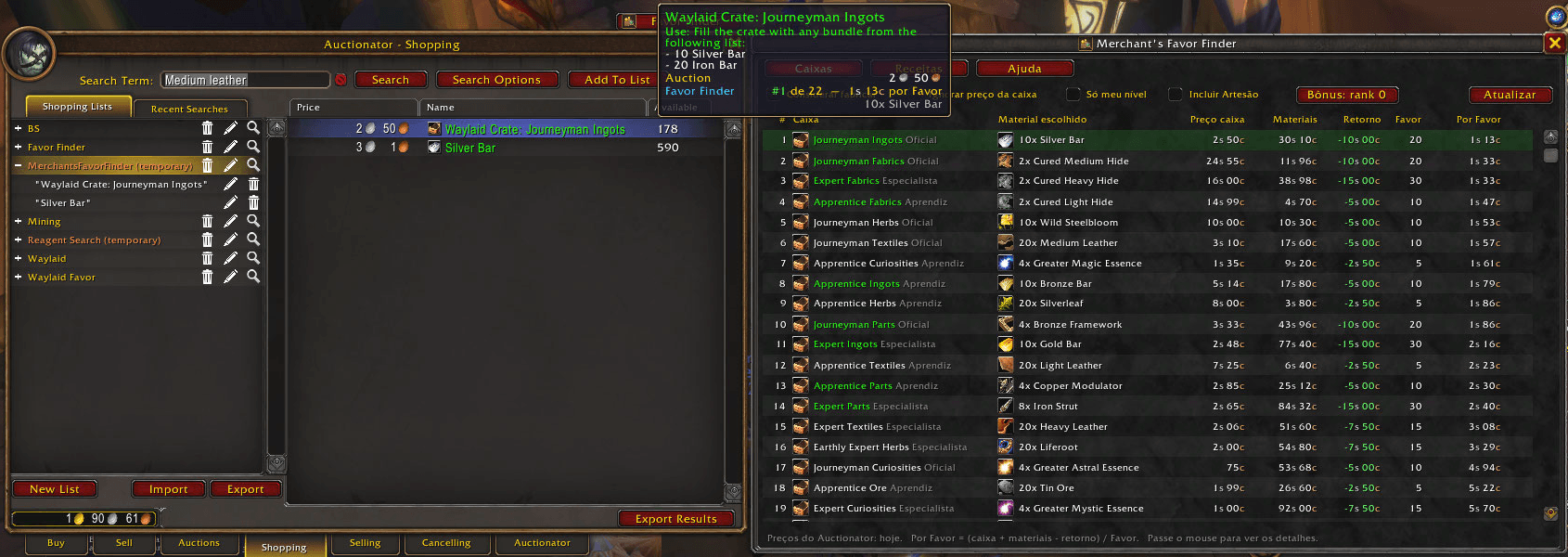
- Ranking in the crate tooltip: hover any Waylaid Crate (bags, Auction House, chat links) to see its position in the ranking and its price per Favor, right below the Auctionator price.
- Detailed tooltip: hover a row to see every material option with its cost, the refund, the net cost and the price per Favor.
- Craft mode (optional): compares buying the finished material against crafting it from components (bars from ore, bolts from cloth, engineering parts). Only useful if you have the profession.
- Other options:
- Ignore the crate price, for when you already have one from a drop.
- Show only crates usable at your level.
- Performance Bonus rank 0 to 3, counted as expected value.
- Button on the Auction House window and a
/mffcommand.
How to use
- Install Auctionator (required).
- Run a full scan in Auctionator.
- Type
/mff, or click Favor Cost at the top of the Auction House window. - Click the crate at the top of the ranking and buy from the list.
Commands
| Command | What it does |
|---|---|
/mff or /mfc |
Opens or closes the window |
/mff favor <crateID> <value> |
Overrides the Favor of a crate. Without a value it lists all crates. |
/mff refund <crateID> <silver> |
Overrides the silver refund of a crate, for example /mff refund 248703 5 |
/mff bonus <0-3> |
Sets the Performance Bonus rank |
/mff help |
Lists the commands |
Default values
| Tier | White Favor | Green Favor | White refund | Green refund |
|---|---|---|---|---|
| Apprentice | 5 | 10 | 2s 50c | 5s |
| Journeyman | 10 | 20 | 5s | 10s |
| Expert | 15 | 30 | 7s 50c | 15s |
These values come from community guides. If the game pays something different, override it with /mff favor or /mff refund and the ranking updates.
Artisan crates are hidden by default because their Favor has not been confirmed yet. You can show them with the "Include Artisan" checkbox.
Notes
- Languages: English interface, switching to Portuguese automatically on pt-BR clients. Item names come from your game client.
- Prices are only as fresh as your last Auctionator scan. The age of the data is shown at the bottom of the window.
- Bugs and suggestions are welcome in the comments.
Merchant's Favor Cost (Português)
Descubra o jeito mais barato de farmar Merchant's Favor. (Antes chamado Merchant's Favor Finder.)
O Merchant's Favor Cost lê a última varredura do Auctionator e monta um ranking de todas as Waylaid Crates pelo quanto custa, de verdade, cada ponto de Merchant's Favor. A conta inclui o preço da caixa, a opção de material mais barata e a prata que volta na entrega.
Clique numa caixa e a lista de compras abre pronta no Auctionator.
Recursos
- Ranking por preço por Favor: todas as caixas Aprendiz, Oficial e Especialista, brancas e verdes, da mais barata para a mais cara.
- Escolhe o material mais barato: cada caixa aceita qualquer um de vários grupos de material, e o addon compara todos e escolhe o mais barato.
- Custo líquido real:
(caixa + materiais − retorno em prata) / Favor. - Compra em um clique: clicar numa linha cria a lista "Favor Cost" na aba Shopping do Auctionator, com as quantidades certas. Com a Casa de Leilões aberta, a busca já é feita na hora.
- Planejador de receitas (novo na 1.1.0): escolha a profissão, marque as receitas que quer comprar com Merchant's Favor (os 320 itens dos vendedores, com o custo em Favor) e veja o total de Favor, quanto falta, quantas caixas da opção mais barata encher e o custo total em ouro. Um clique monta a lista de compras no Auctionator.
- Aba na Casa de Leilões: abra o addon pela aba própria Favor Cost na janela do leilão.
- Leve: nada é carregado no login; o addon só trabalha com a janela aberta.
- Ranking no tooltip da caixa: passe o mouse em qualquer Waylaid Crate (bolsa, Casa de Leilões, links no chat) para ver a posição dela no ranking e o preço por Favor, logo abaixo do preço do Auctionator.
- Tooltip detalhado: passe o mouse numa linha para ver todas as opções de material com o custo de cada uma, o retorno, o custo líquido e o preço por Favor.
- Modo fabricar (opcional): compara comprar o material pronto com fabricar a partir dos componentes (barras a partir de minério, bolts a partir de tecido, peças de engenharia). Só faz sentido se você tem a profissão.
- Outras opções:
- Ignorar o preço da caixa, para quando você já tem uma de drop.
- Mostrar só caixas que seu nível pode usar.
- Rank do Performance Bonus de 0 a 3, considerado como valor esperado.
- Botão na janela da Casa de Leilões e comando
/mff.
Como usar
- Instale o Auctionator (obrigatório).
- Faça uma varredura completa no Auctionator.
- Digite
/mffou clique em Favor Cost no topo da janela da Casa de Leilões. - Clique na caixa do topo do ranking e compre pela lista.
Comandos
| Comando | O que faz |
|---|---|
/mff ou /mfc |
Abre ou fecha a janela |
/mff favor <idCaixa> <valor> |
Ajusta o Favor de uma caixa. Sem valor, lista todas as caixas. |
/mff retorno <idCaixa> <prata> |
Ajusta a prata devolvida na entrega, por exemplo /mff retorno 248703 5 |
/mff bonus <0-3> |
Define o rank do Performance Bonus |
/mff ajuda |
Lista os comandos |
Valores padrão
| Nível | Favor branca | Favor verde | Retorno branca | Retorno verde |
|---|---|---|---|---|
| Aprendiz | 5 | 10 | 2s 50c | 5s |
| Oficial | 10 | 20 | 5s | 10s |
| Especialista | 15 | 30 | 7s 50c | 15s |
Esses valores vêm de guias da comunidade. Se o jogo pagar diferente, ajuste com /mff favor ou /mff retorno e o ranking se atualiza.
As caixas Artesão ficam escondidas por padrão porque o Favor delas ainda não foi confirmado. Dá para mostrá-las marcando "Incluir Artesão".
Observações
- Idiomas: interface em inglês, que muda para português automaticamente em clientes pt-BR. Os nomes dos itens vêm do seu cliente do jogo.
- Os preços valem só até a última varredura do Auctionator. A idade dos dados aparece no rodapé da janela.
- Bugs e sugestões são bem-vindos nos comentários.
Merchant's Favor Cost Team