Medalluin
- By
Description
Medalluin
A bespoke, artful HUD, unit frame, and console suite for World of Warcraft.
Medalluin transforms World of Warcraft's interface into a unified, ornamental console rendered in an elegant ink-and-gold art style. By wrapping Blizzard's secure templates into custom frames, Medalluin preserves full native combat security, macros, drag-and-drop, and keybindings while delivering a modern, cohesive UI experience.
🤖 AI-Assisted Development Disclaimer
Medalluin is developed with the assistance of Artificial Intelligence. Design specifications, art tooling, secure template integration, and code iterations have been co-authored and refined using advanced AI paired with human testing and direction. Code is thoroughly linted and harness-tested for taint safety and combat protection.
✨ Features
🎮 Central Console & Unit Frames
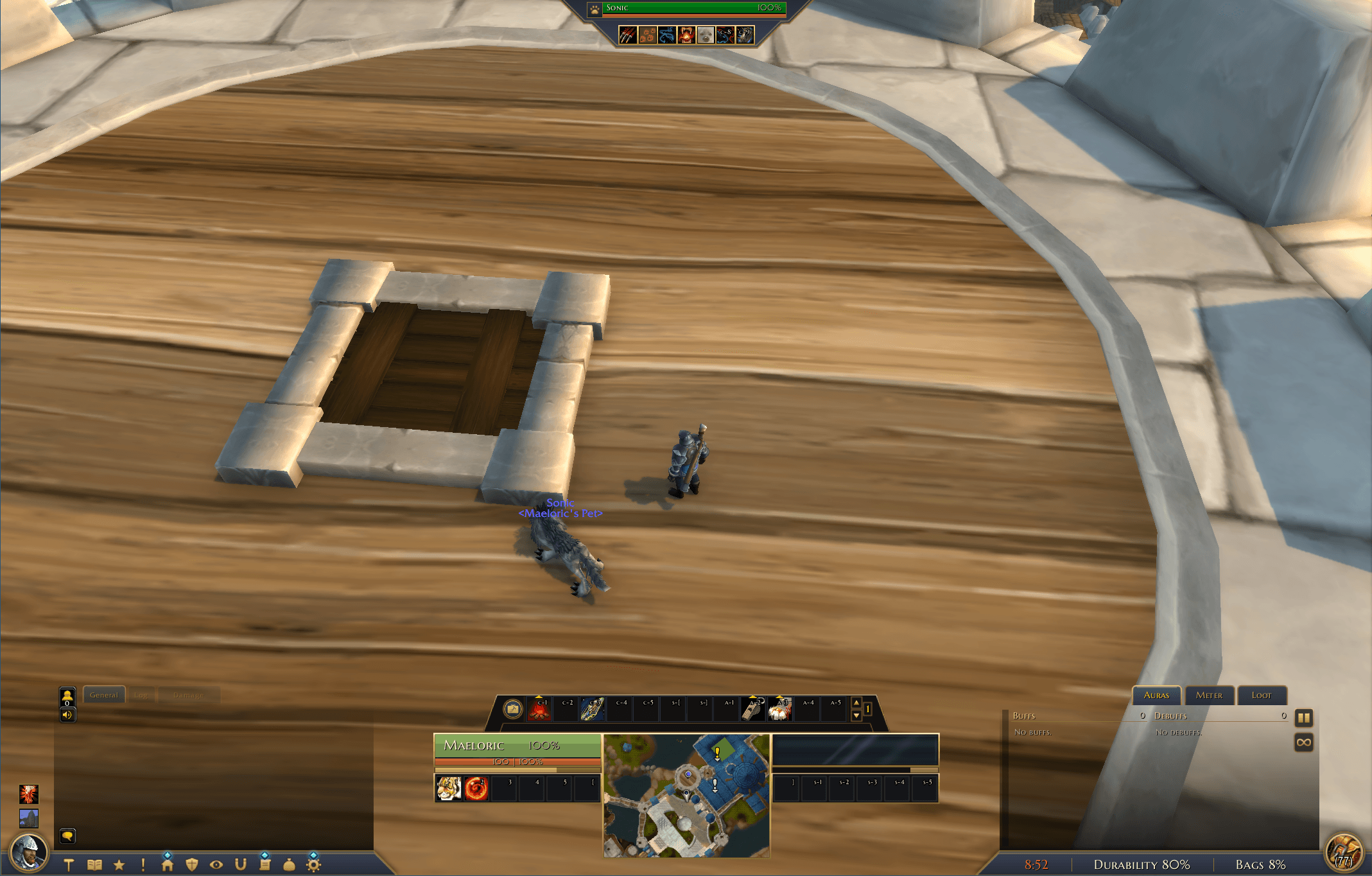
- Player & Target Frames: Sculpted into the primary bottom console with smoothly animated health/power bars, class colors, combat threat glows, and status badges.
- Console Profiles:
- Medallion (Default): Symmetrical ornamental console with central artwork, power/cast meters, and expandable side panels.
- Central Console (Light): Streamlined, compact variant featuring an integrated minimap bay, a 2x5 form/stance/skyriding center grid (
Action Bar 7), and a dedicated 4-member party row directly under the console.
- Overhead & Boss Frames: Overhead boss cast bars, health bars, and target-of-target indicators designed to float cleanly above combat encounters.
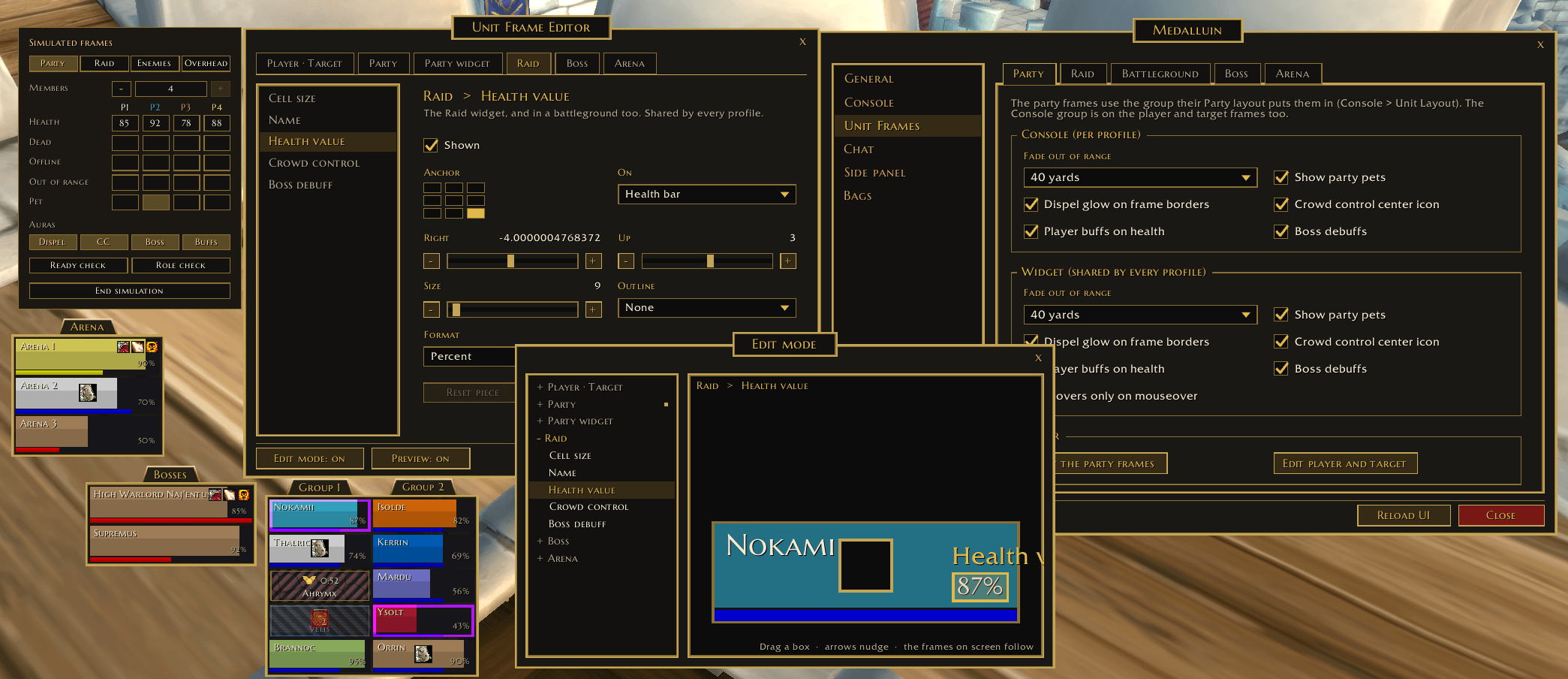
- Party & Raid Layouts: Choose between the integrated Console Row or flexible, draggable Widgets for Party, Raid, Boss, and Arena units.
- Distinctive Offline & Dead States:
- Offline: Distinct plug/unplug icon with diagonal hazard-striped texture bars.
- Dead: Angel halo wings icon, formatted death duration timer, character name, and embossed skull-texture bars.
⚔️ Action Bars & Keybinds
- Customizable Rows: Run 1, 2, or 3 rows (Action Bar 1, MultiBar Bottom Left, and MultiBar Bottom Right).
- Art Style Options:
- With Art: Preserves Blizzard's iconic button textures with tinting and custom frame styling.
- Bare Icons: Modern WeakAuras-style clean flat icons with centered cooldown digits, formatted hotkey abbreviations (
s-1,c-E,M4), and usable range tints.
- Hide Empty Buttons:
- Automatically hides unused button slots and keybind text on extra bars (rows 2 and 3) while keeping Action Bar 1 and stance grids visible.
- Seamless drag-and-drop: hovering an item, spell, or macro automatically reveals the empty slots so you can place abilities.
- Built-in Power & Cast Bars: Integrated segment-based class power display (Holy Power, Combo Points, Runes, Soul Shards, Arcane Charges, Dragonriding Vigor) and responsive cast bars.
- Keybinding Overlay (
/mdlui kb): Point and click on any action button and press a key to immediately bind or update hotkeys.
⚙️ Profiles & Complete Customizability
- Per-Profile Independence: Settings are stored per profile, allowing distinct layouts and settings across characters or specs.
- Action Bar Skills & Keybinds by Profile: Medalluin remembers which spells, items, macros, and bindings belong to each profile and restores them seamlessly on profile or spec switches.
- In-Game Unit Frame Editor (
/mdlui edit):- Interactive visual editor with a live side-by-side canvas.
- Customize piece dimensions, fonts, text formats, offsets, and visibility for every unit frame.
- Fully secret-guarded to prevent combat lockups and taint.
🎒 All-In-One Bags (Inspired by Baganator)
- Single Window Experience: Combines your backpack, equipped bags, and reagent bag into a single unified window.
- Equipped Bag Drawer: Open the bag drawer above the window to inspect, swap, or equip containers without cluttering the screen.
- Automatic Category Grouping: Organize items into intuitive categories: New, Equipment, Consumables, Quest items, Trade goods, Junk, and Other.
- Blizzard Search & Sorting: Full native support for text search, item quality dimming, and one-click bag sorting.
- Responsive Resizing: Drag the bottom-right corner dots to change columns across, with automatic window height scaling.
🌟 Miscellaneous Highlights
- Dynamic LFG Queue Eye: The queue status eye automatically replaces the character medallion on the left strip whenever you are in queue for a dungeon, raid, or battleground.
- Dynamic Vehicle Exit Seat: When operating a vehicle or on an early-landing taxi, a custom crimson-and-gold ejection seat replaces the backpack medallion on the right strip.
- Minimap Addon Drawer: Neatly collects minimap icons (DBM, Details, RaiderIO, Bagnon, etc.) into a collapsible drawer next to the action bar to keep your minimap clean.
- Side Panel Integration: Integrated side strip supporting embedded damage meters (Details/Recount), timeless logs, and aura trackers.
⌨️ Slash Commands
| Command | Description |
|---|---|
/mdlui or /mui or /medalluin |
Opens the Medalluin settings window |
/mdlui bar |
Opens settings directly to the Action Bar tab |
/mdlui party / raid / boss |
Opens settings directly to unit frame pages |
/mdlui kb |
Enters quick keybinding mode (hover button and press key) |
/mdlui edit |
Launches the interactive unit frame layout editor |
/mdlui taint |
Runs internal diagnostics to inspect secure variable integrity |
🛠️ Work in Progress & Contributions
[!IMPORTANT] Medalluin is an active work-in-progress (WIP). Features, textures, and capabilities are continuously evolving.
- Issues & Suggestions: Feel free to submit an issue on GitHub for bug reports, compatibility edge cases, or feature suggestions.
- Pull Requests: Community contributions, optimizations, and bug fixes are welcome! Please ensure code adheres to standard Lua conventions and passes
luacheckand the test harness before opening a PR. By opening one, you agree to the contribution terms in section 4 of the LICENSE.
Medalluin Team