
MBGStats BGStats PvP Battleground Statistics
- By
meebeegeeStats. BGStats. Tracks battleground stats, and arena stats like kills, deaths, win/loss. Also visualizes data and preps for extract!
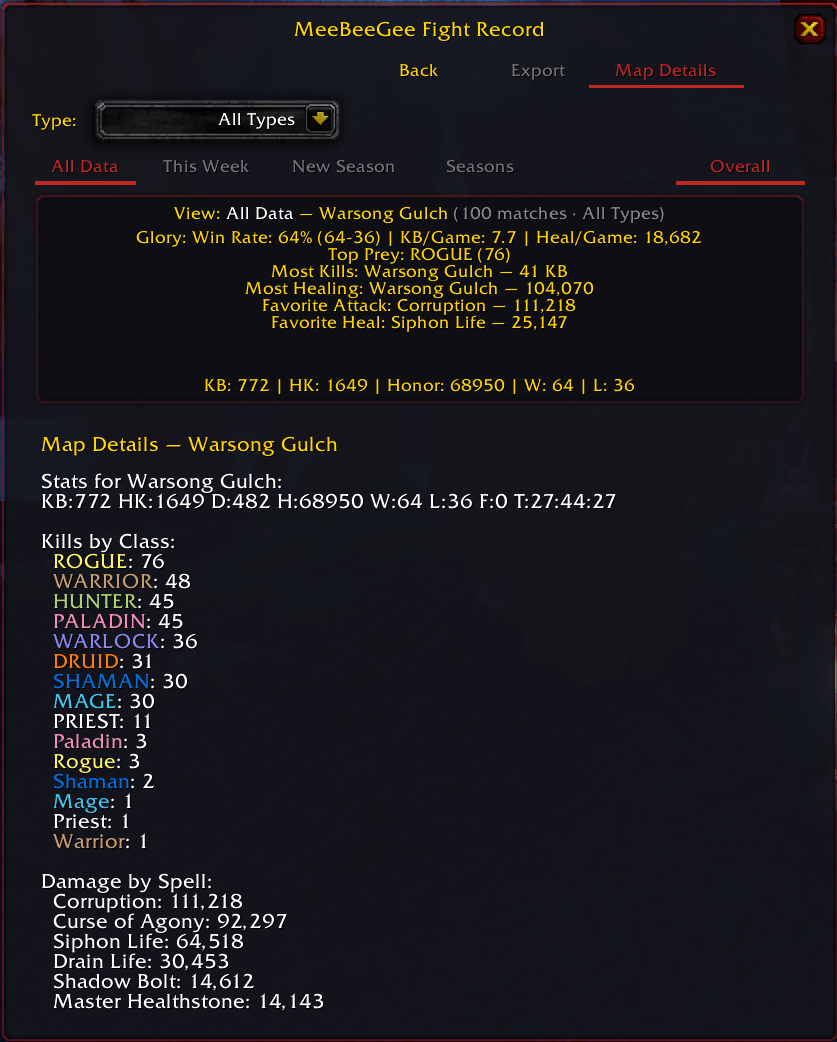
wsgdetailview.png
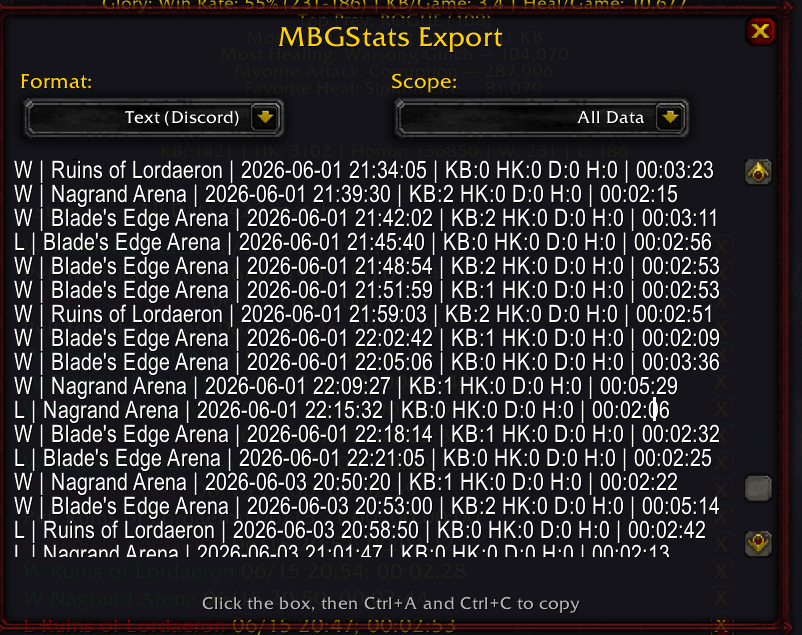
exportview.png
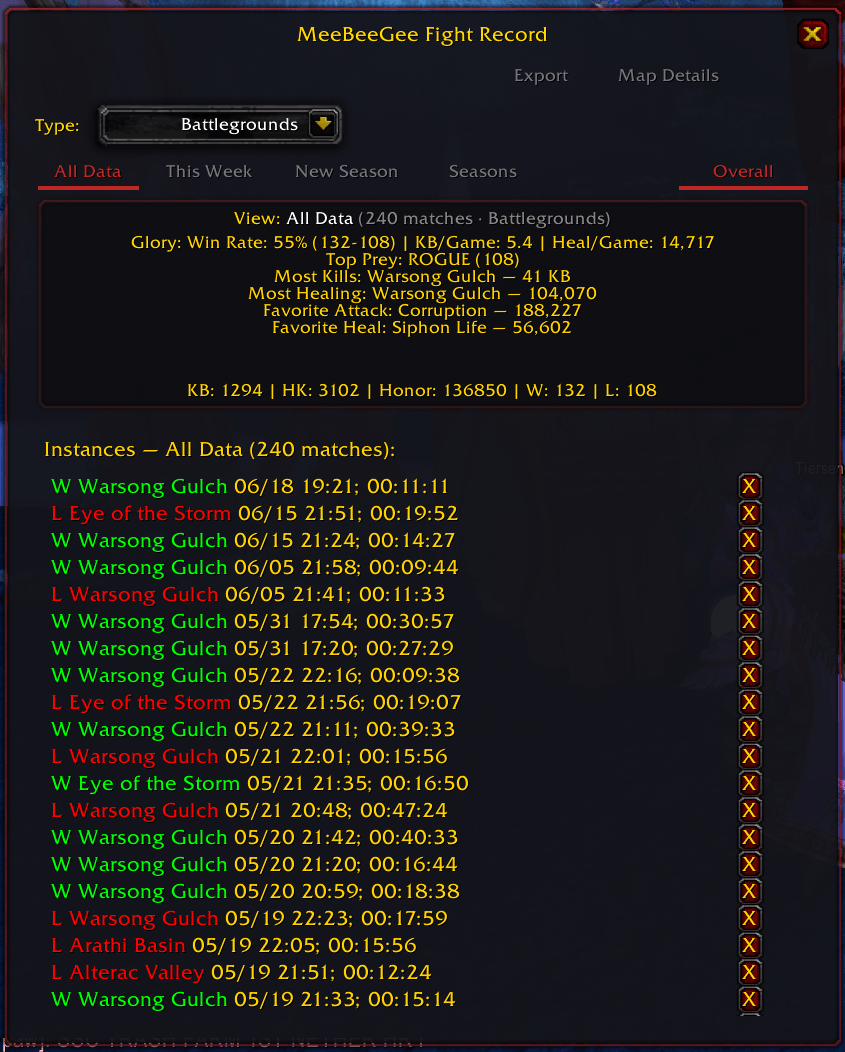
bgview.png
Description
What's up gamers!
=============
MeeBeeGeeStats
=============
MeeBeeGeeStats (MBGStats) is a PvP-focused statistics tracker. It records your fight data during instanced PvP, gives you a UI to explore it, and drops commands so you can flex in chat. Battlegrounds and Arenas. Classic Realms — MoP Classic, Classic Era (Vanilla), and TBC Anniversary.
All the BGStats you'll ever need!
Data made easy in one of the coolest places possible: WoW stats. YOUR HAIR WILL BE BLOWN BACK AND START TO TURN WHITE FROM HOW COOL THIS IS!
Current Features
Battleground and arena stats managed at your fingertips. Your fight record — not a spreadsheet.
Simple ingame commands
<mbg> is your root command
/mbg - Show UI (overall stats, instances, glory panel)
/mbg resetall - Reset ALL stats (requires /confirm)
/mbg brag <channel> - Random glory or map flex. Default Say
/mbg win <channel> - Post your All Data win rate. Default Say
/mbg here <channel> - Flex stats for the map you're in. Default Say
/mbg last <channel> - Flex your most recent match. Default Say
/mbg export - Open export dialog (Text/CSV). /mbg export chat for legacy CSV
/mbg popup - Toggle popup mode (ALWAYS or SMART)
/mbg status - PvP session / detection debug info
/mbg flush - Force-save a stuck open session
/mbg help - Show this help list
Channel aliases for brag, win, here, last: say, party, yell, raid, instance, guild, raidwarning (or s, p, y, r, i, g, rw)
UI
/mbg opens your fight record (dark PvP-themed frame, blended filter buttons).
Category tabs — All Types | BG | Arena filter instances and glory stats.
Export — Export button or /mbg export. Copy stats for Discord or CSV. Scopes: current view, All Data, last 10 matches.
Glory panel — win rate, KB/game, heal/game, top prey class, most kills, most healing. Built to fuel the flex.
Milestones — First Blood, Hat Trick, Dominant Game, Win Streak unlock from play (one-time chat notice).
Overall vs Instances — toggle between aggregated map stats and match-by-match history.
Instance rows — W/L, map, date, duration. Hover for full detail: objectives, kills by class, damage/healing, top spells.
All Maps — drill into a specific battleground or arena (kills by class with class colors).
Seasons — **All Data** (left toolbar) shows every match ever recorded. **All Types** tab filters BG/Arena only — not the same as All Data. **New Season** tags *new* matches; **Close Season** stops tagging; **Seasons** dialog filters what you're viewing. The gold **View:** line in the stats panel always shows your current scope and match count.
Popup — after a match, one-line summary plus confirm win/loss. Flex hints on Confirm (`/mbg last`, `/mbg brag`).
Tracked Statistics
Per map, stats aggregate into Overall Data. Per match, stats are stored by ID and timestamp.
Killing Blows (KB) — overall kills; also tracked by class
Honorable Kills (HK)
Deaths
Honor
Damage and Healing
Win / Loss — per match result
Alliance / Horde wins — faction outcome
Time Played — duration in the instance
Objectives — flag captures, bases assaulted, etc. (when scored)
Damage by Spell — top spells from combat log
Partitions (Seasons)
Use **New Season** on the main window to start recording to a new season. Open **Seasons** to browse, activate, or delete seasons.
Deleting a season does not delete its matches — they return to All Data.
Deleting an instance (X on a row) permanently removes that match and its contribution to overall stats.
Data Storage
Stats live in SavedVariables: your character's `WTF` folder, `meebeegeeStats.lua`. Use /mbg for the UI or **Export** for Discord/CSV output.
Suggested Use
1. Queue for PvP (BG or Arena)
2. Play. MBG tracks automatically in instanced PvP.
3. After you leave, the popup may ask you to confirm the result (if popup is on).
4. Repeat. Build your library.
5. Open /mbg to explore. /mbg brag, /mbg here, /mbg last, or /mbg win when the lobby gets loud.
Planned Features
-- add a comment to this addon if you have a specific ask.
World PvP — automatic outdoor fight sessions (sidelined; coming back in a follow-up)
Intercharacter UI — query another character's data
Tuning stat and result detection (KB, honor, auto W/L)
Richer milestone / brag templates
MBGStats BGStats PvP Battleground Statistics Team
