MaxDPS.com Upgrades - Gear Upgrades, Stat Weights & Where to Get Them
- By
Gear upgrades from level 1 to raids: every tooltip shows what an item adds for your build, level and activity, and one window lists your best upgrades and where to get them. A free Pawn alternative.
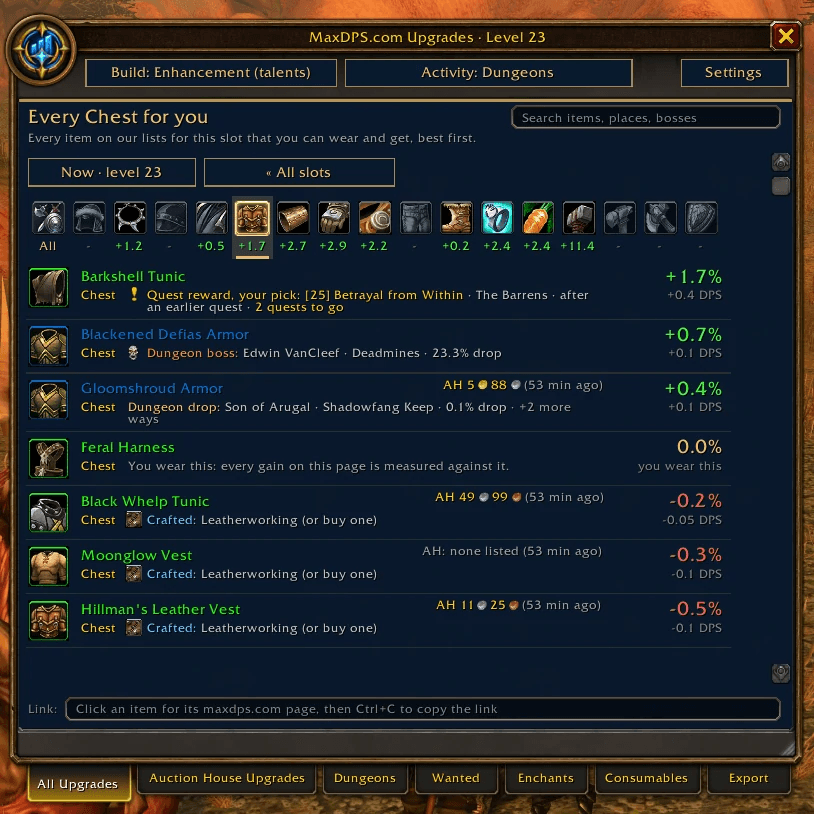
Open the window from the minimap button. Slot icons show each slot's best upgrade; click one for every item that fits, best first. Every row says where it comes from: the boss and drop chance, the vendor, the quest or the recipe.
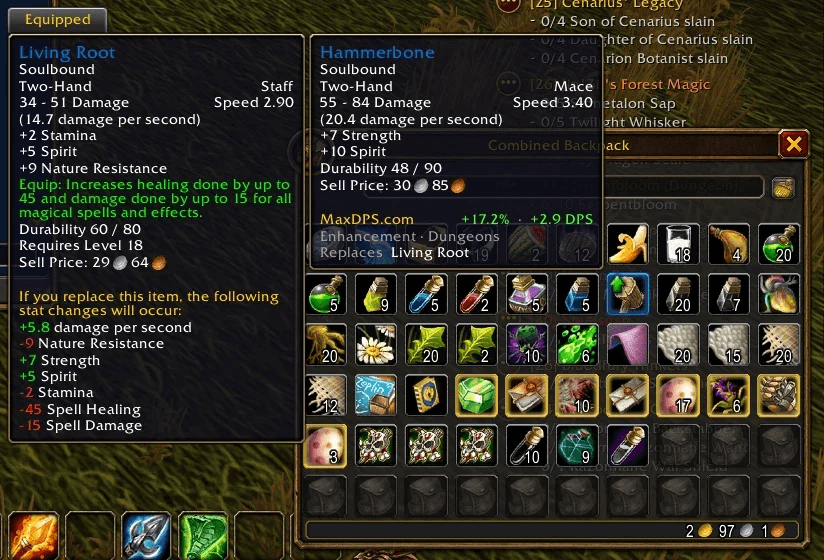
Hover an item for its gain for your build and activity, and the item it would replace. The gain is a share of your whole gear's score, so a ring and a two-hander read on the same scale.
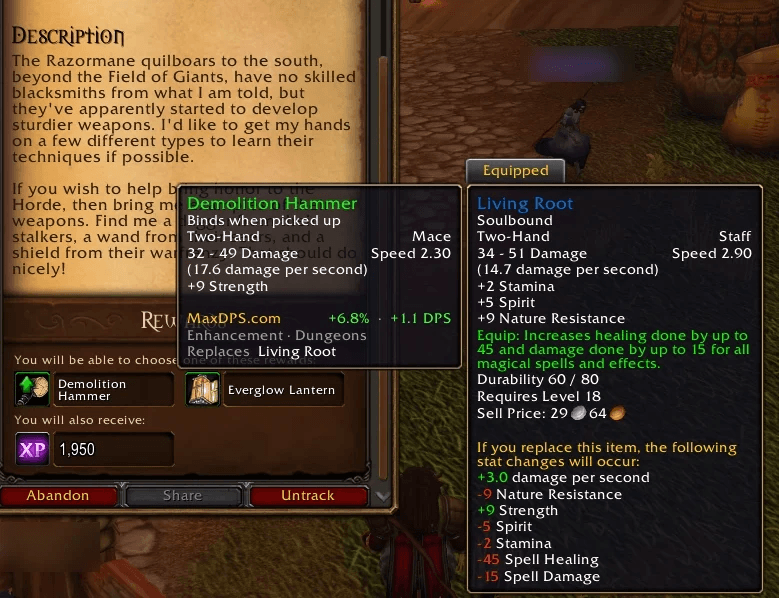
Each quest reward shows its gain before you choose, next to what you wear now, so you take the one that helps your build and not the one with the biggest numbers.
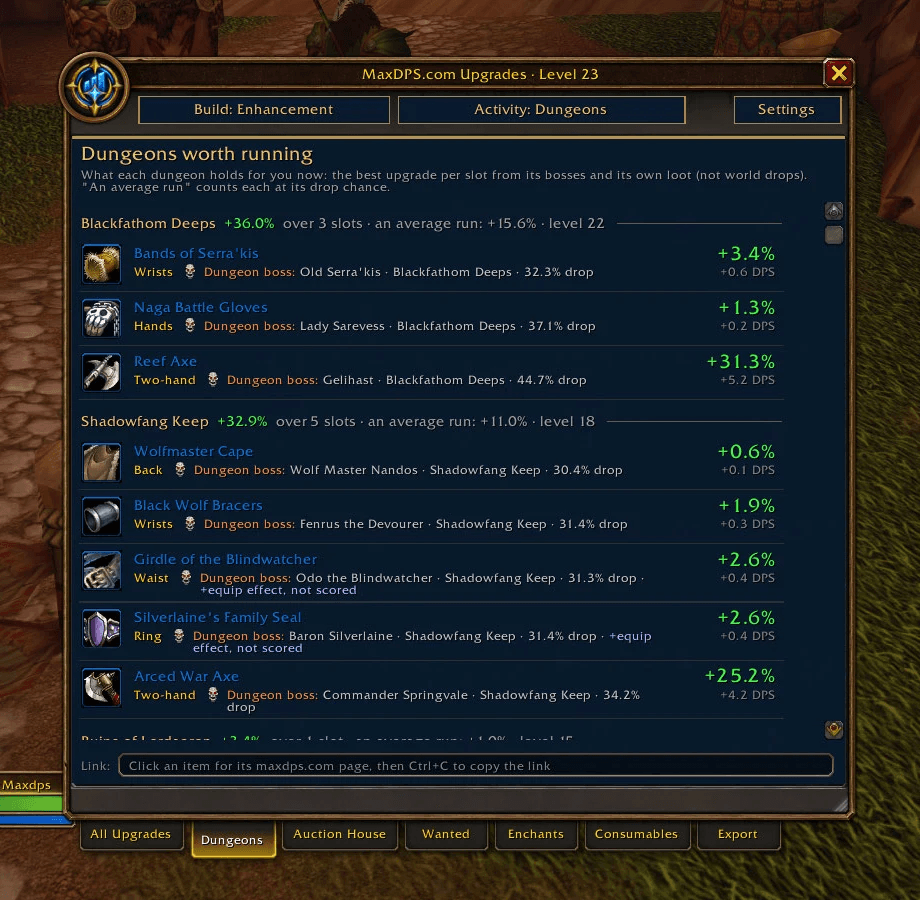
Every dungeon at your level, with the best upgrade per slot from its bosses and what an average run gives you once drop chances are counted.
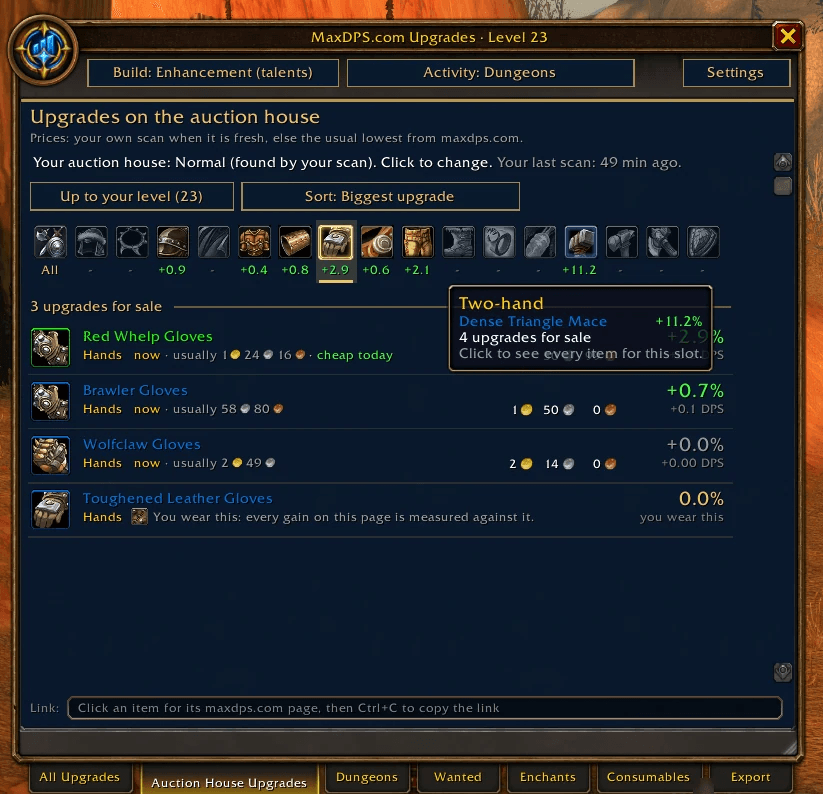
Scan once at the auctioneer to see every upgrade for sale, with today's price beside the usual one and the cheap ones marked. The slot icons show what each slot has for sale.
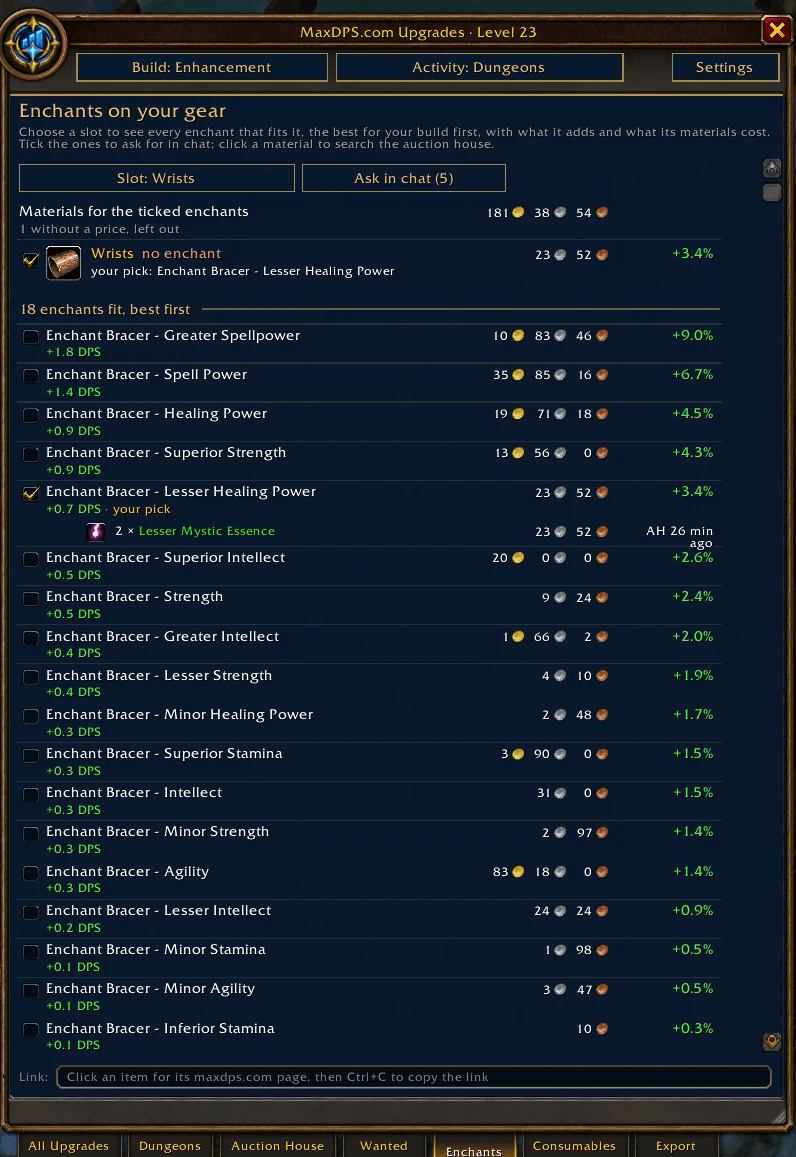
Pick a slot for every enchant that fits it, the best for your build first, with what it adds and what its materials cost on your auction house today.
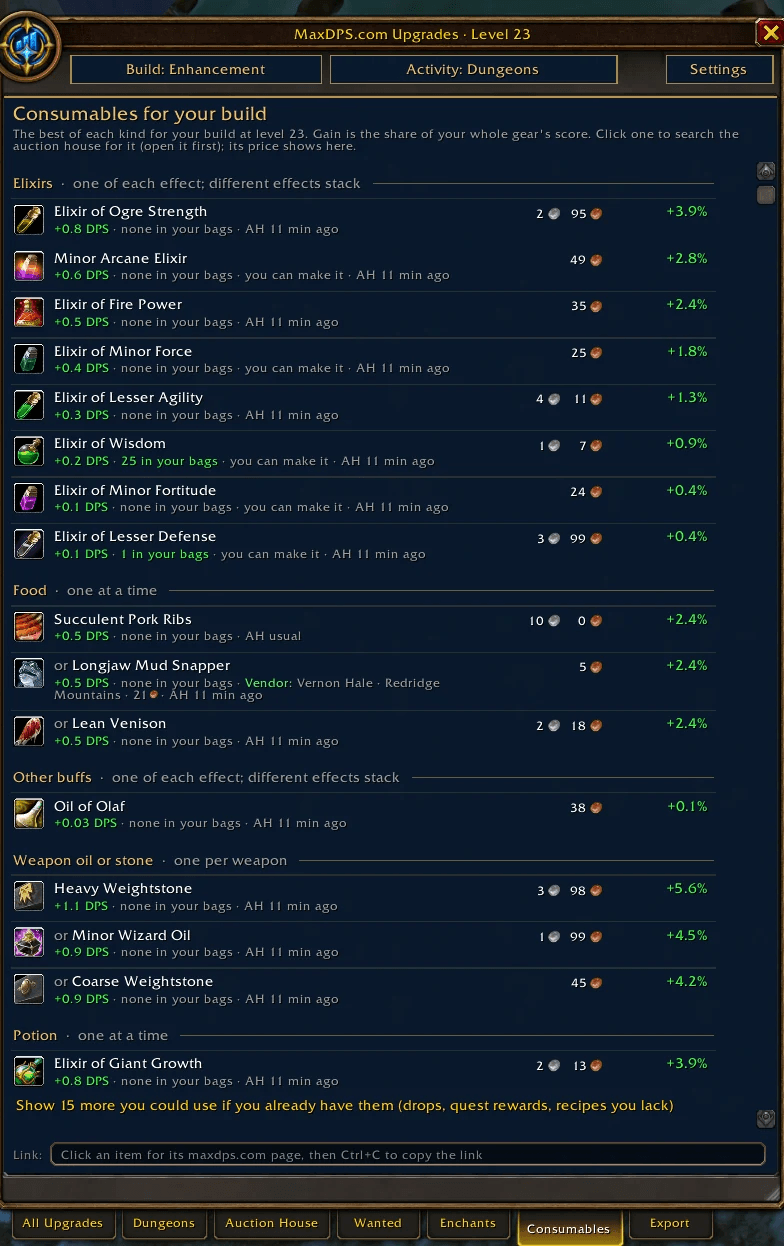
The best elixirs, food, weapon stones and potions for your build at your level, only ones a vendor sells, the auction house lists or you can make. Each kind says what stacks.
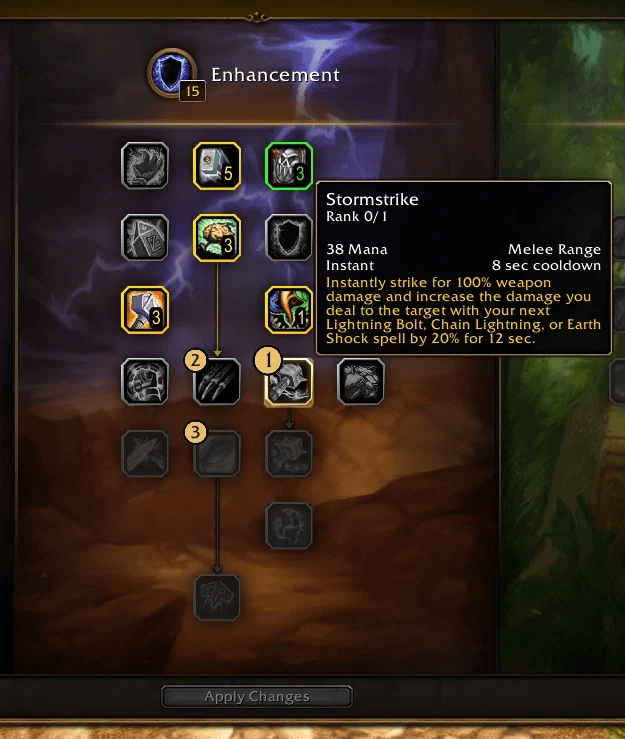
Open your talents and the plan from your build page is there: the next talent to take glows gold with a 1, the two after it are numbered, and a line above the window says what the next point adds.
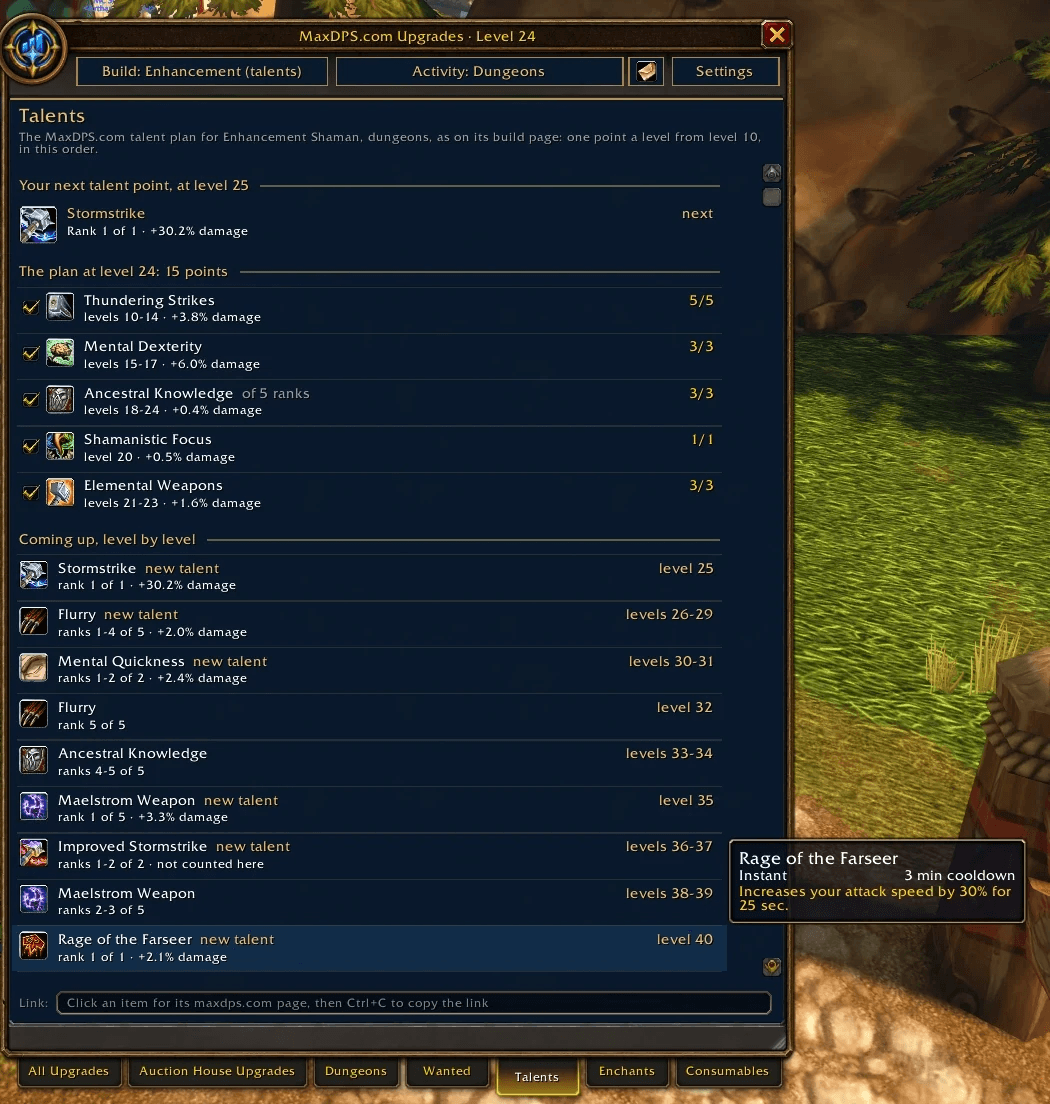
The Talents tab: the plan at your level with what you have, then every point to level 60, which talent and rank, and how much damage it adds.
Description
Is it an upgrade? Your tooltip already knows.
MaxDPS.com Upgrades scores every item for your build, your level and what you are doing (soloing, dungeons or raids), and shows where your next upgrades come from. It is made by MaxDPS.com and uses the same stat weights as the site, so an item scores the same in the game as on the web.
Modelled, not guessed
Every gain comes from MaxDPS stat weights, the same ones behind every build page on maxdps.com. Nobody hand-picks a stat order: for each build, level and activity we play the build's rotation from the game's own files and measure what one more item's worth of each stat adds.
- Every ability in the rotation. Each build presses its real abilities, at the ranks and with the talents you have at that level: seals, totems, poisons, finishers, Execute in a fight's last fifth, pets and their share.
- Procs and chance on hit. Trinkets, weapon chance-on-hit effects, relics and set bonuses are scored too, from the proc chance in the game files or a rate measured in game. An effect nobody has measured says "not scored" rather than a guess.
- 28 builds, every level. Each build has its own weights for every level from 1 to 60, for soloing and dungeons, and raids from level 60.
- Checked against a simulator. Level 60 reference gear runs through the open-source WoWSims simulator for WoW Forever to check the rotations.
How the weights are worked out
What it does
- Tooltips. Hover any item and the MaxDPS.com line gives its gain for your build and activity, and names the item it would replace. The gain is a share of your whole gear's score, so a ring and a two-hander read on the same scale.
- Quest rewards. Each reward choice shows its gain before you pick.
- Your best upgrade for every slot. Click the minimap button for a window with a row of slot icons, each showing that slot's best upgrade. Click one to see every item that fits it, best first, with what you wear as the 0% mark. Every row says where the item comes from: the boss and its drop chance, the vendor and price, the quest, or the recipe. Click a row to pin the place on your map.
- Talents, planned for you. The talent plan from your build page on maxdps.com: open your talents and the next one to take glows gold with a 1, the two after it are numbered, and a line above the window says what the next point adds. A Talents tab shows the plan at your level and every point to 60, with what each adds.
- Dungeons worth running. Every dungeon at your level, with the best upgrade per slot from its bosses and what an average run gives once drop chances are counted.
- Auction House Upgrades. Scan once at the auctioneer and see every upgrade for sale, with today's price beside the usual one, slot by slot.
- Any class. Pick another class's build in the Build menu and every tab shows its gear, for an alt or a friend.
- Also: a wanted list, the best enchant per slot, consumables for your build, and bag upgrade arrows in Baganator, Bagnon and BetterBags.
Good to know
- Made for WoW Forever. The window follows your talents, or you choose the build.
- It only lists items your character can wear and get; drops under 5% give way to likelier picks.
- It works out of combat only. It reads your gear, bags and quest log, never the fight.
- Addons cannot reach the internet. Auction prices start from the usual prices at release time; your own scan replaces them.
- English, German, French, Spanish, Portuguese, Russian, Italian, Korean and Chinese.
- Not related to the MaxDps rotation helper: this addon is only about gear.
Report problems with your class, level and what you saw at hello@maxdps.com.
Free and open source under the MIT licence.
MaxDPS.com Upgrades - Gear Upgrades, Stat Weights & Where to Get Them Team