
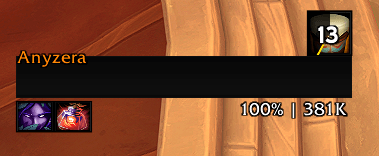
CD Tracker for racials, trinkets and consumables
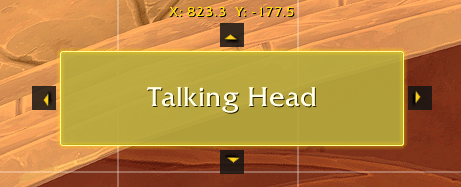
Arrows to nudge a frame in edit mode
Description
MathWro QOL
A personal World of Warcraft addon for quality-of-life tweaks. Built for Midnight patch 12.1.0 (120100).
Compatibility
The addon targets Retail patch 12.1.0. Buff Health Color uses spell-ID aura queries only; Blizzard may restrict private or combat aura data, so those auras cannot be inspected by addon Lua. EllesmereUI Raid Frames provides its own 12.1 Aura Container-based buff indicators and MathWroQOL does not duplicate that runtime.
Provider integrations are optional and remain inactive when their provider is unavailable. CooldownManagerCentered viewer skinning requires both CooldownManagerCentered and Masque to be loaded.
Features
General
Game Menu Scale Scale the Escape menu up or down. Range: 0.5× – 2.0×. Persists across sessions.
Game Menu Dragging Make the Escape menu freely draggable. Position is saved and restored on each login. Includes a Reset Position button to snap it back to centre.
CDM Button
Adds a "CDM" button to the Escape menu that directly opens the Cooldown Manager window (CooldownViewerSettings). It discovers the lowest visible custom menu button between Shop/Options and AddOns, hides its stale position while other integrations arrange themselves, then inserts itself without hardcoded addon-button names or unnecessary menu spacing. The button uses ElvUI styling when only ElvUI is active, an exact guarded EllesmereUI popup-menu skin when only EllesmereUI is active, and native Blizzard styling when both or neither suite is active. Also registers /wa and /cm chat commands as shortcuts. All three (button, /wa, /cm) can be toggled independently in the options panel.
Auction House Filters Automatically pre-enables selected filters each time you open the Auction House. Two independent toggles in the options panel: "Current expansion only" and "Usable only". Filters are re-applied on every AH open so any in-session manual changes are reset.
Combat Logging
Automatic Combat Logging Automatically starts and stops combat logging based on instance type. Supports dungeons, raids, scenarios, PvP, and arenas with independent toggles. Optional max-level-only gate to skip logging while levelling. Respects manual stop — if you disable logging mid-instance, the addon will not re-enable it until you leave.
Combat Tracker
Racials, Trinkets & Consumables Displays icon bars for racial abilities, equipped trinkets, and consumable items (combat potions, healing potions, mana potions, healthstones). Each section tracks cooldowns with swipe animations and optional countdown text. Consumables show stack counts from your inventory. Individual racial abilities can be hidden via the options panel. When both a regular and fleeting version of a consumable are in your bags, only the fleeting version is shown.
Layout & Positioning Each section can be positioned independently via Edit Mode (LibEditMode integration) or merged into another section's bar. Layout options include horizontal row, vertical column, and grid with configurable icons-per-row. Anchor direction controls growth direction.
Customisation Per-section icon width and height sliders. Stack counter and cooldown countdown text with independent font and size controls. Custom item tracking by item ID. Reorderable item display with drag-style up/down arrows showing Midnight-style rank quality icons. Optional Masque skinning integration.
Edit Mode
Edit Mode Nudge Adds arrow buttons and a coordinate readout when a Blizzard Edit Mode or LibEditMode frame is selected. Nudge frames by 1px per click, or 10px with Shift held. Coordinates display the frame's position relative to screen centre.
UI Integrations
Integrations are split into ElvUI and EllesmereUI submenus. Each provider's controls are disabled when that provider (or its required module) is not loaded.
Unlock Mode Nudge — EllesmereUI (requires EllesmereUI Unlock Mode; disabled by default) Adds the same arrow controls to EllesmereUI Unlock Mode movers and uses EUI's native pixel-grid coordinate readout and movement units.
Vehicle Bar Visibility (requires ElvUI or EllesmereUI Action Bars) Keep selected action bars (1–10) visible during vehicle combat and override bar states (e.g. shapeshift-style encounters). Handles each provider's secure visibility drivers and prevents its mouseover fade from hiding selected bars while usable vehicle abilities are active. Normal visibility and fade behaviour are restored on exit. By default only bar 1 is enabled.
Buff Health Color — ElvUI (requires ElvUI) Recolor selected ElvUI unit frame health bars while units have configured player-cast buffs. Includes per-buff settings for Atonement, Lifebloom, Prayer of Mending, Riptide, Beacon of the Savior, Renewing Mist, plus custom spell IDs that add more buff profiles alongside the built-ins. Each buff can be enabled, colored, assigned to player, target, party, or ElvUI raid frame sizes, and restricted to relevant player specializations independently.
Buff Health Color — EllesmereUI EllesmereUI Raid Frames already provides this functionality natively. In its Buff Manager, create an indicator and select Health Bar Color to configure spell assignment, ownership, color, and opacity. MathWroQOL deliberately does not install a second competing recolor runtime.
CDM Plugins (requires CooldownManagerCentered and Masque)
Centered Cooldown Manager Masque Skinning Registers CooldownManagerCentered's icon viewers with Masque so their icons can use the same skins as the rest of the UI. The Essential, Utility, and Buff Icons viewers can be enabled independently in the options panel. When enabled, three groups appear in Masque under MathWroQOL: CMC Essential, CMC Utility, and CMC Buff Icons.
Debug
Buff Health Color Diagnostics
Adds a Debug section to the options panel with quick buttons for Target, Party 1, Raid 1, and Player. Each button prints Buff Health Color diagnostic details to chat, including whether the feature is enabled, whether the configured buff is found from the player, whether the current spec matches the buff profile, and which ElvUI unit frames are hooked. The same diagnostic is available with /mqolbuffdebug <unit>.
Slash Commands
| Command | Description |
|---|---|
/mqol |
Open the MathWro QOL options panel |
/mqolbuffdebug <unit> |
Print Buff Health Color diagnostics for a unit token, such as target, party1, or raid1 |
/wa |
Open WeakAuras (requires CDM Button → Enable /wa command) |
/cm |
Open Cooldown Manager (requires CDM Button → Enable /cm command) |
This addon was developed with the assistance of AI.
MathWroQOL Team
