Marksman
Inspired by Necrosis, I built Marksman as a customizable Hunter wheel for WoW Forever with ammo tracking, pet controls, and directions to vendors and trainers.
2026-11-09 12_10_53-World of Warcraft.png
2026-11-09 12_13_21-World of Warcraft.png
2026-11-09 12_13_45-World of Warcraft.png
Description
Marksman
Keep your aim. We’ll mind the quiver.
Marksman is a standalone Hunter companion for World of Warcraft: Forever, bringing ammunition, pet actions, ability sources, and nearby Hunter services into one compact circle.
Your essentials, within reach
- Ammo at a glance: track equipped arrows or bullets carried in matching quivers and ammo pouches, with a color-changing capacity ring.
- A spec of personality: full-color, circular Retail Beast Mastery, Marksmanship, or Survival artwork follows the talent tree with the most points spent. Ties and unspent talents use the Hunter class icon.
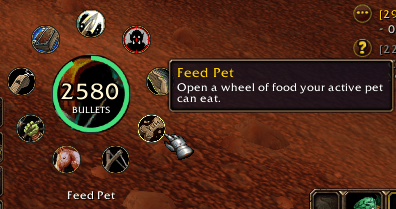
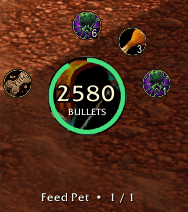
- Pet actions: access Call Pet, Revive Pet, Feed Pet, Tame Beast, and Beast Training. Feed Pet opens a submenu of compatible food in your bags; Call Pet can show your active pet’s portrait.
- Find pet ability upgrades: browse supported tame-learned abilities and ranks, see known ranks, and locate suitable creatures within your level. The default view focuses on relevant upgrades, with an option to show all ranks.
- Hunter services: find the nearest known eligible ammo vendor, Hunter trainer, pet trainer, or stable master. Service nodes provide waypoints and attempt exact-name targeting and a yellow star when range and permissions allow.
- Optional ammo restocking: buy eligible vendor ammo for your ranged weapon, limited by matching ammo-bag space, vendor stock, and available money. Purchases can equip the selected ammo. Removing outdated ammo requires explicit confirmation, one stack per click.
- Learn your vendors: use Add/update this vendor at a merchant to save its supported ammunition and nearby location for the current character.
Shape the dial around your UI
Choose Full circle, Top half, Bottom half, Left half, or Right half in General settings. Half-circle layouts automatically use two rows when needed, and their text sits close to the center on the opposite side of the icons.
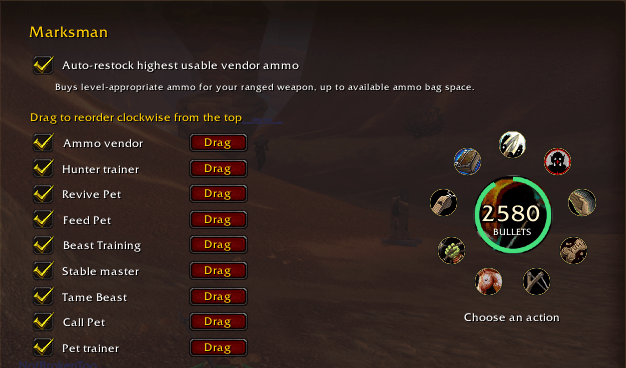
Hide individual nodes, drag to reorder them, adjust the whole interface from 50% to 150%, and preview changes live. Circular artwork extends to the subnodes and submenus.
Combat and dungeon options
The utility wheel closes in combat. Enabled Call Pet and Revive Pet buttons can remain available through the combat pet menu, or you can enable Auto-hide Marksman in combat to hide the whole display.
An optional Auto-mark dungeon roles setting is disabled by default. When entering a five-player dungeon as party leader, it marks the assigned tank with a star and the assigned healer with a diamond. It uses assigned roles and does not continuously maintain marks throughout the run.
Controls
- Left-click: open or close the action wheel; in combat, toggle the enabled combat pet buttons.
- Right-click: open settings.
- Middle-drag: move the circle.
- Click outside: close the wheel.
/marksmanor/quiver: toggle the wheel./marksman settings: open settings./marksman addvendor: save or update the currently open supported ammo vendor.
Installation and compatibility
Install the Marksman folder in _forever_/Interface/AddOns, then restart WoW. Marksman initializes only on Hunter characters and preserves settings per character.
Upgrading from an old release? Remove the obsolete HunterQuiver addon folder and keep Marksman. Having both installed can produce duplicate dials. Marksman warns at login when the legacy addon is detected. Keep your WTF folder and saved settings.
NPC locations and outdoor creature coordinates include approximate Classic-derived data. Forever vendors, stock, and spawns can differ. All 60 supported pet-ability ranks across 12 abilities were checked against Petopia Forever on November 18, 2026; creatures without known coordinates are not given invented pins.
Built by WinterShots / Wintershot.
Enjoying Marksman? Buy me a coffee.
Marksman Team