
Markr
- By
Build a world marker sequence, drop it from one hotkey, and switch presets when the plan changes.
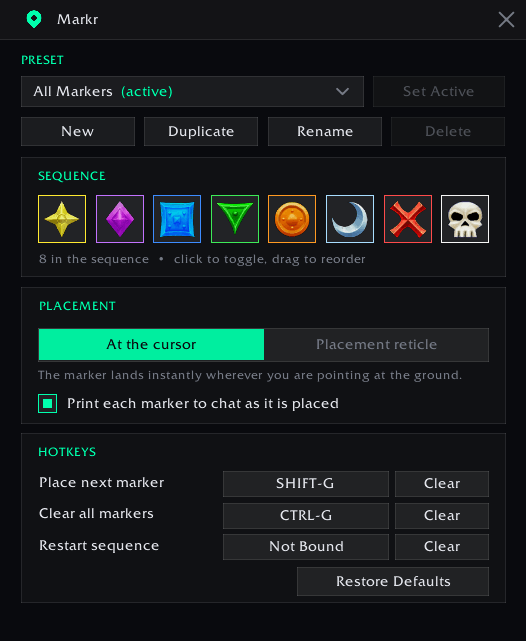
Markr's config menu
Description
Build a world marker sequence, drop it from one hotkey, and switch presets when the plan changes.
Default hotkeys
| Key | Action |
|---|---|
Shift+G |
Place the next marker in the sequence |
Ctrl+G |
Clear all world markers |
| unbound | Restart the sequence from the first marker |
These are claimed on first run only, and only if the key is free; anything you have already
bound is left alone. Set your own in /markr or in Blizzard's Key Bindings panel under the
Markr header.
Commands
/markr                 open the settings window
/markr list            list your presets
/markr use <name>      switch the active preset
/markr reset           restart the sequence at the first marker
/markr help            command list
Settings
Open the window with /markr, the minimap button, the addon compartment, or
Options → AddOns → Markr. From there you can:
- Presets: create, duplicate, rename and delete presets, and pick which one the hotkey uses. Presets are saved account-wide.
- Sequence: click a marker to switch it on or off, drag to reorder. The hotkey walks the strip left to right, skipping the disabled ones, and wraps around at the end.
- Placement: drop instantly at the mouse cursor, or arm Blizzard's placement reticle and click where you want it. Chat announcements toggle here too.
- Hotkeys: click a binding button and press the key you want.
License
MIT
Markr Team

