Marknotes
- By
EN_1.png
scr1.png
scr.png
Description
Marknotes
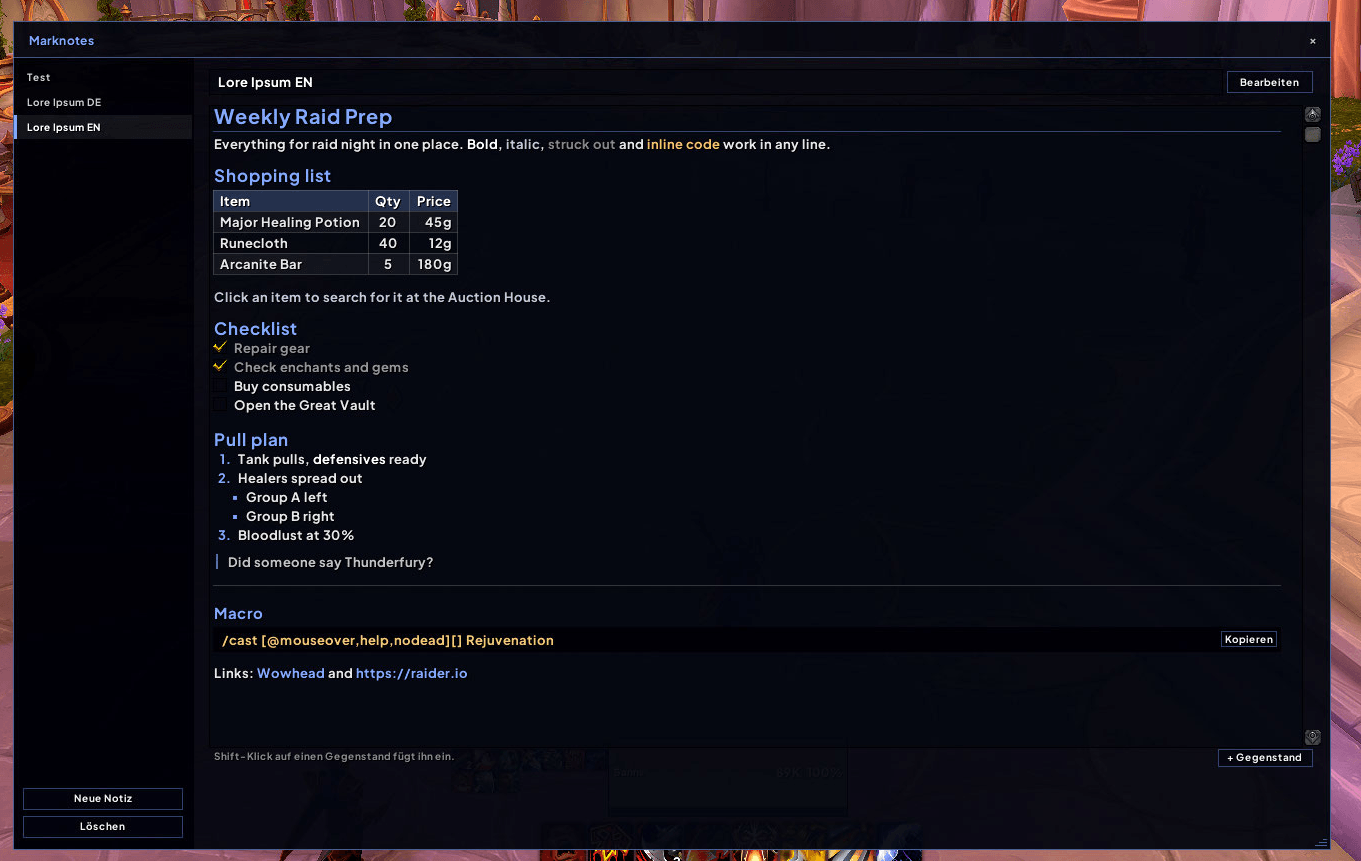
In-game notes with Markdown. Write shopping lists, raid plans, farming routes or guides – with headings, tables, checklists, raid markers, waypoints and real item links. Pin a note right onto your screen or share it live with your group.
Features
- Markdown preview – write in plain Markdown, read it nicely formatted
- Headings, bold, italic,
strikethrough,inline code - Bullet and numbered lists with nesting
- Tables with header row and column alignment
- Checklists – tick items off with a click in the preview
- Quotes, horizontal rules and code blocks with a Copy button
- Links – click to copy the address
- Raid markers like in chat:
{skull},{star},{rt1}–{rt8}(German names work too) - Role icons for splitting up groups:
{tank},{healer}/{heal},{dps}/{dd}
- Headings, bold, italic,
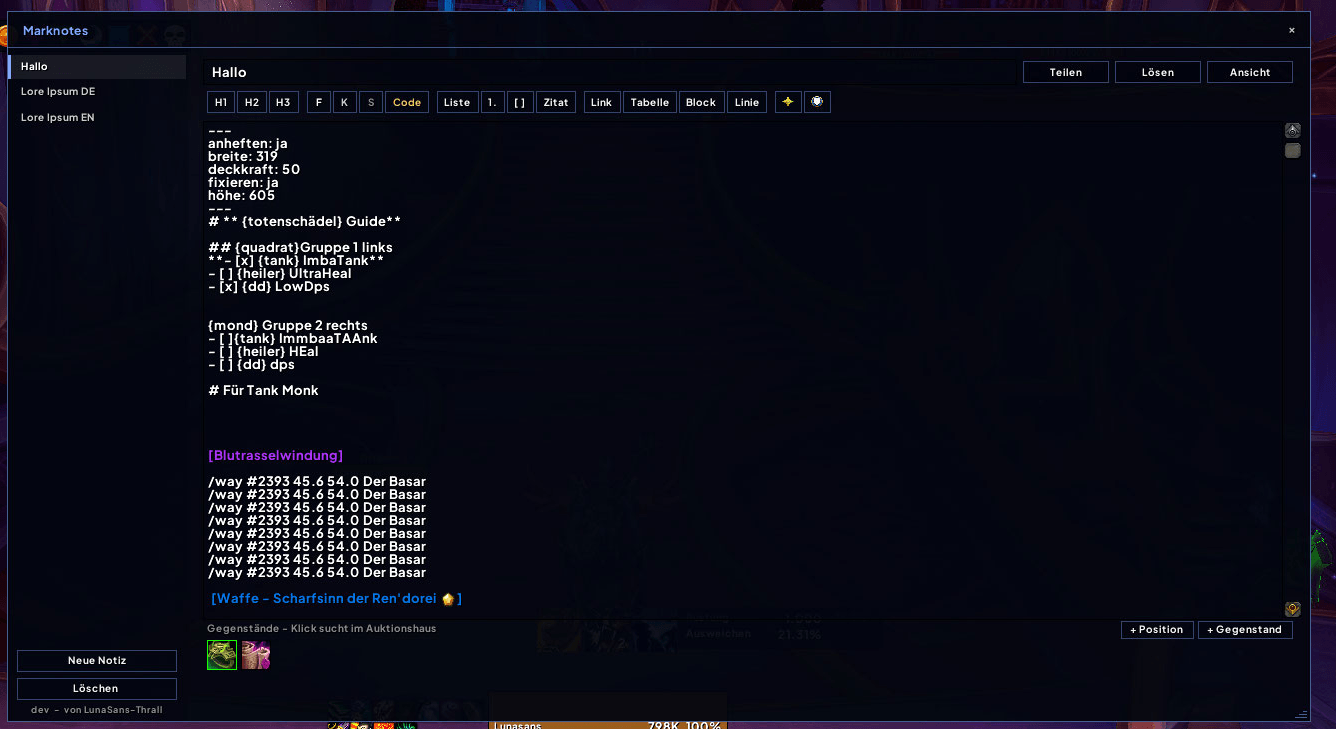
- Toolbar – one click for headings, bold, lists, checkboxes, tables, links and more
- Item links
- Shift-click any item while the window is open
- Or use + Item: type a name (bags and equipment), an item ID or paste a Wowhead link
- All items of a note appear as icons below it – click one to search it at the Auction House
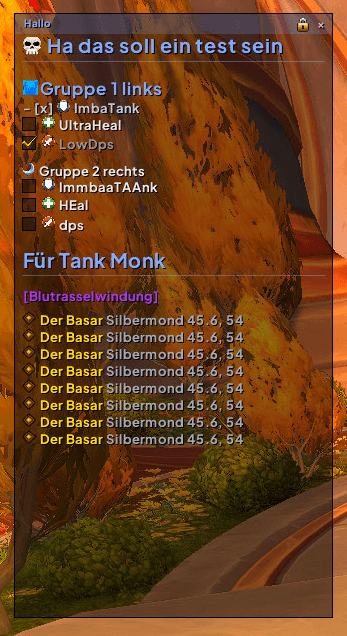
- Pin notes to the screen – show any note as a small Markdown window right on your UI, with clickable checklists; set it up inside the note itself (see below)
- Share with your group or raid – send a note to everyone in your group who has Marknotes; they're asked once, after that every change you make updates their copy automatically (their own ticks stay)
- Waypoints – write
/way 47.5 62.3 Banker,/way #2112 47.5 62.3or/way Valdrakken 47.5 62.3(TomTom style, as found in guides;/twayworks too). In the preview it becomes a link: click it to set the waypoint – in TomTom if installed, otherwise as the game's own map pin. Shift-clicking a map pin on the world map inserts it as well, and + Position inserts where you are standing right now. - Auction House button – open your notes right next to the Auction House
- Resizable window – size and position are remembered; the version is shown below the note list
- Minimap button – left-click opens, right-click creates a new note, drag to move
- Notes are shared across all your characters
- English and German
- No libraries, lightweight
Commands
| Command | |
|---|---|
/notiz or /marknotes |
Open / close |
/notiz new |
New note |
/notiz share |
Share the current note with your group / raid |
/notiz minimap |
Show / hide the minimap button |
Pinned notes
Click Pin in the window (or write the block yourself). The settings live at the very top of the note:
---
pin: yes
width: 300
opacity: 70
---
# Shopping list
- [ ] Flasks| Setting | Values | |
|---|---|---|
pin |
yes / no |
show the note on screen |
width |
150–1000 | width in pixels (default 300) |
height |
60–1200 | fixed height; without it the window fits the text (up to 500) – scroll with the mouse wheel |
opacity |
0–100 | background opacity in percent (default 70) |
scale |
50–200 | size in percent (default 100) |
lock |
yes / no |
can't be moved by accident |
title |
yes / no |
show the title bar (default yes) |
combat |
hide / show |
hide in combat |
Drag the window to move it, double-click the title bar to open the note, click × to unpin and the lock icon to lock it in place. Drag the grip in the bottom right corner to resize it (this writes width and height into the note); double-click the grip and the height fits the text again. Checkboxes can be ticked right on screen. Several notes can be pinned at once. German keys (anheften, breite, …) work too.
Good to know
- A shared note stays live until you click Shared → Stop sharing. Send again reaches players who joined later. Receivers keep their own ticks and pin setting; other edits they make are replaced by the next update.
- Sharing uses hidden addon messages, so only players with Marknotes receive notes. The game limits how fast they go out – a long note takes a few seconds – and blocks them during boss fights in instances.
- WoW does not let addons open a browser or write to the clipboard. Clicking a link or Copy shows the text selected in a small window – just press Ctrl+C.
- Finding an item by name only works for items the game knows right now (bags, equipment, recently seen). For anything else use the item ID or a Wowhead link.
- Markdown you paste from elsewhere works – item links you add in game.
License
All Rights Reserved. You may download and use Marknotes freely; redistributing or publishing modified versions requires permission.
Marknotes (Deutsch)
Notizen im Spiel mit Markdown. Einkaufslisten, Raid-Pläne, Farmrouten oder Guides – mit Überschriften, Tabellen, Checklisten, Zielmarkierungen, Wegpunkten und echten Gegenstandslinks. Eine Notiz direkt auf den Bildschirm heften oder live mit der Gruppe teilen.
Funktionen
- Markdown-Ansicht – geschrieben wird einfaches Markdown, gelesen schön formatiert
- Überschriften, fett, kursiv,
durchgestrichen,Code - Aufzählungen und nummerierte Listen mit Unterpunkten
- Tabellen mit Kopfzeile und Spaltenausrichtung
- Checklisten – in der Ansicht per Klick abhaken
- Zitate, Trennlinien und Codeblöcke mit Kopieren-Knopf
- Links – ein Klick kopiert die Adresse
- Zielmarkierungen wie im Chat:
{totenschädel},{stern},{rt1}–{rt8}(englische Namen gehen auch) - Rollen-Symbole zum Einteilen von Gruppen:
{tank},{heiler}/{heal},{dd}/{dps}
- Überschriften, fett, kursiv,
- Werkzeugleiste – ein Klick für Überschriften, Fett, Listen, Checkboxen, Tabellen, Links und mehr
- Gegenstandslinks
- Shift-Klick auf einen Gegenstand, solange das Fenster offen ist
- Oder + Gegenstand: Name (Taschen und Ausrüstung), Item-ID oder Wowhead-Link eingeben
- Alle Gegenstände einer Notiz stehen als Symbole darunter – ein Klick sucht im Auktionshaus
- Notizen anheften – jede Notiz als kleines Markdown-Fenster direkt auf dem Bildschirm, Checklisten per Klick abhakbar; eingestellt wird in der Notiz selbst (siehe unten)
- Mit Gruppe oder Schlachtzug teilen – eine Notiz an alle in der Gruppe senden, die Marknotes haben; sie werden einmal gefragt, danach aktualisiert sich ihre Kopie bei jeder Änderung automatisch (eigene Haken bleiben)
- Wegpunkte –
/way 47.5 62.3 Bankier,/way #2112 47.5 62.3oder/way Valdrakken 47.5 62.3schreiben (TomTom-Schreibweise wie in Guides, auch/tway). In der Ansicht wird daraus ein Link: ein Klick setzt den Wegpunkt – in TomTom, wenn installiert, sonst als Kartenpin des Spiels. Shift-Klick auf einen Pin der Weltkarte fügt ihn ebenfalls ein, + Position die Stelle, an der du gerade stehst. - Knopf am Auktionshaus – Notizen direkt daneben öffnen
- Fenstergröße veränderbar – Größe und Position werden gemerkt; die Version steht unter der Notizliste
- Minimap-Knopf – Linksklick öffnet, Rechtsklick legt eine neue Notiz an, Ziehen verschiebt
- Notizen gelten für alle deine Charaktere
- Deutsch und Englisch
- Ohne Bibliotheken, schlank
Befehle
| Befehl | |
|---|---|
/notiz oder /marknotes |
Öffnen / schließen |
/notiz neu |
Neue Notiz |
/notiz teilen |
Aktuelle Notiz mit Gruppe / Schlachtzug teilen |
/notiz minimap |
Minimap-Knopf ein- / ausblenden |
Angeheftete Notizen
Im Fenster auf Anheften klicken (oder den Block selbst schreiben). Die Einstellungen stehen ganz oben in der Notiz:
---
anheften: ja
breite: 300
deckkraft: 70
---
# Einkaufsliste
- [ ] Fläschchen| Einstellung | Werte | |
|---|---|---|
anheften |
ja / nein |
Notiz auf dem Bildschirm zeigen |
breite |
150–1000 | Breite in Pixeln (Standard 300) |
höhe |
60–1200 | feste Höhe; ohne passt sich das Fenster dem Text an (bis 500) – scrollen mit dem Mausrad |
deckkraft |
0–100 | Deckkraft des Hintergrunds in Prozent (Standard 70) |
größe |
50–200 | Größe in Prozent (Standard 100) |
fixieren |
ja / nein |
lässt sich nicht versehentlich verschieben |
titel |
ja / nein |
Titelzeile zeigen (Standard ja) |
kampf |
ausblenden / zeigen |
im Kampf ausblenden |
Fenster ziehen zum Verschieben, Doppelklick auf die Titelzeile öffnet die Notiz, × löst sie, das Schloss fixiert sie. Der Griff unten rechts ändert die Größe (schreibt breite und höhe in die Notiz); Doppelklick auf den Griff, und die Höhe passt sich wieder dem Text an. Checkboxen lassen sich direkt auf dem Bildschirm abhaken. Mehrere Notizen können gleichzeitig angeheftet sein. Englische Schlüssel (pin, width, …) gehen auch.
Gut zu wissen
- Eine geteilte Notiz bleibt live, bis du Geteilt → Teilen beenden wählst. Erneut senden erreicht Spieler, die später dazugekommen sind. Empfänger behalten ihre eigenen Haken und ihr Anheften; andere eigene Änderungen ersetzt das nächste Update.
- Geteilt wird über unsichtbare Addon-Nachrichten, deshalb kommen Notizen nur bei Spielern mit Marknotes an. Das Spiel begrenzt das Tempo – eine lange Notiz braucht ein paar Sekunden – und sperrt sie im Bosskampf in Instanzen.
- Addons dürfen in WoW keinen Browser öffnen und nichts in die Zwischenablage legen. Ein Klick auf einen Link oder Kopieren zeigt den Text markiert in einem kleinen Fenster – einfach Strg+C drücken.
- Die Suche nach Namen findet nur Gegenstände, die das Spiel gerade kennt (Taschen, Ausrüstung, kürzlich gesehen). Für alles andere die Item-ID oder einen Wowhead-Link nehmen.
- Markdown von anderswo lässt sich einfügen – Gegenstandslinks fügst du im Spiel hinzu.
Lizenz
Alle Rechte vorbehalten. Marknotes darf frei heruntergeladen und genutzt werden; Weiterverbreiten oder veränderte Fassungen veröffentlichen nur mit Erlaubnis.
Marknotes Team