Marker Rotator
- By
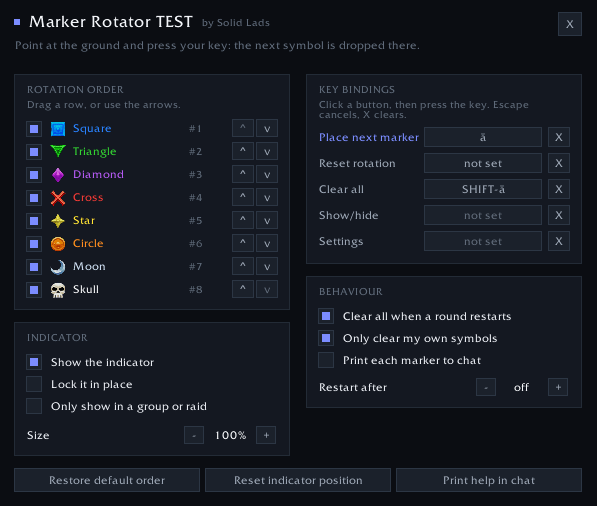
image-1787313245429.png
Description
Marker Rotator turns the eight world markers into one key. Point at the ground, press it, and the next flare in the rotation drops under your cursor. Press again for the next one. A small indicator always shows which symbol is coming, so you never have to think about where you are in the sequence.
Built for marking pulls in dungeons and raids without opening the raid tools every time.
What it does
One keybind cycles all eight markers. Each one is placed at your mouse cursor, in the order you choose.
A small indicator shows what comes next. It takes on the marker's colour and flashes each time you place one, so a glance is enough.
Your own order. Drag the symbols into the sequence you want, or switch off the ones you never use. Three markers for three tank spots works just as well as all eight.
It works in combat, including the cycling itself.
Auto restart. Set a pause length and the rotation returns to the first symbol on its own between pulls, so you never have to reset by hand.
Clear all on a new round. Optionally wipe the old flares the moment a fresh cycle begins, so every pull starts clean.
It can leave fixed markers alone. Raids usually keep a few flares parked in one spot. Tick Only clear my own symbols and clearing removes just the symbols in your rotation, so the fixed ones stay where the raid put them.
Key bindings
Everything is set inside the addon. Type /mr, click the button next to Place next marker, and press the key you want. Modifiers work, and so do mouse buttons 3, 4 and 5.
Optional extras, all bindable the same way: reset the rotation, clear the markers, and show or hide the indicator.
Nothing is written to your saved key bindings. The addon applies its own keys on each login, so clearing one here hands the key straight back to whatever had it before.
Settings
/mr opens the menu. You can set the rotation order and which symbols take part, show or lock the indicator and change its size, hide it while you are not in a group, clear everything when a round restarts, print each placed marker to your own chat, and restart the rotation after a pause.
Good to know
In a raid you need to be leader or assistant to place world markers. That is a WoW restriction, not the addon. Solo and in a party it always works, and the indicator dims whenever placement is not allowed.
Your mouse has to point at walkable ground. Sky, UI windows or spots too far away do nothing, and the rotation still advances. Step back undoes that.
Settings are stored account-wide.
Why placing needs a key
PlaceRaidMarker() is a protected function that addons may not call, so no slash command can place a marker. The route the game leaves open is a macro on a secure button, which is what the addon binds your key to.
That also means you can drive it from a macro yourself with /click MarkerRotatorPlaceButton. Also available: MarkerRotatorUndoButton, MarkerRotatorClearButton, MarkerRotatorBackButton and MarkerRotatorResetButton.
Slash commands
/mr opens the menu and /mr help lists everything. The useful ones: /mr key h binds the place key straight from chat, /mr only 5 4 1 uses just star, cross and square in that order, /mr autoreset 20 restarts the rotation after 20 seconds of nothing, and /mr scale 1.4 changes the indicator size.
Marker Rotator Team