Manflesh
- By
xmTKsfeKwt.jpg
Description
Manflesh
A World of Warcraft addon for TBC / Classic Anniversary 2.5.5 (build 68101+, interface 20505).
It imports a raid-helper.xyz roster (as JSON), lets you tweak each player's class/role, attach per-boss raid assignments, and export everything as a table you paste straight into Google Sheets.
Why import/export is copy-paste (important)
WoW addons run in a sandbox with no network access. An addon cannot fetch a URL and it cannot upload to Google Sheets — this is a hard Blizzard restriction on every client, including Anniversary. So the network hop happens outside the game, exactly like WeakAuras / DBM import strings:
- Import: you copy the JSON from raid-helper and paste it into the addon.
- Export: the addon produces a tab-separated table you copy and paste into Sheets.
Install
- Copy the
Manfleshfolder into:World of Warcraft\_classic_\Interface\AddOns\(so you end up with...\AddOns\Manflesh\Manflesh.toc) - Restart the client (or
/reloadif already running) and make sure Manflesh is enabled on the character-select AddOns screen.
Usage
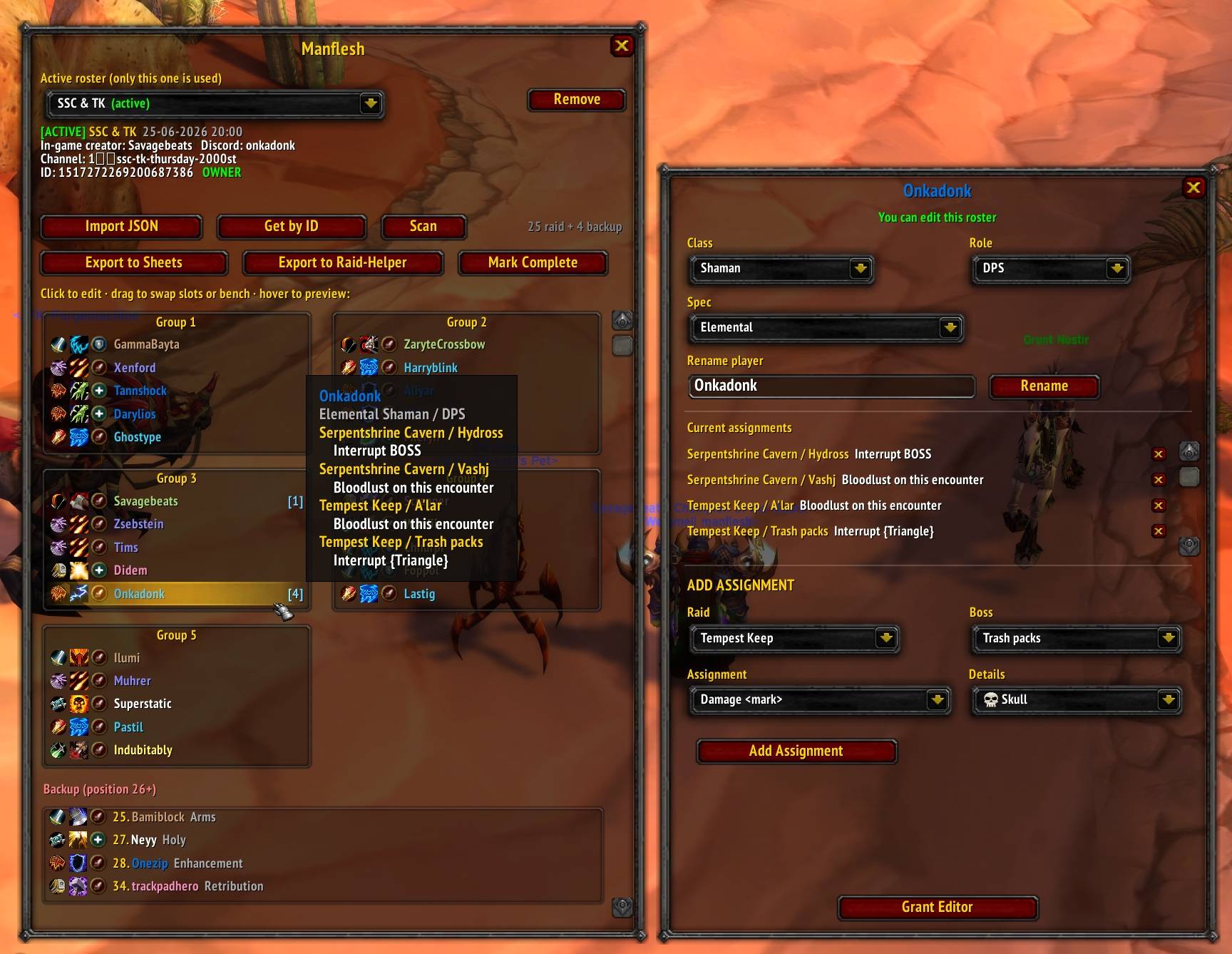
/mf(or/manflesh) to open the main window. The Active roster dropdown at the top selects which roster is active — only the active roster is ever used (export, the encounter window, etc.). Just one roster is active at a time, and the most recently added roster (imported, duplicated, or received via sync) becomes active automatically. Remove deletes the selected one.- Import roster (you become its creator):
- On Discord, get the event's JSON from Raid-Helper, or open the API URL in a
browser:
https://raid-helper.xyz/api/v4/events/<EVENT_ID> - Copy the whole JSON, click Import JSON, paste, click Import.
- The roster is laid out as a 25-man raid grid (positions 1-5 = Group 1, 6-10 =
Group 2, … shown as five boxes in two columns). Sign-ups at position 26+ are
listed as backup below the grid. Class/role/spec are mapped from the signup.
Absence/Bench/Late/Tentative are skipped. The roster also stores: event title,
date + time, the Raid-Helper creator's Discord name, the channel name, the event
ID, and you as the in-game
Creator. - Drag a player (press, move, release) onto another cell to swap positions, onto an empty cell to move there, or onto the Backup area to bench them. Drag a backup player onto a raid cell to bring them in (whoever they replace is benched). A name tag follows your cursor while dragging. Creator/editors only; moves sync to everyone. A plain click (no drag) opens the player editor.
- If a roster with that event ID already exists, you're asked to either get the
latest from its creator (guild sync) or create a duplicate with a new ID of
the form
<eventId>-<random6>(e.g.1520055851975446586-a1b2c3).
- On Discord, get the event's JSON from Raid-Helper, or open the API URL in a
browser:
- Edit a player: click any name (only the creator/editors can change things;
everyone else is read-only).
- Change Class / Spec / Role (overrides the website values). Hunters, Rogues, Mages and Warlocks are locked to DPS.
- Rename player (creator/editor) — handy to make a roster nickname match the actual in-game character name so sync/permissions line up.
- ADD ASSIGNMENT: pick Raid → Boss → Assignment; a details control appears (marker / target-player / custom text up to 255). Click Add Assignment. You can add as many as you want per player per boss (e.g. heal Skull, heal RAID, plus a custom note). Remove with the X.
- Grant/Revoke Editor (creator only) — lets that player edit and have their changes sync to everyone.
- View assignments: hover a name for a quick tooltip, or click it for the full pop-up. Works for everyone, read-only or not.
- Mark Complete (finalize): when management is done, the creator or an editor clicks Mark Complete. The roster becomes read-only for everyone (editors and the owner included): no group moves, class/spec/role changes, renames, or assignment edits. Only the owner can hit Reopen to make it writable again. The state syncs to all holders.
- Export to Sheets (creator only): click Export to Sheets, Ctrl+C, paste
into a Google Sheet. Columns:
Player, Class, Spec, Role, Raid, Boss, Assignment. - Export to Raid-Helper (creator only): click Export to Raid-Helper to get a
ready-to-run
curlcommand (toggle for raw JSON) that PATCHes the event's raidplan via Raid-Helper's comp API (/api/v4/comps/<eventId>). Replace<YOUR_RAIDHELPER_API_KEY>with your server key (Discord/apikey) and run it; the 25-man groups appear in the website's raidplan. The comp keys players by their Discord user id (captured on import), so re-import the event JSON before exporting if a roster predates this feature. Assignments are intentionally not included — they live only in the addon. Note: a duplicate roster pushes to the original event's raidplan, and thecurlis bash/sh style.
Data persists in SavedVariables\ManfleshDB.lua (rosters, account-wide) between
sessions; per-character UI state (window positions) is stored alongside it
(ManfleshUIDB).
In-game guild sync
Sync uses guild addon messages, so it only works between online members of the same guild who both have the addon. Large rosters are chunked and rate-limited.
- Each roster has a unique ID (the Raid-Helper event ID; duplicates get a suffix).
- Auto-discovery on login: ~8s after you log in, the addon asks the guild who has rosters that include you. Holders that list your name reply, and you're prompted to import each one (read-only unless you're an editor). Press Sync to re-scan anytime.
- Get by ID: click Get by ID, enter a roster ID. If anyone in your guild, party, or raid is online, holds it, and your name is in it, it's sent to you. This is how players who are not in the guild (but listed in the roster) obtain it — they just pull it from the creator by ID; they can't create duplicates.
- Removing a roster: click Remove (top-right of the main window) or use
/mf roster remove <id>; you'll be asked to confirm. If the creator removes a roster, everyone who holds it is told in chat (no interrupting popup) to remove their copy via the window or/mf roster remove <id>. Such rosters are flagged with a red[X]/[REMOVED BY CREATOR]marker until you delete them. - Catch-up after being offline: if a roster was deleted while you were offline you miss the live notice. Press Scan (or relog) and the addon asks each roster's creator whether it still exists; if the creator is online and confirms it's gone, your copy is flagged the same way. If the creator is offline the check is inconclusive and nothing changes.
- Permissions: only the creator can edit by default, export, and grant/revoke editors. Editors (and the creator) can edit assignments, class/role, and rename players. All edits propagate to everyone holding that roster.
- Identity matching is by character name (realm stripped, case-insensitive). If a Raid-Helper nickname differs from the WoW character name, rename the roster entry to match so that person is recognised for sync and editor permissions.
Slash commands
/mf— toggle main window/mf import— open JSON import box/mf id— open "get roster by ID"/mf sync(or/mf scan) — re-scan the guild/group for shared rosters and verify deletions/mf export— export the active roster (creator only)/mf roster list— list your rosters (IDs) in chat/mf roster remove <id>— remove a roster by ID (asks to confirm)
Encounter window (zone-triggered)
When you enter a supported raid zone the addon pops a small encounter window with your assignments for that context. Initial scope:
- Serpentshrine Cavern and The Eye (Tempest Keep) → shows your Trash packs assignments for that raid (from the active roster). If you have none, the window still appears with "No tasks."
You can drag the encounter window anywhere; its position is saved per character.
Boss-by-boss switching (swapping to A'lar's assignments when the fight starts, etc.) is
planned next via ENCOUNTER_START / ENCOUNTER_END.
Assignments available
- DPS: damage
<mark>, damage BOSS, interrupt<mark>, interrupt BOSS, AOE, custom text - Tank: tank
<mark>, tank BOSS, tank ADDS, custom text - Heal: heal
<mark>, heal main tank, heal off tank, heal RAID, custom text - Class-specific (added on top of role options):
- Druid: Innervate
<player> - Shaman: Bloodlust on encounter
- Hunter: Misdirection
<player> - Rogue: Improved Expose Armor
- Mage: Sheep
<mark>or Sheep<custom target> - Warlock: Banish
<mark>or Banish<custom target>
- Druid: Innervate
Markers: skull, cross, diamond, triangle, moon, star.
Raids/bosses:
- Serpentshrine Cavern: Hydross, Lurker, Leotheras, Morogrim, Karathress, Vashj, Trash packs
- Tempest Keep: A'lar, Solarian, Void Reaver, Kael'Thas, Trash packs
File layout
| File | Purpose |
|---|---|
Manflesh.toc |
Addon manifest (Interface 20505, load order, SavedVariables) |
JSON.lua |
Dependency-free JSON decoder and encoder (Lua 5.1) |
Constants.lua |
Shared constants: addon name/version, comm prefix, UI grid geometry, textures |
Data.lua |
Class/raid registries (RegisterClass/RegisterRaid), class colors + spec icons |
Roles.lua |
Roles, raid markers, role-based assignment definitions, GetAssignmentTypes |
Classes\*.lua |
One file per class: display/color, specs + spec icons, DPS-only lock, Raid-Helper export emotes, class-specific assignments |
Raids\*.lua |
One file per raid (SSC, TK): name + boss list |
Core.lua |
SavedVariables, multi-roster model, permissions, mutators |
Comm.lua |
Guild sync: throttled queue, chunked transfer, discovery, edit ops |
RaidHelper.lua |
All Raid-Helper format logic: event-JSON import + comp/raidplan export (JSON & curl) |
Export.lua |
TSV builder for Google Sheets (creator-gated) |
UI.lua |
Main window, popups, player editor + assignment builder, sync prompts, encounter window |
Zone.lua |
Zone watcher that pops the encounter window for supported raids |
Manflesh.lua |
Init, events, addon-message routing, slash commands |
Manflesh Team
