Mana Meters
See every caster's mana at a glance, right on your party frames.
Simple lightweight update to the stock player raidstyle UI
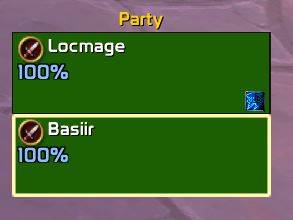
Mana Meters adds a small mana readout to each member of Blizzard's raid-style party frames. You can see your healer is at 15% before the pull goes bad, without opening another window or installing a big unit-frame addon. It's lightweight and sits on top of the default frames.
Features
- Mana on your party frames. Each party member who uses mana gets a clean outlined number on their frame, either a percentage (
85%) or their actual mana (123K). - Only shows when it matters. Warriors, rogues, Death Knights and other non-mana specs show nothing. The readout also hides for members who are dead, released as a ghost, or offline, so your frames stay uncluttered.
- Low-mana warning colors. The number turns yellow below 50% and red below 20%, so a healer who is running dry stands out immediately. Above 50% it's a soft blue.
- Healers-only mode. Prefer to track just the healer? One command hides everyone else's mana.
- Fully positionable. Pick one of seven anchor points on the frame, fine-tune with pixel offsets, and set any font size from 6 to 24.
- Built for Midnight. During combat the game sometimes hides other players' exact power values from addons. Mana Meters handles that gracefully: it keeps showing what it's allowed to and never throws errors in the middle of a fight.
- Follows the frames automatically. It keeps up when people join or leave, when roles change, when frames get rearranged, and when you change your Edit Mode layout.
- Saved settings. Your settings are saved account-wide, so every character uses the same setup.
Requirements
Mana Meters attaches to Blizzard's raid-style party frames. To turn them on:
- Open Edit Mode (Game Menu → Edit Mode).
- Select the Party Frames.
- Check Use Raid-Style Party Frames.
With the classic (non-raid-style) party frames, nothing will appear. Mana Meters covers 5-player party frames only, so it does not show on the raid frames in a full raid group.
Commands
All commands start with /manameters, or use the shorter /mmeters. Commands are not case-sensitive. Changes take effect immediately and are saved automatically. Type /manameters on its own to see the command list in-game.
/manameters healers
Toggle healers-only mode. (Default: off, all mana users are shown.)
When on, only party members whose assigned group role is Healer show a readout. This is handy if you only care whether your healer can keep going and don't want a mage's or shaman's mana on screen. It uses the group role (the one set by the Dungeon Finder or a role check), not the player's spec. A player with no assigned role won't show in this mode.
Run it again to go back to showing every mana user.
/manameters value
Switch between percentage and actual mana. (Default: percentage.)
- Percentage (
85%) is the easiest way to compare casters at a glance. - Actual mana (
123K,1.2M) shows their current mana pool, shortened to keep it compact.
The warning colors still work in actual-mana mode, because they are always based on the percentage.
/manameters color
Toggle the low-mana warning colors. (Default: on.)
| Mana | Color |
|---|---|
| 50% and above | Blue |
| 20% – 49% | Yellow |
| Below 20% | Red |
Turn this off if you want the readout to always stay blue. Note: during combat in Midnight, the game sometimes won't let addons compare other players' mana values. When that happens the number is still shown, but it stays blue until the value can be read again.
/manameters size <number>
Set the font size. (Default: 11. Range: 6 – 24.)
Example: /manameters size 14 for larger, easier-to-read numbers, or /manameters size 8 to keep it small on compact frames. The text always has an outline so it stays readable over the health bar.
/manameters anchor <position>
Choose where the readout sits on each frame. (Default: left.)
The position is measured against the member's health bar. Options:
| Position | Where it appears |
|---|---|
topleft |
Top-left corner |
left |
Middle of the left edge (default) |
topright |
Top-right corner |
bottomleft |
Bottom-left corner |
bottomright |
Bottom-right corner |
bottom |
Centered along the bottom edge |
center |
Centered, a little below the middle of the frame |
Example: /manameters anchor bottomright
Text placed on the right side is right-aligned, bottom and center are centered, and everything else is left-aligned, so the number grows away from the edge.
/manameters offset <x> <y>
Nudge the readout from its anchor point. (Default: 0 0. Range: -100 to 100 for each value.)
Fine-tune the position if the readout overlaps something, such as a role icon, buffs or another addon's text.
- x: positive moves right, negative moves left
- y: positive moves up, negative moves down
Both values are required. Examples:
/manameters offset 0 -4moves it 4 pixels down/manameters offset 10 0moves it 10 pixels to the right/manameters offset 0 0puts it back on the anchor point
The offset is added on top of the anchor, so you can switch anchors and keep the same nudge.
/manameters reset
Restore all default settings.
This puts every setting back to its default: all mana users shown, percentage display, warning colors on, font size 11, left anchor, offset 0 0.
Quick start
- Install the addon and turn on Use Raid-Style Party Frames in Edit Mode.
- Join a group. Mana users show their mana on the left side of their frame.
- Adjust if you like, for example:
/manameters healers
/manameters anchor bottomright
/manameters size 13
FAQ
I don't see anything. Make sure raid-style party frames are turned on (see Requirements) and that you're in a party with at least one mana user. Members who are dead, released, or offline are hidden on purpose. If healers-only mode is on, only players with the Healer role will show.
Does it work in raids? Not currently. Mana Meters only covers the 5-player party frames.
Why did the color stop changing mid-fight? In Midnight, the game sometimes hides exact power values from addons during combat. The number keeps updating, but the color can't be worked out until the value is readable again.
mana meters Team