MailForwarder
- By
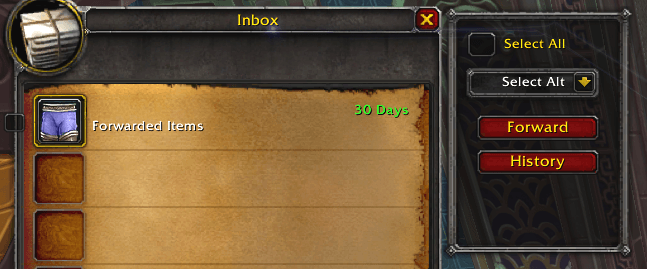
MailForwarder streamlines alt management in World of Warcraft Classic and Era by automatically looting and forwarding mail, offering features like recursive inbox clearing, selective item forwarding, bag space protection, and a session history log.
Screenshot1.png
Description
# MailForwarder
MailForwarder streamlines alt management in World of Warcraft Classic and Era by automatically looting and forwarding mail, offering features like recursive inbox clearing, selective item forwarding, bag space protection, and a session history log.
## Features
* **Smart Forwarding:** Snapshots your bags, loots the inbox, and identifies "new" items to forward to your selected alt.
* **Recursive Looting:** Automatically loops through the inbox to ensure it is 100% empty before scanning bags.
* **Selective Control:** Use the "Select All" checkbox for bulk operations, or uncheck it to manually pick specific mails to forward.
* **Safety First:**
* **Bag Space Check:** Prevents looting if you don't have enough room.
* **Self-Mail Prevention:** Stops you from accidentally mailing items to yourself.
* **Large Batch Confirmation:** Warns you before processing more than 50 items.
* **Session History:** Tracks every item sent during your current session in a viewable log.
* **Cross-Version Compatible:** Works seamlessly on both Mists of Pandaria Classic and Classic Anniversary (Era).
* **ElvUI:** Compatible with ElvUI.
## Installation
1. Download the addon files.
2. Extract the zip file.
3. Place the `MailForwarder` folder into your World of Warcraft AddOns directory:
* **Classic Era:** `\World of Warcraft\_classic_era_\Interface\AddOns\`
* **MoP Classic:** `\World of Warcraft\_classic_\Interface\AddOns\`
4. (Optional) If the folder is named differently, rename it to `MailForwarder` to match the `.toc` file.
5. Launch the game and ensure the addon is enabled in the "AddOns" menu at the character selection screen.
## Usage
1. **Populate Alts:** Log in to your alt characters once with the addon enabled. This saves their names to the database.
2. **Open Mailbox:** Visit a mailbox on your main character. The MailForwarder side panel will appear on the right.
3. **Select Recipient:** Choose your target alt from the dropdown menu.
4. **Select Items:**
* Check **Select All** to forward everything in the inbox.
* Uncheck **Select All** to reveal checkboxes next to each mail item for manual selection.
5. **Forward:** Click the **Forward** button.
* *Note: The addon includes a 2-second delay between mail batches to prevent server disconnects.*
6. **View History:** Click the **History** button to see a log of items sent during this session.
MailForwarder Team