Magic Vendor
- By
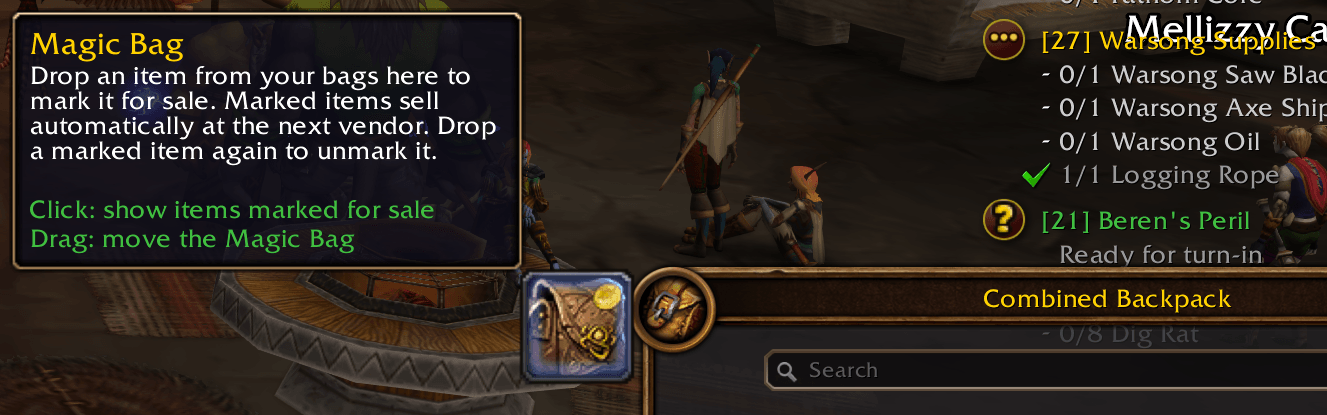
Drop items on the Magic Bag to mark them for sale, and they sell automatically the next time you visit a vendor.
Description
MagicVendor
Tired of clicking through your bags at every vendor? Mark the items you want gone once, and MagicVendor sells them for you the next time you open a merchant.
How it works
- Open your bags and the Magic Bag appears next to them. Drag it wherever you like; it remembers the spot and follows your bags.
- Drop an item on the Magic Bag to mark it for sale. Marked items turn grayscale with a small gold coin in the corner, so you can see at a glance what's going.
- Open any vendor and everything marked sells automatically, followed by a chat summary of what sold and the total gold.
- Changed your mind? Drop a marked item on the Magic Bag again to unmark it.
Choose how each item sells
When you mark an item, a small popup lets you pick how it should sell:
Gear and other single items
- Sell Once sells just that one copy, then forgets about it.
- Always Sell sells every copy, including ones you loot later.
Stackable items
- Sell Some sells a set amount once (defaults to however many you're carrying).
- Sell All sells every one you have, now and on every future vendor visit.
You can change these settings at any time from the sell list.
Sell list
Click the Magic Bag to see everything marked for sale: how many will sell, the price of each, and the total payout. Search the list by name, open any item's options with its gear button, and find marked items you aren't carrying in a collapsible "Not In Bag" section.
Tooltips
Hover over a marked item to see how it's set to sell and what the next vendor visit will pay for it.
Good to know
- Only items marked before you open a vendor are sold during that visit. Anything you mark while shopping waits for your next visit, so buying something marked "Sell All" won't instantly sell it back.
- Items with no vendor value can't be marked.
- The vendor buyback tab only holds the last 12 stacks sold. MagicVendor warns you if a visit sells more than that.
- Works with the default bags (separate or combined) and EllesmereUI bags.
Commands
/mv list: show the sell list/mv reset: move the Magic Bag back to its default spot
Built for WoW: Forever.
Magic Vendor Team