MagePortalPanel

Compact mage panel with Teleport and Portal dropdowns, per-destination cooldowns in the menu, and quick-use items (Hearthstone, trinkets) in one bar.
Mage Port Panel

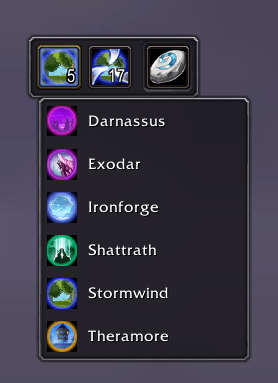
A compact action bar for mages in WoW TBC / Anniversary: Teleport and Portal destinations in dropdown menus, optional item shortcuts (Hearthstone, trinkets, engineering toys), and cooldown display that matches how Blizzard shows spells on action buttons.


Features

Teleport & Portal hub

  • Two main buttons — Teleport and Portal — open a sorted list of cities for your faction.
  • Only known spells are shown (learned on your mage).
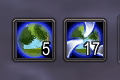
  • Rune counts on each button: Rune of Teleportation (Teleport) and Rune of Portals (Portal), with red text when you have none.

Smart cooldown display

  • Main Teleport/Portal buttons show only the global cooldown (GCD) after casting — not the long destination cooldown (e.g. Theramore 60s).
  • Inside the dropdown, each destination shows its own cooldown: radial swipe + countdown text (same style as the default action bar).
  • Item buttons (Hearthstone, trinkets, etc.) use the standard cooldown animation and timer (bag and equipped items supported).

Item shortcuts

  • Extra slots for items you define (default: Hearthstone, D.I.S.C.O., Ultrasafe Transporter, Dimensional Ripper, Warp-Stim Module, etc.).
  • Equipped items are preferred over copies in bags (trinkets in slots 13–14 work correctly).
  • Buttons appear only when you actually have the item.

Panel control

  • Drag to move, lock when you’re done.
  • Panel uses a lower UI layer so it stays behind most addon windows and popups.
  • Classic-style tooltip borders and slot frames.

Slash commands

Command Action
/mpp
Show or hide the panel
/mpp move
Unlock and drag the panel
/mpp lock
Lock position
/mpp reset
Reset position to screen center
/mpp cd
Debug cooldown info in chat (optional)
/mpp help
List commands

Installation

  1. Download and extract the MagePortPanel folder.
  2. Place it in:
    World of Warcraft\_anniversary_\Interface\AddOns\
    (or your TBC Classic / Anniversary Interface\AddOns folder).
  3. Enable Mage Port Panel on the character select AddOns screen.
  4. Log in on a mage — the panel appears automatically (or use /mpp).

Compatibility

  • The Burning Crusade Classic / TBC Anniversary (Interface 20504–20505).
  • Mage only — other classes do not load the panel.
  • Works alongside TrinketMenu, standard action bars, and bag addons; uses C_Container APIs where the client requires them.

Customization

Item list is in Core.lua under TELEPORT_ITEMS — add or remove item IDs if you want more shortcuts on the bar. Spell lists follow your faction and learned teleports/portals automatically.


Support & feedback

If something breaks after a patch, try /reload and check that your addon version matches the game client. Bug reports with class, client version (Anniversary vs other), and steps to reproduce are very helpful.


Enjoy fewer cluttered bars and faster ports — one panel for teleports, portals, and your favorite clickables.

The MagePortalPanel Team

profile avatar
  • 1
    Projects
  • 1
    Downloads