


Maelstrom Aura
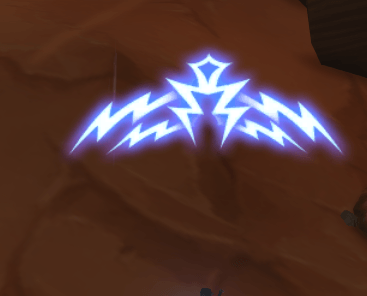
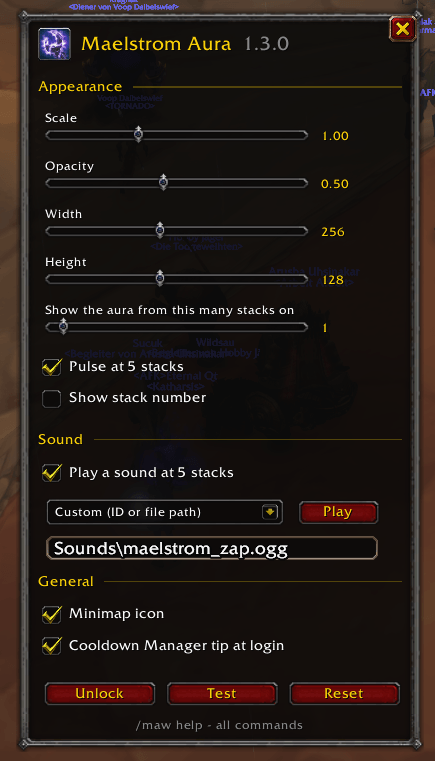
Screenshot 2026-11-18 160443.png
Description
# Maelstrom Aura
**The retail Maelstrom Weapon overlay for Enhancement Shamans in WoW Forever.**
Maelstrom Aura shows the original Blizzard Maelstrom Weapon spell overlay above your character and builds it up with every stack, just like in retail. At 5 stacks the full overlay pulses - and if you like, a sound plays - so you never miss an instant Lightning Bolt.
## Features
- Uses the **original retail overlay textures** (5 build-up stages, one per stack)
- **Works in combat** via Blizzard's Cooldown Manager (see "Setup")
- **Real-time stacks**: updates instantly with every stack gained or spent, also in long fights
- **Sound at 5 stacks** (optional): choose a built-in sound, any LibSharedMedia sound or your own sound file
- **Settings window** with sliders and checkboxes - open it with `/maw`, the **minimap icon**, the addon compartment or Options -> AddOns
- **Show only from X stacks**: e.g. hide the aura until you have 5 stacks
- **Hide out of combat** (optional): leftover stacks after a fight no longer keep the aura on screen
- **Consistent opacity**: only the current stage is drawn, so your opacity setting looks the same at every stack
- Pulses at 5 stacks, smooth fade in/out, optional stack number in the center
- Movable, scalable, adjustable size and opacity
- Supports all 5 talent ranks of Maelstrom Weapon
- Lightweight and FPS-friendly, no dependencies
## Setup (required for combat)
Maelstrom Weapon can be tracked in Blizzard's **Cooldown Manager**. Open the Cooldown Manager settings, find **Maelstrom Weapon** under "Not displayed" and drag it into **Tracked Buffs** (or Tracked Bars). Maelstrom Aura then reads your exact stacks from it in combat. Without this step the aura only works out of combat. The addon reminds you once per login if it's not tracked yet, and warns you once in combat if the stacks can't be read (both can be turned off in the settings).
## Settings
Type `/maw` or left-click the minimap icon (right-click starts the test preview, drag moves the icon).
- **Appearance**: scale, opacity, width, height, "show from X stacks", pulse, stack number
- **Sound**: turn the 5-stack sound on, pick a sound from the list, press **Play** to hear it
- **General**: minimap icon, Cooldown Manager login tip
- Buttons: **Unlock** (drag the aura with the mouse), **Test** (cycles through 0-5 stacks), **Reset**
## Using your own sound
1. Create a folder in your AddOns directory, e.g. `Interface\AddOns\MySounds\`, and put your sound file in it (`.ogg` or `.mp3`).
2. **Restart the game completely** - WoW only finds new files after a full restart, `/reload` is not enough.
3. In the settings choose **"Custom (ID or file path)"** and enter the path, e.g. `Interface\AddOns\MySounds\alert.ogg`, then press **Enter**.
4. Press **Play** to check it.
The custom field also accepts a Blizzard sound kit ID (e.g. `8959`) or a sound file ID.
## Commands
| Command | Description |
|---|---|
| `/maw` | Open the settings window |
| `/maw test` | Preview: cycles through 0-5 stacks (type again to stop) |
| `/maw unlock` / `/maw lock` | Move the aura with the mouse |
| `/maw scale 1.2` | Change the scale |
| `/maw alpha 0.8` | Change the opacity |
| `/maw size 256 128` | Change width and height |
| `/maw from 3` | Only show the aura from 3 stacks on (1-5, default 1) |
| `/maw pulse` | Toggle the pulse at 5 stacks |
| `/maw count` | Toggle the stack number |
| `/maw ooc` | Toggle showing the aura out of combat (default on) |
| `/maw sound` | Toggle the sound at 5 stacks |
| `/maw minimap` | Show/hide the minimap icon |
| `/maw cdm` | Show Cooldown Manager status |
| `/maw hint` | Toggle the login tip about the Cooldown Manager |
| `/maw debug` | Show diagnostic info |
| `/maw reset` | Reset all settings |
| `/maw help` | List all commands in chat |
## How it works
Out of combat the addon reads your Maelstrom Weapon stacks directly. In combat WoW Forever hides the buff from addons, so Maelstrom Aura reads it from the Cooldown Manager's Maelstrom Weapon entry. For the sound, 5 stacks are recognized by Lightning Bolt becoming free and instant. No guessing, no calibration.
## Feedback
Found a bug or have an idea? Leave a comment. Please include the output of `/maw debug` (typed in combat).
Maelstrom Aura Team
