Macro Forge
A lightweight addon that combines randomized message macros with raid communication tools, allowing players and raid leaders to quickly send organized messages and encounter calls without managing large macro lists.
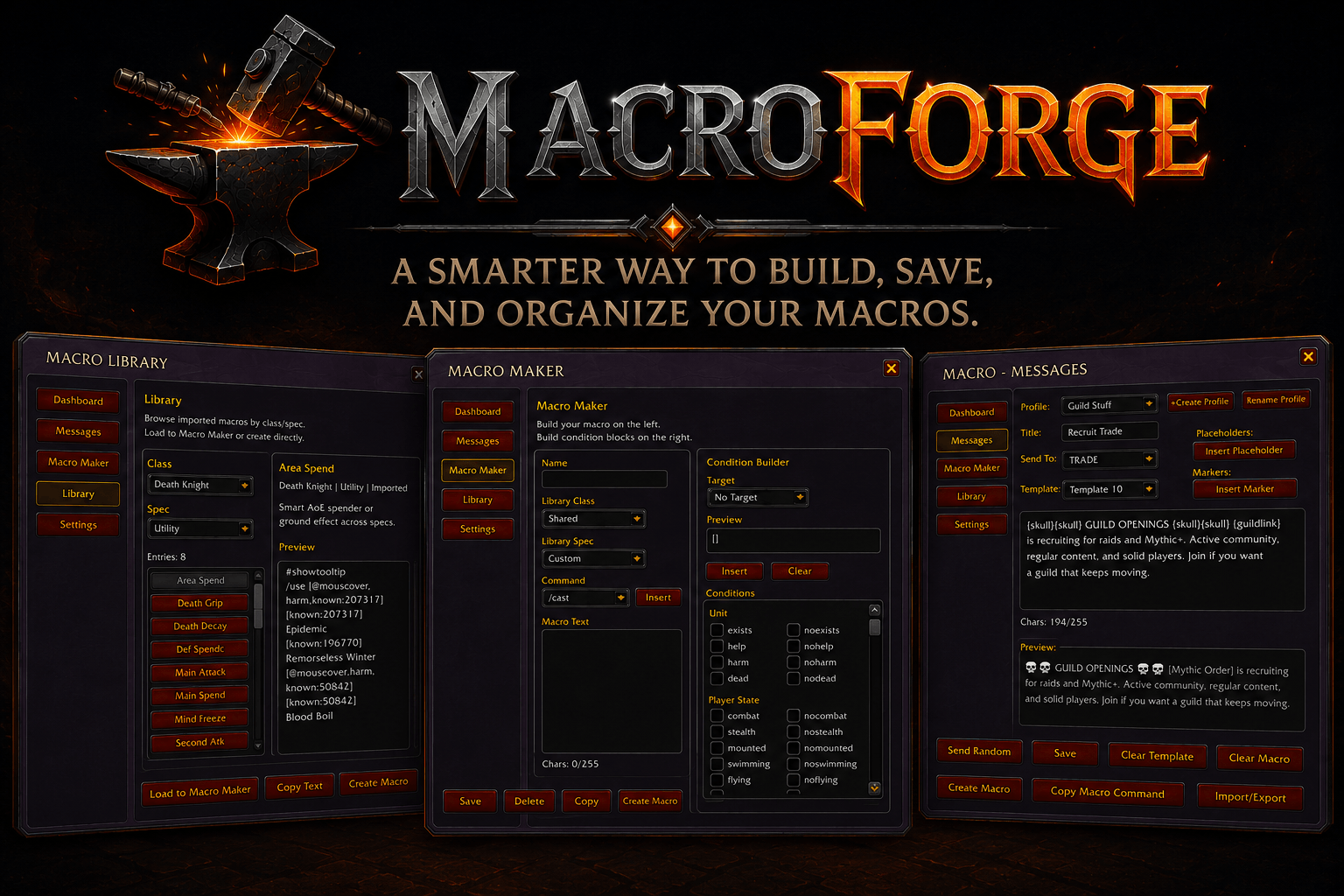
image_2026-06-09_032420410.png
Description
MacroForge gives you a cleaner way to manage macros without digging through messy lists, rebuilding the same things on every character, or wasting active macro slots on stuff you only need sometimes.
You can build normal macros in the Macro Maker, save useful ones to the Macro Library, and set up message macros for things like raid text, reminders, RP lines, or other reusable messages. The library also includes a list of useful premade macros to help you get started or quickly grab common setups.
Message slots can use a single message or multiple messages, with optional randomization when you want some variety.
It is meant to keep your macro setup easier to build, easier to reuse, and a lot less annoying to maintain.
Features
Macro Maker
Build and edit macros in a dedicated editor instead of working only inside the default macro window.
- Edit macro names and macro bodies
- Track character limits while writing
- Insert common macro commands
- Build conditional brackets without memorizing every condition
- Create account-wide or character-specific macros
- Create real macros from the builder
- Copy macro text for manual use
- Save macros into the MacroForge Library
- Macro Library
Macro Library
Keep useful macros saved outside your active macro slots.
- Save and browse your own macros
- Browse useful premade macros
- Organize macros by class, spec, shared use, or custom groups
- Load saved macros back into Macro Maker
- Copy macro bodies directly
- Create real macros from saved library entries
- Reuse macros across characters without deleting and remaking them
Message Macros
Create message-based macro slots for reusable text.
- Add one or more messages to each slot
- Send one valid message per macro press
- Use optional randomization for slots with multiple messages
- Reduce repeated messages when randomization is enabled
- Preview messages before sending
- Create launcher macros for saved message slots
- Keep longer message sets out of the macro body
Profiles
Set up different message macro layouts for different uses.
- Create, rename, delete, and clear profiles
- Import and export full profiles
- Keep separate message setups per profile
- Swap between setups quickly
Channel Routing
Choose where your message macros are sent.
- Supports say, yell, party, raid, raid warning, instance, guild, officer, emote, whisper, and custom channels
- Smart Raid routing can pick the best raid-friendly channel based on your group and permissions
- Supports whisper targets and custom channel targets
Placeholders and Tokens
Add dynamic info to messages without typing it all manually.
- Player, target, class, level, race, realm, zone, subzone, spec, and guild info
- Guild links and raid marker tokens
- Preview examples before sending
- Token buttons and menus for quicker setup
Import and Export
Back up or share your setups.
- Export individual message macros
- Import message macros into slots
- Export full profiles
- Import full profiles
Mini Panel
Use a small movable panel for quick access to selected message slots.
- Show, hide, collapse, and move the panel
- Send selected message slots without opening the full UI
Link Insertion
Add links to macros and messages faster.
- Insert spell links, item links, and other clickable links
- Supports modified-click insertion from parts of the UI
Slash Commands
/mf
Open MacroForge.
/macroforge
Open MacroForge.
/mf minimap
Show or hide the minimap button.
/mf panel
Show or hide the mini panel.
/mf send <slot>
Send a stored message slot.
/mf macro <slot>
Create or interact with a generated message launcher macro.
Notes
MacroForge is for players who want their macros stored, organized, and easy to reuse instead of scattered across characters, notes, old backups, or half-finished macro slots.
Bug reports and feedback are welcome.
Macro Forge Team