


Macro Drawers
- By
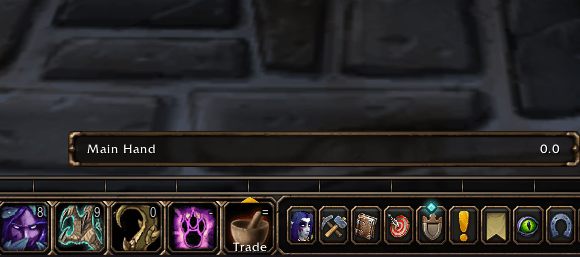
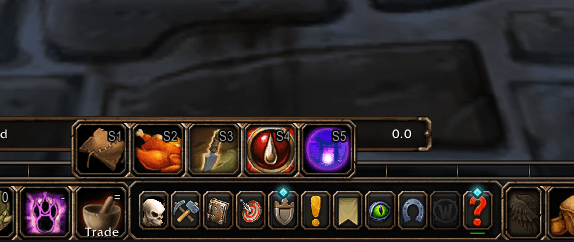
Turn any macro into a combat-ready flyout drawer of spells, items, mounts, pets, toys, emotes and other macros, styled like the Blizzard action bar.
MacroPic2.PNG
MacroPic.PNG
Description
Macro Drawers turns any macro into a flyout drawer, so one action bar button can hold a whole set of spells, items, emotes and macros.
Features
- Any macro becomes a drawer. Start a macro with
#drawerand clicking its button opens a flyout. - Put almost anything in it. Spells, items, mounts, pets, toys, emotes and other macros all work. Bind an emote to a macro, then drag that macro into the drawer.
- Works in combat. Open and use drawers mid-fight. Contents can only be edited out of combat, because the game blocks macro editing then.
- Looks like the Blizzard action bar. It uses the bar’s frame, dividers and rounded icons, so it blends in with the default UI.
- Horizontal or vertical. Choose the layout in settings. Horizontal is the default.
- Hotkeys. The action button’s own keybind opens the drawer. While it’s open, each entry has its own hotkey (default Shift+1 to Shift+0), and you can rebind or clear each one.
- Closes when you want it to. It closes after you use an entry (optional), when you press Escape, and when you click away.
- Simple editor. A drag-and-drop panel under the macro window lets you add entries, drag to reorder, and right-click or drag off to remove.
- Easy to learn. The settings page has a short how-to and a demo.
- Light on CPU. It only does work while a drawer is open.
Getting started
- Open
/macro, click New, and make the first line#drawer. - Drag spells, items, mounts, pets, toys or other macros into the Drawer editor.
- Save, then put the macro on your action bar.
Settings
Find them under Game Menu > Options > AddOns > Macro Drawers.
Compatibility
Built and tested on the World of Warcraft Forever beta.
Inspired by the Drawer Macro feature in Plumber.
Macro Drawers Team
