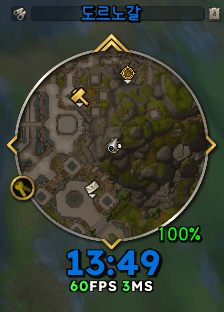
01.clock.png
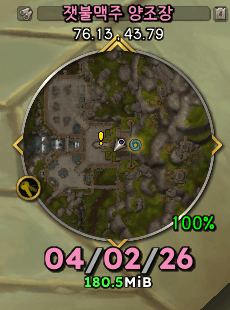
02.clock.png
Description
M87 Clock & Info
Lightweight & Minimalist: Time + Location + System Info Text Add-on M87 Clock & Info provides essential information through a clean interface without cluttering your UI. Designed with an ultra-lightweight structure to ensure minimal CPU usage.
Note:
Inspired by Sow Clock and MinimapStats.
Created with the help of ChatGPT & Gemini.
Description generated/summarized by AI.
🧩 Key Features
Lightweight: Minimal memory footprint and CPU impact.
Optimized Updates: Real-time information with performance-focused coding.
Drag & Move: Easily reposition the UI elements.
📍 Location Display
Shows Current Zone / Sub-zone.
Optional Coordinates display.
Automatically hides default Blizzard minimap zone text.
Controls:
Alt + Drag Zone Text: Reposition the element.
Left-Click Zone Text: Toggle Sub-zone visibility.
Right-Click Zone Text: Toggle Coordinates On/Off.
Left-Click Coordinates: Change decimal precision (1 ↔ 2).
🕒 Clock
Real-time digital clock.
Automatic Class Color application.
Integrated Calendar invite alerts.
Controls:
Left-Click Clock: Toggle between Time ↔ Date.
Right-Click Clock: Open In-game Calendar.
📅 Calendar Notifications
Chat notification for new invitations.
Visual clock glow and highlight colors for pending invites.
Dismisses automatically upon accepting/declining.
📊 InfoText (FPS / MS / Memory)
Displays FPS and Latency.
Tracks Add-on memory usage.
Applied "FPS Smoothing" for a stable display.
Controls:
Left-Click InfoText: Toggle between FPS/MS ↔ Memory mode.
Right-Click InfoText: Manual Memory Cleanup (Garbage Collection).
Ctrl + Mouseover: Show detailed Add-on memory usage tooltip.
📦 Installation
Extract the ZIP file.
Copy to your _retail_/Interface/AddOns/ folder.
Restart the game.
※ Important Notes:
Automatically hides the default Blizzard clock, zone text, and minimap buttons.
Do NOT delete the 'Font' folder within the add-on directory.
Credits & Resources:
* Font: Lexend by Google Fonts (SIL Open Font License).
* Code: Developed with assistance from ChatGPT & Gemini.
* Inspiration: Special thanks to the authors of Sow Clock and MinimapStats.
M87 Clock & Info
가볍고 깔끔한 시계 + 위치 + 시스템 정보 텍스트 애드온입니다. UI를 방해하지 않으면서 필요한 정보만 제공합니다. 초경량 구조로 설계되어 CPU 사용을 최소화했습니다.
Sow Clock과 MinimapStats 참고하였습니다.
챗GPT 이용해서 만들었어요. (+ Gemini 한 스푼)
애드온 설명도 AI요약 입니다.
🧩 Key Features
매우 가벼움
CPU 사용 최소화
실시간 업데이트 최적화
드래그 이동 지원
전투 안전 설계
📍 Location Display
현재 지역 / 세부 지역 표시
좌표 표시 (선택 가능)
기본 미니맵 지역 텍스트 자동 숨김
조작
지명 Alt + 드래그 → 위치 이동
지명 좌클릭 → 세부 지역 표시 On/Off
지명 우클릭 → 좌표 표시 On/Off
좌표 표시 상태에서
→ 좌표 좌클릭 → 소수점 자리 변경 (1 ↔ 2)
🕒 시계
실시간 디지털 시계
클래스 컬러 자동 적용
달력 초대 알림 연동
조작
시계 좌클릭 → 시계 ↔ 날짜 전환
시계 우클릭 → 달력 열기
📅 달력 초대 알림
새 초대 도착 시 채팅 알림
시계 글로우 + 강조 색상
초대 수락 시 즉시 해제
📊 InfoText (FPS / MS / 메모리)
FPS + 지연시간 표시
애드온 메모리 사용량 표시
부드러운 FPS 스무딩 적용
조작
인포텍스트 좌클릭 → FPS/MS ↔ 메모리 모드 전환
인포텍스트 우클릭 → 메모리 정리 (Garbage Collect)
Ctrl + 마우스 오버 → 애드온 메모리 사용량 툴팁
📦 설치 방법
ZIP 압축 해제_retail_/Interface/AddOns/ 폴더에 복사
게임 재시작
*순정 시계/지명/애드온 버튼 자동 숨김
* 애드온 폴더 내 'Font' 폴더 삭제 금지
The M87 Clock & Info Team