


M+ Tracker
- By
05_modern_boss_times_tooltip.png
Description
M+ Tracker: Mythic+ history, stats and key tracker for WoW Retail (Midnight)
M+ Tracker is a Mythic+ tracker, logbook and statistics addon for World of Warcraft Retail (Midnight, patch 12.x). Every Mythic Plus key you run is recorded automatically: dungeon, key level, time, +1 / +2 / +3 result, group, loot, deaths. Then it becomes a clear home page, tables and charts, so you can finally answer questions like "Which healer gives me the best success rate?", "Which dungeon is dragging my M+ score down?" or "Am I actually getting better at this dungeon?"
Think of it as a Mythic+ run history, key log, score tracker and dungeon stats in one window. No setup, no external website, no account. Install it, play your keys, open the window. It also imports your existing Blizzard Mythic+ history.
Categories: Dungeons & Raids, Tank, Healer, Damage Dealer, Data Broker. Useful for every role: stats by spec, and an optional Data Broker feed for your info bar.
Keywords: Mythic+ tank healer DPS, Data Broker, Mythic+ rating goal, M+, Mythic Plus, keystone, key history, run history, dungeon stats, M+ score, M+ rating, score calculator, Great Vault, weekly keys, success rate, timed keys, loot tracker, boss timers, Midnight, Season 2.
What you get
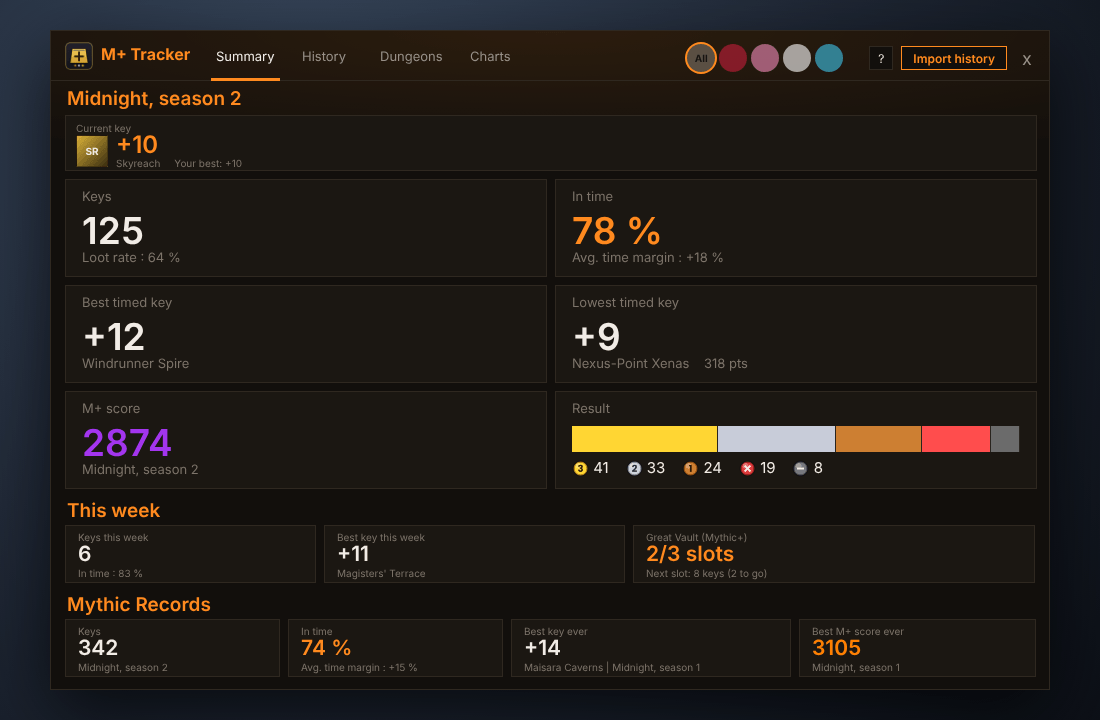
- A home page that answers in one glance: your current keystone, your season (keys, in-time rate, best and weakest dungeon, M+ score, results), this week (keys, best key, Great Vault progress toward the 1 / 4 / 8 key slots) and your Mythic Records across all seasons.
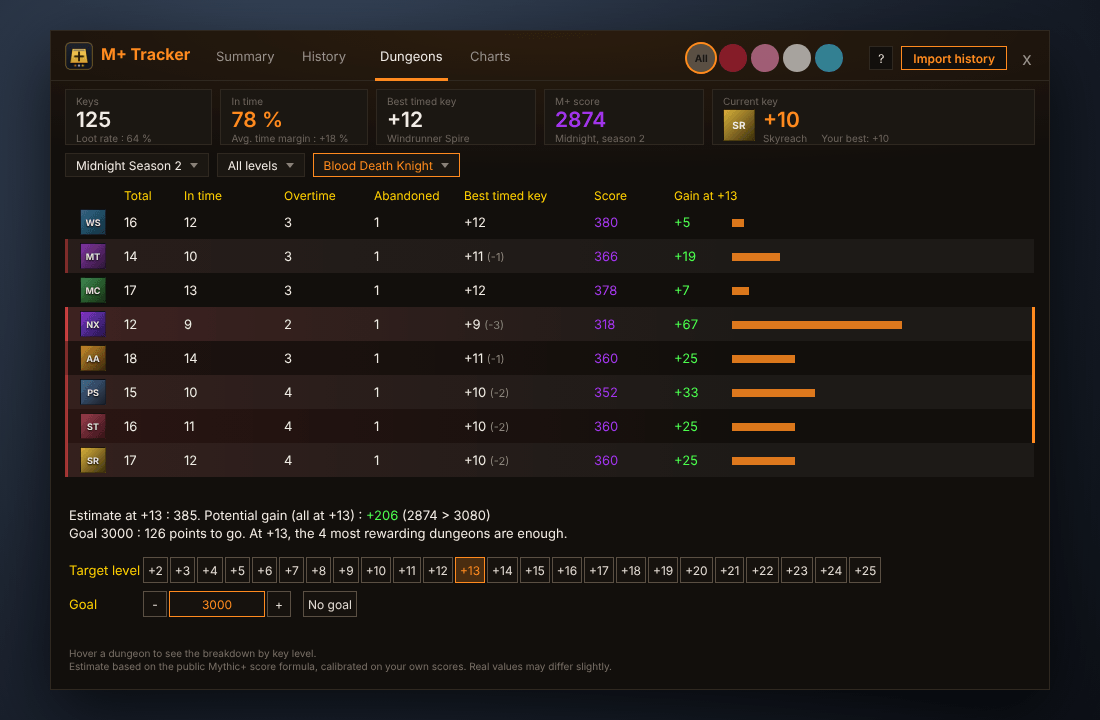
- A score planner with a goal, right in the Dungeons page: pick a target key level and a score goal, and see which dungeons would raise your Mythic+ score the most and which ones are enough to get there.
- Data Broker: your M+ score in Titan Panel, ChocolateBar, Bazooka and other info bars (when one is installed).
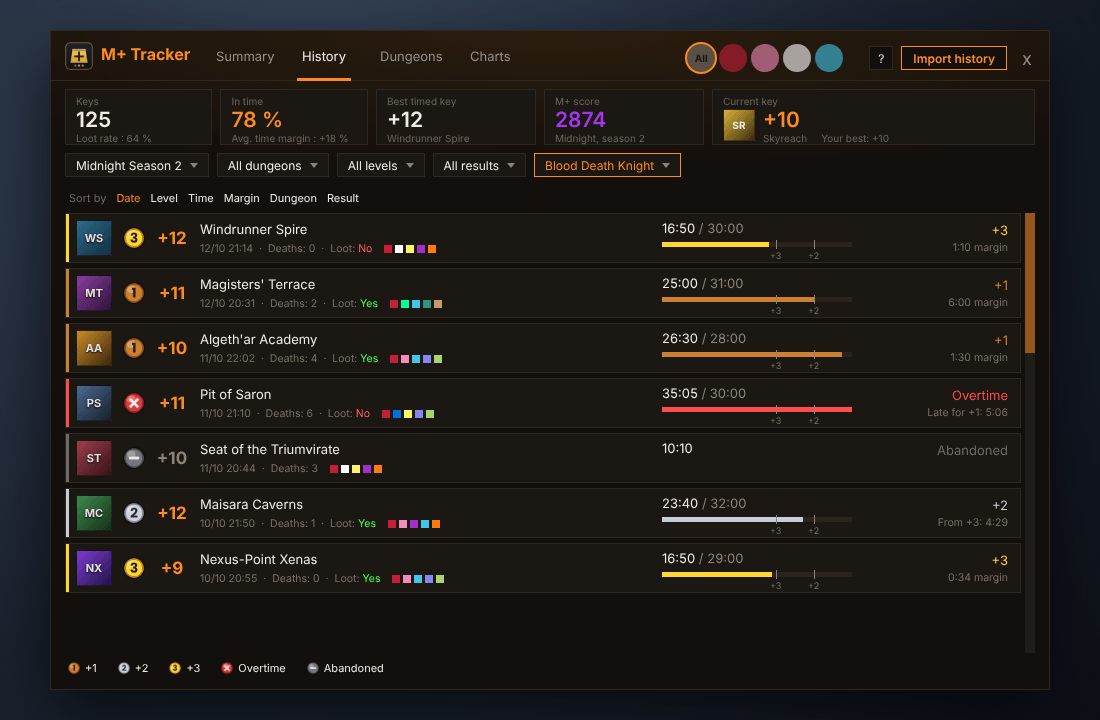
- A full run history with medals, time bars, boss splits and group, plus statistics by spec (tanks, healers, DPS).
- Export to CSV, import of the Blizzard history, and a movable end-of-key summary you can post to the group.
Summary page (home)
- The window opens on a Summary page made of large, readable boxes.
- Current season: current keystone (dungeon image, level, your best on it), number of keys, in-time rate, best timed key, weakest dungeon by score, M+ score and a results bar (+3, +2, +1, overtime, abandoned).
- This week: keys, best key, and Great Vault progress (slots unlocked, next slot and keys to go).
- Mythic Records: keys (with your most played season), in-time rate, best key ever (level, dungeon, season) and best M+ score ever (with its season).
- The Current key box is also shown in the header of the other pages.
- Hover a character badge in the header: M+ score, best key of the season and the keystone that character carries. With many characters, the badges become a drop-down.
Score planner (Dungeons page)
- Choose a target key level: for each dungeon of the season you see your best key, your score, the estimated score at that level and the gain, sorted from most to least rewarding.
- Dungeons are shown as icons (hover for the name); the estimated gain is at the end of each row, with level and goal buttons under the list.
- Set a score goal: the planner shows the points missing and the fewest dungeons needed at that level.
- Based on the public Mythic+ score formula, calibrated on your own scores. It is an estimate: real values may differ slightly.
Highlights
Automatic key tracking
- Starts when the keystone is inserted, ends when the key is completed, depleted or abandoned. Simply zoning in and out of a dungeon is ignored.
- Records dungeon, key level, affixes, season, time, time limit, deaths and the full group composition, with each member's specialization (inspected automatically in the background).
- Clear result for every key: timed (+1 / +2 / +3), overtime, or abandoned.
- Loot tracking: did you get an item, which one, did you use your bonus roll, and how many Venomblight Manaflux you earned.
Boss kill times
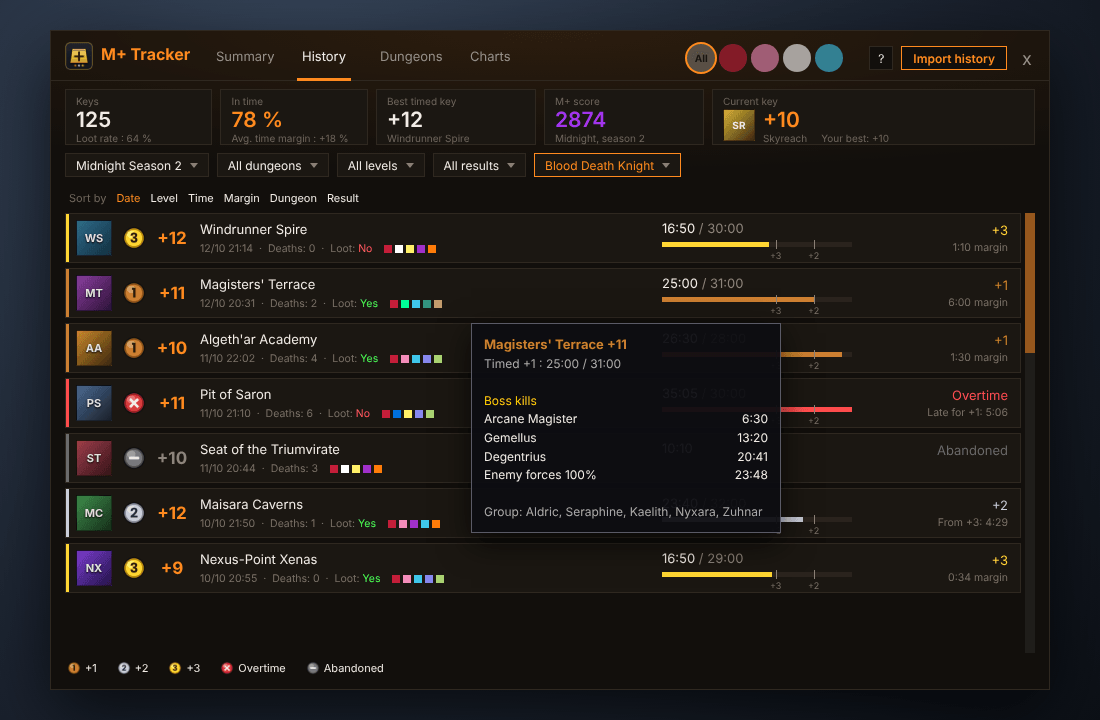
- For every new key, the addon records when each boss dies (and when enemy forces reach 100%).
- Hover a key in History to see the splits. Hover a dungeon in Dungeons to see the average and best time of each boss over your timed keys.
- Not available for keys imported from the Blizzard history.
Season score and old seasons
- Your Mythic+ season score is shown in a header tile (rarity colour), with a Score column per dungeon on the Dungeons page.
- The season filter keeps the current season on top and files older seasons in an "Old seasons" submenu. Nothing is ever deleted.
Dungeons to catch up
- On the Dungeons page, dungeons behind your best timed key level are colour-coded (left stripe and light tint, stronger when the gap is larger), with the gap shown next to the level.
Medals at a glance
- Every key gets a small medal: bronze 1 (+1), silver 2 (+2), gold 3 (+3), a red cross for overtime and a grey dash for abandoned.
- Times, results, tooltips and the end-of-key summary all follow the same code.
End-of-key summary pop-up
- Always shows your time against the limit and the margin to the next upgrade level (in seconds).
- You choose the rest in Help and options: deaths per player, avoidable damage, interrupts, average DPS, average HPS.
- Drag it anywhere: its position is saved (
/mpt windowresets it). A simple click closes it. - One click on "Send to group" posts a compact summary in party / instance chat with the same choices: timed or not, time and margin, then each member's stats.
A modern, dark interface with an orange accent
- Tabs in the header (Summary, History, Dungeons, Charts), round character badges on the right, and a summary strip: keys played, success rate, best key, M+ score and your current key.
- History as cards: a medal, the key level, dungeon, date, deaths, loot and group. A time bar with the +3 and +2 thresholds shows at a glance how close you were to the next upgrade, with the margin on the right.
- Sort by date, level, time, margin, dungeon or result: every option is one click away, left-aligned above the list.
- Dungeons: how many times you ran each dungeon, at which levels, and your timed / overtime / abandoned counts and best key.
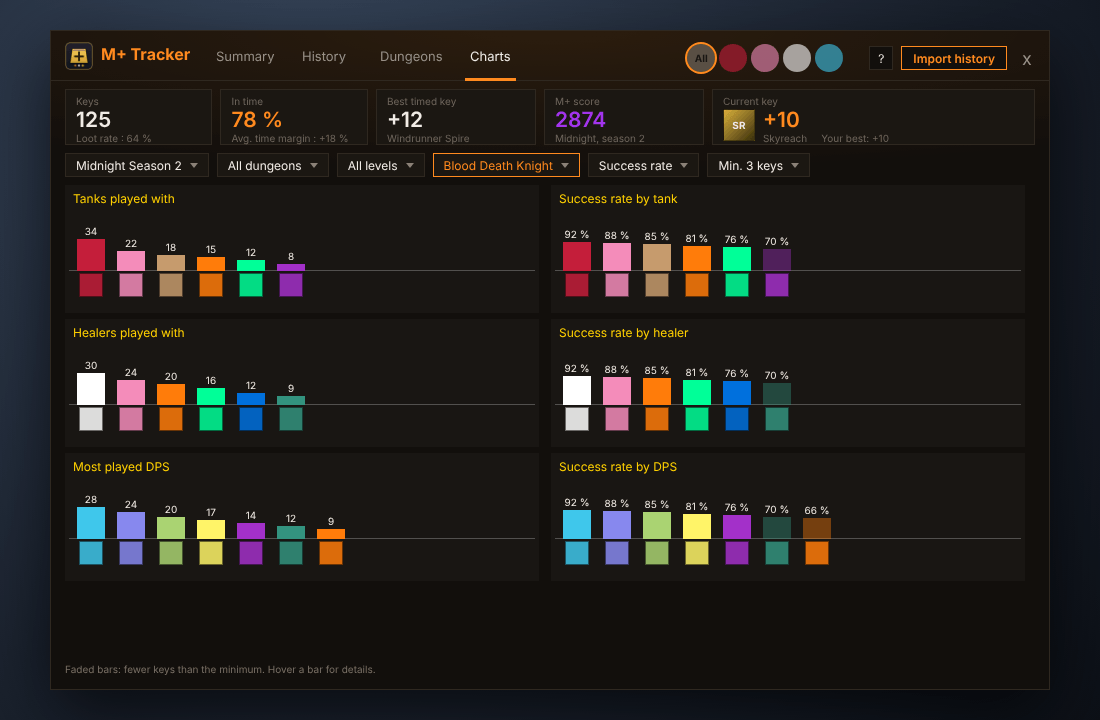
- Charts: success rate and most-played specs for the tanks, healers and DPS you play with (six bar charts), with the success rate or the average time margin as the metric.
Options
- Two skins, one layout: modern (orange) or classic (Blizzard dialog style, gold), switched live from the ? button (Help and options).
- Help and options panel: scale, minimap icon, end-of-key summary, tips, commands, import, reset, troubleshooting, about, changelog and license.
- Group players can be shown as class-coloured markers, class icons or spec icons.
Filters that stay out of your way
- Season (Midnight Season 2 by default, or all seasons / a whole expansion), dungeon, minimum key level, result, and your own specialization.
- Character tabs on the left of the window, with the class icon, one per character you play. Great if you swap characters or roles.
- Honest statistics: small samples are shown faded, and the tooltip gives a confidence interval and how a spec compares with what you would expect at that key level.
Export and import
- Export your whole history as CSV from Help and options (or
/mpt export): date, character, season, dungeon, level, result, time, deaths, loot. Open it in any spreadsheet.
Import your existing history
- One button imports the Blizzard Mythic+ history of the character you are logged on: dungeon, level, time, date, season and result. Already-tracked keys are never duplicated.
Comfortable to use
- Resizable window, position, size and filters are remembered.
- Minimap icon (left click opens, drag to move, right click hides).
- Opens from the addon compartment as well.
- Fully localized: English, French, German, Spanish (EU and Latin America), Italian and Brazilian Portuguese, picked automatically from your game language.
Getting started
- Install the addon and log in.
- Run your keys as usual. Nothing to configure.
- Open the window with the minimap icon or /mpt.
- Optional: click the ? button (Help and options), then Import history to bring in your past keys.
Commands
| Command | What it does |
|---|---|
/mpt or /mplus |
Open or close the window |
/mpt import |
Import the Blizzard Mythic+ history |
/mpt export |
Export your history as CSV (text to copy) |
/mpt recap |
Turn the end-of-key summary on or off |
/mpt minimap |
Show or hide the minimap icon |
/mpt window |
Reset window position and size |
/mpt scale 0.7-1.5 |
Change the window scale |
/mpt season |
Show the detected season |
/mpt lang |
Show the language in use |
/mpt debug |
Diagnostic log (useful for bug reports) |
/mpt reset |
Erase all recorded data |
Tips: Shift + right-click a key or a dungeon deletes it. Ctrl + click on a key fixes its loot, Alt + click fixes its bonus roll.
Good to know
- Avoidable damage comes from Blizzard's built-in damage meter, so that meter must be enabled in the game options. Blizzard hides these values during combat, so the numbers appear a few seconds after the key ends.
- Imported keys have no group composition or loot, because Blizzard does not keep them. They count in your totals and dungeon tables, but not in the spec charts.
- Per-player deaths are counted while the key is running, starting from the version you install. Older keys only have the group total.
- Chat posting uses the standard chat API and requires you to be in a group.
- Data is stored per account in the
MPlusTrackerDBsaved variable.
Feedback and bug reports
Found a bug or want a feature? Open a ticket or leave a comment. For bugs, please include the output of /mpt debug and any Lua error text.
Not affiliated with or endorsed by Blizzard Entertainment.
M+ Tracker Team
