LXXIX_QOL
- By
A lightweight bundle of quality-of-life tools: target distance, speed, buff timers, crafting order tracking, combat/rest icons, cursor size and more.
QOL-.png
QOL-1.png
QOL-2.png
QOL-3.png
QOL-5.png
Description
# LXXIX-QOL
A collection of small quality-of-life features in a single, lightweight addon. Every feature can be turned on or off individually from the settings window, so you only run what you actually use.
Open the settings with /lq (or via the minimap/LDB launcher).
## Features
**Information**
- Target / mouseover distance display (uses LibRangeCheck-3.0)
- Movement speed display
- Buff icon timers
- Resizable error / notification text (UIErrorsFrame font size)
**Items & Inventory**
- Highlights items you already know / have collected
- Auto filters for the Auction House and crafting windows
- One-click instant item destroy
- Low durability warning
- Hides the default loot window when using auto loot (Shift for manual pickup still shows it normally)
**Professions & Crafting Orders**
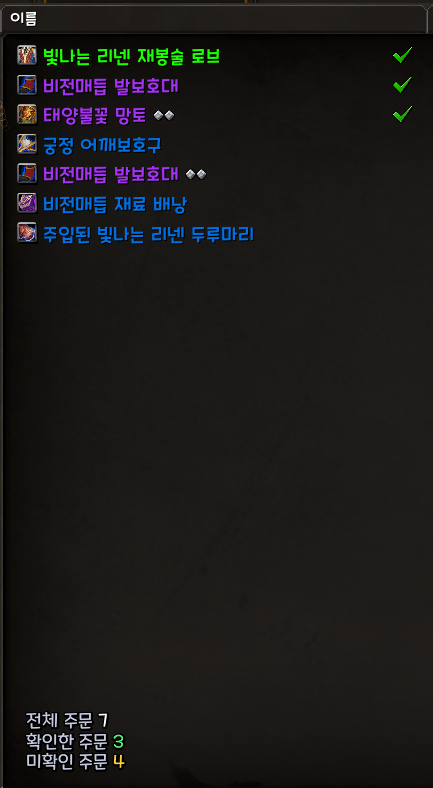
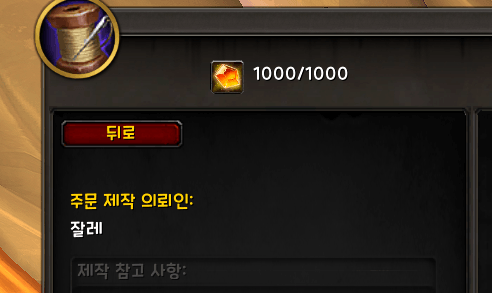
- Check marks on crafting orders you have already viewed, aligned in a single column at the end of the name field
- Order counter (total / checked / unchecked) with font selection
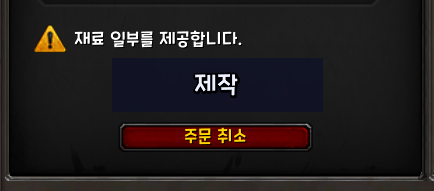
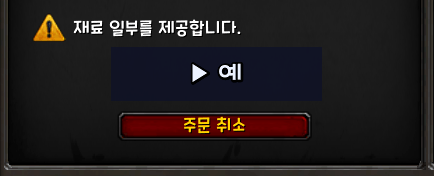
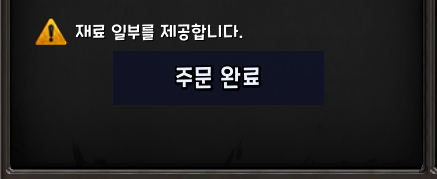
- One-button flow: start an order, then craft, complete and confirm popups with the same center button
- Mouse button 4 (Back) triggers the [Back] button in the professions and achievements windows
**Combat & Movement**
- Combat and resting status icons that fade in and out (position and size adjustable, separate image choices for the rest icon)
- Druid Travel Form automatically switches to Flight Form in flyable zones (and back to ground Travel Form elsewhere)
**Trade**
- Chat notifications and thank-you message for trade start / complete / cancel
- Selectable sound on trade completion
**Interface**
- Mouse cursor size control (Auto / 32 / 48 / 64 / 96 / 128). Click through the sizes from any LDB display addon (ChocolateBar, Titan Panel, Bazooka, etc.)
- LDB launcher entry that opens the settings window; the on-screen menu icon can be turned on or off
- Optional Slug text rendering applied to every font in the addon
## Optional Dependencies
LibRangeCheck-3.0 (bundled), LibSharedMedia-3.0, LibDataBroker-1.1. The addon works without the optional ones, with the matching features simply unavailable.
## Commands
/lq - open the settings window and list sub-commands
Notes
- Built for World of Warcraft: Midnight (12.1.x)
- Settings are saved per account in SavedVariables.
- Bug reports and suggestions are welcome in the comments.
# LXXIX-QOL
여러 가지 작은 편의 기능을 하나로 모은 가벼운 애드온입니다. 모든 기능은 설정창에서 하나씩 켜고 끌 수 있어서, 필요한 기능만 골라 쓸 수 있습니다.
설정창은 /lq (또는 LDB 런처 / 화면 메뉴 아이콘)로 엽니다.
## 기능
**정보 표시**
- 대상 / 마우스오버 거리 표시 (LibRangeCheck-3.0 사용)
- 이동 속도 표시
- 버프 아이콘 타이머
- 알림(UIErrorsFrame) 글자 크기 조절
**아이템 / 인벤토리**
- 이미 습득한 아이템 강조
- 경매장 / 제작 자동 필터
- 아이템 즉시 파괴
- 낮은 내구도 경고
- 자동 전리품 방식일 때 기본 전리품창 숨김 (Shift로 수동 선택하면 정상 표시)
**전문기술 / 주문제작**
- 이미 확인한 주문제작 주문에 체크 표시 (이름 칸 끝에 한 줄로 정렬)
- 주문 수량 표시 (전체 / 확인 / 미확인, 글꼴 선택)
- 주문 시작 후 제작 / 주문 완료 / 확인 팝업을 가운데 버튼 하나로 이어서 클릭
- 마우스 M4(뒤로가기) 버튼으로 전문기술창 / 업적창의 [뒤로] 버튼 실행
**전투 / 이동**
- 전투 시작·종료, 휴식 지역 진입·이탈 시 서서히 나타나고 사라지는 전투 / 휴식 상태 아이콘 (위치·크기 조절 가능, 휴식 아이콘 이미지는 여러 종류 중 선택)
- 드루이드 여행 형태가 비행 가능 지역에서는 자동으로 비행 형태로 전환 (그 외 지역에서는 지상 여행 형태로 복귀)
**거래**
- 거래 시작 / 완료 / 취소 채팅 알림 및 감사 인사
- 거래 완료 사운드 선택
**인터페이스**
- 마우스 커서 크기 조절 (자동 / 32 / 48 / 64 / 96 / 128). ChocolateBar, Titan Panel, Bazooka 같은 LDB 표시 애드온에서 클릭할 때마다 크기가 순환됩니다
- 설정창을 여는 LDB 런처 항목 제공, 화면 메뉴 아이콘 켬 / 끔
- 이 애드온의 모든 글꼴에 Slug 렌더링 적용 켬 / 끔
## 선택 라이브러리
LibRangeCheck-3.0 (포함), LibSharedMedia-3.0, LibDataBroker-1.1. 선택 라이브러리가 없어도 동작하며, 해당 기능만 사용할 수 없습니다.
## 명령어
/lq (/ㅣㅂ) - 설정창 열기 및 하위 명령 목록
## 참고
- 와우 한밤(Midnight, 12.1.x) 기준으로 제작되었습니다.
- 설정은 계정 공용 SavedVariables에 저장됩니다.
- 버그 제보와 건의는 댓글로 남겨 주세요.
LXXIX_QOL Team