
L'Ura Memory Sync
- By
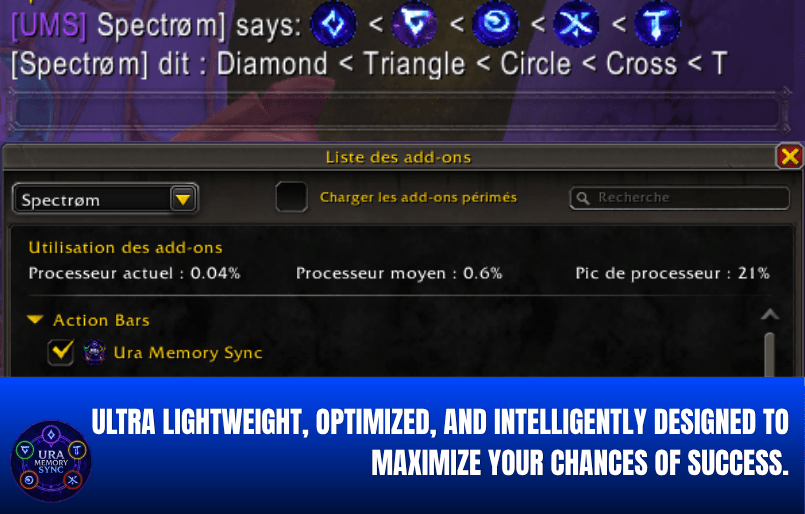
0.04% CPU usage — one of the lightest raid addons available. Broadcasts the full symbol sequence via /SAY with visual icons directly in the chat frame, visible to all addon users in real time. No voice callouts needed.
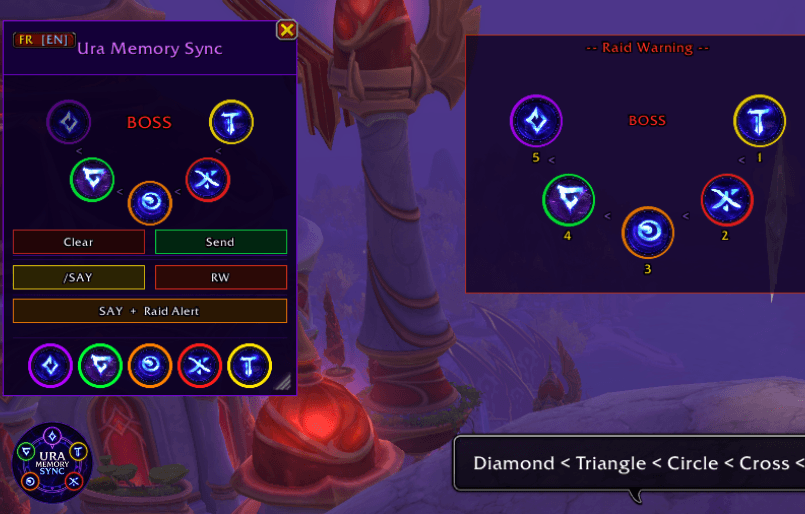
Main interface of Ura Memory Sync - a raid addon for L'ura's Dark Rune memory game in Midnight Falls. Click the 5 symbols in sequence, the pattern syncs instantly across the raid.
Description
⚠️ Blizzard restriction
Like all addons, during an encounter only players with the addon installed can see the overlay and receive synced patterns.
────────────────────────
What it does
Any raid member clicks the 5 symbols in the order the boss displays them.
The pattern is instantly broadcast to every raid member who has the addon installed.
A visual arc displays all 5 symbol positions, numbered 1–5, so every player knows the exact sequence.
After 4 clicks, the 5th missing symbol is automatically deduced (the boss always uses all 5 distinct symbols each round).
────────────────────────
Features
🔄 Real-time broadcast via addon messaging (works in combat)
🎯 Visual arc — 5 symbols displayed in a numbered arc
✨ Auto-complete — select 4 symbols and the 5th is filled automatically
🚫 Duplicate protection — the same symbol cannot be selected twice
🔔 Fake Raid Warning — movable overlay with RW sound
💬 /SAY with icons — icons displayed to addon users
⚡ SAY + Raid Alert combo
🌐 Bilingual — FR/EN toggle
↔️ Resizable window
✅ Works on Normal and Heroic
────────────────────────
Blizzard restrictions & workarounds
Restriction: Textures stripped from player chat
Workaround: Icons broadcast via addon messages
Restriction: Overlay invisible to non-addon users
Workaround: Fake Raid Warning visible only to addon users
────────────────────────
Slash commands
/ums — Toggle the main window
/ums clear — Clear the pattern and notify the raid
/ums rw — Send a manual Raid Warning
/ura — Toggle the main window (alias)
────────────────────────
Requirements
Everyone who wants to see synced patterns, symbol icons, and the Raid Warning overlay needs the addon installed.
L'Ura Memory Sync Team
