rew# Bunny with Lura
A lightweight raid coordination addon for the Death's Dirge memory mechanic on L'ura (Midnight Falls) in the March on Quel'Danas raid.
The Problem
During Death's Dirge, L'ura marks players with Dark Rune symbols that must be activated in the correct clockwise order by a sweeping beam. One wrong position triggers Dissonance — raid-wide Cosmic damage every second for 5 seconds. Coordinating this over voice comms is chaotic, especially when the same rune can appear multiple times.
In Mythic, the 2nd memory game of phase 1 reverses to counter-clockwise, making coordination even harder.
WoW 12.0 Midnight's addon disarmament blocks SendAddonMessage and makes chat text "secret" during raid boss encounters. However, CHAT_MSG_RAID events still fire and secret values can be passed directly to WoW API rendering functions like SetFormattedText.
The Solution
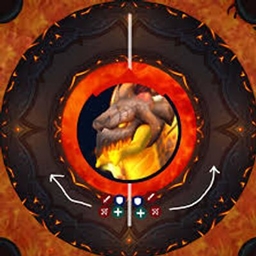
One caller (tank or raid leader) uses action bar macro keybinds to send rune texture paths via /raid. Each message appears as a CHAT_MSG_RAID event for all raid members. The addon renders the texture directly via SetFormattedText — no string parsing needed, works with secret values. Everyone sees a clean compass display showing exactly where to stand.
How It Works
Combat Sync: /raid Texture Macros
The addon creates WoW macros that send addon texture paths via /raid:
| Macro | Command | Rune |
|---|---|---|
| 圓形 | /raid Interface/AddOns/BunnyWithLura/Textures/rune_circle |
Circle |
| 交叉 | /raid Interface/AddOns/BunnyWithLura/Textures/rune_cross |
Cross |
| 菱形 | /raid Interface/AddOns/BunnyWithLura/Textures/rune_diamond |
Diamond |
| T | /raid Interface/AddOns/BunnyWithLura/Textures/rune_T |
T-Shape |
| 三角形 | /raid Interface/AddOns/BunnyWithLura/Textures/rune_triangle |
Triangle |
| BL_Undo | /rw undo |
Undo last rune |
Each /raid message = next rune in the sequence. The viewer renders the texture via SetFormattedText("|T%s:32:32|t", msg) which handles secret values transparently.
Raid chat listening is only active during boss encounters (or when test mode is enabled). Random raid chat outside encounters will not trigger the viewer.
Auto-clear after 15 seconds of no input. If sequence is full (5 runes) and a new rune arrives, the sequence resets and starts fresh.
Heroic vs Mythic(TO-DO)
| Difficulty | Memory games | Direction |
|---|---|---|
| Heroic | Always clockwise | Numbers: 1, 2, 3, 4, 5 |
| Mythic | 3 games in phase 1 | 1st: CW, 2nd: CCW (auto-flip at 60s), 3rd: CW (auto-flip at 120s) |
The caller sets difficulty once with /lura diff h or /lura diff m — this syncs to all viewers via addon message. No need for every player to set it manually.
In Mythic, the viewer automatically flips numbers (5,4,3,2,1) for the counter-clockwise phase. Compass dot positions stay the same — only the numbers change.
Setup (Caller)
- Set difficulty:
/lura diff h(heroic) or/lura diff m(mythic) — syncs to raid - Type
/lura mto create the combat macros - Drag 圓形, 交叉, 菱形, T, 三角形, and BL_Undo to your action bar
- Bind keys as desired
- During the encounter, press the corresponding rune keybind in the order L'ura shows them
Custom Macro Icons
Macro icons use Blizzard texture IDs that can be overridden with custom artwork. Place TGA files in Interface/ICONS/ to replace the default icons:
| Texture ID | Override File | Rune |
|---|---|---|
| 132392 | inv_axe_01.blp |
Circle |
| 132393 | inv_axe_02.blp |
Cross |
| 132394 | inv_axe_03.blp |
Diamond |
| 132395 | inv_axe_04.blp |
T-Shape |
| 132396 | inv_axe_05.blp |
Triangle |
The addon includes pre-made override TGA files in the Textures/ folder (inv_axe_01.tga, etc.). Copy them to Interface/ICONS/ to use.
Viewer (All Raiders)
Opens automatically when runes are received during encounters. Shows a minimal compass:
- Red circle = Boss (center)
- Shield icon = Tank position (north, fixed reference)
- Dark Rune icons = Numbered clockwise (or counter-clockwise in mythic phase 2) positions around the boss
Match your overhead rune symbol to an icon on the compass, then stand at that position relative to the tank.
Features
- Combat-proof sync —
/raidtexture macros bypass WoW Midnight's addon disarmament - Mythic counter-clockwise — auto-flips numbering for the 2nd memory game (60s/120s timers)
- Difficulty sync — caller sets H/M once, broadcasts to all viewers via addon message
- Encounter-only listening — raid chat only triggers viewer during boss fights (or test mode)
- No string parsing — secret values passed directly to WoW rendering API
- Macro-based input — action bar keybinds for fast rune entry during encounters
- Custom macro icons — override Blizzard textures with your own rune artwork
- Undo support —
/rwmacro uses a different event type (CHAT_MSG_RAID_WARNING) - 15s auto-clear — viewer hides automatically after 15 seconds of no input
- Minimal UI — just boss, runes, and tank marker. No clutter
- Auto show/hide — viewer opens when sequence arrives, closes on clear/timeout
- Draggable viewer — position saved between sessions
- Sound alerts — optional sound on each rune received
- Test mode —
/lura testenables raid chat listening outside encounters
Commands
| Command | Description |
|---|---|
/lura |
Toggle viewer panel |
/lura hide |
Hide viewer |
/lura clear |
Clear sequence |
/lura m |
Create/update combat macros |
/lura dm |
Delete all combat macros |
/lura diff <h/m> |
Set difficulty & sync to raid (Heroic/Mythic) |
/lura test |
Toggle test mode (enables raid chat listening) |
/lura test random |
Generate a random sequence (testing) |
/lura test stop |
Stop test mode |
/lura scale <0.5-2> |
Adjust UI scale |
/lura sound |
Toggle sound alerts |
/lura reset |
Reset viewer position |
/lura debug |
Toggle debug mode |
/lura version |
Show version |
/lura help |
Show all commands |
Installation
- Download and extract the addon
- Place the
BunnyWithLurafolder in:
World of Warcraft/_retail_/Interface/AddOns/BunnyWithLura/- (Optional) Place custom icon TGA files in:
World of Warcraft/_retail_/Interface/ICONS/- Restart WoW or type
/reload - All raid members need the addon installed
- The caller runs
/lura diff hor/lura diff m, then/lura mand drags macros to action bar
Folder Structure
BunnyWithLura/
├── BunnyWithLura.toc
├── Core.lua
├── MythicComms.lua
├── Display.lua
├── TestMode.lua
├── Config.lua
└── Textures/
    ├── rune_circle.tga          (addon texture)
    ├── rune_cross.tga           (addon texture)
    ├── rune_diamond.tga         (addon texture)
    ├── rune_T.tga               (addon texture)
    ├── rune_triangle.tga        (addon texture)
    ├── inv_axe_01.tga           (icon override → Circle)
    ├── inv_axe_02.tga           (icon override → Cross)
    ├── inv_axe_03.tga           (icon override → Diamond)
    ├── inv_axe_04.tga           (icon override → T-Shape)
    └── inv_axe_05.tga           (icon override → Triangle)
Technical Details
- Combat sync:
/raid <texturePath>macros.CHAT_MSG_RAIDevents fire during encounters. Message text is a secret value but can be passed toSetFormattedTextfor rendering. - Undo:
/rw undomacro.CHAT_MSG_RAID_WARNINGevent type distinguishes undo from rune input — no content comparison needed. - Encounter-only: Raid chat events registered on
ENCOUNTER_START, unregistered onENCOUNTER_END. Test mode overrides this. - Mythic CW/CCW: Phase timers at 60s (flip to counter-clockwise) and 120s (flip back to clockwise). Numbers display as
6-iwhen inverted. Visual positions unchanged. - Difficulty sync:
SendAddonMessagewithDIFF:heroicorDIFF:mythic— works out of combat. - Auto-clear: 15 seconds after last rune received, sequence resets and viewer hides
- Macro icons: Blizzard texture IDs (132392-132396) — override with custom TGA in
Interface/ICONS/ - Dark Rune spell ID: 1249609 (private aura — addons cannot auto-detect which symbol a player has)
- Death's Dirge cast ID: 1244412
- Saved variables:
BunnyWithLuraDB— stores viewer position, scale, and preferences - Interface: 120001 (WoW 12.0.1 Midnight)
Author
BunnyTwo@銀翼要塞-TW
The BunnyWithLura Team