


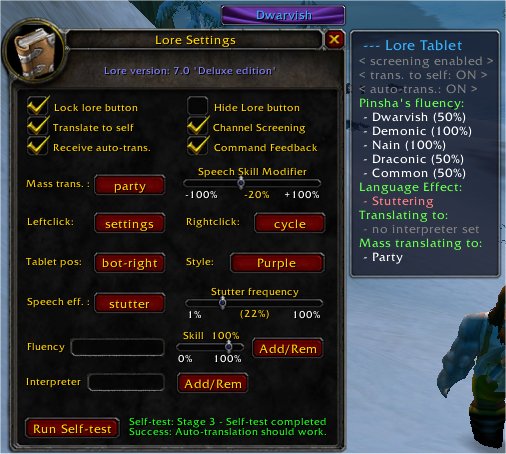
Settings window
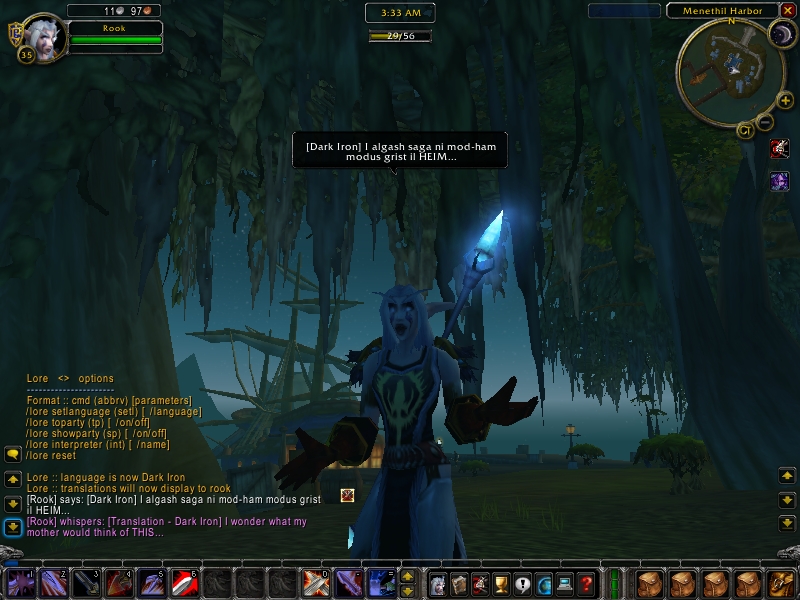
Compose and speak in custom-defined 'languages'
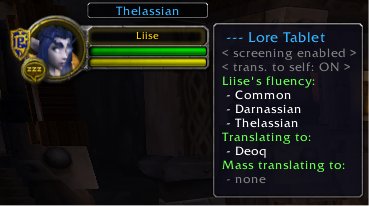
The tablet (tooltip)
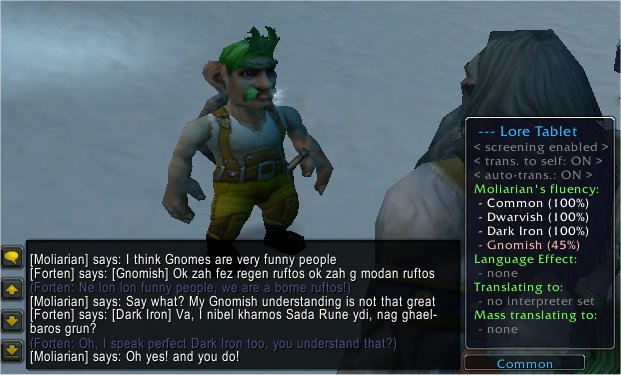
Language skill and auto translate example
Description
I recently picked up WoW again, and since no one really offered to take over, I'll at least try and keep Lore working. However, if there's anyone willing to take care of helping people who are having problems with it, it'd be greatly appreciated. I play the role of tech support enough as it is, I'd rather not play it more.
--- Lore v7.0 (Deluxe edition) by Liise on Argent Dawn (Alliance)
=O=O=O=O=O=O=O=O=O=O=O=O=O=O=O=
- I M P O R T A N T !! - R E A D - T H I S - F I R S T !! -
IF YOU HAVE A PROBLEM WITH LORE, MEANING YOU CAN'T SELECT CUSTOM LANGUAGES,
YOU GET AN ERROR MESSAGE, OR SOMETHING ELSE: FIRST CHECK THE README.TXT FILE
THAT YOU FIND AMONGST THE LORE FILES. THE SAME QUESTIONS (WHICH ARE ANSWERED
THERE VERY CLEARLY) KEEP RETURNING OVER AND OVER AGAIN ON THE COMMENTS BELOW.
I WILL NO LONGER ANSWER THOSE, ONLY CASES NOT COVERED BY THE LORE MANUAL.
=O=O=O=O=O=O=O=O=O=O=O=O=O=O=O=
ABOUT:
Lore was designed to aid Roleplayers in World of Warcraft with the ability to speak in 'languages' other than those enabled by Blizzard (for example: Dark Iron, Demonic, Elemental, Druidic, etc). Lore translates your text in /say, /party, /raid, /guild and /yell to a specified user-defined language. This translation occurs before the text enters Blizzard's language functions.
Lore has grown since then. New functionality has been added to allow for automatic translation, an option to render your character (partially) unable to understand a certain language, speak dialects, stutter, hiss, growl, lisp and more!
Below you find a list of the files, and indication which you might need. For further information, please refer to the Readme.txt document enclosed in the zip file. You will find almost anything you want or need to know about Lore there.
FILES:
- Lore vX.X: Lore itself. You cannot use Lore without this. Installing the latest version is always recommended.
- Dialects.lua vX: You need this file. If you already have already customised your dialects.lua file, you don't generally have to download this again. Overwriting dialects.lua will erase your self created languages! (v8 is here)
- Ephemeral fix for Lore5: If you use the AddOn called Ephemeral and you use LORE V5.X you need this file to prevent conflicts. (for Eph ver. 1.6.3)
- Ephemeral fix for Lore6: If you use the AddOn called Ephemeral and you use LORE V6.X you need this file to prevent conflicts. (for Eph ver. 1.6.3)
- Ephemeral fix for Lore7: If you use the AddOn called Ephemeral and you use LORE V7.X you need this file to prevent conflicts. (for Eph ver. 1.6.3)
- Language pack 01: Extra player made custom languages for use with Lore. Please read its README file for instructions on how to use. Included languages in this language pack: "The Ancient Tongue", "Sanvairu", "Ooh". Included dialects in this language pack: "*Cumbrian", "*Fudd", "*Moron", "*Norfolk", "*Pirate", "*Scottish" (the latter is an improved version of what you already find in the dialects.lua - to be replaced if you want it.
- Language pack 02: Extra player made custom languages for use with Lore. Readme file included explains how to use. This language pack includes the dialect "*Riverfolk" and languages "Nutterspeak", "Streetslang" and "AncientRunic".
-CLPs: This is just short for Custom Language Pack, as Curse's new interface won't allow 'Custom Language Pack' because it is too long.
COMPATIBILITY:
- Lore v6.0 (EN) is only fully compatible with English Gameclients. Other clients can also use this version, the only drawback they will have is that if they want to have it 'auto-translate' Blizzard Default languages (such as Gnomish, Gutterspeak) and lower their fluency in these same languages, they will not see the wanted effect. Later versions are also localised to work for German and French clients.
OPTIONS:
See the included ReadMe or type /lore in game to bring up a menu of available commands.
NOTE:
Do NOT confuse this with a mod intended to remove the language barrier. This AddOn has nothing whatsoever to do with other people's text. Its purpose is to avail you of pre-defined languages for appearance/aesthetics only. Ultimately, it's just modifying the text YOU send out, immediately prior to sending it out in a completely ordinary fashion. Also, Blizzard enabled languages are not modified by Lore.
NOTE:
After Rook discontinued the 'Lore' project about 4 months ago (due to no longer playing World of Warcraft) I have been given permission to continue her work. The result is Lore version 4.0 and higher.
NOTE:
Those people who use the AddOn 'Ephemeral' in combination with Lore should download the Ephemeral.lua file here and replace the old version with it, to prevent unwanted effects due to incompatibility.
--- Installing
Download and extract Lore to your World of Warcraft/Interface/AddOns directory to install. To use the prepackaged languages you must download dialects.lua and extract it to the same directory (it will automatically be added to the Lore folder).
These files are seperated to prevent updates from overwriting your own custom-defined languages, which are added to the dialects.lua file. Once you have dialects.lua you will not need to download it again for updates; simply download the main AddOn and re-extract it to replace the old files.
To define your own languages look in the AddingLanguages.txt tutorial or open dialects.lua in Notepad and follow the examples provided by the included languages.
--- Troubleshooting
If you have a problem with Lore, there are a few things you can try before looking for outside help:
* Problem: I installed Lore, but it does not load when I enter the world.
* Solution: It is likely disabled in your AddOns options. Go to the character selection screen, click the 'AddOns' button at the left bottom corner of your screen. Select Lore, and select the option to 'ignore version checking' (this allows you to use 'out of date' versions). Blizzard updates their UI version number all the time and I don't want to keep uploading a new version of Lore each time they do, so it will go out of date but that shouldn't matter. Also a new patch may reset this.
* Problem: I get an error on my screen, mentioning something like "argument #1 to `getn' (table expected, got string)".
* Solution: Type the command "/lore reset". If that doesn't work, you can try "/lore default". If that also doesn't work, please check that you have downloaded the dialects.lua file and that it is in the same directory as the rest of Lore.
*Problem: Lore loads, but I cannot access any of the custom languages.
* Solution: First, make sure your dialects.lua file is named just that and not 'Dialects_v_8'. If that does not fix the problem delete your WTF, Cache, and Lore folders, then load in a new copy of Lore while Warcraft is not running.
Known Issues ---
* Trying to send item links while talking in custom language still results into an error.
* Using %T works alright, but returns %T to self if translating to self.
* Using Blizzard's language selection menu does not work.
The Lore Team
