


LootSource
- By
Wow_f4Opb1F9MP.png
Description
Loot Source
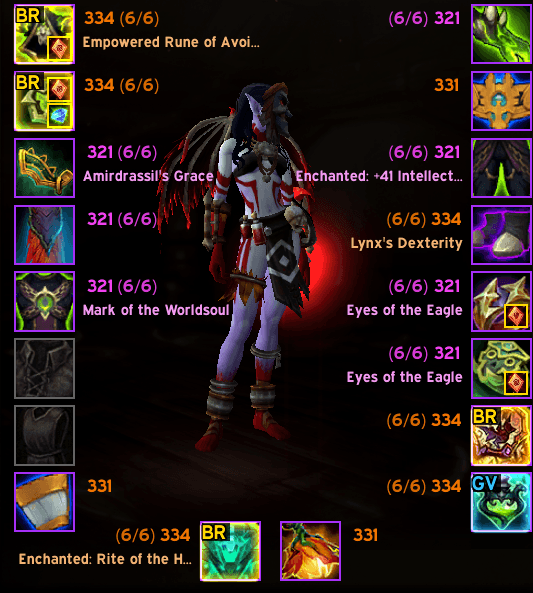
See at a glance which of your equipped items came from a Bonus Roll and which came from the Great Vault.
World of Warcraft doesn't tell you where a piece of gear came from. Once an item is equipped, a coined drop and a Great Vault pick look exactly the same. Loot Source reads the hidden item context stored in every item link and marks the source right on your character sheet and in item tooltips.
Features
- Character sheet badges
- Items from a Bonus Roll (Nebulous Voidcore) get a gold glow and a BR label.
- Items from the Great Vault get a blue glow and a GV label.
- Bag badges: the same BR / GV markers on items in the default Blizzard bags (combined or separate) and in EUI's bag window.
- Tooltip line: hover any item to see Source: Bonus Roll or Source: Great Vault. This works for items in your bags, on other players and in links in chat too.
- Raw context on demand: hold Alt while hovering an item to see its raw item context number.
- Chat summary: type
/lsrcto list every tagged item you have equipped, with a count per source. - Lightweight: no libraries, no options panel, no saved data and no impact in combat.
Commands
| Command | What it does |
|---|---|
/lsrc |
Prints your tagged equipped items and a count per source |
How it works
Every item link contains an item context value that Blizzard sets when the item is created. Loot Source maps these values to sources:
| Context | Source |
|---|---|
| 95, 190 | Bonus Roll (Nebulous Voidcore) |
| 35, 96 | Great Vault |
You can change these values or add your own (for example M+ end-of-run loot) by editing the SOURCES table at the top of LootSource.lua. Hold Alt over an item to find out which context number it has.
Known limitations
- Item context only identifies a source if Blizzard gives that source its own context value. If a patch changes these values, update the
SOURCEStable, then let me know in the comments so I can update the defaults. - Items from sources that aren't in the table are not marked.
- Bag badges work with the default Blizzard bags and EUI's bags only. Other bag replacement addons (Bagnon, Baganator, ArkInventory, etc.) aren't supported yet, but the tooltip line still works there.
Feedback
Found an item that's marked wrong, or a source with its own context value worth adding? Leave a comment with the item link and the context number (hold Alt over the item to see it).
LootSource Team
