LootRuler
- By
Soft reserves inside World of Warcraft, for the TBC Anniversary realms. No website, no spreadsheet, no copying names out of Discord.
08-session.png
09-reserves.png
04-reserve.png
Description
LootRuler
Soft reserves inside World of Warcraft, for the TBC Anniversary realms. No website, no spreadsheet, no copying names out of Discord: the raid leader picks the raid, how many soft reserves everyone gets and what's hard reserved; raiders pick their reserves from the raid's loot in the game, or whisper the leader if they don't have the addon; and when loot drops, everyone gets a roll window that knows who reserved it, and a loot list of everything that's dropped and who has it. Or send it all to Gargul with one click.
Type /lr in game.
Beta. If something looks off or throws an error, please say so, with a screenshot if you can.
Burning Crusade: Karazhan, Gruul's Lair, Magtheridon's Lair, Serpentshrine Cavern, Tempest Keep, Mount Hyjal, Black Temple, Zul'Aman and the Outland world bosses. The original raids, still there in TBC: Molten Core, Onyxia's Lair, Blackwing Lair, Zul'Gurub, Ruins of Ahn'Qiraj, Temple of Ahn'Qiraj and the Azeroth world bosses.
Every boss's loot in kill order, with trash drops, patterns, books, tier tokens, boss heads (the right one for your faction) and Zul'Aman's timed chests: 1,446 items. Items show with the game's own icons, tooltips and quality colours, and every list can be searched, in one raid or all of them, with or without a session open. (Naxxramas isn't there: the original 40-player Naxxramas can't be entered in TBC.)
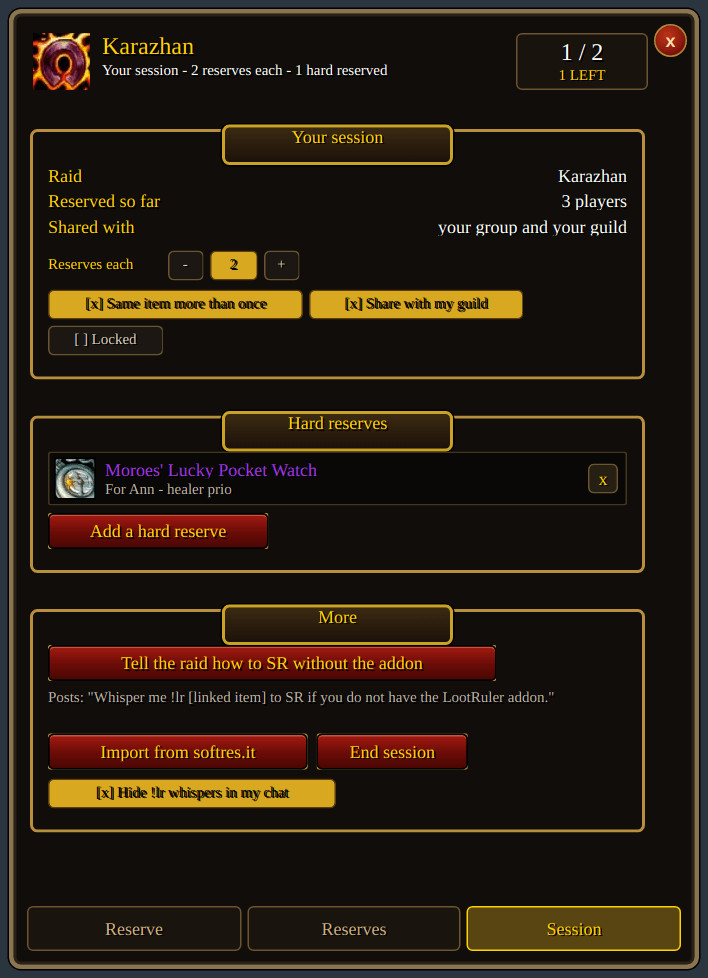
- Open reserves on the Session tab: pick the raid, how many soft reserves each player gets, whether a player can put more than one on the same item (on by default), and whether to share the session with your guild so people can reserve before the group is even made.
- Hard reserve anything: say who it's for and add a note if you like. Anyone who had soft reserved it gets that reserve back.
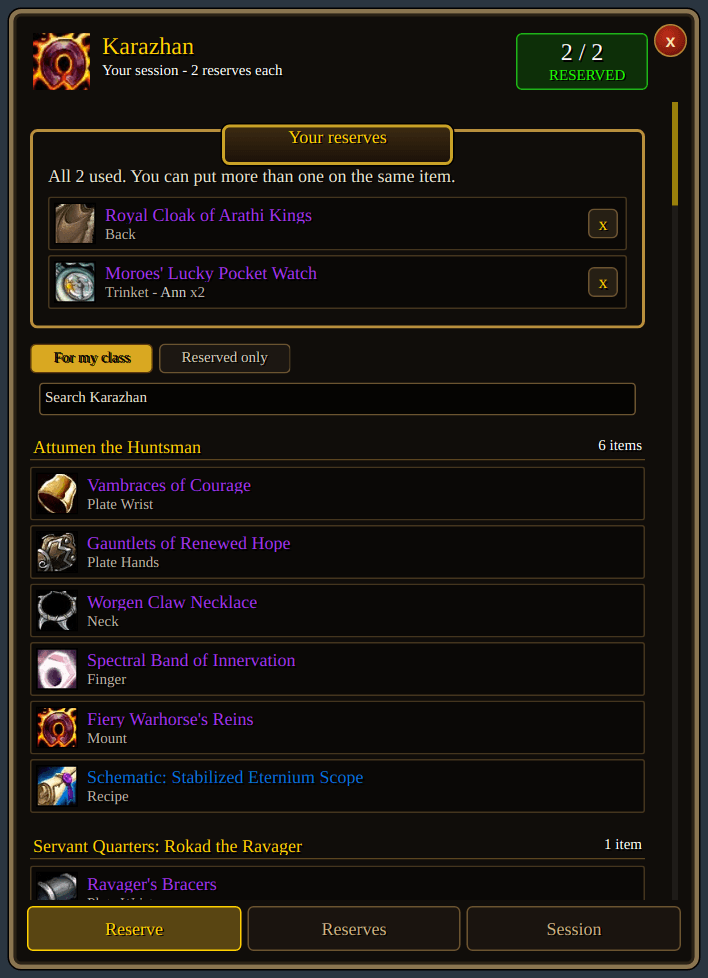
- Reserve yourself on the Reserve tab, like everyone else.
- Post in raid chat tells everyone how to reserve, addon or not.
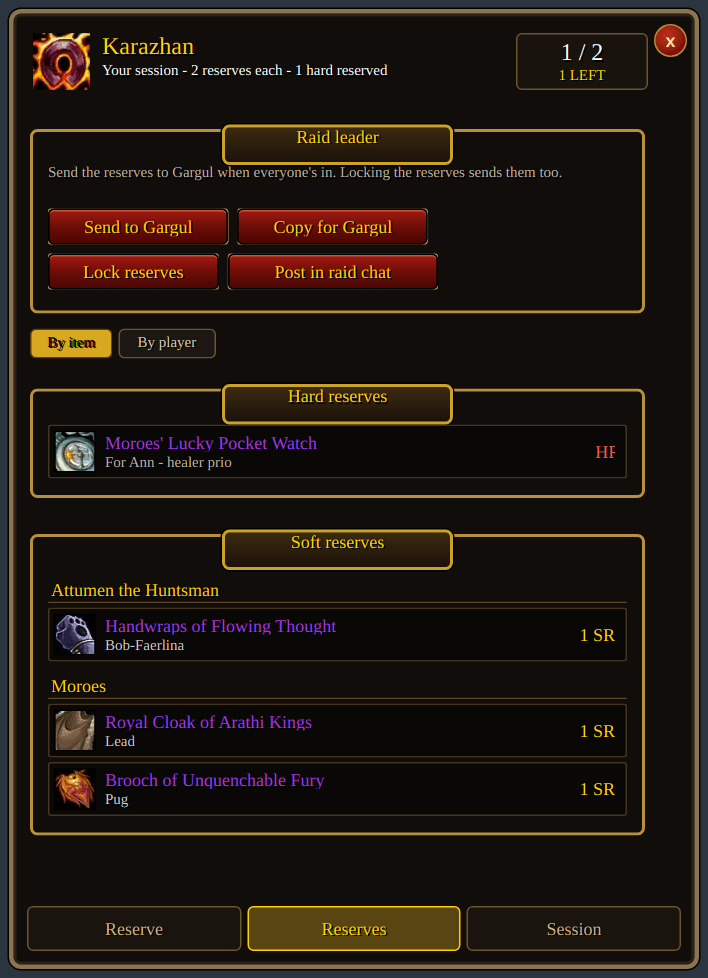
- Watch it fill up on the Reserves tab, by item or by player, with who in the group hasn't reserved yet. Take reserves away or add them for people who can't.
- Lock when you're ready, and the reserves go into Gargul (if it's loaded). Or Send to Gargul any time, or Copy for Gargul to paste into Gargul's importer (
/gl sr) on the character running loot.
Already used softres.it? Import from softres.it brings in its "Gargul Export".
- With the addon: a message tells you when your leader opens reserves. Type /lr, click an item to reserve it, right-click to take it back. The list only shows what your class would wear unless you switch "For my class" off. If the leader is offline, your picks wait and go to them when they're back.
- Without the addon: whisper the leader.
| Whisper | Does |
|---|---|
!lr <item link or name> |
reserves it (several links in one whisper reserve each) |
!lr remove <item> |
takes a reserve back |
!lr clear |
takes all of them back |
!lr |
tells you what you have reserved |
(!sr is left alone: Gargul answers that one.)
When it's time to hand out loot, LootRuler pops up a roll window for everyone, like the game's own Need/Greed window, and it knows who reserved what.


- The loot master opens a corpse with master loot on and LootRuler lists what's in it beside the loot window, with who reserved each item. Click one to roll it out (or type
/lr rolland an item link). - Everyone with LootRuler gets a roll window: the dice is main spec (
/roll), the coin is off spec (/roll 99), the x passes. It shows the timer and the highest roll so far, then who won. - A soft reserved item is only rolled for by the players who reserved it, and who are in the raid. Everyone else sees who reserved it, and their window won't let them roll. Once a reserve has won its item it's used up, so if a second one drops it goes to the next reserver.
- A hard reserved item isn't rolled for at all: the loot master gets a "Give to" button.
- A tie can be rolled again, just between the players who tied.
- Players without the addon are told in raid chat what to roll, and their
/rolls count the same. - Giving it out: the loot master's window lists every roll, best first, and the ones that don't count (wrong roll, didn't reserve it, too late) underneath. One click gives the item to the winner through master loot. The item, the winner and how they won it go on the Reserves tab's list of loot given out.
The Loot tab lists everything that has dropped this raid, boss by boss, for the whole raid to see, with the game's icons, tooltips and quality colours: who reserved it, whether it's still on the corpse or being rolled for, who won it and how, and who has it now. Your own wins and reserves stand out. It's part of the soft reserves, so it's cleared when the session ends.

- Roll now or at the end. The loot master can roll an item out as soon as it drops, or give it to themselves, keep going, and roll it out from the Loot tab later. The game lets you trade raid loot for 2 hours after you loot it, so the list shows how long is left.
- Trade help. When the winner of an item the loot master is holding opens a trade (either of them can open it), LootRuler puts their item in the trade window. When the trade goes through, the list shows they have it. A "To trade" list shows the loot master what they still have to hand over. You can turn this off.
- Any loot method. With master loot the loot master's addon writes down each corpse's loot (opening a corpse again doesn't list it twice). With group loot the leader's addon writes down the epics people loot.
- Mistakes: the leader can right-click an item to take it off the list, or take an award off.
The loot master (or the raid leader, or an assistant) needs LootRuler; raiders don't, but it's nicer if they have it. /lr test shows a pretend roll window so you can drag it where you want it. The Session tab can turn roll windows off, or show them only for items you can roll on.
LootRuler Team