


LootMirror
A lightweight party and raid loot feed for World of Warcraft.
Screenshot 2026-09-21 105651.png
Screenshot 2026-09-21 105700.png
Screenshot 2026-09-21 105743.png
Screenshot 2026-09-21 105856.png
Description
LootMirror
A lightweight loot feed and wishlist for World of Warcraft
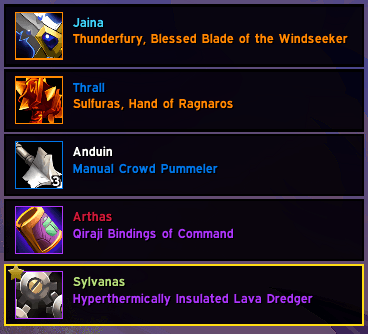
LootMirror shows what you and your group members loot in a clean, unobtrusive feed — no bloat, no interruptions.
Features
- Equipment-only loot feed — built specifically for group loot in dungeons/raids
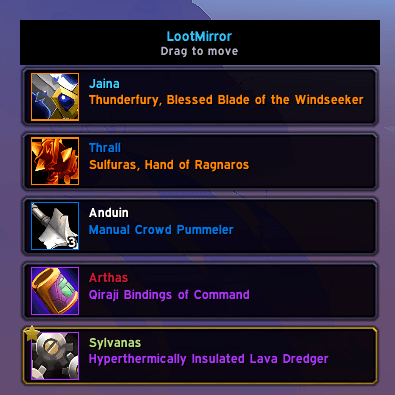
- Full Loot Feed — displays your own loot as well as loot received by party and raid members
- Class colors — player names are displayed in their class color
- Item tooltips at the cursor — hover a row for the full item tooltip
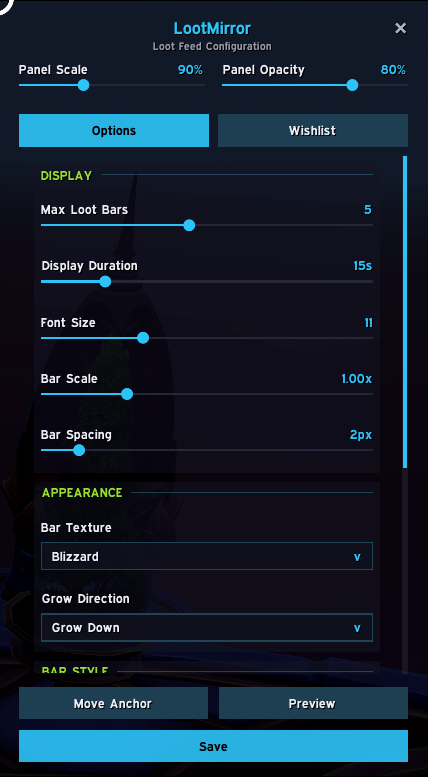
- Item quality filter — show or hide loot by quality
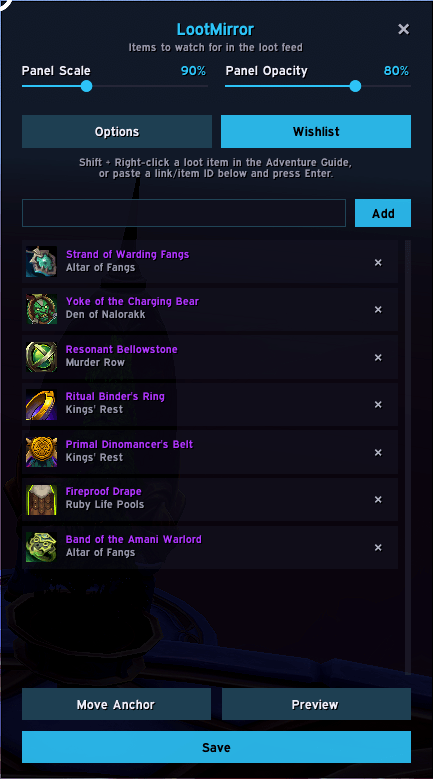
- Wishlist — track specific items
- Live settings preview — with Options window's Preview button
- Game Menu integration — shows up under Game Menu → Options → AddOns
Slash Commands
| Command | Description |
|---|---|
/lm |
Open the Options panel (Game Menu → Options → Addons → LootMirror) |
/lm move |
Show or hide the draggable anchor bar |
Wishlist
Track specific items you're after — a wishlisted item's loot bar always shows (gold border + star badge), for any group member's drop, even if it's a non-equipment item or a quality you've filtered out.
Adding items:
- In the Wishlist tab, paste an item link (Ctrl+V) or type a numeric item ID into the input box and click Add
- While browsing loot in the Adventure Guide, hover an item and Shift + Right-click it
Removing items: click the × next to an entry in the Wishlist tab, or simply loot (or get traded) a copy — it's removed and confirmed in chat automatically.
Compatibility
- Interface: 12.1 (Midnight)
- Dependencies: none
- Optional: none
LootMirror Team
