LootMate
- By
görsel_2026-06-30_193159171.png
Description
💼 LootMate
LootMate is the ultimate all-in-one tracking suite designed for gold makers, farmers, and everyday adventurers in World of Warcraft. It seamlessly tracks your wealth, farming sessions, bag values, and custom currencies while providing handy Quality of Life (QoL) automations.
Whether you are doing a 2x4 raw gold farm, sniping the Auction House, or just playing casually, LootMate provides all the data you need in a sleek, customizable, and lightweight interface.
✨ CORE FEATURES
💰 Main Wealth Tracker
A highly customizable, draggable top-bar that displays:
• Total Gold: See your current wealth at a glance.
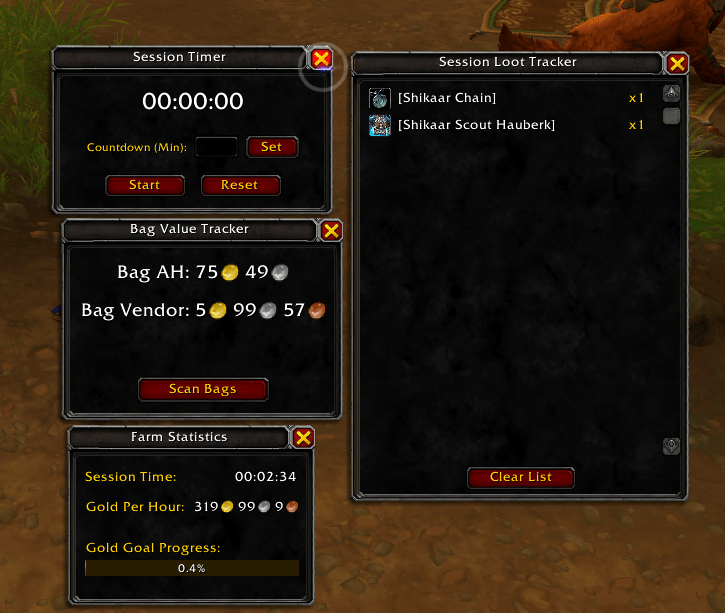
• Bag Value: Instantly displays the total Auction House & Vendor value of all items currently sitting in your bags.
• Currencies: Track any currency in the game (e.g., Kej, Trader's Tender) directly on your bar.
⏱️ Farming & Session Tracking
• Session Tracker: Tracks how much Gold and XP you've earned since you logged in or reset the session.
• Farm Stats Window: Calculates your real-time Gold Per Hour (GPH) and lets you set a Session Gold Goal with a visual progress bar.
• Session Timer: A built-in stopwatch to precisely time your farming runs.
🎒 Advanced Bag & Loot Tracking
• Loot Tracker: A dedicated window showing every item you've looted during your session. It automatically calculates and separates the total Vendor Value and Auction House Value of your drops.
• Bag Value Scanner: Manually scan your bags at any time to see your total potential wealth. Fully integrated with TradeSkillMaster (TSM) and Auctionator for accurate live market prices. If an item cannot be auctioned, it smartly falls back to vendor pricing.
🛠️ Quality of Life (QoL) Automations
Tired of repetitive tasks? LootMate handles them for you:
• Auto-sell Junk: Automatically sells all grey/junk items the moment you open a merchant window and prints the profit in chat.
• Auto-repair: Automatically repairs your gear. You can even choose to use Guild Bank funds first!
🎨 Fully Customizable UI
Make LootMate truly yours through the intuitive Options panel or via the Minimap menu:
• Display Formats: Choose between Detailed (Coin icons), Exact, or Abbreviated (e.g., 13.5k) formats.
• Frame Styles: Choose from 10+ different backdrops (Tooltip, Dialog, Parchment, Wood, Marble, etc.) and custom background colors.
• Profile System: Save your layout and settings on a per-character basis or share them across your account.
• Premium Minimap Menu: Access all windows, trackers, and settings quickly via a beautifully designed tooltip menu on your minimap.
⚙️ HOW TO USE & COMMANDS
• Type /lt in chat to open the Options Menu.
• Minimap Icon: Click to toggle the modern context menu, or right-click to instantly hide/show the Main Tracker.
• Drag any LootMate window by simply clicking and holding its background.
• To find out the total value of the items in your bag, you’ll need to use TSM or Auctionator. With Auctionator, all you need to do is run a single scan; with the TSM app, simply leave it running.
LootMate is built to be extremely lightweight and will not impact your game's performance, even during heavy farming sessions. Say goodbye to screen clutter and hello to efficient wealth tracking!
LootMate Team