


Lootline
- By
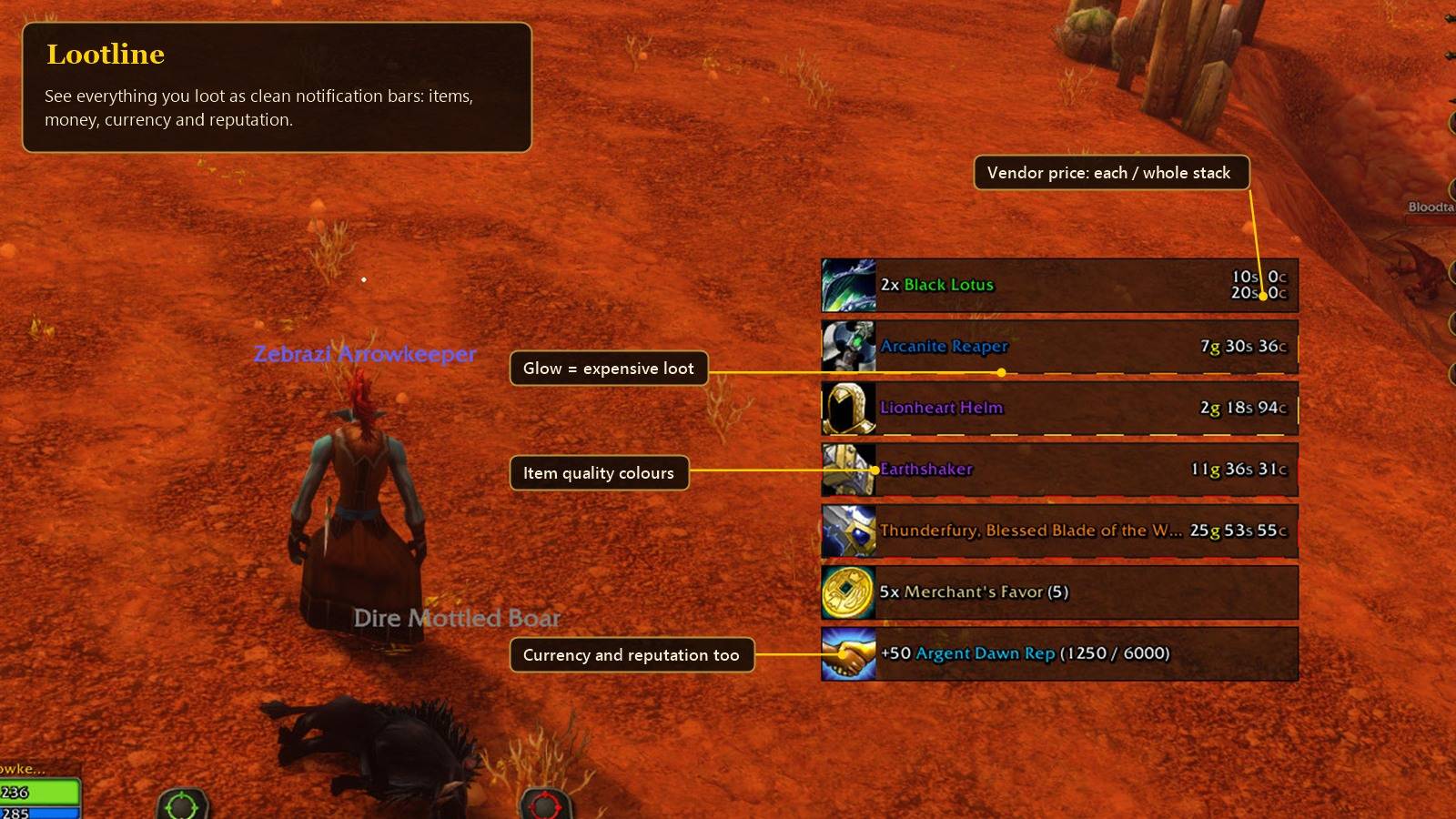
Items, money, currency and reputation as clean notification bars.
Description
Lootline
Shows what you loot as a small stack of bars: items, gold, currencies and reputation, with vendor prices. Made for WoW: Forever, based on the "Loot Frame" WeakAura by Hypocrit.
What it does
- One bar per item you pick up, with its icon, quality colour and stack count. Looting more of the same item adds to the bar that's already there.
- Vendor price per item and for the whole stack. If you use Auctionator it can show the auction price too.
- Expensive loot gets a glowing border. You set the three price levels yourself (gold and silver), and there's an optional sound for the top one.
- Gold, currencies and reputation gains show up in the same list. Profession skill-ups can too (off by default).
- Farm counter: start it and it counts the gold and items you loot, with their vendor and auction value, the total, gold per hour and your best items. It keeps counting across /reload and logout.
- Minimap button for the farm counter, with a Classic, Modern or Minimal window.
- Optional faster auto loot: right-click a corpse and everything goes into your bags without the loot window popping up. The window still opens for BoP items, group rolls or master loot, and with whatever is left if something can't be taken (full bags). Hold Shift if you want the normal window.
- A message in chat when your bags are almost full.
- You can hide gold, currencies, reputation, quest rewards or crafted items, and hide items below a quality or a price.
- Shift+Right-click a bar to ignore that item from then on.
- Position, size, font, how long bars stay and which way they stack can all be changed.
Settings
Esc > Options > AddOns > Lootline, or type /lootline.
The "Show test bars" button puts some sample loot on screen so you can see your changes while you adjust things. To move the bars, click "Move bars" on the Layout tab, drag the green box and click Lock.
Faster auto loot is off by default. You can turn it on in the Looting tab.
Farm counter
- Left-click the minimap button: the farm window
- Shift+Left-click: start or pause the counter
- Right-click: Settings or Hide minimap button
Items count at their vendor price, or the Auctionator price when that is higher (grey items: vendor price). The counter is kept per character. The window style is on the Farm tab, the minimap button on the Layout tab.
Commands
- /lootline - settings
- /lootline farm - farm window (farm start / stop / reset for the counter)
- /lootline minimap - minimap button on/off
- /lootline test - sample bars
- /lootline clear - remove all bars
- /lootline fastloot - faster auto loot on/off
- /lootline bagwarn - bags-almost-full warning on/off
- /lootline skills - profession skill-ups on/off
- /lootline labels - AH / vendor / stack labels on the prices on/off
- /lootline ignorelist - show ignored items
- /lootline reset - reset the position
- /lootline help - full list
Mouse
- Right-click a bar to dismiss it
- Shift+Right-click to ignore that item
- Shift+Left-click to link it in chat
Notes
- In combat the game doesn't let addons open the Options window, so /lootline opens the settings in a small separate window instead.
- Auction prices need Auctionator and at least one AH scan. After each scan the prices on screen update by themselves.
- Works with the gamepad interface as well.
Credits and the original
The idea and the look come from the "Loot Frame" WeakAura by Hypocrit: https://wago.io/-IWPKK1il
Lootline is not a copy or a conversion of that aura. It's a standalone addon written from scratch and contains no code from the WeakAura (the full source is on GitHub, see below). What's different:
- It doesn't need WeakAuras.
- Its own settings page in Esc > Options > AddOns instead of the WeakAuras options.
- Faster auto loot without the loot window.
- A farm counter with its own window and a minimap button.
- Hiding items by price, an ignore list you can manage in the settings, and filters for quest rewards and crafted items.
- Made for WoW: Forever: Classic items in the preview, gamepad interface support, and it works with the restrictions of the new client.
Lootline's own code is under the MIT license.
Links
- Source code: https://github.com/Glatier/Lootline
- Bugs and ideas: https://github.com/Glatier/Lootline/issues
- If you'd like to support the addon: https://buymeacoffee.com/lastern
Lootline Team
