LootAquiredMover

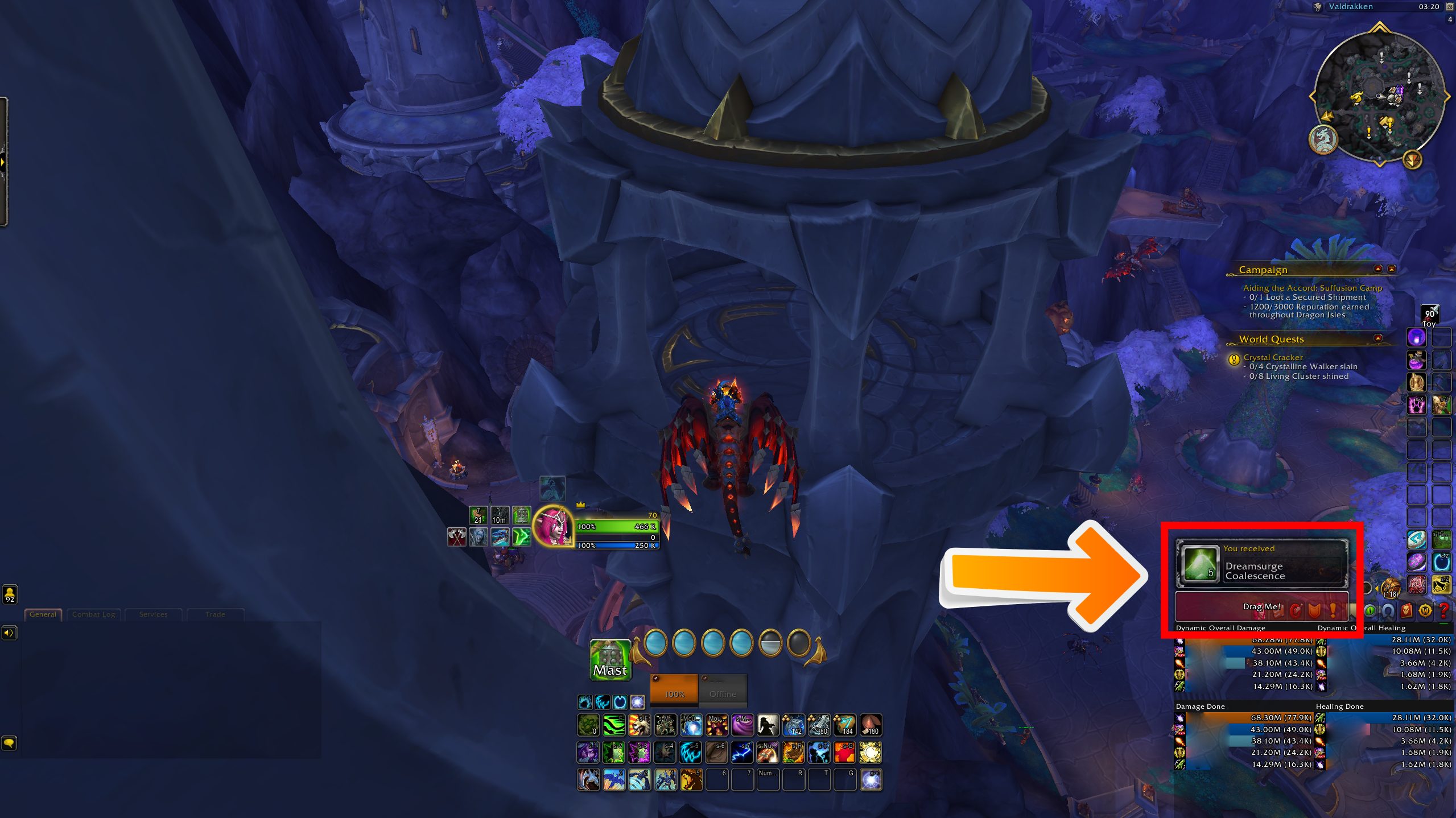
LootAquiredMover allows players to effortlessly drag and reposition the otherwise unmoveable AlertFrame directly from the wow edit mode (Loot aquired messages and loot roll options)

DISCONTINUED
LootAquiredMover

Description

LootAquiredMover is a simple and lightweight World of Warcraft addon designed to give players more control over the placement of the AlertFrame, which displays "Loot Acquired" messages and loot roll options. With just a few commands, you can easily reposition the AlertFrame to any location on your screen.

Features

  • WoW Native Edit Mode: Configureable directly through the wow Edit Mode.
  • Draggable Anchor: A clear, draggable anchor allows you to visually choose where you want the AlertFrame to appear.
  • Persistent Positioning: Once you've positioned the AlertFrame, the addon remembers your choice, ensuring the AlertFrame appears in the same spot every time you log in or reload.
  • Easy Reset: With a simple command, you can quickly reset the AlertFrame back to its default position.

Installation

  1. Download the LootAquiredMover addon.
  2. Extract the folder into your World of Warcraft\_retail_\Interface\AddOns directory.
  3. Launch World of Warcraft.
  4. Make sure the addon is enabled by checking the "AddOns" button on the character selection screen.

Usage

  • Use WoW built in Edit Mode: Open the in game Edit Mode (Esc > Edit Mode) The anchor is directly moveable through blizzards Edit Mode
  • Toggle the draggable anchor: /mam This command will show or hide the draggable anchor. Simply drag and drop it to your desired location, and the AlertFrame will move accordingly.
  • Reset the AlertFrame position: /mam reset If you ever want to revert back to the default position, this command will reset both the anchor and the AlertFrame.

Support

If you encounter any issues or have suggestions for the addon, please comment on this addon on CurseForge.

Credits

Author: Skye

The LootAquiredMover Team

profile avatar
  • 6
    Projects
  • 6.6K
    Downloads

More from SpecialAgentSkyeView all

  • SkyesScrollingLoot project image

    SkyesScrollingLoot

    • 2.0K
    • Addons

    Addon that adds sleek scrolling loot to your screen, with nice smooth animations, and a modern look

    • 2.0K
    • March 17, 2026
    • Addons
  • CursorChamp project image

    CursorChamp

    • 404
    • Addons

    Super lightweight, and very simple cursor circle addon. Out the box does nothing else, but in settings GCD and Castbar display can be added. Can be hidden while in game cursor is present. Can be plain white, or your class color!

    • 404
    • March 12, 2026
    • Addons
  • TargetCircles project image

    TargetCircles

    • 55
    • Addons

    Shows party member target indicators on enemy nameplates

    • 55
    • February 12, 2026
    • Addons
  • BlizzardNotificationMover project image

    BlizzardNotificationMover

    • 480
    • Addons

    Moves the blizzard notification (especially useful now that it is in the middle of the screen... Thanks blizzard)

    • 480
    • December 13, 2024
    • Addons
    • +1
  • SkyesScrollingLoot project image

    SkyesScrollingLoot

    • 2.0K
    • Addons

    Addon that adds sleek scrolling loot to your screen, with nice smooth animations, and a modern look

    • 2.0K
    • March 17, 2026
    • Addons
  • CursorChamp project image

    CursorChamp

    • 404
    • Addons

    Super lightweight, and very simple cursor circle addon. Out the box does nothing else, but in settings GCD and Castbar display can be added. Can be hidden while in game cursor is present. Can be plain white, or your class color!

    • 404
    • March 12, 2026
    • Addons
  • TargetCircles project image

    TargetCircles

    • 55
    • Addons

    Shows party member target indicators on enemy nameplates

    • 55
    • February 12, 2026
    • Addons
  • BlizzardNotificationMover project image

    BlizzardNotificationMover

    • 480
    • Addons

    Moves the blizzard notification (especially useful now that it is in the middle of the screen... Thanks blizzard)

    • 480
    • December 13, 2024
    • Addons
    • +1