LootWatcher! – Retail-Style Loot Toasts for MoP Classic
Bring modern World of Warcraft “loot toasts” to MoP Classic.
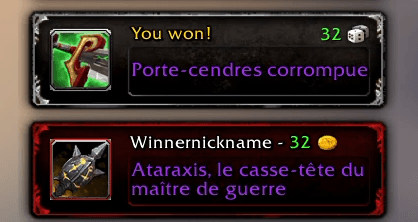
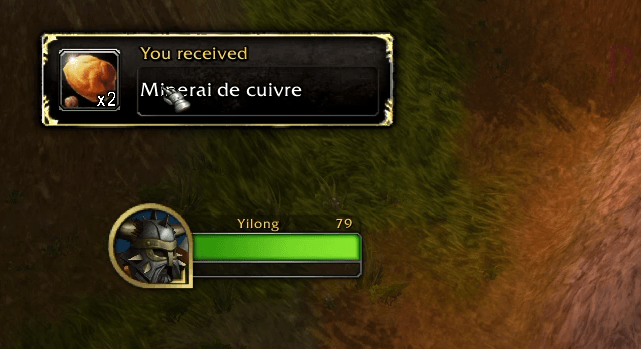
Whenever you, or anyone in your group, wins an item roll, LootWatcher pops a sleek retail-looking notification
with quality-coloured names, roll icons, scores and more.
[Group context]
[Single player context]
Key Features
- Retail-inspired toast frame
- Need / Greed / Pass icons, coloured names, quantity text, fade-out animations.
- Solo & group aware
- Solo loot, party rolls, raid rolls—everything is detected.
- Shows win toasts for you, and optional loss toasts when someone else wins.
- Fully localised – EN / FR / DE / ES / IT / PT-BR / RU / KO / ZH-CN / ZH-TW.
- Minimap icon – left-click to open options.
- DressUp on right-click – preview items (or their crafted output) straight from the item icon toast.
- Item tooltip on icon mouse-over.
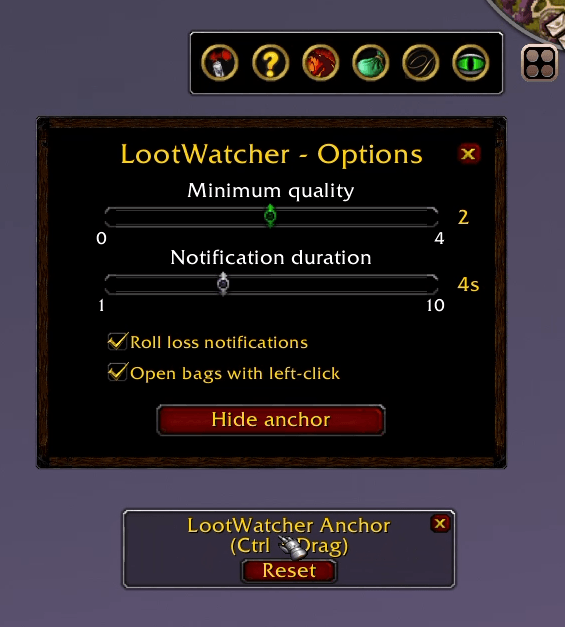
- Customisable:
- Minimum quality filter (grey → epic).
- Display duration (1-10 s).
- Toggle loss-toasts & “open all bags on left-click”.
- Show movable anchor frame (Ctrl+Drag) with reset.
FAQ
“Does it replace the Blizzard loot frame?”
No—Blizzard’s chat and need/greed pop-ups stay; LootWatcher only adds visual toasts.
“Why didn’t a toast appear?”
Check your filter: items below the minimum quality you set are ignored.
“Left-click opens my bags, can I disable that?”
Yes—un-tick ‘Open bags with left-click’ in the options.
Feedback & issues: open a ticket on CurseForge.
Happy looting!
Loot Watcher! Team