Loot Rolls Forever
- By
Shows who chose Need or Greed, what they rolled and who won, as floating text.




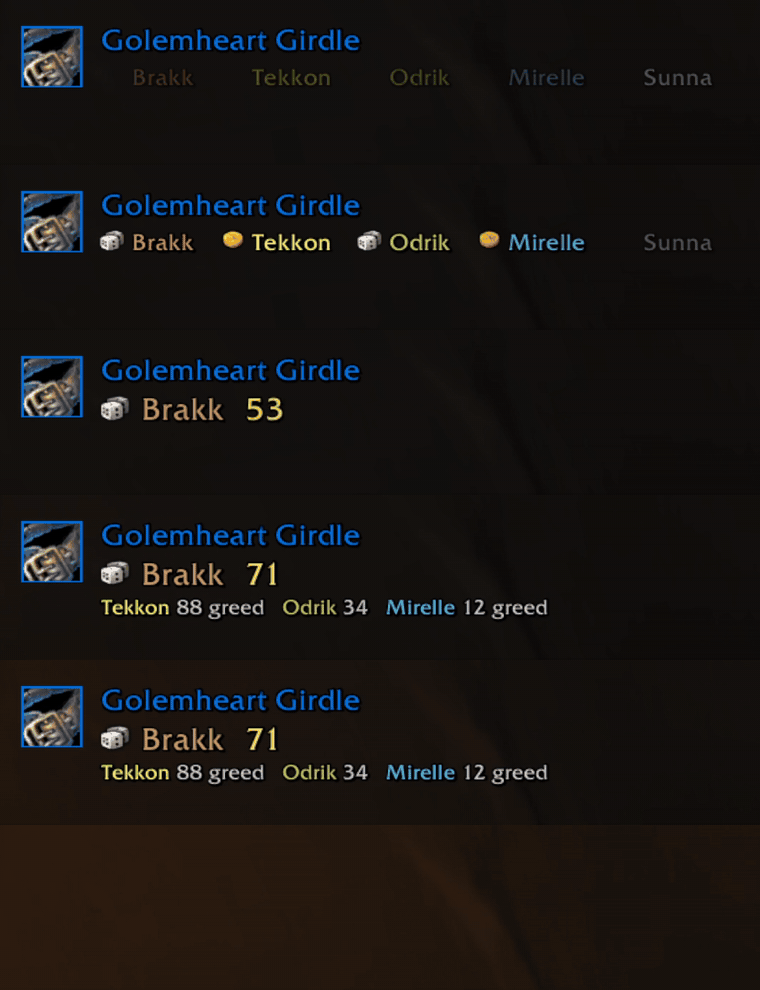
When your group rolls for a blue or better item (green optional), you see every player's choice, the rolls and the winner as plain floating text. No window, no frame.
Features
- Choices: each party member's name lights up with the dice, coin or pass icon when they choose.
- Result: the winner and the winning roll in gold, the other rolls small underneath.
- Floating text: no background by default. An optional dark backdrop fades out to the right. It fades in, stays a few seconds after the winner is known and fades out.
- Several items: rolls on more than one item stack below each other.
- Raids: with more than five players it shows a count per choice, and every roll drops in as a compact list under the winner, up to 40 players.
- Dismiss: hover the item icon and click the checkmark to clear an item early.
- Hover: the item shows its tooltip, the choices show who picked what, a raid result also shows who passed.
- Fold: with several raid results only one shows its full list. Click an item name to fold its rolls out or back in.
- Settings: a settings window with a live preview for position, size, backdrop and green items.
- Light: one small file, no libraries, nothing running while nothing is being rolled.
How to use
It shows up by itself when a roll starts. Type /rolls to open the settings. The preview there shows a party or a raid example; drag it to place it.
Feedback
Bugs and ideas are welcome in the comments.
Loot Rolls Forever Team