Loot and Roll Rules
- By
Automatically take/leave or roll/pass/do nothing on items based on names, rarity, item type, and ilevel.
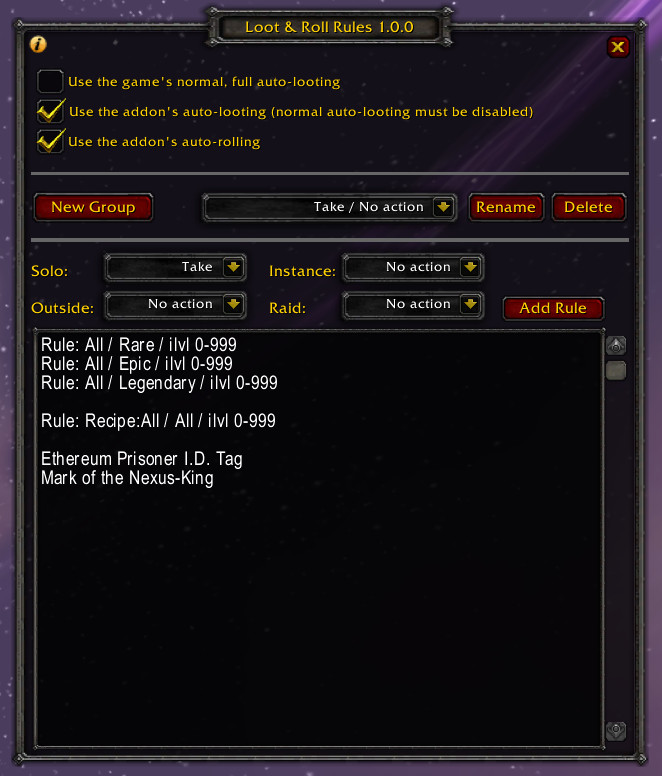
The settings window with an example group showing a few rules and specific items. This group will always loot things when possible, but if rolling then it does nothing so you can decide.

No time to dawdle over a Dream Catcher Bow of the Bandit!
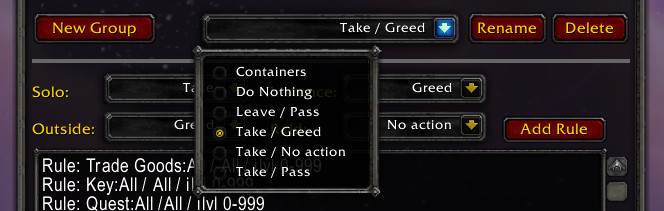
Each group you make has its own settings for looting and rolling. You can name them whatever you want, but in this example they're just named mostly by what they do.
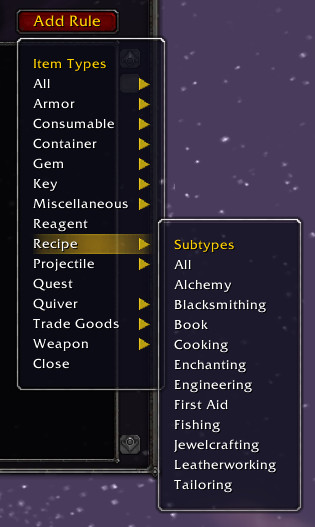
Selecting a rule will add a rule line to whatever group you're editing, which will include the item type/subtype, item quality, and item level range to match.
Description
Purpose:
This can automatically loot, roll, pass, or do nothing for specific items or items based on type/rarity/iLevel rules. The autolooting and autorolling parts can be enabled/disabled separately.
Using:
To open the settings window, use either /autoloot or /autoroll.
For shortcuts to enable or disable the addon's looting/rolling handling, you can use:
/autoloot <"on"|"off">
/autoroll <"on"|"off">
You create groups of items, and each group is set to handle looting/rolling for all the items in it. You'll probably have a group of things you always want to take, like badges of justice and quest items. If you keep adding groups/items/rules, then some day you may barely have to manually pick loot or roll again.
To add a rule instead of an item name, click the "Add Rule" button and pick something from the list. If it needs to be more specific, you can edit the text it adds to change things like the iLevel range.
When a loot item is checked, it looks for the most specific matches first. This lets you do things like always pass on a Mark of Illidari or lockboxes while still picking greed for other green items, or to handle cloth armor differently than all other armor types for some reason. The item match order is:
1. Full names, like: mote of air
2. Lua pattern matching, like: mote of .+
3. Rules about specific item types with a wear location, like: Armor:Cloth:Head
4. Rules about any armor with a wear location, like: Armor:All:Head
5. Rules about specific item types, like: Armor:Cloth
6. Rules about all of an item type's subtypes, like: Armor:All
7. The All item type rule, normally used for handling a certain item quality
Item level ranges and binding types could be matched in any order, so don't let them overlap. For example, if you make a rule about BoE rare armor, then don't also make a rule about rare armor of "Any" binding type because it may match first. If you're specific on one, then be specific on the others of that item type.
Notes:
- Sometimes items are set strangely by Blizzard - for an example, a quest item might be considered a consumable even though you don't consume it at all, or a high level animal gray item that's worth selling might have an item level of 1.
- You can drag items to the editbox to add their names, and blank lines are OK.
- "Solo" is for anything you can loot without rolling. "Outside" is for non-raid groups that aren't in an instance. "Raid" is for any raid group, both inside and outside of instances.
- Item level refers to this, not the required character level to use an item.
The Loot and Roll Rules Team