 LookBook
❤️ Bookmark Your Goals
LookBook allows you to bookmark and easily track any number of transmogs, outfits, furniture, mounts, pets, toys, illusions, and other various items to come back to later when you're ready for the hunt. As well as that it features many qol features to help your fashion journey and general farming!
Simple and Easy Item Tracking
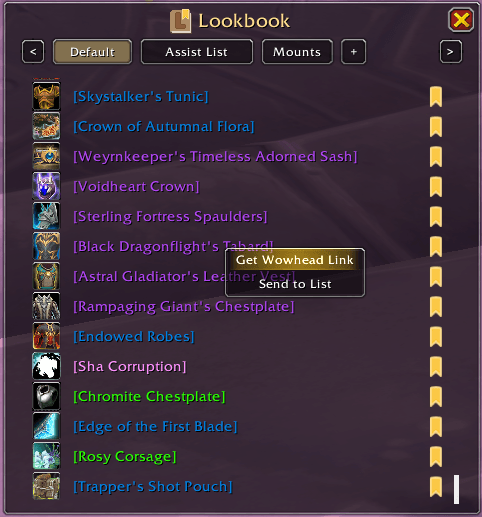
A simple and easy to follow interface to keep track of any content you want. Featuring built in support for Wowhead links making it easy for you to quickly figure out where you need to go! As well as other nice features like automatically showing a ✔️ next to items you've already collected, multiple lists for better organization, list import/exports for sharing, and ctrl+clicking and shift+clicking for previews and chat links. Also pairs amazing with addons like All The Things and Appearance Tooltip for additional features!
Quick View in Dressing Room & Quick Mount Bookmarking
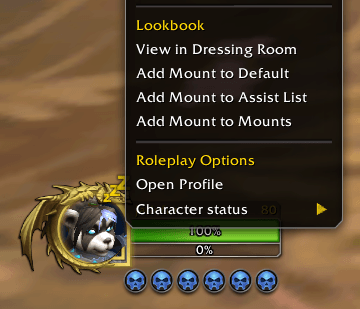
Right click any player to view their outfit in the Dressing Room to see what they're wearing or add their outfit to your collection! Now if they're mounted you'll also have the option to add their mount to your bookmarks! Either of these can be disabled in the settings if you prefer.
QOL Dressing Room Features
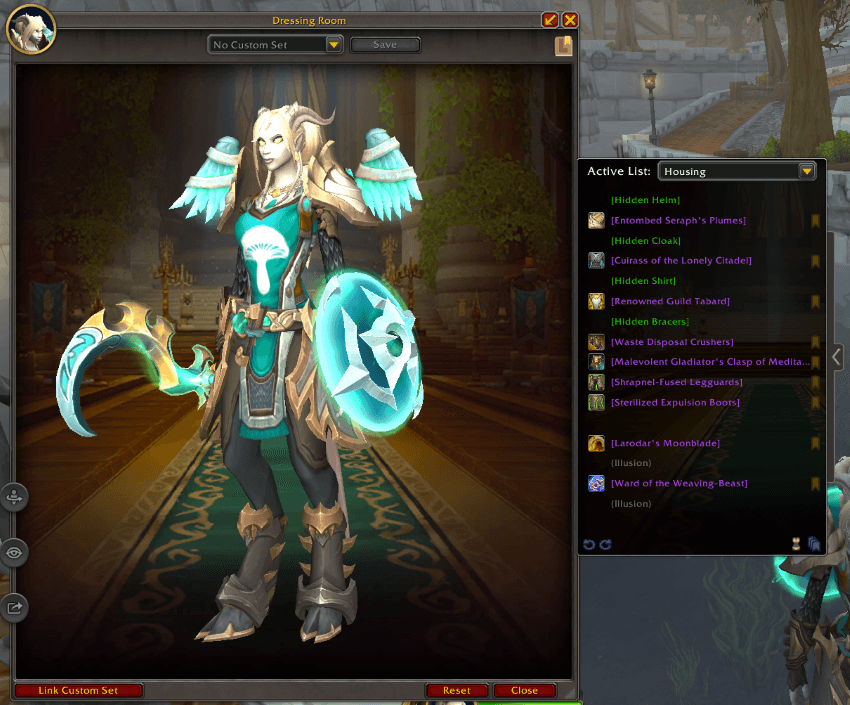
Upgrades to the Dressing Room including:
- A resizable window (pull tab on bottom right of the main window, next to the "close" button)
- Quick access to your bookmarks menu (Lookbook icon in the top right of the main window, below the "x" button)
- Undressing/redressing individual items (left clicking any item in the equipment list to the right)
- Quick bookmarking individual items to the active list (bookmark icon to the right of each item in the equipment list)
- Wowhead link generating for individual items (right clicking any item in the equipment list)
- Bookmark whole outfit button (bottom right of the equipment list)
- Undress/Redress all button (bottom right of the equipment list, to the left of the bookmark outfit button)
- Undo/redo buttons (bottom left of the equipment list)
All of which can be disabled in the settings if prefered!
Bookmarking from Collections Journal & Housing Catalog
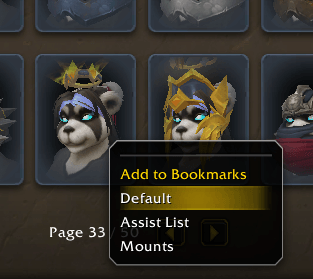
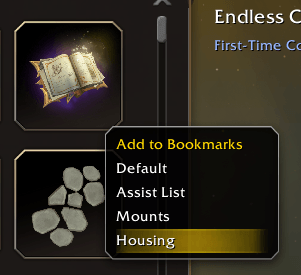
Easily add any transmog, mount, toy, pet, and now furniture from your collections journal (or housing catalog) to your bookmarks with a simple right click! The appearance collections now also has a "Click to preview" option for easier viewing in the dressing room without holding down ctrl. All of these can be disabled if prefered.
Extra Usage Notes
Your bookmark list can be accessed via the minimap button, /lb, or the dressing room.
You can use the command /lb add followed by any amount of item links you'd like to add them to the currently selected list.
In the bookmarks menu you can right click any item or list to get extra options or the + button to import a list.
Clicking the bookmark button in the bookmarks menu on any item, or clicking the bookmark button again in the dressing room if the item is already in the active list will remove it from the list.
Suggestions and Bugs
This is now my second addon! If you intend on inspecting the code you're welcome to of course, but please be gentle.
Any bug reports or suggestions are highly encuraged as always <3
Help Fund My WoW Addiction?

LookBook Team