


LOHR
- By
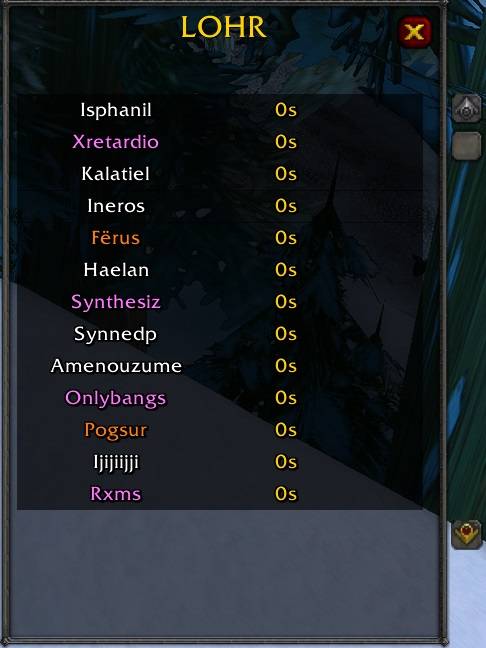
LOHR (Loatheb Heal Rotation) is a WoW Classic add-on that automates, displays, and synchronizes the healer rotation in the Loatheb fight.
lohr1.jpg
Description
LOHR (Loatheb Heal Rotation) is an addon that coordinates the healer rotation in the Loatheb fight (Naxxramas).
It shows which healer is currently healing, who is next in line, and synchronizes the order in the raid.
HOW-TO:
1. As group/raid leader or assistant, enter the command “/lohr”
2. "Sync" so that the data of all players is queried and the window opens for each player.
3. Change the list as needed.
4. "Sync "so that everyone has the same data.
5. “Start” to start the order OR begin a fight.
The healer order can be changed by clicking on the name and clicking again on the new position.
The table can be dragged with a left click and scaled with a right click.
The add-on can be tested beforehand with Start/Stop. When the battle begins, the add-on starts automatically if it is open.
/lohr opens the window.
Group leaders and assistants see 3 buttons: Synch, Start, Stop.
Synch = Synchronizes all addon versions so that everyone has the same list. It also opens the addon for every player in the group and scans other addon users.
Start = Simulates a battle start and starts the healer sequence.
Stop = Stops all sequences.
Design and features in development.
#############################################################################
LOHR (Loatheb Heal Rotation) ist ein Addon, das die Heilerrotation im Loatheb-Kampf (Naxxramas) koordiniert.
Es zeigt an, welcher Heiler aktuell heilt, wer als Nächster an der Reihe ist und synchronisiert die Reihenfolge im Raid.
HOW-TO:
1. Als Gruppen/Raidleiter oder Assistent Befehl "/lohr" eingeben
2. "Synch", damit die Daten aller Spieler abgefragt werden und das sich das Fenster bei jedem Spieler öffnet
3. Liste nach Bedarf verändern
4. "Synch", damit jeder die selben Daten hat
5. "Start", um die Reihenfolge zu starten ODER den Kampf beginnen
Heilerreihenfolge kann per Klick auf den Namen und nochmaligem Klick auf die neue Position geändert werden.
Die Tabelle ist per Linksklick ziehbar und per Rechtsklick skalierbar.
Das Addon ist durch Start/Stop vorher testbar, bei Kampfbeginn startet das Addon automatisch, sofern es geöffnet ist.
/lohr öffnet das Fenster
Gruppenanführer und Assistenten sehen 3 Buttons: Synch, Start, Stop
Synch = Synchronisiert alle Addonversionen, sodass jeder die selbe Liste hat. Zudem öffnet es das Addon für jeden Spieler in der Gruppe.
Start = Simuliert einen Kampfstart und startet die Heilerreihenfolge.
Stop = Stoppt jegliche Sequenzen
Design und Funktionen in Entwicklung
The LOHR Team


