Log Lovers
- By
Screenshot 2026-08-14 193431.png
Screenshot 2026-08-14 193307.png
Screenshot 2026-08-14 193339.png
Screenshot 2026-08-14 193352.png
Description
Log Lovers
An advanced combat log and chat replacement for TBC Anniversary.
Log Lovers replaces the two windows you actually read — the combat log and the chat frame — with faster, deeply interactive versions of themselves, wrapped in a warm dark skin. Every line in the log is a live object: hover it, click it, filter by it, break it out into its own window. Every chat tab is a filter set you control, right down to individual channels and colours.
No libraries. No dependencies. One folder of plain Lua.
The combat log
Combat events are captured into a rolling buffer of up to 20,000 events, and windows render from that buffer — so changing a filter instantly re-slices your entire history. Filtering never throws anything away.
Every line is interactive:
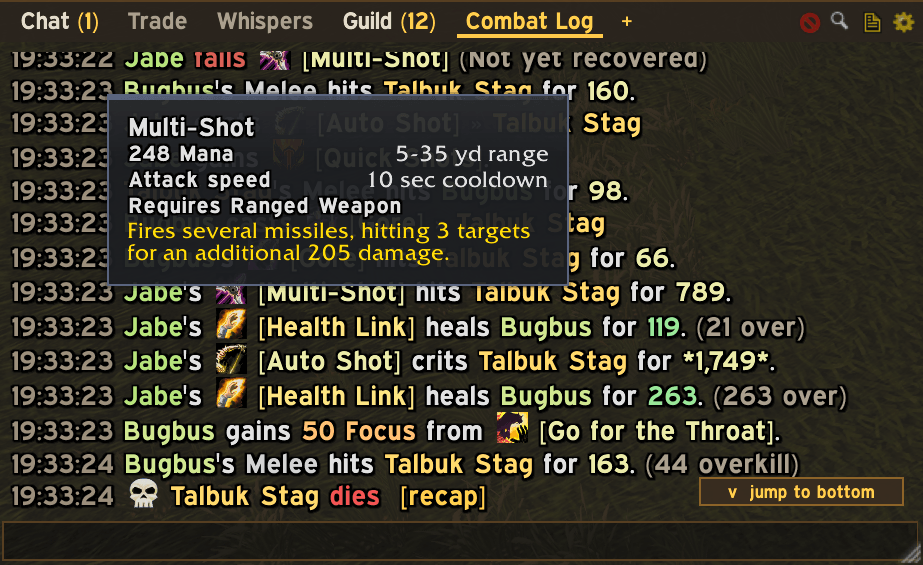
- Hover a spell for its full tooltip, plus the spell ID.
- Click a spell for the spell inspector — your hit / crit / miss / average / max / resist breakdown for that spell, and the same against you — or to show only that spell, hide it, break it into its own window, or highlight it everywhere. Shift-click links it to chat.
- Click a name to focus the window on events from or to that unit, spawn a window dedicated to them, or open their death recap. Hovering a name shows their damage, healing and damage-taken totals for the current fight.
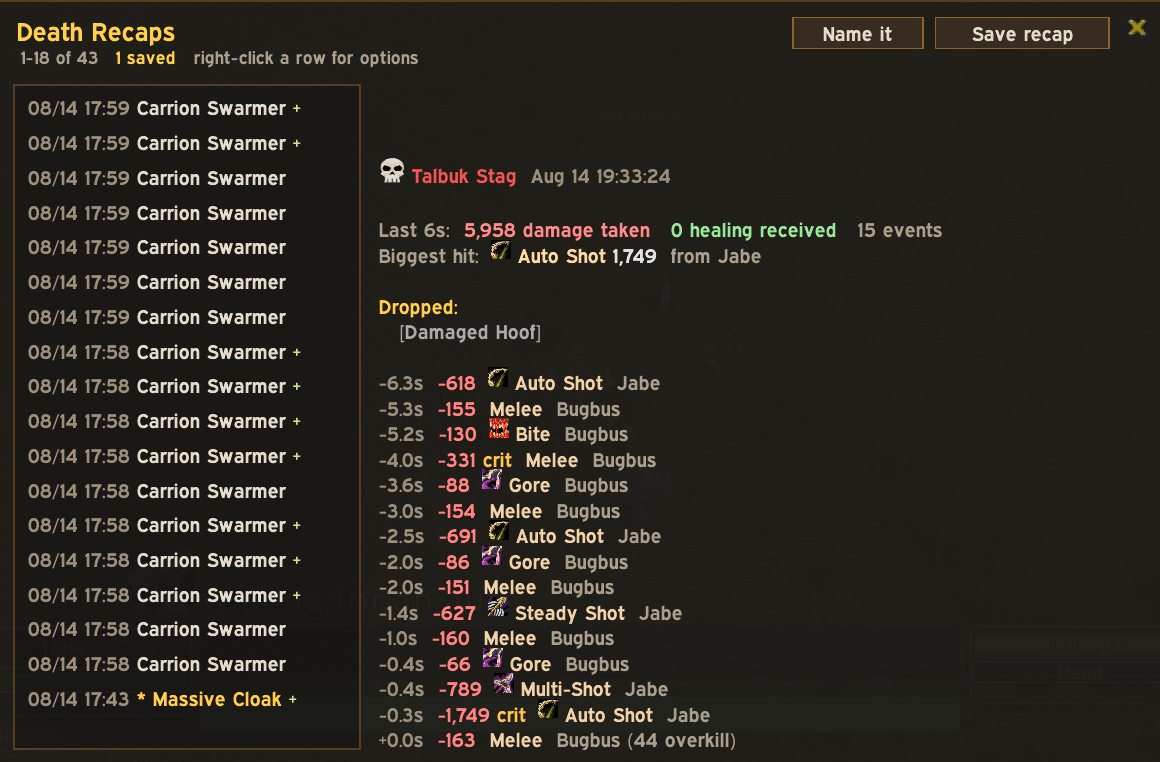
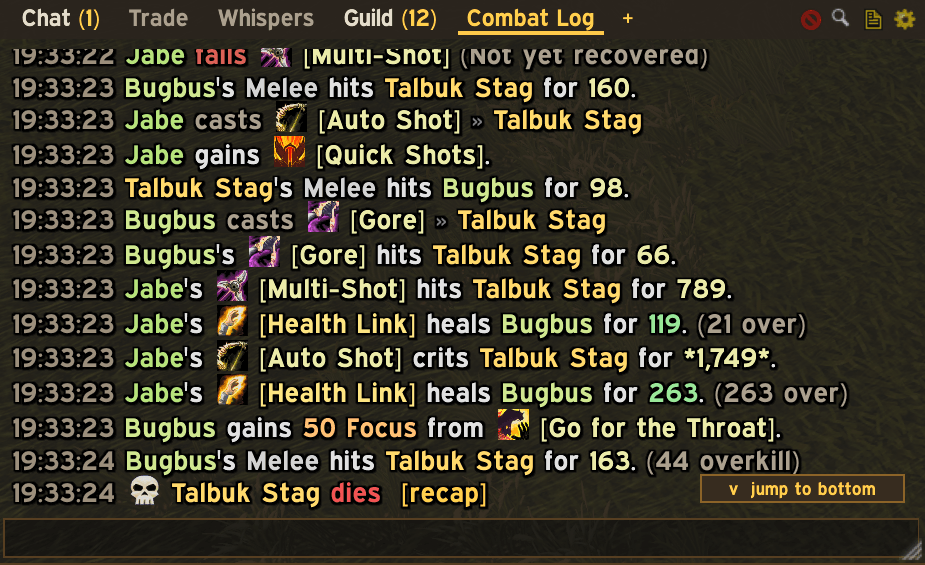
- Deaths carry a skull and a clickable recap link.
Lines render everything the log knows: crits, glancing and crushing blows, partial resists, blocks, absorbs, overkill, overheal, off-hand tags, dot and hot markers, school-coloured spell names and damage numbers, class-coloured names, raid target icons and spell icons — in compact arrow style or full sentences.
Windows. Create as many as you want, each with its own filter set: 11 event categories, source and target roles, minimum-amount thresholds, and per-spell allow/block lists. Presets get you started — My damage, Incoming, Healing, Pet only, Deaths, Just me & my pet. Per-window font size, opacity, max lines, fading, lock and click-through. Every window has a live search bar.
Taming the spam
A combat log in a capital city or a 25-man raid is unreadable by default. Log Lovers attacks that at the root instead of with endless spell blacklists:
- Involvement filter — Only me & my pet hides every event that doesn't touch you, no matter what the spell is called. It catches every stranger's buff, bandage, craft and pet heal without a single name in a list. Me, my pet & my group is also available, and your group's deaths always come through.
- Zone auto-rules — the involvement filter lifts itself automatically when you enter an arena, then restores when you leave. Battlegrounds, dungeons and raids are opt-in too. Filtered in the world, everything in the arena, no clicking.
- Group category limits — from party, raid and friendly players, show only the categories you choose. Keep their deaths and interrupts, drop their damage and casts.
- Professions, cooking and fishing — three separate switches for other players' tradeskill spam.
- Hide "begins casting" — shows completed casts only, halving cast lines.
- Raid mode — one button: just you and your pet, cast starts hidden, arena exception intact.
The chat
Log Lovers fully replaces Blizzard chat — optionally, and reversibly. Blizzard's frames are only hidden at runtime; your saved chat settings are never modified.
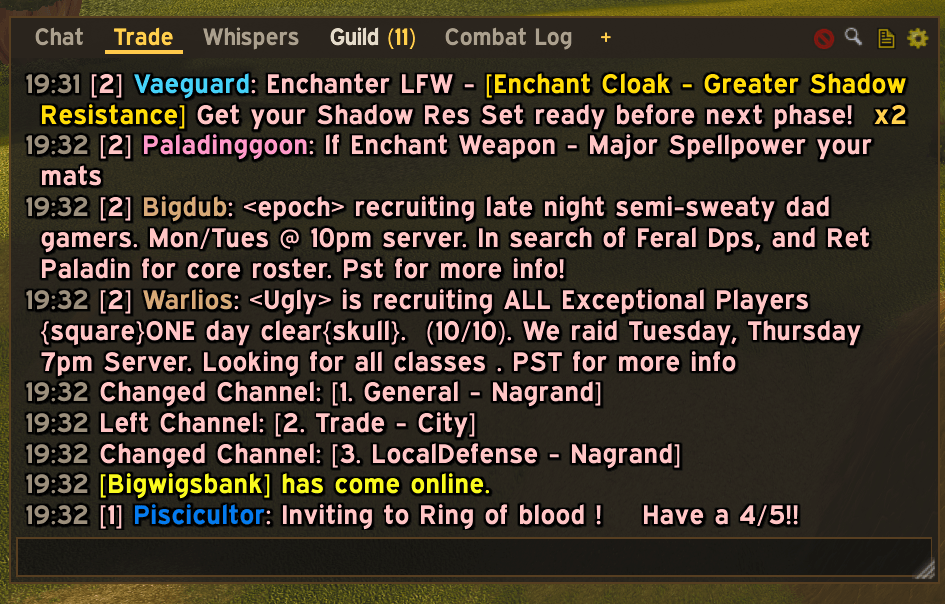
- Tabs live in the title bar. Each tab is a filter over roughly 20 message types plus per-channel checkboxes, so a "Trade + Guild" tab so you miss nothing is two clicks. Drag tabs to reorder them, or pull one off the window to float it. They wrap onto extra rows and show unread counts.
- The combat log docks here too, as a tab, exactly like the stock UI — and any combat window can dock in or break back out.
- Typing is completely native. The addon reskins and docks Blizzard's own edit box, so every slash command, macro, tab-completion, alt-arrow history, sticky channel and reply behaves exactly as it always has.
- Battle.net-style names — left-click a name to whisper instantly, shift-click or right-click for invite, who, friend, ignore and copy.
- Whispers raise an alert bar with a one-click pop-out, and every whisper line carries its own inline pop-out marker. A popped-out conversation is a per-person window with its own reply box.
- Channels and colours — one-click join and leave for every server channel, a box for custom channels, and colour overrides for every message type and every individual channel.
- History persists across reloads and relogging.
Analysis tools
- Death recap — a timeline of the final seconds before any death: every hit with its source and amount, heals received, auras gained and lost, and the killing blow. Hunter Feign Death is detected and flagged rather than counted as a death.
- Stats browser — damage done, healing done and damage taken, per fight or overall, drawn as class-coloured bars. Expand any unit for per-spell rows with total, count, average, max, crit rate and miss rate.
- Spell highlights — give key spells a custom colour, an alert icon and a sound wherever they appear.
- Capture and export — copy any window's filtered contents as plain text, or record every event to SavedVariables for offline analysis.
- Profiles — export your entire setup as a single shareable string and import someone else's. Imports are sandboxed: profile strings are pure data and cannot execute code.
Customisation
Fonts (built-ins, any custom font path, or LibSharedMedia if you have it), font sizes, outlines, line spacing, icon sizes, class and school colouring, background, border and title-bar colours with opacity, title-bar height and text size, timestamps (off, clock, milliseconds, or seconds into the fight), full or abbreviated numbers, and compact or sentence formatting.
Every option has a tooltip explaining exactly what it does.
Getting started
- Install and log in.
- Type
/llto open options — Log Lovers also appears under ESC → Options → AddOns. - Type
/ll meto filter the log down to you and your pet. It is the single biggest quality-of-life change the addon offers, and arenas will still show everyone.
Commands
/ll— open options/ll me— toggle "only my events" on every combat view/ll new— create a new combat window/ll chat— show or hide the chat window;onandofftoggle the whole chat module/ll stats— stats browser/ll deaths— death recap browser/ll search— toggle the search bar/ll copy— copy or export the main window's text/ll capture start/stop— record all events to SavedVariables/ll profile export/import— share or load a full settings profile/ll lock/unlock— lock or unlock all windows/ll clear,/ll wipe,/ll reset— clear windows, wipe the buffer, reset positions/ll help— full command list
Notes
- Built and tested for TBC Anniversary (2.5.x, Interface 20506 / 20505).
- Works alongside damage meters, boss mods and aura addons — Log Lovers only reads the combat log and draws its own frames, and other addons' chat output is captured and shown like any other message.
- To return to Blizzard chat, untick Hide Blizzard chat frames (or the chat module) and reload. Nothing about your Blizzard chat configuration is ever changed.
- Released under the MIT licence.
Log Lovers Team