
Lodestar Guide
- By
Screenshot 2026-08-27 172304.png
Screenshot 2026-08-27 172321.png
Screenshot 2026-08-27 172328.png
Screenshot 2026-08-27 172334.png
Description
Lodestar
Find what matters. Ignore the rest.
Lodestar is a decision engine for World of Warcraft. It looks at your Great Vault, professions, reputations, and the goals you actually care about, then ranks what is worth doing next. It is not a checklist of five hundred world quests.
CurseForge: Lodestar Guide GitHub: Co2Noss/Lodestar Wiki: Lodestar wiki Latest release: v1.5.6 Discord: Lodestar Guide PayPal: paypal.me/Co2Noss Ko-fi: ko-fi.com/co2noss GitHub Sponsors: github.com/sponsors/Co2Noss
What it does
On first login Lodestar asks what you care about: Great Vault and endgame, solo content, prey hunts, PvP, housing, professions, mounts, battle pets, reputation, questing, or gold making. Nothing is assumed. A goal that is off is hidden on purpose, so it will not silently drop recommendations you never chose to ignore. You can change this later in Settings.
Lodestar works on its own. Optional addons unlock extra behaviour if they are loaded:
- TradeSkillMaster, Auctionator, or RECrystallize — gold prices. Without one, gold making stays quiet.
- Raider.IO — colours the Mythic+ dashboard tile from your profile. Without it, that tile still shows the client's mythic rating.
- TomTom — multiple waypoints and a closest-arrow. Settings → Optional Addons can force TomTom, the client's map pin, or Auto.
- HandyNotes plus a notes pack — nearby rares those packs mark. HandyNotes by itself has no coordinates; packs such as Midnight and Silvermoon (and many others) supply the pins. Lodestar ranks rares, not treasures or other map marks. Known rewards stay hidden if the pack hid them. Without a pack, Lodestar stays quiet about rares.
- ElvUI — the ElvUI theme reads ElvUI's live backdrop, texture, and font. A near-black ElvUI border falls back to a lighter grey.
- GW2 UI — Auto follows GW2 UI when it is loaded. The GW2 theme uses GW2 UI's gold and font when
GW2_ADDONexposes them. - W2UI — Auto follows W2UI when it is loaded. The W2UI theme reads that addon's live theme tokens.
- RealUI — Auto follows RealUI when it is loaded. The RealUI theme reads
Aurora.Colorwhen Aurora is there. - Great Vault Key Info — Champion/Hero ranks in the client's Great Vault window. Dashboard hover uses named keys and reward item levels the client already has.
From there it builds a plan. The left menu is workspaces (Dashboard, planning, tracking, account), not a second copy of Today's tabs:
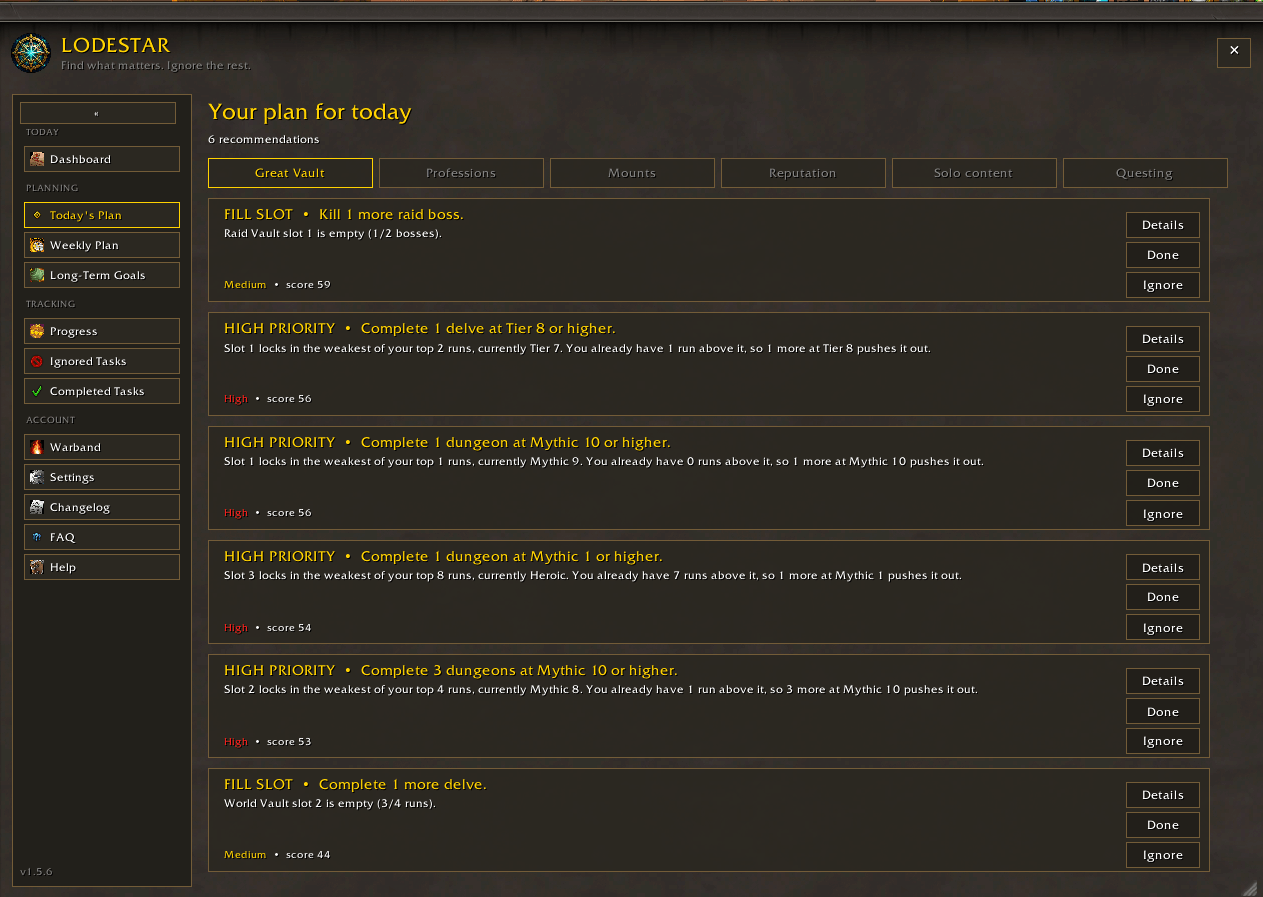
- Today's Plan — ranked recommendations, split into tabs (Great Vault, Professions, Reputation, Gold, Solo content, Questing, PvP, Housing, Battle Pets). Only categories with work appear. The tab you were last on is remembered. Bountiful delves are named from the map when the client marks them. Questing ranks the current campaign, quests the client marks important (Prey and Voidcore unlocks included), and quests already in the log; if those are empty it asks you to check the map. Prey hunts are a goal; they fill the World Vault and drop gear. PvP ranks weekly Conquest the client still needs. Housing ranks a missing house, unfinished neighborhood initiatives, and weekly housing quests already in the log (Housewarming and the like). Lodestar does not invent housing quest IDs. Battle Pets ranks locked slots, an empty team, and pet battle quests already in the log. Lodestar does not invent a catching list.
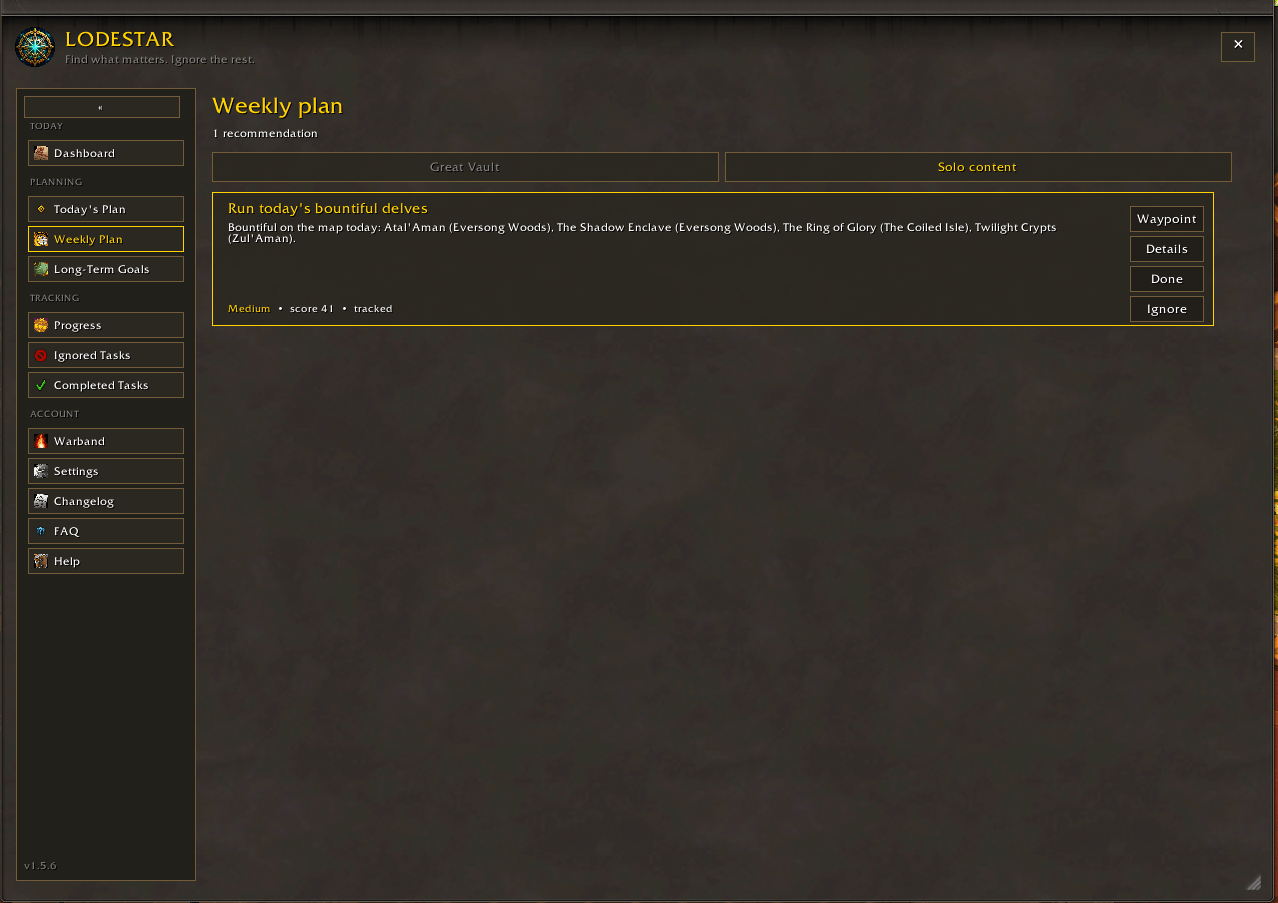
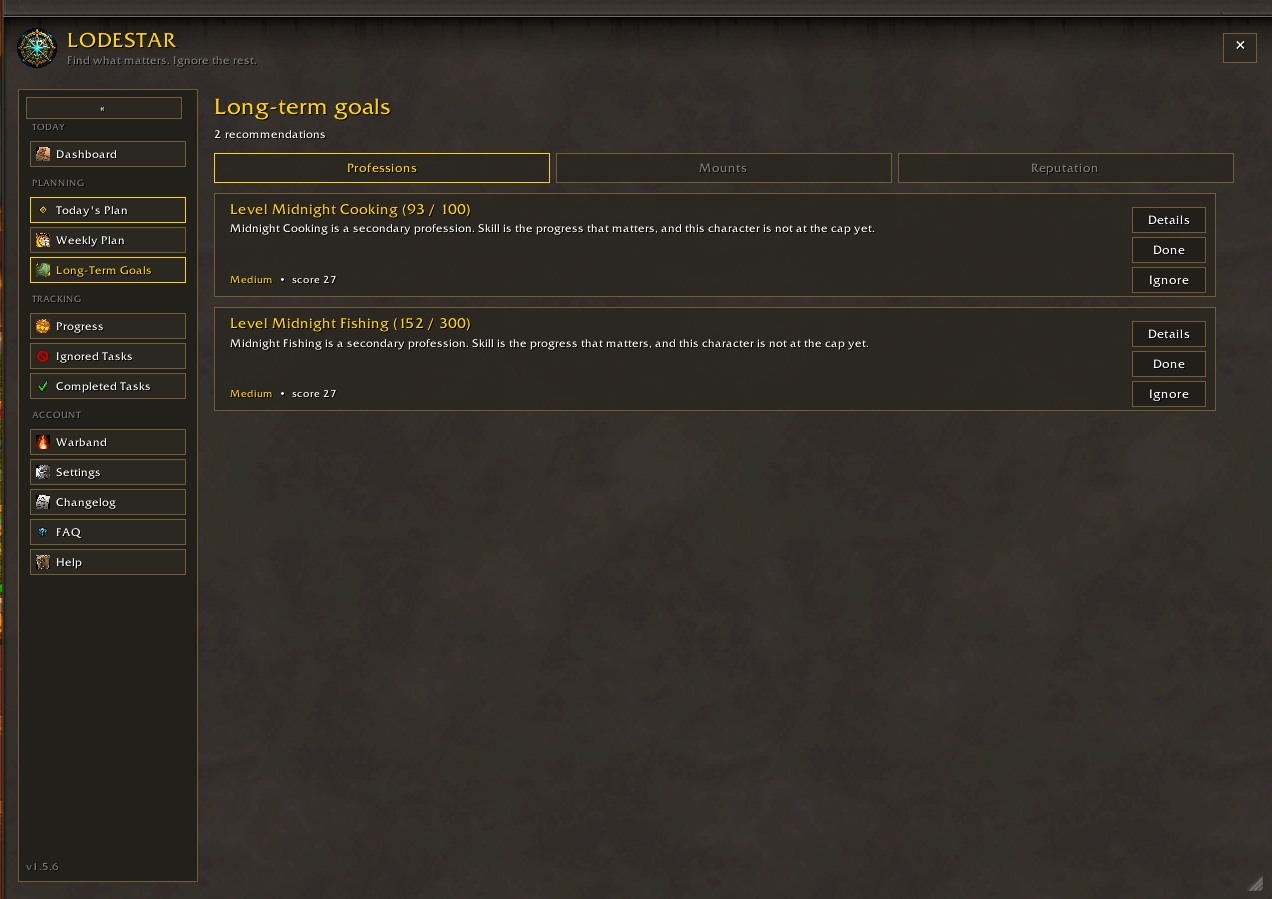
- Weekly Plan / Long-Term Goals — the same cards, split by whether they reset this week or wait.
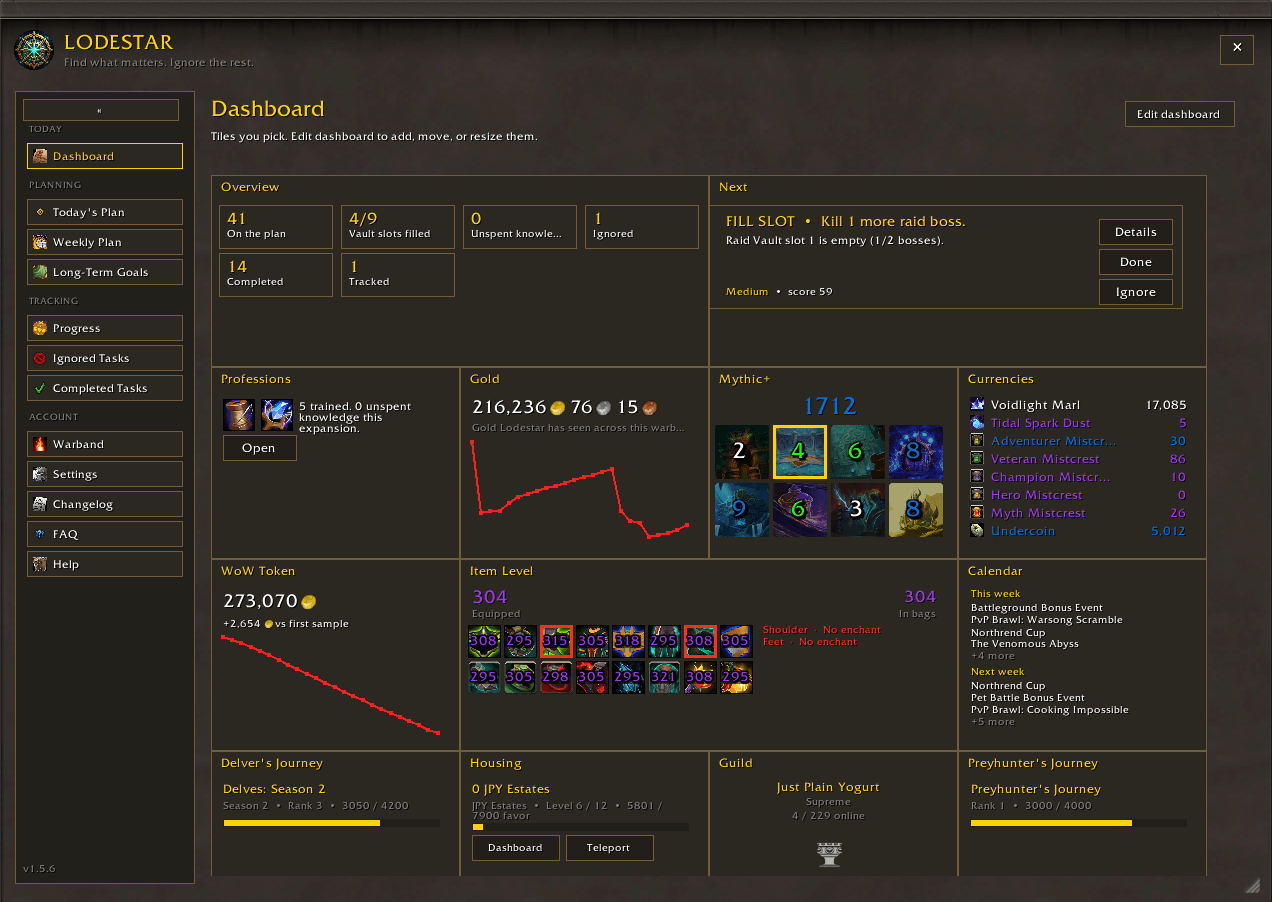
- Dashboard — snapshot of the plan as widgets you can add, remove, resize, and drag. Edit dashboard to pin Great Vault, WoW Token, weekly reset, tracked work, warband, HandyNotes rares, Mythic+, gold, currencies, PvP, item level, readiness, housing, battle pets, calendar, guild, Delver's Journey, or Preyhunter's Journey. Other addons can register tiles with
Lodestar:RegisterWidget. Open on Professions still opens the profession tabs. - Progress — activities you tracked. Compact mode shows the same list.
- Gold making — gathering you have trained, cloth from humanoids, and a few pet farms, priced from TSM, Auctionator, or RECrystallize. Settings → Optional Addons picks the source.
- Warband — every character Lodestar has seen on the account, with vault and knowledge status. Track or untrack alts when more than one character is saved.
- Settings — Goals, Optional Addons, Reputation, Appearance, Compact, and Layout on their own tabs.
- Changelog — the last five versions.
- FAQ — why something is missing, and what Lodestar is not.
- Help — commands, debug isolation, and copy-to-clipboard links to Discord and GitHub.
Each recommendation shows priority and score. Priority is High, Medium, or Low. Unspent knowledge (while a tree still has ranks to buy) and weekly lockouts are High. Gathering and unfinished secondaries are Medium. Treasures, HandyNotes rares, catch-up, dungeon mount farms, and unfinished reputations are Low because they wait. Score still decides the order.
There is no time-budget slider. Lodestar ranks everything that matches your goals instead of hiding whatever does not fit a session length.
Compact mode
A small always-on window of the activities you tracked.
- Toggle it in Settings, with
/ls compact, or by right-clicking the minimap button. - Click an entry for details. Double-click to open Progress. Main opens the full window.
- Stays up while the main window is open. Collapses to the title bar in combat.
- Position and width are saved.
Looks
- Blizzard uses the modern panel art from Dragonflight and the client’s own font colors.
- ElvUI reads ElvUI’s backdrop, texture, and font when ElvUI is loaded. A near-black ElvUI border falls back to a lighter grey.
- GW2 UI and RealUI have their own palettes. Auto follows them when those addons are loaded. Live colours come from
GW2_ADDONandAurora.Colorwhen those addons expose them. - W2UI has its own palette. Auto follows W2UI when it is loaded and reads that addon's live theme tokens.
- All The Things — With ATT loaded, Lodestar ranks mounts, appearances, achievements, and watched quests you track there.
- Can I Mog It — When loaded, Lodestar nudges learnable appearances already in your bags.
- Ellesmere and Minimal are standalone palettes.
- Every color (accent, text, background, panels, cards, borders, warnings, muted text) can be changed in Settings → Appearance. Your colors survive switching themes. The minimap button stays on the minimap unless you unlock it there.
The window is draggable and resizable. Size and position are saved.
Commands
| Command | What it does |
|---|---|
/ls or /lodestar |
Open or close Lodestar |
/ls compact |
Toggle compact mode |
/ls compact single |
Toggle single-recommendation compact mode |
/ls theme auto |
Follow W2UI, GW2 UI, RealUI, ElvUI, or Ellesmere when loaded (blizzard, elvui, ellesmere, gw2, w2ui, realui, minimal also work) |
/ls debug |
Disable every other addon and reload, to see if an error is Lodestar |
/ls debug off |
Restore the addons /ls debug turned off |
/ls reset |
Wipe saved settings and reload |
Treasure cards with a known location have a Waypoint button. Settings chooses Auto (TomTom when loaded), TomTom, or the client's single map pin. HandyNotes rares get the same button; treasures and other map marks stay off that card. Bountiful delves pin from the map POIs when the client names them. Midnight gathering farms have a Map button for the zone circuit.
Left-click the minimap button for the full window. Right-click for compact mode.
What it is not
- Not a replacement for your quest tracker.
- Not a list of everything available in the game.
- Profession catch-up from Patron Orders cannot be counted from the client, so Lodestar describes it instead of inventing a number.
Feedback
Questions and install help: Discord (/faq, or open a ticket). File reproducible bugs on GitHub. Include your class/spec, the theme you use (Blizzard, ElvUI, or other), and what you expected versus what happened. If you are not sure Lodestar is the addon erroring, /ls debug isolates it.
Lodestar Guide Team
