


Lockout Ledger
- By
Description
Raid and heroic lockouts for every character, shared across your accounts and friends.
Lockout Ledger tracks the raid and heroic dungeon lockouts of all your characters in one window. Optionally, it shares them with your other account or with other players through a private sync group.
Built for TBC Classic Anniversary (2.5.5 / 2.5.6).
Why this addon exists
I play two WoW accounts, each with several raiding characters. By mid-week it gets hard to remember which characters are saved to which raids, and logging in and out of each one to check is tedious.
The game shows lockouts one character at a time, and addons can't read data from another account. Lockout Ledger solves both problems:
- One view for the whole account. Every character's lockouts are recorded when you log in and shown together.
- Sharing across accounts. A private, invite-only channel lets your other account, or friends and raid members, exchange lockout data automatically.
Features
Lockout tracking
- Records raid and heroic lockouts for every character on your account each time you log in, enter the world or kill a boss.
- Stores the exact reset time for each lockout, so other characters' lockouts expire correctly without logging them in.
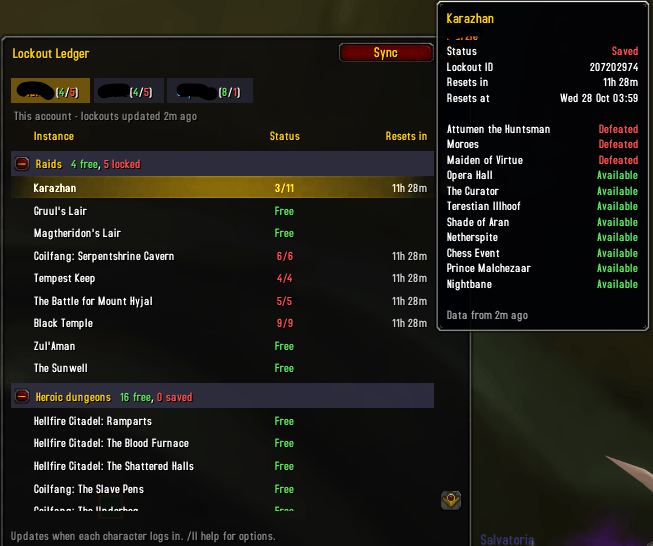
- Covers all nine TBC raids and all sixteen heroic dungeons, including bosses defeated and lockout IDs.
The Lockout Ledger window
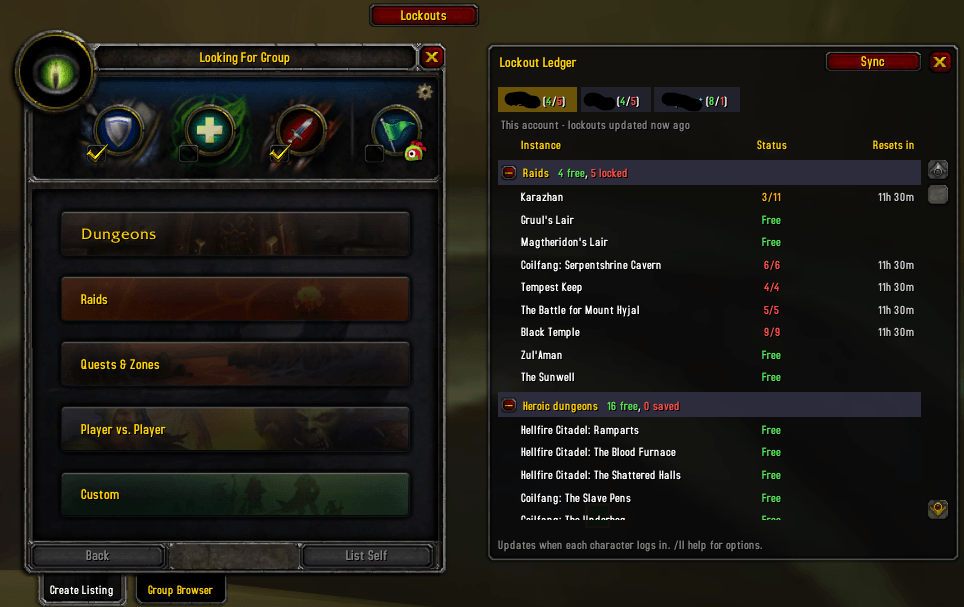
- One tab per character. Your current character comes first, then the rest alphabetically. Each tab shows a quick raid summary: (free/locked).
- Raids and Heroic dungeons sections. Each section can be collapsed and shows its own free and saved counts.
- Status for each instance: Free, bosses killed (for example
4/11), or Saved, plus the time until reset. - Detailed tooltips: lockout ID, reset date and time, and each boss's status.
- Fits smaller screens. The window is fixed-width, tabs wrap onto new rows, and the list scrolls once it gets long.
- Hide characters you don't care about with Shift-right-click on their tab.
Fits into your UI
- Docks beside the Looking for Group window when you open it, so lockouts are visible while you build or join groups.
- Minimap button using LibDataBroker and LibDBIcon. It works with minimap button collectors and broker display bars (Titan Panel, ElvUI and similar).
- Opens beside the minimap button by default. Drag the window anywhere and it remembers the position.
Sync groups (optional)
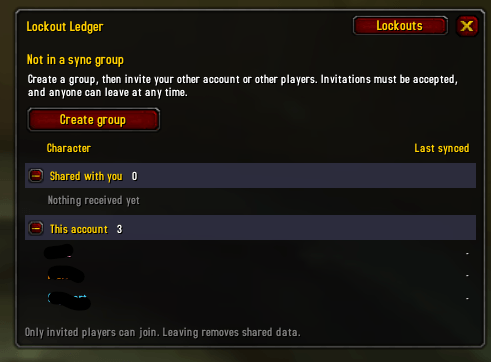
- Create a private group and invite players by name or by targeting them. The addon generates a hidden channel with a random name and password.
- Invitations must be accepted. Nobody can add you to a group without your agreement. Accepting applies to every character on that account.
- Automatic exchange when members log in and whenever lockouts change. Members also pass on data they hold for players who are currently offline.
- Signed messages. Every message is signed with a secret shared only through invitations, so data from anyone outside the group is ignored. Data is signed, not encrypted.
- See how fresh the data is. Shared characters have blue tabs and show when they were last synced and who it came from. The Sync view lists every shared character with its last sync time.
- Leave at any time. Leaving tells the group to remove your characters and deletes everything you received. Hidden characters are never shared.
Getting started
- Install the addon and log in on each of your raiding characters once.
- Open the window with the minimap button or
/ll. - To share with your other account or friends, click Sync → Create group, then Invite…. The other player needs Lockout Ledger installed and accepts the invitation popup.
Slash commands
| Command | Description |
|---|---|
/ll |
Toggle the window |
/ll raids, /ll heroics |
Collapse or expand a section |
/ll rows <n> |
Visible rows before the list scrolls (default 16) |
/ll hide <name>, /ll show <name> |
Hide or unhide a character |
/ll minlevel <n> |
Minimum level to list a character (default 70) |
/ll realms |
Show characters from all realms and factions |
/ll dock |
Toggle docking beside the LFG window |
/ll anchor |
Open beside the minimap button again after dragging the window |
/ll minimap |
Toggle the minimap button |
/ll sync |
Open the sync view |
/ll create <name> |
Create a sync group |
/ll invite [name] |
Invite a player (or your target) |
/ll leave |
Leave the sync group |
/ll syncnow |
Request a sync from the group |
/ll debug |
Print diagnostic information |
Known limitations
- A character's data is only as fresh as its last login. Lockouts only change while you play that character, so this is accurate in practice.
- Sync works between characters on the same realm and faction.
- Each account can be in one sync group at a time.
- There is no way yet to remove another member from a group. To remove someone, create a new group and re-invite the others.
- Sync data travels over a hidden custom chat channel. If Blizzard restricts addon messages on custom channels in a future patch, sync may stop working until the addon is updated.
How this addon was made: vibe coded
This addon was "vibe coded". All of the code was written by an AI model (Anthropic's Claude) through conversation.
I'm a software developer by trade, with over 20 years of experience, mostly in .NET. For this project I deliberately took the role of product owner rather than programmer. My part was to:
- define the goals and the problem to solve,
- make the product decisions: features, layout, sync design and security trade-offs,
- review the proposals and push back where needed,
- test the result in game and feed back what worked and what didn't.
The AI wrote the Lua, chose the libraries, and designed and tested the sync protocol outside the game.
What this means for you:
- The code has been reviewed and tested, but not to the standard of a long-established addon. Expect rough edges, particularly in the first releases.
- Bug reports are very welcome. Please include the output of
/ll debugand any Lua error messages. - The project is also an experiment in what this way of working can produce. Feedback on that is welcome too.
Credits
- Embedded libraries: LibStub, CallbackHandler-1.0, LibDataBroker-1.1, LibDBIcon-1.0, AceComm-3.0, AceSerializer-3.0 and ChatThrottleLib. Thanks to their authors.
- Banner title set in Cinzel (SIL Open Font License).
Lockout Ledger Team
