LoadOutCaller
- By
Stop pulling bosses with your questing build! LoadOutCaller calls out your active talent loadout on instance enter or ready check - text, chat, TTS voice and sound. Per-mode config for Mythic+, Raids, Delves, Arena 2v2/3v3 and Battlegrounds.
loadoutcaller-4.jpg
loadoutcaller-2.jpg
loadoutcaller-1.jpg
loadoutcaller-3.jpg
Description
LoadOutCaller
Never pull a boss with your questing build again.
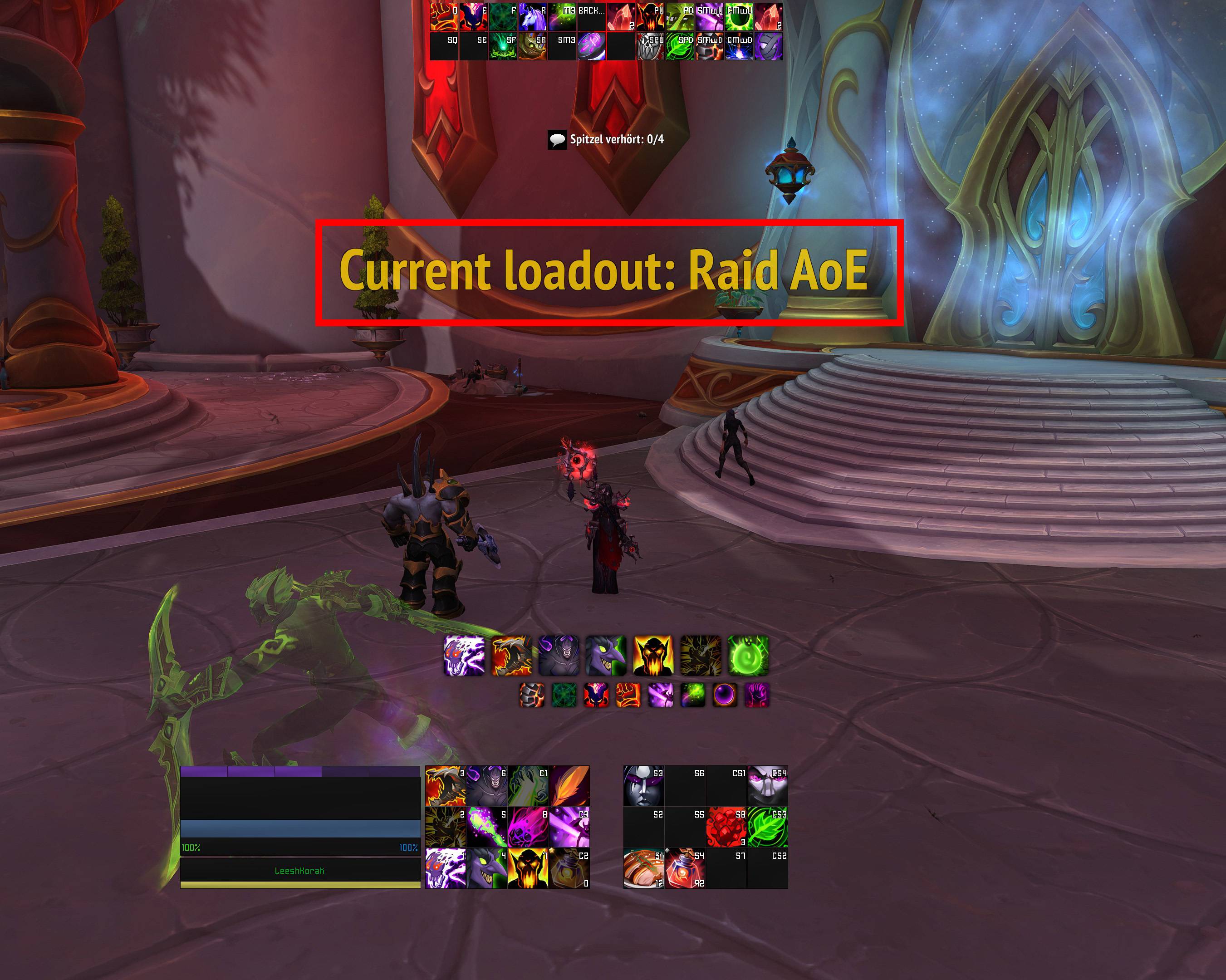
LoadOutCaller announces your currently selected talent loadout the moment you enter a Mythic+ (M+) dungeon, a raid, a Delve, an arena, or a battleground - when a ready check starts, when the PvP match-start countdown begins, or when you switch specialization. It also warns you if your assigned group role doesn't match your spec. The loadout name is spoken out loud via WoW's built-in text-to-speech, written to chat, and shown as large text on your screen - so you notice before the pull that you're still on the wrong build.
How it works (read this first!)
LoadOutCaller does not know which loadout is "right" for which content. It just compares two things:
- The kind of instance you entered (dungeon / raid / delve / arena 2v2 / arena 3v3 / battleground, plus optionally open world with War Mode on/off - determined by WoW's
instanceType, group size, and War Mode state). - The name of your currently active loadout (the one you picked in the talent UI).
For each mode there is a skip keyword. The rule is dead simple:
If your active loadout's name contains the skip keyword for this mode (case-insensitive, substring match), the announcement is silently skipped - LoadOutCaller assumes you're on the correct build.
Otherwise, it warns you - because you probably forgot to switch.
So you have to line up the two sides yourself. Two equally valid ways:
- Name your loadouts to match the default keywords (
M+,Raid,Delves,2v2,3v3,BG, plusWarmode/Open Worldif you enable the open-world modes) - e.g. name your raid loadout"Fury Raid", your M+ loadout"Fury M+", your BG loadout"Fury BG". The defaults then Just Work™. - Or change the keywords to match your naming scheme - if you call your raid loadout
"Fury Council"and your M+ loadout"Fury Trash", set the raid skip keyword toCounciland the dungeon skip keyword toTrash.
If you do neither, you will get warned every single time you enter instanced content, because no loadout name will ever match any keyword. That's a feature, not a bug - but people tend to blame the addon for "spamming" when they haven't aligned their loadout names with the keywords. Align them once and you're done.
Features
- Eight independent modes: Mythic+ / Dungeons, Raids, Delves, Arena 2v2, Arena 3v3, Battlegrounds, plus two optional open-world modes (War Mode on / off) - each with its own triggers and skip keyword. PvE modes (dungeon/raid/delve) support both instance-enter and ready-check triggers; PvP modes support instance-enter and match-start countdown (fires when the arena/BG gates-open countdown begins). Arena 3v3 covers rated, skirmish, and Solo Shuffle (all 6-player brackets); Arena 2v2 covers rated and skirmish.
- Optional open-world tracking (off by default): separate modes for "open world with War Mode enabled" and "open world with War Mode disabled" let you announce your build when zoning into the world map - useful if you run a dedicated War Mode / PvP-flagged loadout vs. a questing / daily build and want a reminder before you get ganked with the wrong talents.
- Clean settings hierarchy: each mode and output area has its own page under
Esc -> Options -> AddOns -> LoadOutCallerin the sidebar, so you only see the controls relevant to what you're editing. - Spec / role safety net: warns when your assigned group role (Tank/Healer/Damage) doesn't match your current spec's natural role (e.g. signed up as Tank but currently in Frost DK). Also announces your loadout on spec switch, re-applying the skip-keyword logic.
- Four output channels: on-screen banner, chat message, spoken TTS, and a short sound alert - each independently toggleable.
- Customizable banner: configurable display duration (1-15s) and font size (12-64pt), repositionable via Blizzard's Edit Mode.
- Sound alerts: curated Blizzard sound presets (Ready Check, Raid Warning, Alarm Clock, …). If LibSharedMedia-3.0 is installed, its sounds are offered too - but it's not a dependency.
- Smart skip: if your active loadout already contains a keyword (e.g.
M+in dungeons,Raidin raids,2v2in 2v2 arena), the announcement is silently skipped for that mode. Keywords are fully configurable and case-insensitive, and every mode has a one-click Reset to default button. - Per-trigger "always announce" flags per mode if you want the reminder unconditionally (e.g. on every raid ready check).
- Queue-pop announcements: fires the moment a queue invite appears - PvP (Battlefield-Status
confirmevent for Arena 2v2/3v3 and Battlegrounds) and PvE (Dungeon Finder / LFR viaLFG_PROPOSAL_SHOW). This is the earliest possible moment to switch builds, ~60s before the actual instance enter. M+ and other premade groups don't fire this event by design. - Anti-duplicate cooldown: multiple triggers firing within a few seconds (common on arena entry: invite + enter + countdown) only produce one announcement.
- Customizable colors: pick the on-screen banner color and the chat-message color independently (color picker, defaults to gold).
- Draggable display frame integrated with Blizzard's Edit Mode - no clunky lock/unlock commands needed, just Esc -> Edit Mode.
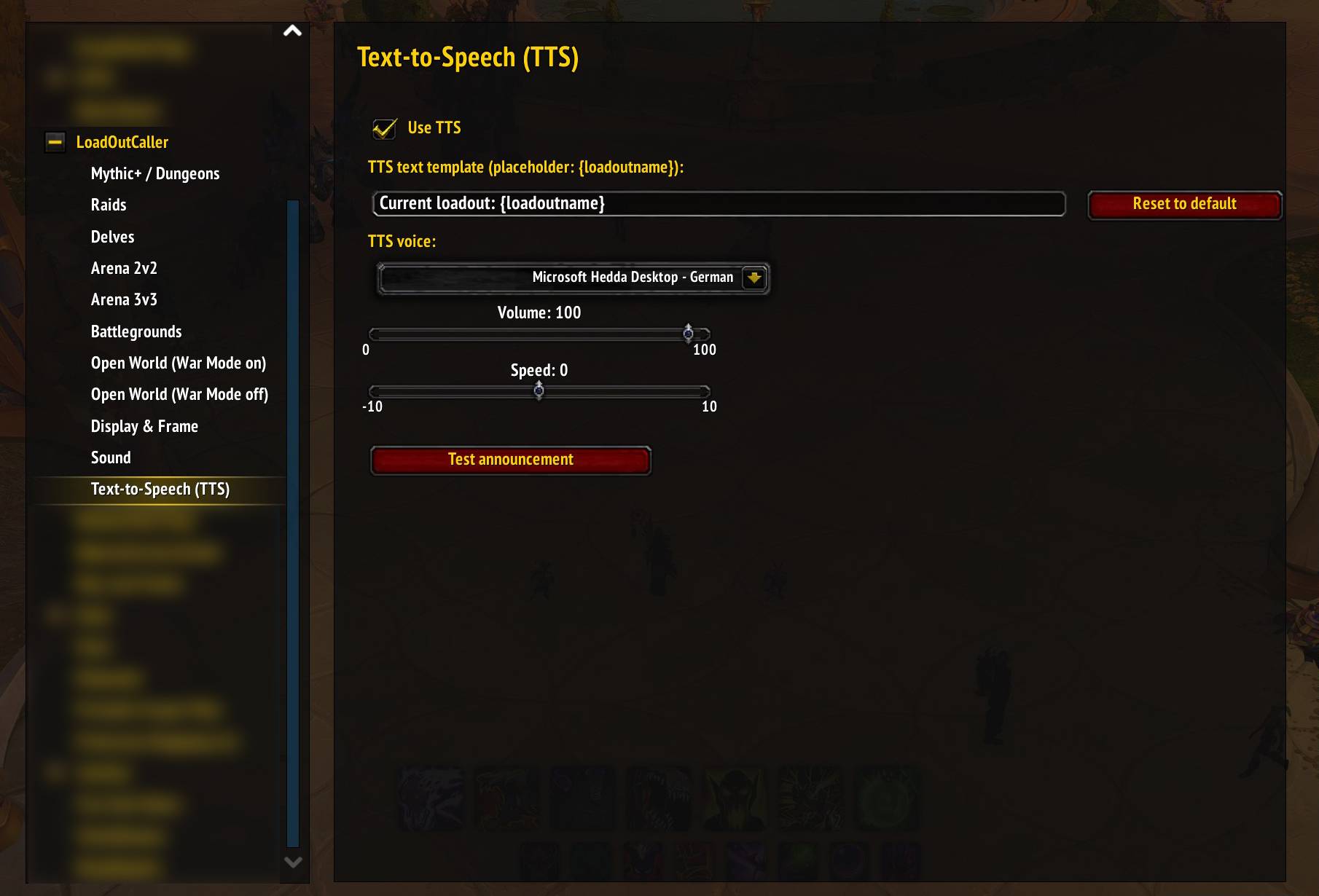
- Fully configurable TTS: voice, volume, speed, and a custom message template with a
{loadoutname}placeholder. - 11 locales: English, German, French, Spanish (ES+MX), Italian, Portuguese (BR), Russian, Korean, Simplified + Traditional Chinese.
- Improved Talent Loadouts (ITL) support: if ITL is installed, LoadOutCaller reads the real ITL loadout name. Nothing to configure - works out of the box when both addons are loaded.
Installation
CurseForge
Install via the CurseForge app or download from the addon's CurseForge page and extract into:
World of Warcraft\_retail_\Interface\AddOns\Manual
- Download the zip.
- Extract so that
LoadOutCaller\LoadOutCaller.tocends up inWorld of Warcraft\_retail_\Interface\AddOns\LoadOutCaller\. - Restart WoW (or
/reloadif already running) and enable LoadOutCaller in the AddOns list.
Usage
Slash commands
| Command | Effect |
|---|---|
/lc or /loadoutcaller |
Open the options panel |
/lc test |
Trigger a test announcement using your current loadout |
/lc lock / /lc unlock |
Fallback to lock/unlock the display frame without Edit Mode |
/lc help |
List commands |
Moving the on-screen banner
Press Esc -> Edit Mode. The banner appears automatically, drag it wherever you want, exit Edit Mode - position is saved. (You can also open Edit Mode directly from the Display & Frame subcategory with the Open Edit Mode button.)
Options
The panel lives at Esc -> Options -> AddOns -> LoadOutCaller and is organised as a sidebar tree:
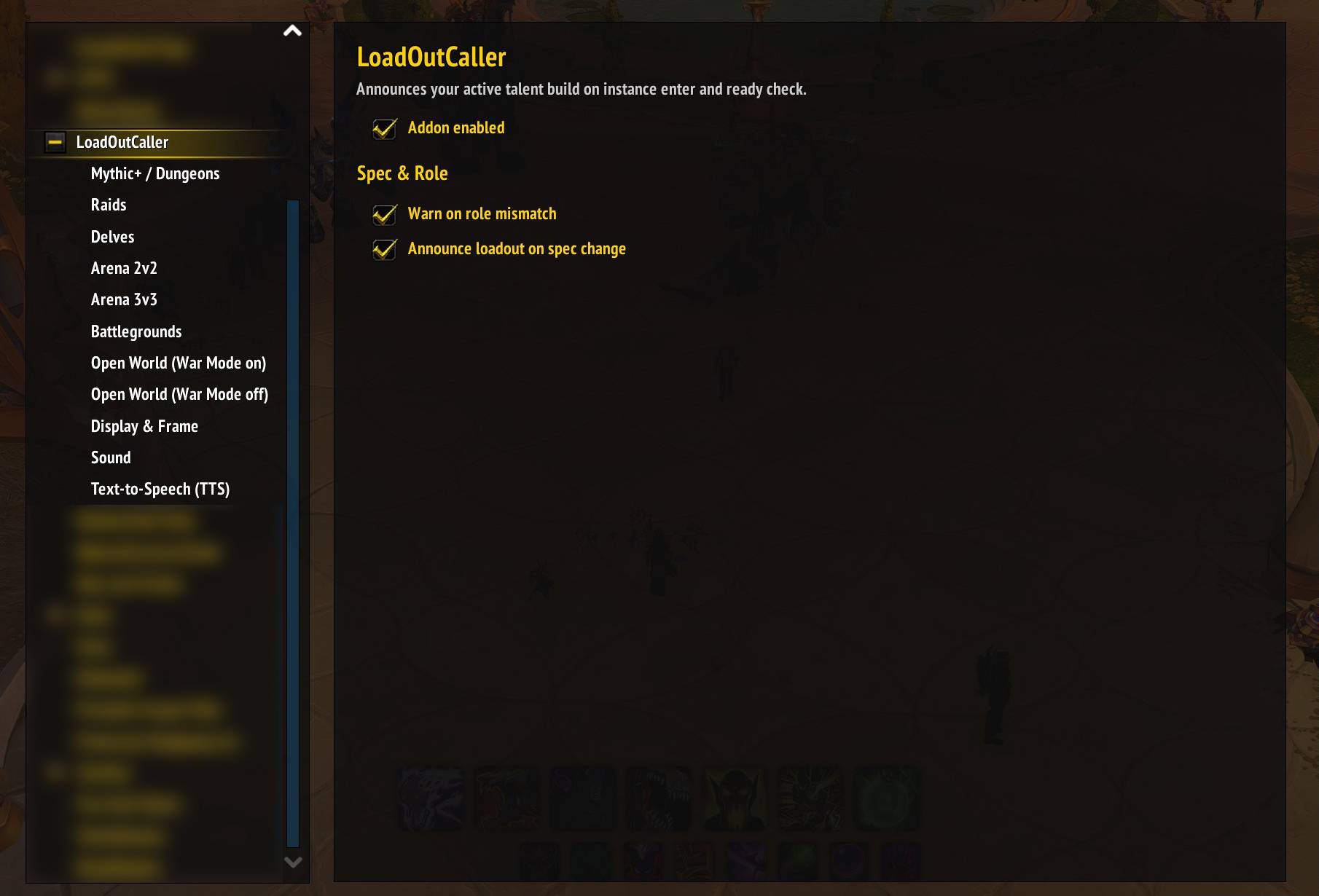
- LoadOutCaller (main page) - master switch, role-mismatch warning, loadout-on-spec-change toggle.
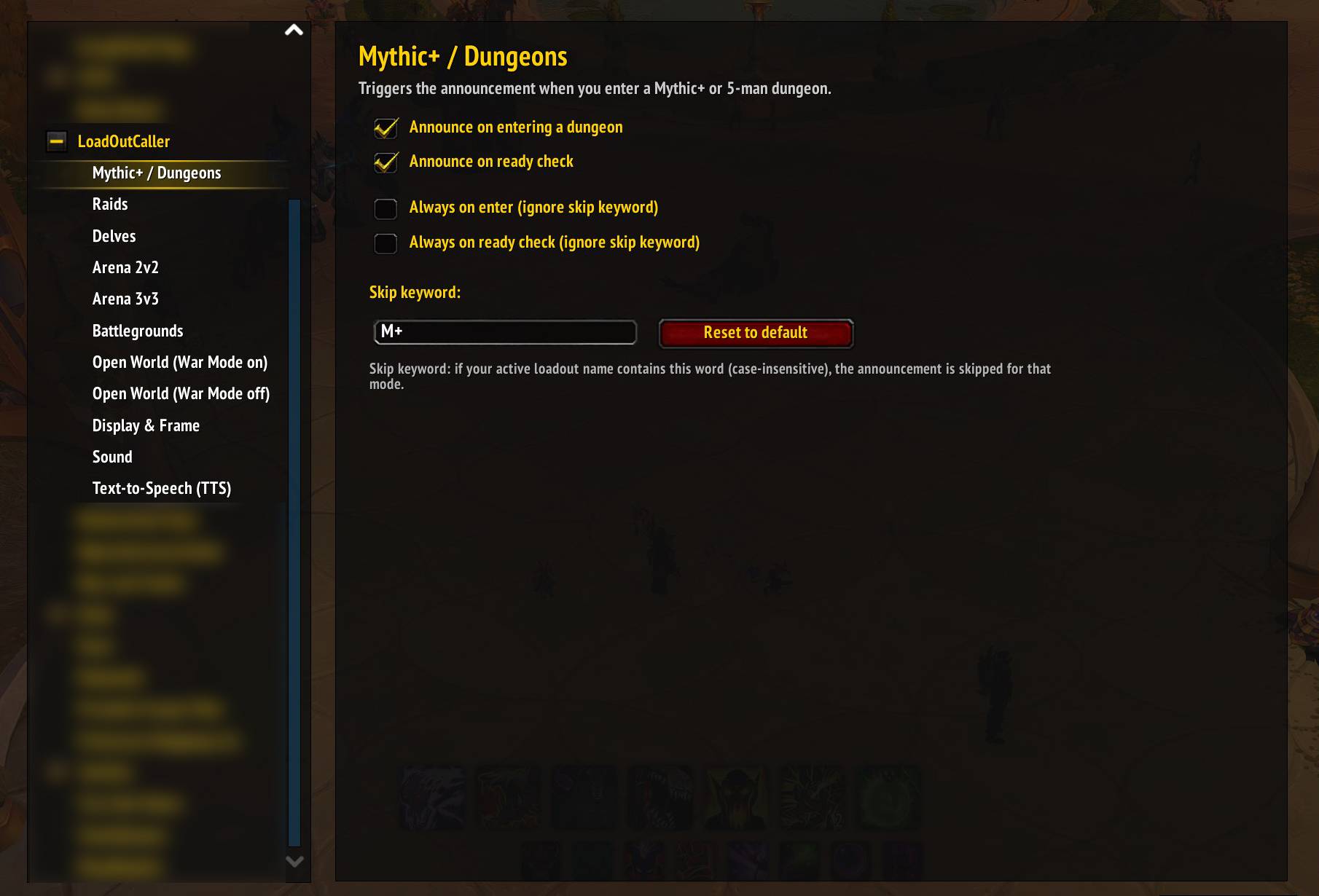
- Mythic+ / Dungeons, Raids - per-mode triggers: Announce on entering, Announce on ready check, Announce on Dungeon Finder / Raid Finder invite (LFG queue pop, fires only for random/heroic dungeons and LFR/Flex - not premade or M+), each with its own Always on … override. Plus Skip keyword (defaults
M+,Raid) with Reset and hover-tooltip explanation. - Delves - same triggers minus the LFG-invite (Delves don't go through the Dungeon Finder).
- Arena 2v2, Arena 3v3, Battlegrounds - per-mode triggers: Announce on entering, Announce on match start countdown, Announce on queue invite (fires the moment the "Enter Battle" dialog appears), each with its own Always on … override. Plus Skip keyword (defaults
2v2,3v3,BG) with a Reset button. - Open World (War Mode on), Open World (War Mode off) - opt-in (both off by default): fire the announcement when you zone into the open world with the respective War Mode state. Per-mode triggers: Announce on entering, Always on enter, plus Skip keyword (defaults
Warmode,Open World) with a Reset button. Useful if you keep distinct loadouts for War Mode PvP vs. questing. - Display & Frame - message template (with
{loadoutname}placeholder, used by banner / chat / TTS alike; Reset button restores the default "Current loadout: {loadoutname}"), on-screen text toggle, chat toggle, banner duration (1-15s), font size (12-64pt), on-screen text color picker, chat text color picker, Edit Mode button. - Sound - sound-on-announce toggle, alert sound dropdown (Blizzard presets + LibSharedMedia if installed), test button.
- Text-to-Speech - Use TTS, voice dropdown, volume, speed, test button. (The spoken text uses the same template as the banner / chat - configured in Display & Frame.)
Every Skip-keyword input has a tooltip on hover explaining the case-insensitive substring match.
Examples of the skip-keyword rule
You name your M+ loadout "Fury M+" and your raid loadouts per-boss ("Fury Council", "Fury ST", …).
- Mythic+ dungeon,
"Fury M+"active → silent (name containsM+, clearly the right build). - Mythic+ dungeon,
"Fury Council"active → announced (name doesn't containM+, so you probably forgot to switch). - Raid boss ready check, loadout =
"Fury Council"for that fight:- With Always on ready check off: silent (name doesn't contain
Raid, but you still won't get a nudge - probably fine, you just swapped). - With Always on ready check on: announced every time (recommended if you use a per-boss naming scheme, so you hear the loadout name before every pull regardless of skip keyword).
- With Always on ready check off: silent (name doesn't contain
- Arena 2v2, loadout =
"Fury 2v2"→ silent (contains2v2). Loadout ="Fury M+"→ announced. - Open World with War Mode on (opt-in, loadout =
"Fury Warmode PvP") → silent (containsWarmode). Loadout ="Fury M+"→ announced (you'd get ganked with the wrong build).
The per-mode Always on … toggles let you force announcements regardless of the skip keyword - useful for raid ready-checks where you actually want to hear the build name every pull.
Requirements
- World of Warcraft Retail, The War Within / Midnight (Interface
120001). - TTS works out of the box using Blizzard's built-in voice engine; no external dependencies. Requires at least one Windows TTS voice installed (check
Time & Language -> Speechin Windows).
Compatibility with Improved Talent Loadouts
Improved Talent Loadouts stores many per-spec profiles client-side and swaps talents into a single shared Blizzard config called "[ITL] Temp". Without integration, LoadOutCaller would always announce that placeholder name. When ITL is loaded, LoadOutCaller queries ITLAPI:GetCurrentLoadout() first and falls back to the Blizzard API otherwise - your ITL profile name flows into the skip-keyword check and the spoken / on-screen / chat output exactly like a native Blizzard loadout. No configuration needed.
Languages
| Locale | Status |
|---|---|
| enUS / enGB | base |
| deDE | native |
| frFR | translated |
| esES / esMX | translated |
| itIT | translated |
| ptBR | translated |
| ruRU | translated |
| koKR | translated |
| zhCN | translated |
| zhTW | translated |
Translations for non-English locales were done with reasonable care but have not been reviewed by native speakers for every language. Native-speaker corrections welcome - strings live in Locales/<locale>.lua, keyed by their English original.
License
MIT
Credits
Author: Comag-Malfurion (Have Fun)
The LoadOutCaller Team