Loadout Pilot
- By
Automatically switch spec, loot spec, talents and gear by content, with per-dungeon overrides for Normal, Heroic, Mythic 0 and Mythic+.
Loadouts.png
Override.png
Principal.png
Description
Loadout Pilot
Set your rules. Play your content. Loadout Pilot handles the rest.
Loadout Pilot is a World of Warcraft Retail addon that automatically follows the content you are playing with the playing specialization, Loot Specialization, saved Blizzard talent loadouts, and equipment sets that you already chose.
The philosophy is intentionally simple:
You decide the strategy. Loadout Pilot remembers when to use it.
Loadout Pilot does not try to decide what is best for your character. It does not calculate BiS, choose talents for you, inspect raid or dungeon loot tables, or recommend an "optimal" Loot Specialization. You create your setup using Blizzard's normal systems, define when each setup should be used, and Loadout Pilot handles the transitions whenever World of Warcraft allows them.
Loadout Pilot 2.0
Version 2.0 is the largest Loadout Pilot update so far.
The addon has evolved from a simple context-based loadout switcher into a more complete rules and automation system, while keeping the original goal: configure your character once and spend less time manually changing specialization, talents, equipment, and Loot Specialization every time the type of content changes.
Major additions in 2.0 include:
- Raid Boss Loot Spec Overrides
- Independent AUTO / NOTIFY / OFF modes
- A scalable Raid -> Boss -> Loot Spec manager
- Improved Dungeon / Mythic+ overrides
- Rule inheritance and source tracking
/lpilot explain- Configuration Import / Export
- Event History for troubleshooting
- Improved role-safe specialization automation
- Better solo vs. grouped role handling
- A reorganized configuration interface
- Improved Raid Boss list layout for long localized names
- Improved PT-BR interface spacing and alignment
- More reliable transition, retry, and recovery behavior
- Improved diagnostics without requiring permanent verbose debug output
Supported Content
Loadout Pilot automatically detects the content you are currently playing.
Supported contexts:
- World
- Delve
- Dungeon
- Mythic+
- Raid
- PvP
- Battlegrounds
- Arenas
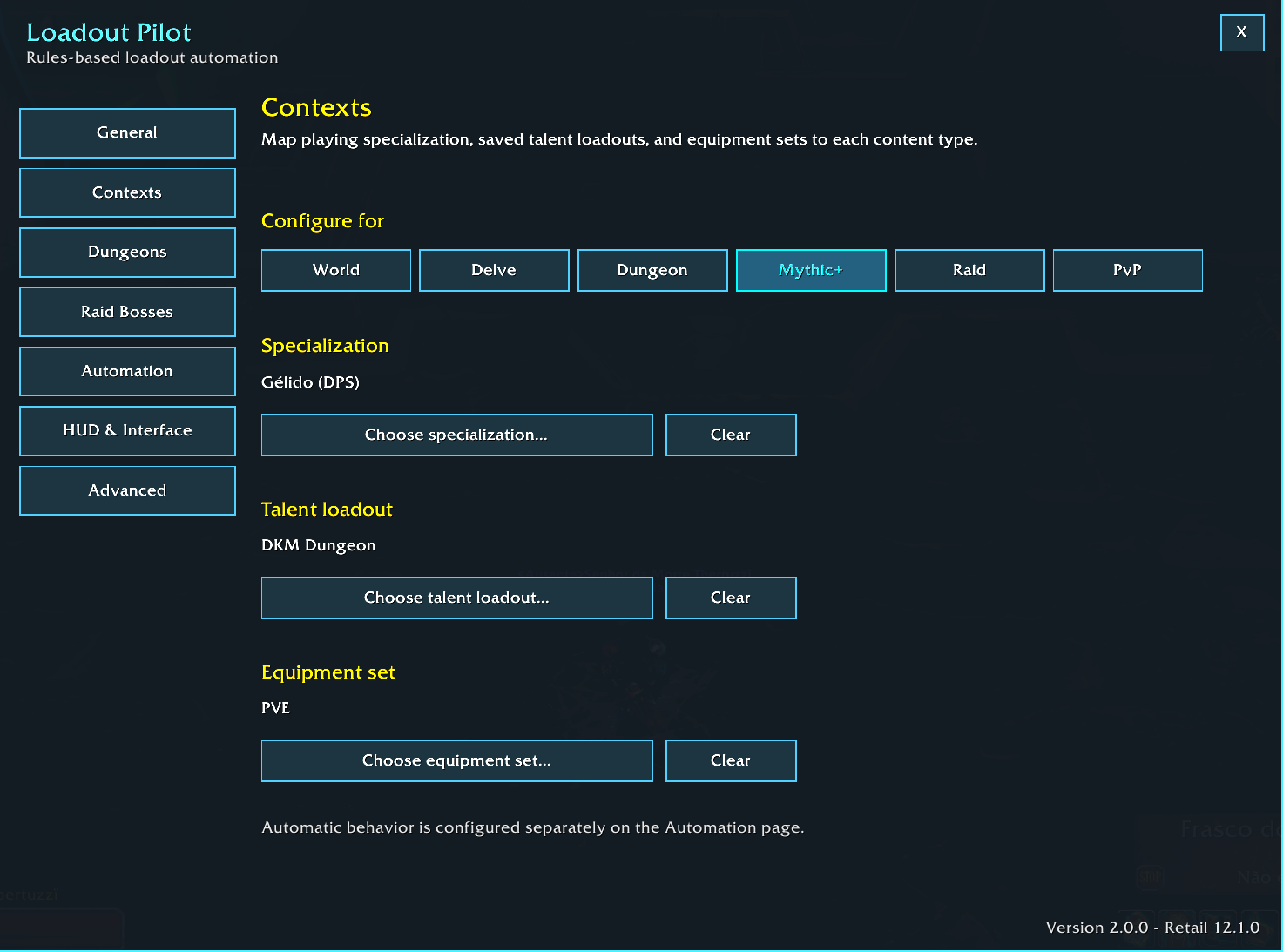
Each general context can define its own:
- Playing specialization
- Saved Blizzard talent loadout
- Equipment set
Additional Dungeon and Raid Boss rules can override specific parts of the general configuration.
How Loadout Pilot Works
Loadout Pilot resolves the rule that applies to your current character and content.
A normal rule can come from several layers:
- Your general content context
- A dungeon-specific override
- A raid-boss Loot Spec override
- Your current player state when a field is intentionally left unchanged
For example:
Context: Mythic+
Dungeon: Altar of Fangs

Specialization: Unholy <- Dungeon override
Loot Spec: Blood <- Dungeon override
Talents: M+ Default <- Context default
Gear: PvE Default <- Context default
You do not need to duplicate a complete configuration every time.
Configure only what is different and let the remaining values inherit from the correct context.
General Context Rules
For each supported content context, Loadout Pilot can map:
- Playing Specialization
- Saved Blizzard Talent Loadout
- Equipment Set
For example:
World
  Specialization: Frost
  Talents: Open World
  Gear: PvE

Delve
  Specialization: Blood
  Talents: Delve Solo
  Gear: Delve

Raid
  Specialization: Frost
  Talents: Raid Single Target
  Gear: Raid
When your content changes, Loadout Pilot reevaluates the active rule and applies the required changes according to your automation settings.
AUTO / NOTIFY / OFF
Loadout Pilot 2.0 lets you control automation independently for four categories:
- Specialization
- Talents
- Gear
- Loot Spec
Each category has its own mode.
AUTO
Apply the configured value automatically whenever WoW allows the change.
Example:
Specialization -> AUTO
Talents -> AUTO
Gear -> AUTO
Loot Spec -> AUTO
This is the classic "set it and forget it" experience.
NOTIFY
Do not immediately make the change.
Instead, Loadout Pilot displays a compact notification with:
- Apply
- Ignore
This is useful when you want Loadout Pilot to detect the right setup but still want to approve the change manually.
Example:
Specialization -> AUTO
Talents -> NOTIFY
Gear -> AUTO
Loot Spec -> AUTO
OFF
Leave that category alone.
Loadout Pilot will neither apply the change automatically nor show an Apply / Ignore prompt.
This makes it possible to automate only the parts of your loadout that you actually want the addon to control.
Dungeon Overrides
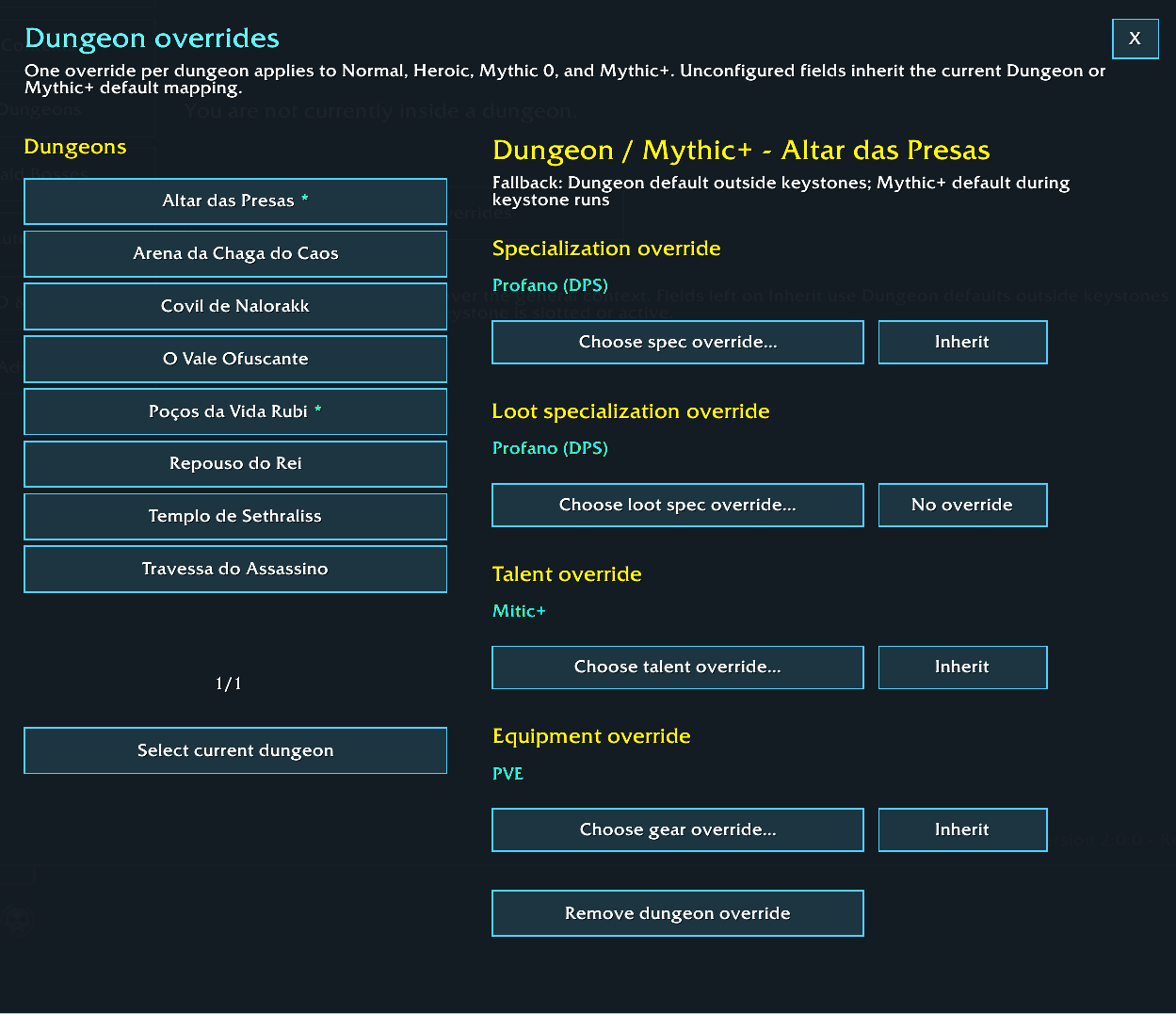
Loadout Pilot supports one shared dungeon-specific override per dungeon, regardless of difficulty.
The same override is reused across:
- Normal
- Heroic
- Mythic 0
- Mythic+
This prevents duplicate rules for the same place.
At the same time, the general Dungeon and Mythic+ context defaults remain separate, so inherited values still use the correct fallback for the type of run you are doing.
A dungeon override can independently configure:
- Playing specialization
- Loot Specialization
- Talent loadout
- Equipment set
Each field can be configured independently.
Fields left on Inherit continue using the appropriate Dungeon or Mythic+ default.
Dungeon Override Example
Dungeon default
Specialization: Frost
Talents: Dungeon Build
Gear: PvE Gear
Mythic+ default
Specialization: Frost
Talents: M+ Build
Gear: PvE Gear
Altar of Fangs override
Specialization: Unholy
Loot Spec: Blood
Talents: Altar Build
Gear: Inherit
The Altar of Fangs override is reused whether you enter the dungeon as:
- Normal
- Heroic
- Mythic 0
- Mythic+
If Gear is set to Inherit:
- Normal / Heroic / Mythic 0 use the general Dungeon gear mapping
- Mythic+ uses the general Mythic+ gear mapping
This lets you configure only what is actually different for that dungeon.
Loot Specialization Overrides
Loot Specialization is handled independently from the specialization you are actually playing.
For example:
Playing Spec: Frost DPS
Loot Spec: Blood
You remain Frost and continue playing as DPS, while World of Warcraft uses Blood as your Loot Specialization.
This is useful when you already know which loot table you want for a specific dungeon or raid boss.
Loadout Pilot supports Loot Spec through:
- Dungeon-specific rules
- Raid Boss rules
You can also use Current Specialization as the loot setting when you want WoW to follow your active specialization normally.
Loadout Pilot does not decide which Loot Spec is optimal.
You choose the strategy; the addon simply remembers and applies it.
Raid Boss Loot Spec Overrides
One of the biggest additions in Loadout Pilot 2.0 is the ability to configure Loot Specialization for individual raid bosses.
Instead of using one Loot Spec for an entire raid, you can pre-plan your desired Loot Spec boss by boss.
Example:
Raid default -> Frost

Boss A -> Frost Loot Spec
Boss B -> Unholy Loot Spec
Boss C -> Blood Loot Spec
Boss D -> No override
Your normal Raid setup still controls:
- Playing specialization
- Talents
- Equipment
The boss rule affects Loot Specialization only.
Raid Boss Manager
The Raid Boss manager is organized as:
Raid -> Boss -> Loot Spec
This design allows the boss catalog to remain usable even after you configure multiple raids.
The manager includes:
- Automatic current-raid selection
- Saved previously discovered raids
- All raids view
- Boss-name search
- Configured only filter
- Configured / total boss counters
- Raid picker pagination
- Boss list pagination
- Visible Loot Spec information
- Persistent saved raid rules
- Clear-all-overrides action for one selected raid
- Explicit confirmation before clearing a raid's overrides
Clearing a raid's overrides removes only that raid's saved Loot Spec rules.
It does not delete the raid or boss catalog.
How Raid Boss Detection Works
Loadout Pilot does not rely on targeting a hostile boss.
Modern World of Warcraft can restrict hostile creature identity from addon code inside instances. Creature names, GUIDs, or IDs that appear normally in the WoW UI may not always be safely readable by addons.
Because of this, Loadout Pilot uses Blizzard's public raid information instead:
- Blizzard Encounter Journal
- Stable DungeonEncounterID
ENCOUNTER_START
The visible boss catalog is created from real Encounter Journal encounters rather than random raid enemies, adds, or helper NPCs.
When Blizzard fires ENCOUNTER_START, Loadout Pilot receives the encounter ID and checks whether you configured a Loot Spec for that boss.
This also creates an important safety rule:
Simply targeting a boss never changes your specialization, talents, equipment, or Loot Specialization.
Raid Boss Safety Rules
Raid Boss Overrides are intentionally limited to Loot Specialization.
They never automatically replace your:
- Playing specialization
- Talents
- Equipment
Those continue to follow the normal Raid context rule.
This prevents a boss-specific loot decision from unexpectedly changing the build you are actually playing.
Raid Boss Loot Spec Lifecycle
Loadout Pilot also handles transitions between encounters carefully.
When a configured boss encounter starts:
- The configured boss Loot Spec is activated according to your Loot Spec automation mode.
- The value remains active through encounter end so an immediate post-kill loot or bonus-roll interaction does not lose the requested setting.
- If the next boss has no override, the previous boss rule is not allowed to leak into the new encounter.
- When the raid boss override session ends, Loadout Pilot restores the Loot Spec that was active before the addon changed it.
This makes boss-by-boss Loot Spec planning practical without permanently replacing your normal loot preference.
Role-Safe Specialization Switching
Automatic specialization switching is aware of your assigned group role.
When you are grouped in:
- Dungeon
- Mythic+
- Raid
- PvP
Loadout Pilot checks whether an automatic playing-specialization change would conflict with the role your group expects you to perform.
Examples:
Frost DPS -> Unholy DPS
Allowed

Frost DPS -> Blood Tank while assigned DPS
Blocked

Blood Tank -> Frost DPS while assigned Tank
Blocked
This prevents an automatic rule from unexpectedly changing a Tank into DPS or a DPS player into a Tank while they are actively filling another role for a group.
Solo Cross-Role Rules
Role protection behaves differently when you are solo.
If you are definitely not grouped, Loadout Pilot does not block cross-role specialization rules.
For example, a solo Paladin can use:
Retribution DPS -> Protection Tankwhen entering a solo dungeon or raid configured that way.
This is useful for:
- Legacy raid farming
- Solo dungeon content
- Class setups that use a Tank specialization only when playing alone
- Solo content where survivability matters more than the queued group role
Loadout Pilot reevaluates role safety when the group roster changes, so joining or leaving a group immediately updates the protection rules.
Loot Spec Is Independent From Group Role
Role protection applies to the playing specialization.
It does not restrict Loot Specialization.
For example:
Playing Spec: Frost DPS
Assigned Role: DPS
Loot Spec: Blood
This is valid.
You remain Frost DPS while requesting Blood loot.
Rule Source and /lpilot explain
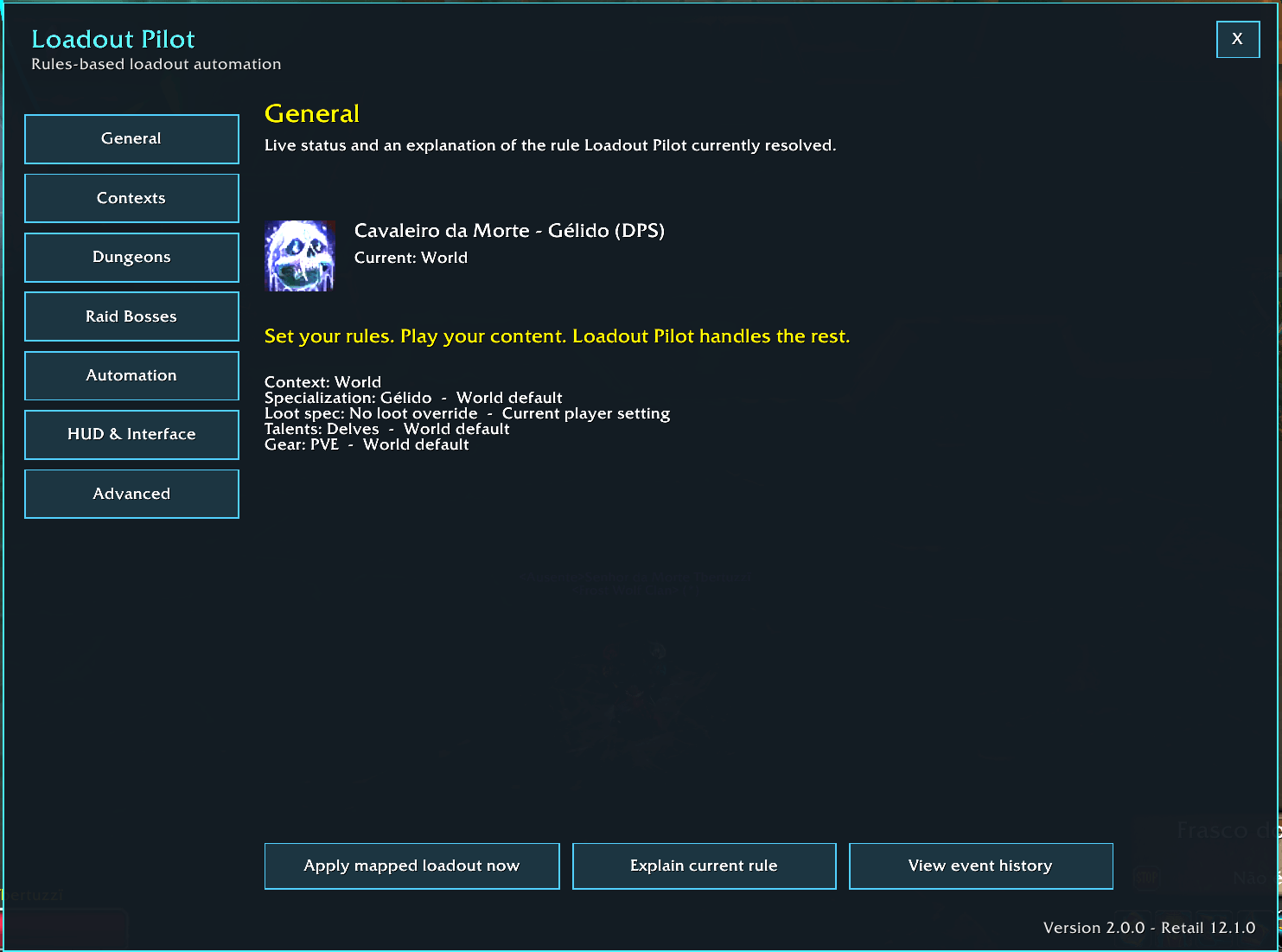
Loadout Pilot 2.0 tracks where each resolved value came from.
Possible sources include:
- Context default
- Dungeon override
- Raid Boss override
- Current player state
Use:
/lpilot explainto print the current resolved rule and its sources.
Example:
Context: Mythic+
Dungeon: Altar of Fangs

Specialization: Unholy <- Dungeon override
Loot Spec: Blood <- Dungeon override
Talents: M+ Default <- Context default
Gear: PvE Default <- Context default
This is especially useful for understanding inheritance and troubleshooting unexpected behavior.
Import / Export
Loadout Pilot 2.0 can export its configuration as a Loadout Pilot transfer string.
The exported configuration includes:
- Context specialization mappings
- Talent mappings
- Equipment mappings
- Dungeon overrides
- Raid Boss Loot Spec overrides
- AUTO / NOTIFY / OFF automation modes
Use:
/lpilot exportand:
/lpilot importImports are restricted to characters of the same class.
This helps prevent incompatible specialization or talent mappings from being loaded onto another class.
The Loadout Pilot export format is its own backup / transfer format.
It is not a Blizzard talent import string.
Event History
Loadout Pilot keeps a short rolling history of meaningful decisions and state changes.
The Event History can contain:
- Context transitions
- Resolved rule changes
- Automation-mode changes
- Raid boss encounter activation
- Confirmed Specialization changes
- Confirmed Talent changes
- Confirmed Equipment changes
- Confirmed Loot Spec changes
- Queued combat actions
- Role-safety blocks
- Retry states
- Failures
- Imports
- Exports
Routine internal reevaluations are intentionally filtered out so the history remains useful.
Repeated identical consecutive events are compacted instead of filling the log with noise.
Verbose debug traces are added only when Chat debug is enabled.
The useful Event History itself remains available even with verbose debug disabled.
Open Event History from:
Advanced -> View Event History
or use:
/lpilot logClear it with:
/lpilot log clearThe history is intentionally short and stored per character.
It is designed for troubleshooting and reproducible bug reports, not long-term analytics.
Mythic+ Detection
Selecting Mythic difficulty alone does not automatically mean you are running Mythic+.
Loadout Pilot detects Mythic+ when:
- A keystone is slotted
- Or the Challenge Mode run is active
When possible, this allows the addon to prepare the mapped Mythic+ rule before the timer begins.
This is particularly useful for:
- Specialization changes
- Talent loadouts
- Equipment
- Dungeon-specific rules
Dungeon-specific overrides are shared between Mythic 0 and Mythic+, while inherited values continue using the correct general Dungeon or Mythic+ fallback.
Safe Application Order
Advanced loadout changes must happen in a safe order.
Loadout Pilot resolves changes as:
Playing Spec -> Loot Spec -> Talents -> Equipment
If a playing-specialization change is required, Loadout Pilot waits for WoW to confirm that specialization before trying to apply specialization-specific talents or equipment.
This avoids trying to apply a talent loadout for a specialization that is not active yet.
Combat-Safe Queue and Retry Logic
World of Warcraft can temporarily reject some configuration changes:
- During combat
- While entering or leaving content
- During loading transitions
- During temporary Blizzard state changes
- While specialization or talent state is still updating
Loadout Pilot does not bypass these restrictions.
When appropriate, it:
- Queues supported changes
- Waits until combat ends
- Retries temporary failures
- Verifies that the expected state was actually applied
- Keeps pending status visible instead of pretending the operation succeeded
This behavior is used for specialization, talents, Loot Spec, and equipment where appropriate.
PvP -> World Recovery
Loadout Pilot contains dedicated recovery behavior for transitions out of PvP.
When returning from Battleground or Arena content, the addon reevaluates your new context and restores the expected World configuration.
This includes reliable recovery for:
- Talent loadouts
- Equipment mappings
- Pending transition states
The addon verifies the final mapped state rather than trusting stale completion events from the previous content.
Interface
Loadout Pilot 2.0 reorganizes the settings window into clear sections.
General
Shows:
- Current content context
- Current resolved rule
- Quick Apply
- Explain Rule
- Event History
Contexts
Configure general mappings for:
- World
- Delve
- Dungeon
- Mythic+
- Raid
- PvP
Dungeons
Open and manage dungeon-specific overrides.
Raid Bosses
Configure boss-specific Loot Specialization rules.
Automation
Configure:
- Specialization -> AUTO / NOTIFY / OFF
- Talents -> AUTO / NOTIFY / OFF
- Gear -> AUTO / NOTIFY / OFF
- Loot Spec -> AUTO / NOTIFY / OFF
HUD & Interface
Manage:
- HUD visibility
- HUD position lock
- Minimap button
- Chat notifications
- Interface position reset
Advanced
Contains:
- Language
- Chat debug
- Import
- Export
- Event History
Raid Boss Interface Improvements
The Raid Boss manager is designed to remain readable with long boss names, raid names, and localized text.
The 2.0 interface includes:
- Boss and raid information separated cleanly
- Loot Spec information isolated visually
- Better handling of long localized names
- Improved alignment and spacing
- Dedicated rows for controls that require more room in PT-BR
- Safer WoW-font-compatible text separators
Compact Adaptive HUD
Loadout Pilot includes a lightweight HUD for quick status information while playing.
The HUD can show:
- Specialization icon
- Current context
- Mapped talents
- Mapped equipment
- Current status
- Pending / Applying state
- Manual state when automation is not active
The HUD automatically adapts its size to the current text.
Short information keeps it compact.
Longer information can expand horizontally and wrap when required.
HUD Tooltip
Hovering the HUD provides more detailed information, including:
- Current context
- Current specialization
- Target specialization
- Group role
- Specialization role
- Loot Specialization
- Talent mapping
- Equipment mapping
- Dungeon override information
- Rule sources
- Pending state
- Current status
This keeps the HUD compact without hiding useful troubleshooting information.
Minimap Button
Loadout Pilot includes a custom minimap button.
Default behavior:
- Left Click -> Open / close Loadout Pilot
- Right Click -> Apply the currently resolved loadout
- Shift + Drag -> Move the button around the minimap
The minimap button follows the minimap rim and adapts to minimap size changes.
It can also be hidden from the HUD & Interface page.
Manual Apply
Even with automation enabled, you can manually request the currently resolved rule.
Use the interface button or:
/lpilot applyThis is useful after:
- Manual changes
- Testing
- Temporary Blizzard restrictions
- Recovering from unusual transition states
Status and Diagnostics
Use:
/lpilot statusto see current mapping and state information.
Use:
/lpilot explainto see why each resolved value was selected.
Use:
/lpilot logto inspect recent meaningful automation decisions.
Together, these commands make it much easier to understand what Loadout Pilot is doing and to provide useful information in a bug report.
Language Support
Loadout Pilot supports:
- Automatic
- English
- Portuguese (Brazil)
Automatic mode follows the WoW client language when supported and falls back to English when necessary.
The language can be changed inside the addon or with:
/lpilot language auto
/lpilot language ptbr
/lpilot language en
Slash commands and command keywords remain in English regardless of the selected UI language.
Saved Configuration
Loadout Pilot stores its configuration per character in:
LoadoutPilotDBThe addon remembers:
- Context rules
- Dungeon overrides
- Raid Boss overrides
- Automation modes
- Interface preferences
- Language preference
- Event History
- Other character-specific settings
Loadout Pilot never creates, edits, or deletes your Blizzard talent loadouts or equipment sets.
It only references the Blizzard configurations that you already created.
Main Features
- Works with every World of Warcraft Retail class and specialization
- Automatic content-context detection
- World rules
- Delve rules
- Dungeon rules
- Mythic+ rules
- Raid rules
- PvP rules
- Automatic playing-specialization switching
- Automatic saved Blizzard talent-loadout switching
- Automatic equipment-set switching
- Loot Specialization automation
- Independent AUTO / NOTIFY / OFF modes
- Apply / Ignore notification workflow
- Unified dungeon-specific overrides
- Separate Dungeon and Mythic+ inheritance defaults
- Per-dungeon playing specialization
- Per-dungeon Loot Specialization
- Per-dungeon talents
- Per-dungeon equipment
- Raid Boss Loot Spec Overrides
- Encounter Journal raid discovery
- Encounter-based boss activation
- Saved multi-raid catalog
- Boss search
- Configured-only filter
- Per-raid configured counters
- Role-safe grouped specialization switching
- Solo cross-role specialization support
- Mythic+ pre-start detection
- Combat-safe pending actions
- Retry and verification logic
- PvP -> World recovery
- Rule Source tracking
/lpilot explain- Configuration Import / Export
- Event History
- Compact adaptive HUD
- Detailed HUD tooltip
- Custom minimap button
- Manual Apply fallback
- Optional chat notifications
- Position reset
- English localization
- Brazilian Portuguese localization
- In-addon language selector
Commands
Main
/lpilotOpen or close Loadout Pilot.
/lpilot applyApply the currently resolved rule.
/lpilot statusShow current mapping and status information.
/lpilot explainExplain where the current rule values came from.
Overrides
/lpilot overridesOpen Dungeon Overrides.
/lpilot bossesOpen Raid Boss Loot Overrides.
Automation
/lpilot mode <spec|talents|gear|loot> <auto|notify|off>Set the automation mode for one category.
Examples:
/lpilot mode spec auto
/lpilot mode talents notify
/lpilot mode gear auto
/lpilot mode loot off
The specialization shortcut remains available:
/lpilot spec on
/lpilot spec notify
/lpilot spec off
Import / Export
/lpilot exportOpen configuration export.
/lpilot importOpen configuration import.
Event History
/lpilot logOpen recent Event History.
/lpilot log clearClear Event History.
Interface
/lpilot chat on
/lpilot chat off
Enable or disable routine chat notifications.
/lpilot language auto
/lpilot language ptbr
/lpilot language en
Choose the addon language.
/lpilot resetposRestore HUD and minimap-button positions.
/lpilot debugToggle verbose debug information.
Safe Automation
Loadout Pilot does not:
- Cast abilities
- Execute combat rotations
- Automate combat decisions
- Bypass combat restrictions
- Bypass Blizzard's protected APIs
- Create talent loadouts
- Delete talent loadouts
- Edit your Blizzard talent builds
- Create equipment sets
- Delete equipment sets
- Calculate BiS
- Contain raid loot tables
- Contain dungeon loot tables
- Choose the best Loot Specialization for you
- Decide which specialization you should play
Loadout Pilot only uses Blizzard-supported player-configuration APIs to request changes that you already configured.
If WoW blocks a change, Loadout Pilot waits, retries when appropriate, or reports the pending/manual state.
Designed Around Player Choice
Loadout Pilot is intentionally different from an addon that tries to tell you how to play.
It does not answer:
"What is the best build?"
It answers:
"You already chose this build for this content. Do you want Loadout Pilot to remember and apply it?"
That is the core idea behind the entire addon.
Configure the strategy once.
Play the content.
Let Loadout Pilot handle the repetitive setup changes.
Upgrading From Older Versions
Loadout Pilot 2.0 preserves the core behavior from the 1.x series while expanding the automation system.
Existing automation settings are migrated into the new AUTO / NOTIFY / OFF model where possible.
The 2.0 rules system also preserves the important behavior introduced during the 1.x development cycle, including:
- Dungeon-specific rules
- Unified Dungeon / Mythic+ dungeon identity
- Loot Specialization overrides
- Role-safe specialization switching
- PvP recovery
- Talent retry behavior
- Equipment retry behavior
- Minimap integration
- Adaptive HUD
- Language selection
- Chat notification preferences
Compatibility
- World of Warcraft Retail
- Midnight 12.1.0
- Interface 120100
Loadout Pilot is designed for the Retail client.
Feedback and Bug Reports
Feedback, real-world testing, bug reports, and feature suggestions are very welcome.
Loadout Pilot has already evolved significantly thanks to community feedback, especially around:
- Dungeon-specific rules
- Loot Specialization
- Raid Boss overrides
- Role-safe specialization switching
- Solo content behavior
- UI improvements
- Automation control
- Mythic+ detection
- Transition reliability
For reproducible issues, useful information includes:
- Class
- Playing specialization
- Content type
- Dungeon or raid
- Boss, if applicable
- Expected behavior
- Actual behavior
- Whether you were in combat
- Whether you were grouped or solo
- Relevant
/lpilot logoutput
Source code and development:
GitHub - TBertuzzi/LoadoutPilot
Main addon page:
Support Development
Loadout Pilot is developed and maintained as an independent community project.
If the addon is useful to you and you would like to support continued development:
Thank you for using Loadout Pilot and for all testing, feedback, bug reports, and suggestions that continue to improve the addon.
Author
Developed and maintained by Thiago Bertuzzi.
License
MIT
Loadout Pilot Team