


Loadout Checker

Screenshot 2026-02-23 131051.png

Screenshot 2026-02-23 131337.png
Description
Loadout Checker
Loadout Checker is a lightweight utility designed to prevent that "oops" moment when you pull a boss with your Mythic+ talents still active in a raid.
Features
- Automatic Validation: Checks your talent loadout the moment a Ready Check goes out.
- Context Awareness: Knows whether you're in a Dungeon (M+), Raid, PvP (Arenas & Battlegrounds) or a Delve. Still in town when the ready check goes out? It uses your group type to guess: raid group means raid, party means dungeon.
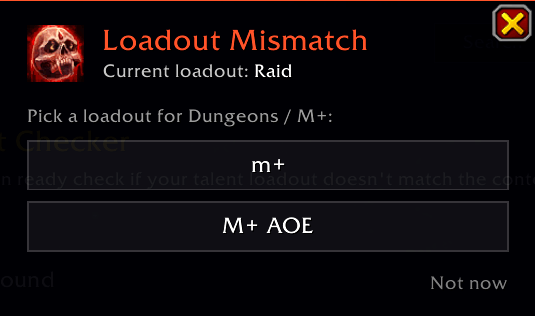
- Visual & Audio Alerts: A warning sound, a popup, and a flashing micro menu (as seen in the screenshots) when your loadout doesn't match.
- One-Click Switch: The popup lists your saved loadouts that match (e.g. "M+" and "M+ AoE"). Click the one you want and it loads it for you.
- Works Out of the Box: Just name your loadouts. No setup required.
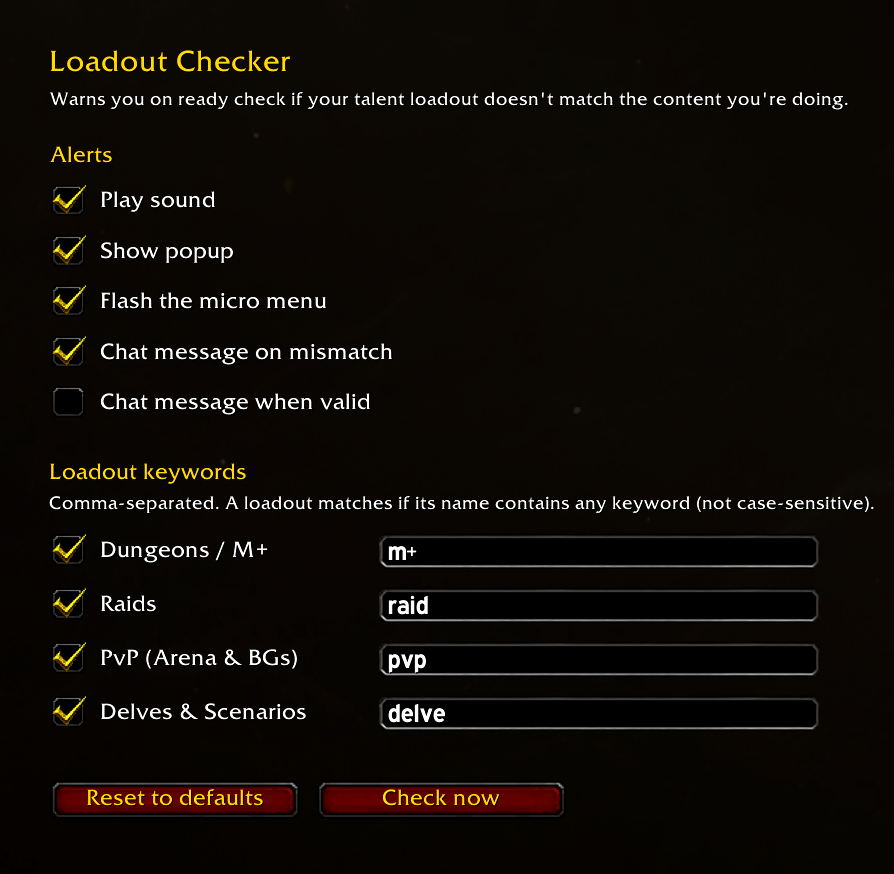
- Customizable: Use your own keywords, turn off any content type, and choose which alerts you want.
How to use
Loadout Checker looks at the name of your active loadout for a keyword. By default:
| Content | Your loadout name should contain |
|---|---|
| Dungeons / M+ | m+ |
| Raids | raid |
| PvP (Arena & BGs) | pvp |
| Delves | delve |
Matching ignores upper and lower case, so "Raid ST", "M+ AoE" and "pvp - arena" all work.
If a mismatch is found, a popup appears and your micro menu flashes until you close the popup, change talents, or enter combat. If any of your saved loadouts for your current spec match, the popup shows a button for each one. Click one to switch to it. Talents can only be changed out of combat, and not during a boss fight or once a Mythic+ key has started.
Settings
Open the settings with /lc (or Options → AddOns → Loadout Checker).
- Custom keywords: Name your builds differently? Add your own keywords, separated by commas. For example,
m+, keys, mythicfor dungeons means any loadout name containing one of those words counts. - Turn content types on or off: For example, turn off Delves if you don't care about them.
- Choose your alerts: Turn the sound, popup, flash and chat messages on or off individually.
Commands
/lcor/loadoutchecker: open the settings/lc check: run a check right now, no ready check needed
Feedback
Found a bug or have an idea? Open an issue on GitHub.
License
MIT © Derek Johnston (Bigbranch). Feel free to use, fork and modify it; just keep the credit.
Loadout Checker Team
