LNuiChat 老农聊天条
- By
Chat channel quick bar. Please open the settings through ESC -> Options -> Addons -> LNuiChat
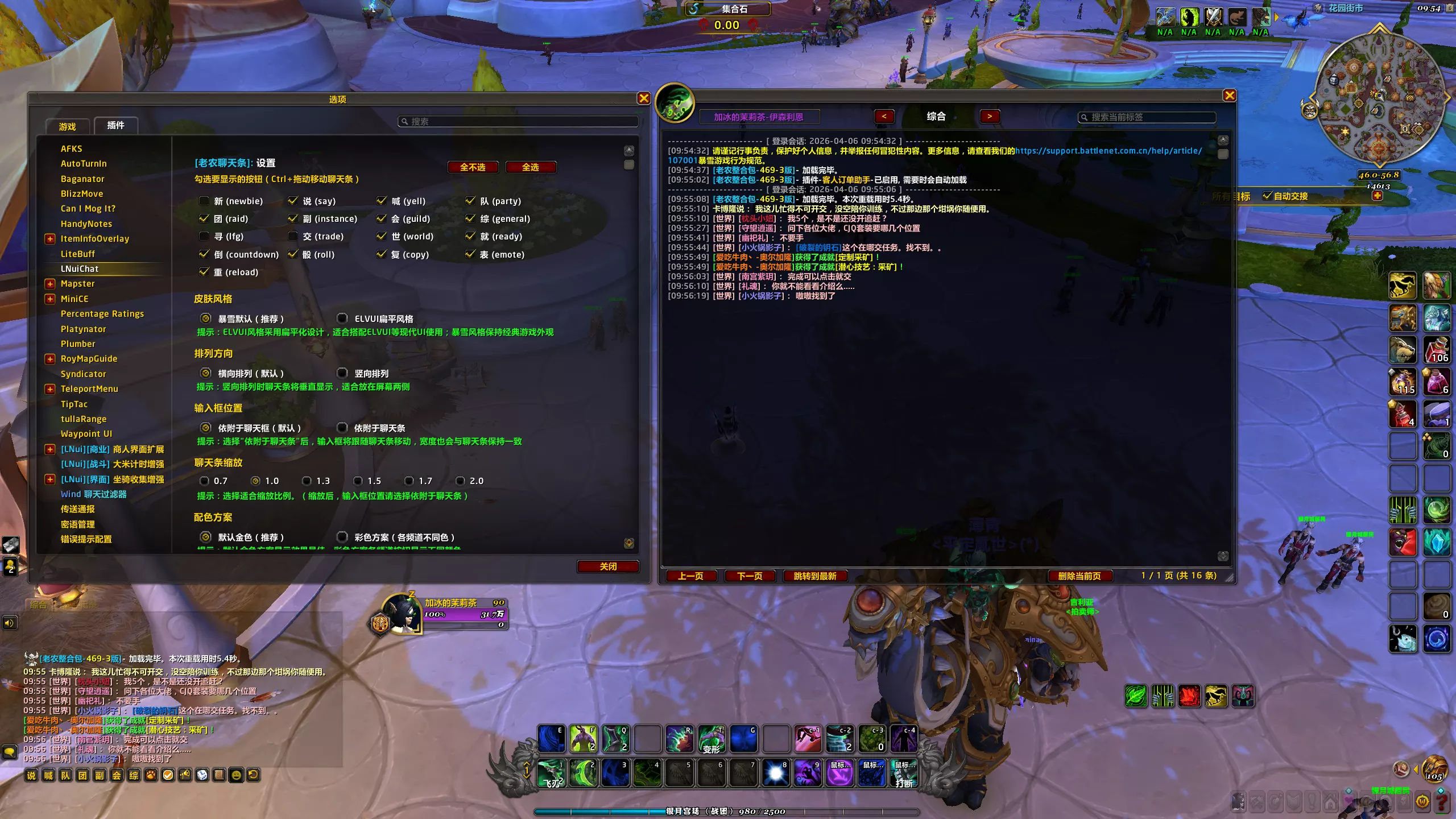
效果图
Description
Author: 雪白的黑牛 (LNui) — Uploaded and maintained on CurseForge by SGSwdzgr.
Open settings via ESC -> Options -> AddOns -> LNuiChat.
Features
- BigFoot Icon: Left-click to chat in the World Channel; Double Left-click to mute BigFoot World Channel messages; Right-click to join or leave the BigFoot World Channel.
- Role/Player Icon: Left-click to initiate a Ready Check; Double Right-click to leave the party.
- Countdown Icon: Left-click for a 5-second pull timer; Right-click for a 10-second pull timer. Click the same button again to cancel an active countdown.
- Dice Icon: Left-click to roll (
/roll); Right-click to open the Loot History / Loot Rolls window. - Text/Log Icon (Chat History & Copy): Saves up to 1,000 lines of chat history across all characters—allowing you to view and copy previous messages even after switching characters.
- Smiley Icon: Left-click to insert chat emojis; Right-click to use emotes.
- Reset Icon: Double Left-click to reload the UI (
/reload); Double Right-click to reset all instances. - "General", "LFG", and "Trade" Buttons: Right-click to join or leave the General, LookingForGroup, or Trade channels.
- Tab Channel Cycling: Press
Tabto quickly cycle through active chat channels. - Drag & Rearrange (Account-Wide): Hold
Ctrl+ drag the Chat Bar to move its position; holdShift+ drag any button to reorder icons. Positions are saved account-wide. - Cursor Navigation: Use the Left and Right arrow keys directly inside the chat edit box to move the cursor without needing
Alt. - Channel Name Abbreviations: Shortens verbose channel prefixes for a cleaner chat frame.
- Settings Panel: Built-in configuration menu.
- No Secret Value Taint: Safe to use in Mythic+ dungeons and restricted combat environments without causing UI taint or blocking chat functions.
- Clickable Timestamps: Click any chat timestamp to copy that message line.
- Account-Wide Settings: Addon configurations are saved globally across all characters.
Special Thanks
With limited coding experience, I would like to sincerely thank the following chat addon authors for providing code references and inspiration.
Feedback and contributions from the addon community are always welcome to help improve this project further.
- ChannelBar - Blizzard-Style Chat Channel Switcher
- SimpleChat Enhancement Addon
- ChatBar Addon (Modified from SimpleChat)
- BDChatLog
- ……
插件作者:雪白的黑牛(老农整合包),我代他上传和维护CurseForge版本
请通过 ESC -> 选项 -> 插件 -> LNuiChat 打开设置
功能说明
1、大脚图标:左键世界频道交流;左键双击屏蔽大脚世界频道信息;右键离开或加入大家世界频道。
2、角色图标:左键就位;右键双击离开队伍。
3、倒计时图标:左键5秒倒计时;右键10秒倒计时。再相同按一次,取消开始的倒计时。
4、骰子图标:左键roll点;右键打开“战利品掷骰”界面。
5、文本图标:历史聊天内容复制功能:保存所有角色历史聊天内容1000条,也就是切换角色都能看到历史聊天内容,可复制。
6、笑脸图标:左键聊天表情;右键表情动作。
7、重置图标:双击左键重置界面;右键双击重置副本。
8、“综”、“寻”、“交”:右键综、寻、交可加入或离开综合、寻求组队、交易频道。
9、tab频道切换。
10、ctrl + 按住“聊天条”可拖动位置;shift + 按住“图标”可拖动图标位置顺序。战网全局保存。
11、输入框里,左右键可定位光标位置。
12、频道简写。
13、设置界面。
14、不会触发秘密值污染。简单说,大米等环境能聊天。
15、聊天时间戳点击复制。
16、插件设置记录跨角色保存方式。
-
衷心感谢
水平有限,衷心感谢以下聊天插件作者提供代码以及二创灵感。
不足之处,也希望能得到更多插件社区朋友们的帮助和完善。
LNuiChat 老农聊天条 Team