LJs Farm & Trade
- By
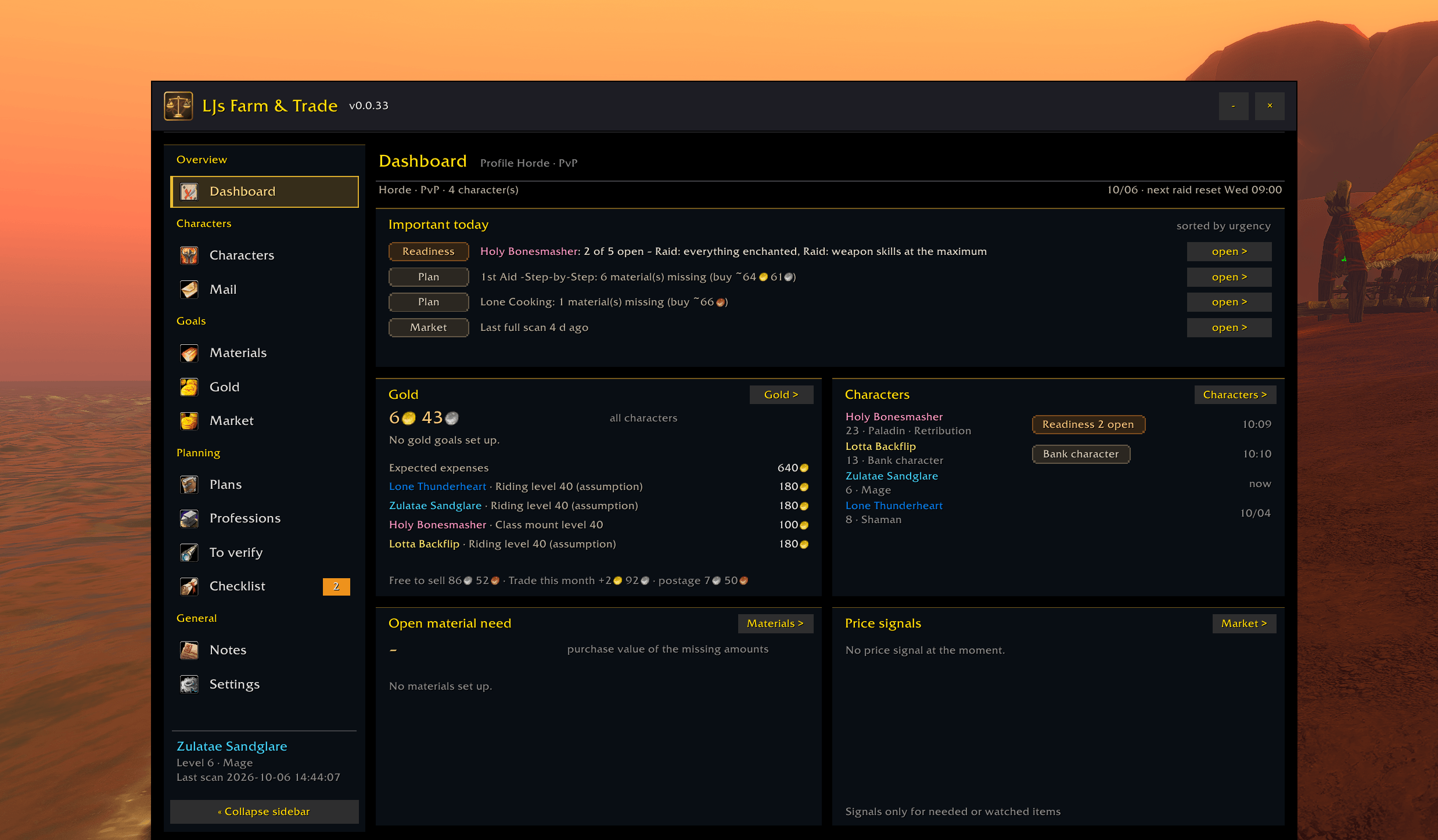
Overall view, today's important tasks, etc.
Description
LJs Farm & Trade
You're level 10 and already thinking about whether you'll have enough gold for your mount at 40 — or the epic one at 60?
LJs Farm & Trade helps you keep track of that, along with pretty much everything else you're saving, farming or planning for.
Set goals for your characters, check what you already have across your characters, and see what you're still missing and roughly what it'll cost you.
Built specifically for WoW Forever.
Features
Goals and plans
- Plan upcoming expenses such as riding training and mounts at level 40 and 60 for each character
- Create material and gold goals that can use stock from several characters
- Plan profession leveling and recipes, including the materials you'll need
- Count what's in your bags, bank and mail
- Expiring mail: LJFT warns about letters with gold or items on all your characters that expire soon, on the dashboard, on the Mail page and optionally in the chat at login
- A "Today" view shows you what's coming up, what's still missing and what it may cost
Farming
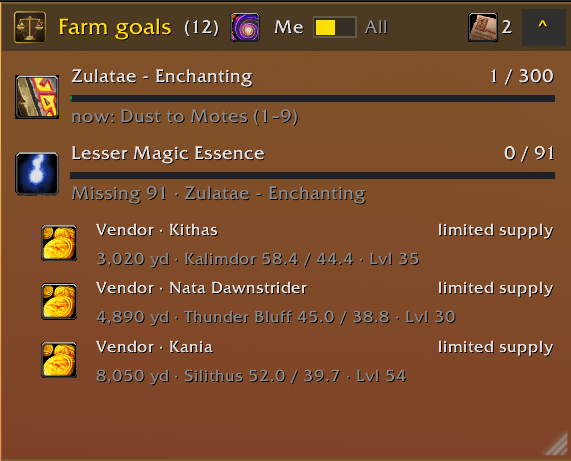
- Farm goals HUD that keeps your current farm goals visible while you're out in the world; it and the other HUDs are switched from small buttons in the title bar or the minimap menu, and the note HUD and the tracking HUD dock beside it (drag one back near its place to dock it again)
- Farm session: the tracking HUD counts kills as they happen, starts with your first kill or loot and shows gold per hour from money and items (auction or vendor value), kills, gathering per kind, your most valuable loot and what your plans need – folded to one line or in full
- Bag marks: a green arrow on upgrades for your current character, a coin on surplus worth selling, optional marks for plan materials and wishlist items – in the Blizzard bags and bank and in Ellesmere UI; other bag addons can use LJFT's interface
- Filter farming goals by zone
- Farm sources can be sent to TomTom as waypoints
- Farm spots by faction: a profession route only counts spots in your own or contested territory; enemy spots are dimmed or hidden
- Notes, a small note HUD and a checklist for things you don't want to forget
Market
- Uses Auctionator prices if available
- If you don't use Auctionator, LJFT can scan the auction house itself
- Keeps price history and shows useful price signals for items you're looking for
- Prices from your own full scan: lowest, median and highest offer, with the cheapest offers of the items you watch
- Price history over 7 days and 13 weeks with Ø 7 days and a chart of 7 days, 4 and 13 weeks
- Buy and sell advice: cheap offers for what your characters need and free stock at a high price, each with a direct auction house search – for one character or all of them
- Plan materials priced over the cheapest offers of a fresh scan
- Trade ledger for purchases, sales, auction house invoices and postage
- Vendor prices count: a vendor beats the auction house unless the AH is clearly cheaper (10 %, adjustable), with your reputation discount
- A hint next to the auction house purchase confirmation of trade goods when a vendor sells them for less (LJFT never touches the purchase)
- The market opens with the auction house if you like
- Its own inbox and send window, including cash on delivery
- "In transit" view for items you've mailed between characters
- Rules for automatically deciding which storage character should receive certain items
- Character needs from your bags: what your other characters need, grouped by character and attached in one click
- Distribute by rules with a selection; profession alts receive the materials of their professions
- Provided by the Mail module – see "Modules" below
Characters
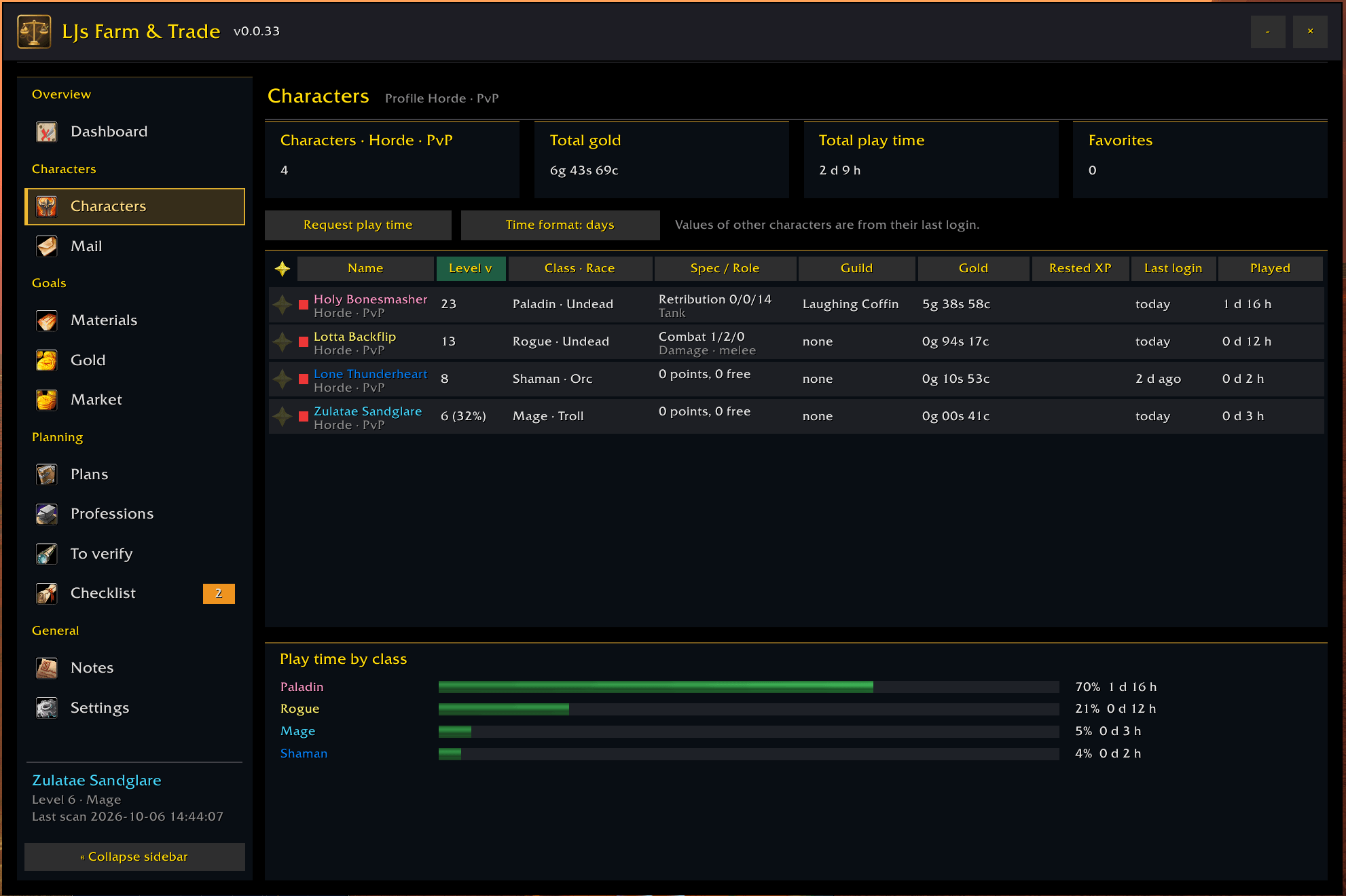
- Character profiles with role, spec and bank-character settings
- Talents and equipment, including a wish list
- Combat values and caps, reputation goals, raid lockouts and professions
- Overview of stored items
Tooltip
- Item tooltip in clear blocks – stock, market and need, compact by default, every detail while you hold Shift: stock per character and suffix, market values for your stack, your wishlist, the best farm source, a disenchant estimate for bound items and an equipment comparison with green and red arrows, also for your other characters
- See at a glance how many you own across your characters, what your plans still need and what an item is worth
- Pick the lines you want and put them in your order
- Stock as a total, per character or split into bags, bank and mail
- Ø 7 days with price history; the current price is marked when it's clearly above or below that average
- Auction house: lowest offer, median and highest each switchable in its own row, with the history's age and source
- Items with a random suffix: the price of this variant and the stock per suffix
- Every piece of gear you can equip: does it fit your spec, and is it better than what you wear? Rated with stat weights per class and spec ("fits", "partly", "does not fit"; gear with a random suffix by the values of its suffix) and compared with the item equipped in the same slot ("+18 % vs. equipped" in green, worse in red; weapons, ranged weapons and wands with the DPS difference), only for gear you can wear (armor type, weapon skill, level: "not wearable (Mail)", "wearable from level 40"); leveling spec from your talents, raid spec or role from your profile, a raid line from a level you choose
- "Buyable at vendor" with the price, apart from the vendor's sell price
- Color templates: LJFT gold, Neutral or Like Blizzard
- Your own color for each part (Head, Label, Value, Advice, ID), picked with the game's color picker
- Class colors for character names, on or off
- Two font sizes, never larger than the game's tooltip text, and a live preview of the compact and the Shift view right in the settings
- The game's item tooltip in every LJFT window; Shift-click links to chat, Ctrl-click opens the dressing room
Look and settings
- Reworked screens: tiles on top, tables with right-aligned numbers and clear empty states on the dashboard, plans, characters, materials, gold, market and notes
- Dates in EU, ISO or US format and numbers in EU or US format, independent of the game language
- Money as coins (like the game) or as text (g/s/c), without empty units
- Double-click the title bar to minimize the window; minimized at the auction house it still offers Auctionator prices and a full scan
- Undo the last restore of a backup
- Settings in cards with the explanation under each field, one reload button for all tabs
- Shift-click items into every LJFT item field and into the letter of the mail window
Modules
Some parts of LJFT are separate modules. On a fresh install they're switched off, so you start with a lean addon and only add what you actually want. Turn them on under Settings › Modules and reload the interface when it asks you to. Once switched on, a module only loads when you use it.
| Module | What it does |
|---|---|
| Its own inbox and send window, cash on delivery, "In transit" and rule-based distribution to storage characters | |
| Notes | Notebook and note HUD |
| To verify | Lists entries whose game data isn't confirmed yet, so you can check them in game; your own kills confirm them in their zone, and every other zone where you kill the creature becomes a find site of its own; /ljft verify <ID or name> explains a point |
Without the Mail module you simply get the normal Blizzard mailbox.
Sharing a contribution (To verify): If you'd like to help improve the addon's data, you can share what you've checked. The window gives you a code – just copy it and post it as a comment on this page or on Discord (link at the bottom). It's completely voluntary and contains no character data: no names, gold, inventory or realm.
Optional addons
You don't need any other addon to use LJFT.
If you already use these, LJFT can make use of them:
| Addon | Used for |
|---|---|
| Auctionator | Auction house prices |
| TomTom | Waypoints to farming locations |
Commands
| Command | Action |
|---|---|
/ljft |
Open or close the main window |
/ljft help |
Show all available commands |
/ljft intro |
Start the short introduction again |
/ljft ui <page> |
Open a page: dashboard, characters, materials, gold, market, plans, professions, checklist, settings; with the module on also mail, notes, verify |
/ljft hud [show/hide/reset] |
Show, hide or reset the farm goals HUD |
/ljft minimap [show/hide] |
Show or hide the minimap button |
/ljft scale <50-100> |
Change the window size (/ljft scale reset resets it) |
/ljft scan |
Rescan the current character |
/ljft export / /ljft import |
Open the settings to back up or restore the active profile |
/ljft version |
Show the addon version |
/ljft diag |
Diagnostics report – handy when you report a bug |
/ljft diag full |
Full diagnostics report with every check – for trickier problems |
Gold goals, materials, material families and the checklist can also be managed through commands. Use /ljft help to see the full list.
Key bindings can be found under Options → Key Bindings → AddOns. You can bind keys for the main window and the farm goals HUD – and, if you use the To verify module, for its verify HUD as well.
FAQ
Does it work on Retail or Classic Era?
No. LJFT is made specifically for the WoW Forever client.
Is any data sent anywhere?
No. Everything is stored locally in SavedVariables, and the addon makes no network requests. Sharing a contribution from "To verify" is optional and only happens if you copy and post the code yourself.
Where's the mail window?
Mail is a module and is off on a fresh install. Switch it on under Settings › Modules – until then you'll see the normal Blizzard mailbox.
Can I turn parts of the addon off again?
Yes. Mail, Notes and To verify can be switched on and off at any time in the settings.
Why is some information from my other characters outdated?
LJFT can only update a character's data while you're logged in with that character. If something looks old, just log in with it once and it'll catch up.
Do I need Auctionator?
No. If Auctionator isn't installed, LJFT can use its own auction house scan instead.
Known issues
- Mount prices are an estimate until you've opened a mount vendor once. Riding training costs are read directly from the trainer, so those are exact.
- The vendor hint at the auction house appears only for trade goods (commodities). Single items such as gear get no hint, because the client gives no reliable way to recognise their purchase confirmation.
WoW Forever
This version is made for WoW Forever (Interface 16001, client 1.60.1) and is ready for the live start on 21 October 2026. If the live client brings a new interface number, an update follows right away.
Languages
English and German are included.
French and Spanish are AI-assisted translations – corrections welcome. If something sounds odd, I'd really appreciate a note in the comments or on Discord.
Feedback
Found a bug or have an idea?
Leave a comment here or drop by on Discord (link at the bottom of this page). If you can, include your addon version (/ljft version), game language and any Lua error message you got – and for trickier problems the output of /ljft diag helps a lot.
In the addon, the Discord button under Settings › General, card "Help and feedback" (and in "Share contribution") shows the server address – copy it and paste it into your browser.
Want to reuse parts of the code? Just ask in the comments or on Discord.
LJs Farm & Trade (Deutsch)
Du bist gerade mal Level 10 und überlegst trotzdem schon, ob das Gold für das Reittier mit Level 40 reicht — und später vielleicht sogar für das epische mit 60?
Genau dabei soll LJs Farm & Trade helfen. Und nicht nur beim Reittier: Du kannst damit Gold-, Material- und Charakterziele im Blick behalten und siehst, was du auf deinen verschiedenen Charakteren bereits besitzt.
So weißt du schneller, was noch fehlt, was du farmen musst und was dich das Ganze ungefähr kosten wird.
Das Addon wurde speziell für WoW Forever gebaut.
Funktionen
Ziele und Pläne
- Plane kommende Ausgaben wie Reiten und Reittiere auf Level 40 und 60 für jeden Charakter
- Erstelle Material- und Goldziele, bei denen der Bestand mehrerer Charaktere berücksichtigt wird
- Plane das Leveln von Berufen oder einzelne Rezepte inklusive der benötigten Materialien
- Gegenstände in Taschen, Bank und Post werden mitgezählt
- Ablaufende Post: LJFT warnt vor bald verfallenden Briefen mit Gold oder Items auf allen deinen Charakteren – im Dashboard, auf der Post-Seite und auf Wunsch im Chat beim Login
- Die Ansicht „Heute wichtig“ zeigt dir, was demnächst ansteht, was noch fehlt und was es ungefähr kostet
Farmen
- Das Farmziele-HUD zeigt dir unterwegs deine aktuellen Farmziele; es und die übrigen HUDs schaltest du über kleine Knöpfe in der Titelleiste oder das Minimap-Menü, Notiz- und Tracking-HUD docken daran an (zieht man eines nah an seinen Platz, dockt es wieder an)
- Farm-Sitzung: das Tracking-HUD zählt Kills sofort, startet mit dem ersten Kill oder der ersten Beute und zeigt Gold pro Stunde aus Geld und Items (Auktions- oder Händlerwert), Kills, Sammelpunkte je Art, die wertvollste Beute und was deine Pläne brauchen – zugeklappt in einer Zeile oder ausführlich
- Taschen-Markierungen: ein grüner Pfeil auf Verbesserungen für den aktuellen Charakter, eine Münze auf Überschuss zum Verkaufen, wahlweise Markierungen für Planmaterial und Items der Wunschliste – in Blizzard-Taschen und Bank und in Ellesmere UI; andere Taschen-Addons können die Schnittstelle von LJFT nutzen
- Farmziele lassen sich nach Gebiet filtern
- Farmquellen können als Wegpunkte an TomTom übergeben werden
- Farm-Spots nach Fraktion: Ein Berufsweg rechnet nur mit Spots auf eigenem oder umkämpftem Gebiet; gegnerische Spots sind abgeblendet oder ausgeblendet
- Dazu gibt es Notizen, ein kleines Notiz-HUD und eine Checkliste
Markt
- Nutzt Preise von Auctionator, wenn das Addon installiert ist
- Ohne Auctionator kann LJFT das Auktionshaus selbst vollständig scannen
- Speichert Preisverläufe und zeigt Preissignale für Gegenstände, die du brauchst oder beobachtest
- Preise aus dem eigenen Vollscan: günstigstes Angebot, Median und höchstes Angebot, dazu die günstigsten Angebote der beobachteten Items
- Preisverlauf über 7 Tage und 13 Wochen mit Ø 7 Tage und einem Verlauf über 7 Tage, 4 und 13 Wochen
- Kauf- und Verkaufsempfehlungen: günstige Angebote für den Bedarf deiner Charaktere und freier Bestand bei hohem Preis, jeweils mit direkter Suche im Auktionshaus – für einen Charakter oder alle
- Plan-Materialien bewertet mit den günstigsten Angeboten eines frischen Scans
- Handelsbuch für Käufe, Verkäufe, AH-Rechnungen und Porto
- Händlerpreise zählen: Ein Händler schlägt das Auktionshaus, außer das AH ist deutlich günstiger (10 %, einstellbar), mit deinem Rufrabatt
- Ein Hinweis neben der Kaufbestätigung des Auktionshauses für Handelswaren, wenn ein Händler sie günstiger verkauft (LJFT greift nie in den Kauf ein)
- Auf Wunsch öffnet sich der Markt mit dem Auktionshaus
Post
- Eigener Posteingang und eigenes Versandfenster, inklusive Nachnahme
- Die Ansicht „Unterwegs“ zeigt Gegenstände, die gerade zwischen deinen Charakteren verschickt werden
- Mit Regeln kannst du festlegen, welche Gegenstände an welche Lager-Charaktere gehen sollen
- Bedarf deiner Charaktere aus den Taschen: was deine anderen Charaktere brauchen, nach Charakter gruppiert und mit einem Klick angehängt
- „Nach Regeln verteilen“ mit Auswahl; Berufe-Twinks empfangen die Materialien ihrer Berufe
- Gehört zum Post-Modul – siehe „Module“ unten
Charaktere
- Charakterprofile mit Rolle, Skillung und Bankcharakter-Einstellung
- Talente und Ausrüstung inklusive Wunschliste
- Kampfwerte und Caps, Rufziele, Raid-Sperren und Berufe
- Übersicht über eingelagerte Gegenstände
Tooltip
- Auf einen Blick: wie viel du auf deinen Charakteren hast, was deine Pläne noch brauchen und was ein Gegenstand wert ist
- Du wählst die Zeilen und ihre Reihenfolge
- Bestand als Summe, je Charakter oder aufgeteilt nach Taschen, Bank und Post
- Händlerpreis pro Stück, pro Stapel oder beides
- Ø 7 Tage mit Preisverlauf; liegt der aktuelle Preis deutlich darüber oder darunter, wird er markiert
- Auktionshaus: günstigstes Angebot, Median und Höchstpreis einzeln schaltbar in eigenen Zeilen, mit Alter und Quelle des Verlaufs
- Items mit Zufallssuffix: der Preis dieser Variante und der Bestand je Suffix
- Jede Ausrüstung, die du anlegen kannst: passt sie zu deiner Skillung, und ist sie besser als das angelegte Teil? Bewertet mit Wertegewichten je Klasse und Skillung („passt“, „teilweise“, „passt nicht“; Ausrüstung mit Zufallssuffix nach den Werten des Suffixes) und verglichen mit dem angelegten Item im selben Platz („+18 % gegenüber angelegt“ in Grün, schlechter in Rot; Waffen, Fernkampfwaffen und Zauberstäbe mit dem DPS-Unterschied), nur für Ausrüstung, die du tragen kannst (Rüstungsart, Waffenfertigkeit, Stufe: „nicht tragbar (Kette)“, „tragbar ab Stufe 40“); Level-Skillung aus den Talenten, Raid-Skillung oder Rolle aus dem Profil, eine Raid-Zeile ab einer wählbaren Stufe
- „Beim Händler kaufbar“ mit dem Preis, getrennt vom Verkaufspreis an den Händler
- Farbvorlagen: LJFT-Gold, Neutral oder Wie Blizzard
- Eigene Farbe für jeden Teil (Kopf, Beschriftung, Wert, Empfehlung, ID), ausgewählt mit der Farbauswahl des Spiels
- Klassenfarben für Charakternamen, an oder aus
- Kompakt-Modus, zwei Schriftgrößen und eine Live-Vorschau direkt in den Einstellungen
- Der Item-Tooltip des Spiels in jedem LJFT-Fenster; Shift-Klick verlinkt im Chat, Strg-Klick öffnet die Anprobe
Aussehen und Einstellungen
- Überarbeitete Masken: Kacheln oben, Tabellen mit rechtsbündigen Zahlen und klaren Leerzuständen auf Übersicht, Plänen, Charakteren, Materialien, Gold, Markt und Notizen
- Datum im Format EU, ISO oder US und Zahlen im Format EU oder US, unabhängig von der Spielsprache
- Geld als Münzen (wie im Spiel) oder als Text (g/s/c), ohne leere Einheiten
- Doppelklick auf die Titelleiste minimiert das Fenster; minimiert bietet es im Auktionshaus weiter Auctionator-Preise und den Vollscan
- Das letzte Wiederherstellen einer Sicherung lässt sich rückgängig machen
- Einstellungen in Karten mit der Erklärung unter jedem Feld, ein Neu-laden-Knopf für alle Reiter
- Shift-Klick legt Items in jedes LJFT-Itemfeld und in den Brief des Postfensters
Module
Einige Teile von LJFT sind eigene Module. Bei einer Neuinstallation sind sie ausgeschaltet – du startest also mit einem schlanken Addon und holst dir nur dazu, was du wirklich brauchst. Einschalten kannst du sie unter Einstellungen › Module; danach einfach die Oberfläche neu laden, wenn du gefragt wirst. Ein eingeschaltetes Modul wird erst geladen, wenn du es benutzt.
| Modul | Was es tut |
|---|---|
| Post | Eigener Posteingang und Versand, Nachnahme, „Unterwegs“ und Verteilung nach Regeln an Lager-Charaktere |
| Notizen | Notizbuch und Notiz-HUD |
| Zu prüfen | Zeigt Einträge, deren Spieldaten noch nicht bestätigt sind, damit du sie im Spiel prüfen kannst; deine eigenen Kills bestätigen sie in ihrem Gebiet, jedes andere Gebiet, in dem du die Kreatur tötest, wird ein eigener Fundort; /ljft verify <ID oder Name> erklärt einen Punkt |
Ohne das Post-Modul nutzt du einfach den normalen Blizzard-Briefkasten.
Beitrag teilen (Zu prüfen): Wenn du helfen möchtest, die Daten des Addons zu verbessern, kannst du deine Prüfergebnisse teilen. Das Fenster gibt dir einen Code – den kopierst du und postest ihn als Kommentar hier auf der Seite oder auf Discord (Link ganz unten). Das ist völlig freiwillig und enthält keine Charakterdaten: keine Namen, kein Gold, kein Inventar, kein Realm.
Optionale Addons
Für LJFT brauchst du keine weiteren Addons.
Wenn du diese ohnehin benutzt, kann LJFT sie aber einbinden:
| Addon | Verwendet für |
|---|---|
| Auctionator | Preise im Auktionshaus |
| TomTom | Wegpunkte zu Farmquellen |
Befehle
| Befehl | Funktion |
|---|---|
/ljft |
Hauptfenster öffnen oder schließen |
/ljft help |
Alle verfügbaren Befehle anzeigen |
/ljft intro |
Die kurze Einführung erneut starten |
/ljft ui <Seite> |
Seite öffnen: dashboard, characters, materials, gold, market, plans, professions, checklist, settings; mit eingeschaltetem Modul auch mail, notes, verify |
/ljft hud [show/hide/reset] |
Farmziele-HUD anzeigen, ausblenden oder zurücksetzen |
/ljft minimap [show/hide] |
Minimap-Button anzeigen oder ausblenden |
/ljft scale <50-100> |
Fenstergröße ändern (/ljft scale reset setzt sie zurück) |
/ljft scan |
Aktuellen Charakter neu einlesen |
/ljft export / /ljft import |
Einstellungen öffnen, um das aktive Profil zu sichern oder wiederherzustellen |
/ljft version |
Addon-Version anzeigen |
/ljft diag |
Diagnosebericht – praktisch, wenn du einen Fehler meldest |
/ljft diag full |
Vollständiger Diagnosebericht mit allen Prüfungen – für kniffligere Probleme |
Auch Goldziele, Materialien, Materialfamilien und die Checkliste lassen sich per Befehl verwalten. Mit /ljft help bekommst du die komplette Übersicht.
Tastenbelegungen findest du unter Optionen → Tastaturbelegung → AddOns. Dort kannst du Tasten für das Hauptfenster und das Farmziele-HUD festlegen – und wenn du das Modul „Zu prüfen“ nutzt, auch für dessen Prüf-HUD.
FAQ
Läuft das Addon auf Retail oder Classic Era?
Nein. LJFT ist speziell für den WoW-Forever-Client gedacht.
Werden irgendwelche Daten übertragen?
Nein. Alle Daten werden lokal in den SavedVariables gespeichert, und das Addon macht keine Netzwerkzugriffe. Einen Beitrag aus „Zu prüfen“ teilst du nur, wenn du den Code selbst kopierst und postest.
Wo ist das Postfenster?
Die Post ist ein Modul und bei einer Neuinstallation ausgeschaltet. Schalte sie unter Einstellungen › Module ein – bis dahin siehst du den normalen Blizzard-Briefkasten.
Kann ich Teile des Addons auch wieder abschalten?
Ja. Post, Notizen und Zu prüfen lassen sich in den Einstellungen jederzeit ein- und ausschalten.
Warum sind Daten von anderen Charakteren manchmal veraltet?
LJFT kann die Daten eines Charakters nur aktualisieren, solange du mit ihm eingeloggt bist. Wenn etwas nicht mehr stimmt, logge dich einfach einmal mit dem Charakter ein, dann ist alles wieder aktuell.
Brauche ich Auctionator?
Nein. Wenn Auctionator nicht installiert ist, kann LJFT stattdessen seinen eigenen Auktionshaus-Scan verwenden.
Bekannte Probleme
- Reittierpreise sind eine Schätzung, bis du einmal einen Reittierhändler geöffnet hast. Die Kosten fürs Reiten selbst werden direkt beim Lehrer gelesen und stimmen deshalb genau.
- Der Händler-Hinweis im Auktionshaus erscheint nur bei Handelswaren. Einzelne Items wie Ausrüstung bekommen keinen Hinweis, weil der Client ihre Kaufbestätigung nicht zuverlässig erkennbar macht.
WoW Forever
Diese Version ist für WoW Forever gedacht (Interface 16001, Client 1.60.1) und bereit für den Live-Start am 21. Oktober 2026. Bringt der Live-Client eine neue Interface-Nummer, folgt sofort ein Update.
Sprachen
Enthalten sind Englisch und Deutsch.
Französisch und Spanisch sind KI-gestützte Übersetzungen – Korrekturen willkommen. Wenn dir dort etwas seltsam vorkommt, freue ich mich sehr über einen Hinweis in den Kommentaren oder auf Discord.
Feedback
Du hast einen Fehler gefunden oder eine Idee für das Addon?
Schreib es gern in die Kommentare oder schau auf Discord vorbei (Link ganz unten auf der Seite). Wenn möglich, nenne dabei deine Addon-Version (/ljft version), die eingestellte Spielsprache und den Lua-Fehlertext, falls einer angezeigt wurde – bei kniffligeren Problemen hilft auch die Ausgabe von /ljft diag sehr.
Im Addon zeigt dir der Knopf Discord unter Einstellungen › Allgemein, Karte „Hilfe und Rückmeldung“ (und bei „Beitrag teilen“) die Adresse des Servers – einfach kopieren und im Browser einfügen.
Du möchtest Teile des Codes wiederverwenden? Frag einfach in den Kommentaren oder auf Discord.
Discord: discord.gg/nDkQPRfR8H
LJs Farm & Trade Team