wooden_sign_1x05_1749367015.png
Description
Tired of talking to Lindormi multiple times just to drop your key two levels?
Have you ever accidentally reduced your keystone level by more than you wanted?
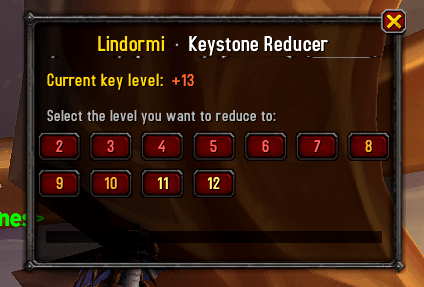
LindormiHelper replaces Lindormi's repetitive confirmation loop with a single clean panel. Talk to her once, pick the level you want, and the addon handles the rest — one click per step, no menus, no spam.
Features
- One-click level picker — opens automatically when you talk to Lindormi, showing every level you can reduce to as color-coded buttons
- Dungeon name display — shows the name of your current keystone so you always know what you're working with
- Progress bar + step counter — tracks how far through the reduction you are in real time
- Completion effects — a gold screen flash and sound cue when your key hits the target level
- Zero configuration — works out of the box, no setup required
How to Use
- Walk up to Lindormi (found near the Timeways portal in Silvermoon City)
- Click her to interact — LindormiHelper's panel opens automatically
- Click the level you want to reduce to
- Click Lindormi once per step — the addon auto-confirms each downgrade
- Done — gold flash and chime when your key reaches the target
Slash Commands
| Command | Description |
|---|---|
/lh |
Show help |
/lh show |
Open the panel manually |
/lh status |
Print your current keystone level in chat |
/lh reset |
Cancel a reduction in progress |
/lh debug |
Toggle debug output for troubleshooting |
Notes
- Blizzard's API requires a real player click to re-open an NPC between steps, so the addon cannot fully automate the loop — you click Lindormi once per level reduced. Still far faster than navigating the menu every time.
- Compatible with WoW: Midnight (12.0+)
Feedback & Bugs
Found a bug or have a suggestion? Use the Issues tab on CurseForge or leave a comment below.
The LindormiHelper Team