
Recording 2026-08-19 203339.gif
Screenshot 2026-08-19 203017.png
Description
Lifebloom Cue
⚠️ IF THE TIMER FEELS A BIT OFF
Lifebloom Cue is designed to stay lightweight and combat-safe. In newer WoW Retail patches, Blizzard can sometimes hide aura timing in combat, so the addon may use a safe backup cast timer when needed.
If your alert feels slightly early or late, this is usually not a bug. For a slightly earlier practical warning, try /lbc threshold 5. For tighter warning timing, try /lbc threshold 4.5. If you want the addon to feel more accurate, try /lbc scan 0.6. If you want it to be smoother and lighter on CPU, try /lbc scan 0.8. If fallback alerts feel slightly late, try /lbc grace 0.2. The default grace setting is /lbc grace 0.35, which helps avoid early fallback alerts. The default same-target Lifebloom refresh cap is /lbc refresh 19.5.
You can also open the in-game command guide with /lbc commands.
Lifebloom Cue is a lightweight Restoration Druid addon for World of Warcraft Retail that helps you track and refresh Lifebloom before it expires.
It provides configurable reminders using sound, screen text, flash alerts, and an optional persistent Lifebloom icon with countdown, stack tracking, and Pandemic-window visibility options.
Features
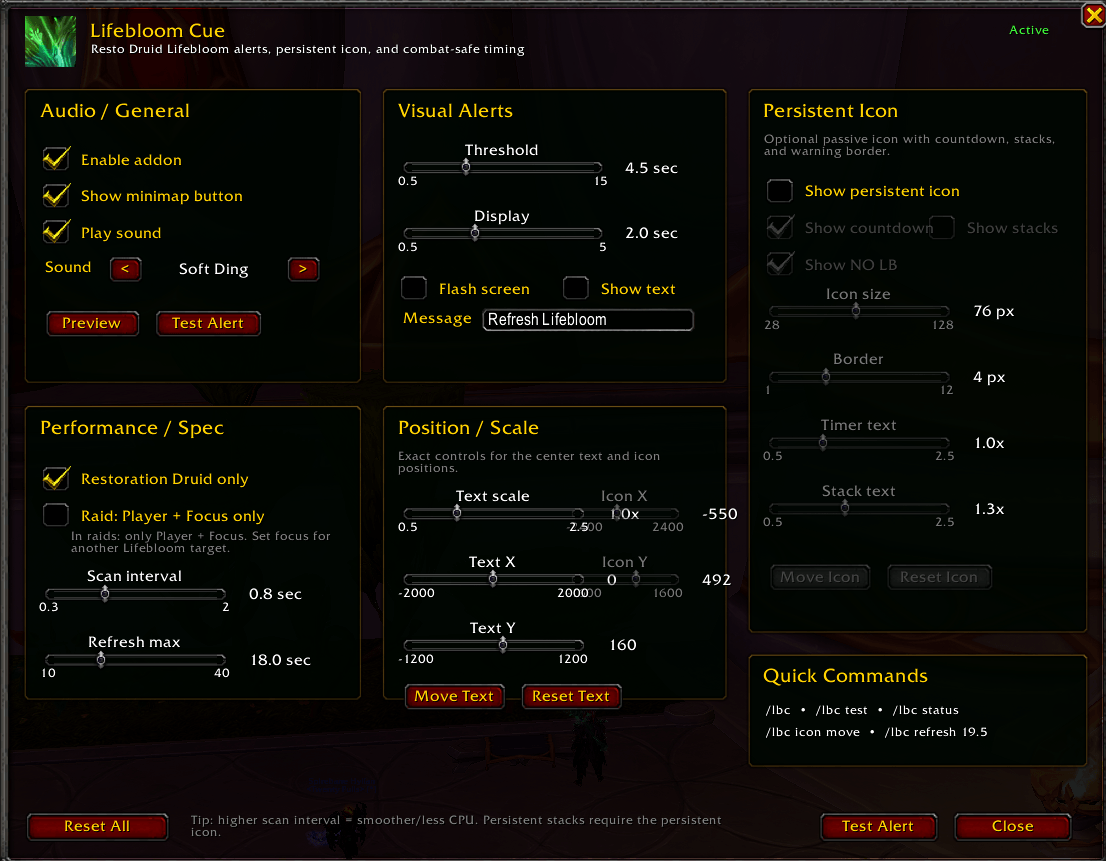
Lifebloom Cue tracks your active Lifebloom buff and lets you choose when you want to be warned before it expires. It includes a configurable alert threshold, multiple clean sound cue options, optional screen flash, optional movable center-screen alert text, adjustable text scale, and configurable alert display duration.
The addon also includes native Blizzard Pandemic and carry-over detection on supported clients, while still keeping compatibility fallbacks for older Retail clients or situations where aura timing is hidden in combat.
The optional persistent Lifebloom icon can show a countdown timer, missing Lifebloom state, stack count, and warning border. It can remain visible all the time, only while Lifebloom is active, only during the Pandemic window, or only when Lifebloom is missing or in the Pandemic window.
The persistent icon includes rarity-style stack coloring. One stack shows as rare blue, two stacks show as epic purple, and three stacks show as legendary gold/orange. The icon also has a gold border when Lifebloom is active and a red border when Lifebloom is missing or close to expiring.
You can adjust the persistent icon size, border thickness, timer text size, stack text size, and position. The icon can be moved freely, locked in place, or optionally anchored near the mouse cursor.
Lifebloom Cue also includes a minimap button, tooltip support, right-click settings access, Shift-drag minimap movement, raid performance mode, Restoration Druid-only mode, and an in-game Quick Commands help window.
Why use it?
Lifebloom can be easy to miss during healing, movement, mechanics, Mythic+, and raid damage.
Lifebloom Cue gives you a clean reminder without needing a full WeakAura setup or a large UI addon. It is designed to stay focused on one job: helping Restoration Druids keep Lifebloom active and refreshed at the right time.
Pandemic Window Support
On supported WoW Retail clients, Lifebloom Cue can use Blizzard’s native Pandemic and carry-over information to better understand when Lifebloom is actually safe to refresh.
This helps reduce incorrect early alerts, especially when Lifebloom has been extended beyond its normal duration.
If the native Blizzard API is not available, the addon safely falls back to readable aura timing or its combat-safe backup timer.
Persistent Icon
The optional persistent icon gives you a small Lifebloom tracker that can show the current Lifebloom countdown, stack count, missing Lifebloom state, warning border, and Pandemic-window visibility behavior.
The icon is disabled by default so it will not change your UI unexpectedly after installing or updating. You can enable it from the addon settings or with /lbc icon on.
Icon Visibility Modes
The persistent icon supports multiple visibility modes.
“Always” keeps the icon visible whenever the persistent icon feature is enabled.
“Always While Lifebloom Active” shows the icon while Lifebloom is active.
“Pandemic Window Only” shows the icon only when Lifebloom is inside the refresh or Pandemic window.
“Missing or Pandemic” shows the icon when Lifebloom is missing or when it is inside the refresh or Pandemic window.
For example, if you only want the icon to appear when Lifebloom is in the refresh window, use /lbc icon visibility pandemic.
Persistent Icon Positioning
The persistent icon can be positioned in two ways.
Free drag mode lets you click “Move Icon”, drag the icon where you want it, and then click “Lock Icon”.
Mouse anchor mode makes the icon follow near your mouse cursor. You can enable it with /lbc icon mouse on.
Mouse-anchor mode is only a passive display. It does not cast spells, target units, or perform protected actions.
Spoken Lifebloom Sound
Lifebloom Cue includes support for a spoken “Lifebloom” sound option.
The addon does not include a generated voice file by default. To use the spoken option, place a custom file at Interface\AddOns\LifebloomCue\Sounds\lifebloom.ogg.
The recommended file format is a short .ogg file with a clear natural voice saying “Lifebloom”. It should ideally be around 0.5 to 1.0 seconds, with no music, no reverb, no click or pop, and no robotic or overly dramatic voice processing.
Once the file exists, select “Lifebloom - Spoken” from the sound options.
Center Alert Text
The center-screen alert text can be moved freely. Use /lbc move, then drag the text preview where you want it and lock it in place.
Raid Performance Mode
Lifebloom Cue includes a raid performance option designed to reduce unnecessary unit scanning in raid encounters.
When enabled in raids, the addon only scans the player and focus target. It does not scan target, mouseover, party units, or raid units while raid performance mode is active.
This is recommended if you want smoother performance in raid content and you keep your Lifebloom target as focus.
Quick Commands
/lbc opens settings.
/lbc commands, /lbc help, and /lbc quick open the in-game Quick Commands help window.
/lbc test tests the current alert.
/lbc status shows current addon status and tracking information.
/lbc pandemic shows Pandemic detection and debug information.
/lbc threshold 4.5 sets the alert threshold.
/lbc scan 0.8 sets the scan interval. Higher values are smoother and use less CPU. Lower values react faster.
/lbc grace 0.35 sets the fallback alert grace used when WoW hides real aura timing in combat.
/lbc refresh 19.5 sets the same-target Lifebloom refresh cap used by the backup timer.
/lbc raid on enables raid performance mode.
/lbc raid off disables raid performance mode.
/lbc icon on shows the persistent Lifebloom icon.
/lbc icon off hides the persistent Lifebloom icon.
/lbc icon visibility shows the current persistent icon visibility mode.
/lbc icon visibility always always shows the persistent icon.
/lbc icon visibility active shows the icon while Lifebloom is active.
/lbc icon visibility pandemic shows the icon only during the Pandemic or refresh window.
/lbc icon visibility missing_pandemic shows the icon when Lifebloom is missing or in the Pandemic or refresh window.
/lbc icon move unlocks the persistent icon for movement.
/lbc icon lock locks the persistent icon.
/lbc icon reset resets the persistent icon position.
/lbc icon mouse on anchors the persistent icon near the mouse cursor.
/lbc icon mouse off turns off mouse-anchor mode.
/lbc icon size 64 sets the persistent icon size.
/lbc icon border 5 sets the persistent icon border thickness.
/lbc icon stacks on enables stack display on the persistent icon. The persistent icon must be enabled first.
/lbc icon stacks off disables stack display.
/lbc icon timer 1.2 adjusts the persistent icon countdown text size.
/lbc icon stacksize 1.2 adjusts the persistent icon stack text size.
/lbc move unlocks the center-screen alert text.
/lbc resto on makes the addon only run as Restoration Druid.
/lbc resto off allows addon UI outside Restoration spec.
/lbc minimap reset resets the minimap button position.
Notes
This addon is designed for Restoration Druids in Retail WoW.
It is intentionally simple, lightweight, and focused only on Lifebloom reminders. It does not cast spells, target units, click abilities, or replace your healing frames.
LifebloomCue Team