Snipaste_2026-04-12_12-16-52.png
Description
LifaMpLoop — Mythic+ Dungeon Loot Browser & Watchlist
LifaMpLoop helps you plan and track gear upgrades from the current Mythic+ dungeon rotation. It pulls loot data from the in-game Encounter Journal, filtered to your class and specialization, and presents it in a clean, browsable UI.
Features
- Browse by Dungeon — Select a dungeon from the sidebar to see all loot your current class/spec can use from each boss.
- Browse by Slot — Filter loot by equipment slot (Head, Neck, Chest, Trinket, Weapon, etc.) to quickly find upgrades for a specific gear slot.
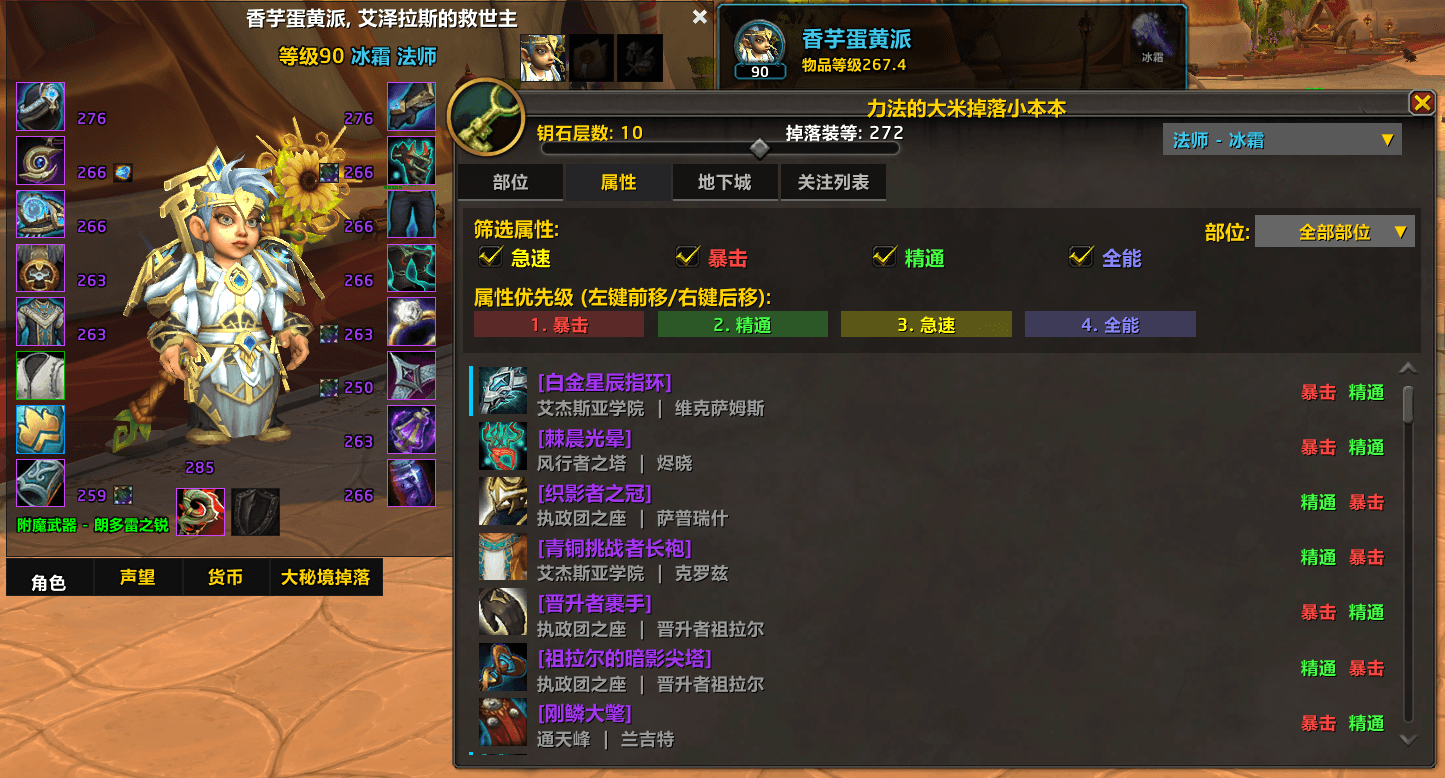
- Browse by Stats — Set your secondary stat priority (Haste, Crit, Mastery, Versatility) and see items ranked by how well they match your preferences. Optionally filter by slot.
- Watchlist — Add any item to your personal watchlist. Items are grouped by dungeon for at-a-glance tracking.
- Loot Monitor — Automatically detects when you or a party member loots a watched item:
- If you receive a watched item, it is automatically removed from your watchlist.
- If a party member receives a watched item, the addon can automatically send a polite whisper asking if they'd trade it (configurable, with anti-spam cooldown).
- Class/Spec Switcher — Quickly switch the viewed class and spec without reloading, so you can plan for off-specs or alts.
- Character Frame Tab — Adds a convenient tab to the default Character Frame for quick access.
Usage
- Open the loot browser via the Character Frame tab or the
/mplslash command. - Switch between Browse by Dungeon, Browse by Slot, Browse by Stats, and Watchlist tabs.
- Shift-click or right-click items to add/remove them from your watchlist.
- Configure auto-whisper behavior and customize the whisper message template in the Watchlist tab.
Slash Commands
/mpl— Toggle the main window.
LifaMpLoop — 大秘境掉落浏览与关注列表
LifaMpLoop 帮助你规划和追踪当前大秘境轮换中的装备升级。插件从游戏内冒险指南读取掉落数据,按你的职业和专精过滤,以简洁的界面呈现。
功能
- 按副本浏览 — 从侧栏选择副本,查看每个Boss可掉落的职业专精适用装备。
- 按部位浏览 — 按装备部位(头、颈、胸、饰品、武器等)筛选掉落,快速定位特定部位的升级。
- 按属性浏览 — 设置你的副属性优先级(急速、暴击、精通、全能),查看按匹配度排序的装备列表,可叠加部位筛选。
- 关注列表 — 将任意装备加入个人关注列表,按副本分组显示,一目了然。
- 掉落监控 — 自动检测你或队友拾取关注装备:
- 你获得关注装备时,自动从关注列表移除。
- 队友获得关注装备时,可自动发送礼貌密语询问是否愿意交易(可配置,含防刷屏冷却)。
- 职业/专精切换 — 无需重载即可切换查看的职业和专精,方便为副专精或小号规划。
- 角色面板标签页 — 在默认角色面板添加便捷标签页,快速访问。
使用方法
- 通过角色面板标签页或
/mpl命令打开掉落浏览器。 - 在"按副本"、"按部位"、"按属性"、"关注列表"标签页之间切换。
- Shift+点击或右键点击装备可添加/移除关注。
- 在关注列表标签页中配置自动密语开关和自定义密语模板。
斜杠命令
/mpl— 切换主窗口显示。
LifaMpLoop Team