LH Tweaks
- By
Add a shared settings hub for LH addons and small WoW UI improvements for chat, tooltips, merchants, and fishing.
LH_Tweaks.jpg
Description
LH Tweaks
Add a shared settings hub for LH addons and small WoW UI improvements for chat, tooltips, merchants, and fishing.
Small changes to the World of Warcraft UI, with a place for all my LH addons in the game's own Settings menu.
Why I made these addons
I'm well aware that an addon already exists for almost everything here. Some do things a little differently; others offer far more features than I need. I wanted a UI that still feels like WoW's own UI, with a few useful changes that fit into it naturally.
Splitting this collection into small addons was a deliberate choice. Install only the pieces you actually want. LH Tweaks provides the shared settings page and a handful of everyday improvements; each companion addon has its own job.
I made these addons mainly for my own use. If one or two of them happen to make your time in WoW a little nicer too, that makes me happy.
If you like the whole setup, install LH Tweaks and LH HideMe, enable all tweaks and choose Hide all in LH HideMe. Then arrange the remaining UI in WoW's Edit Mode to suit you, and you're ready to play. You can always switch individual options back off later.
What LH Tweaks does
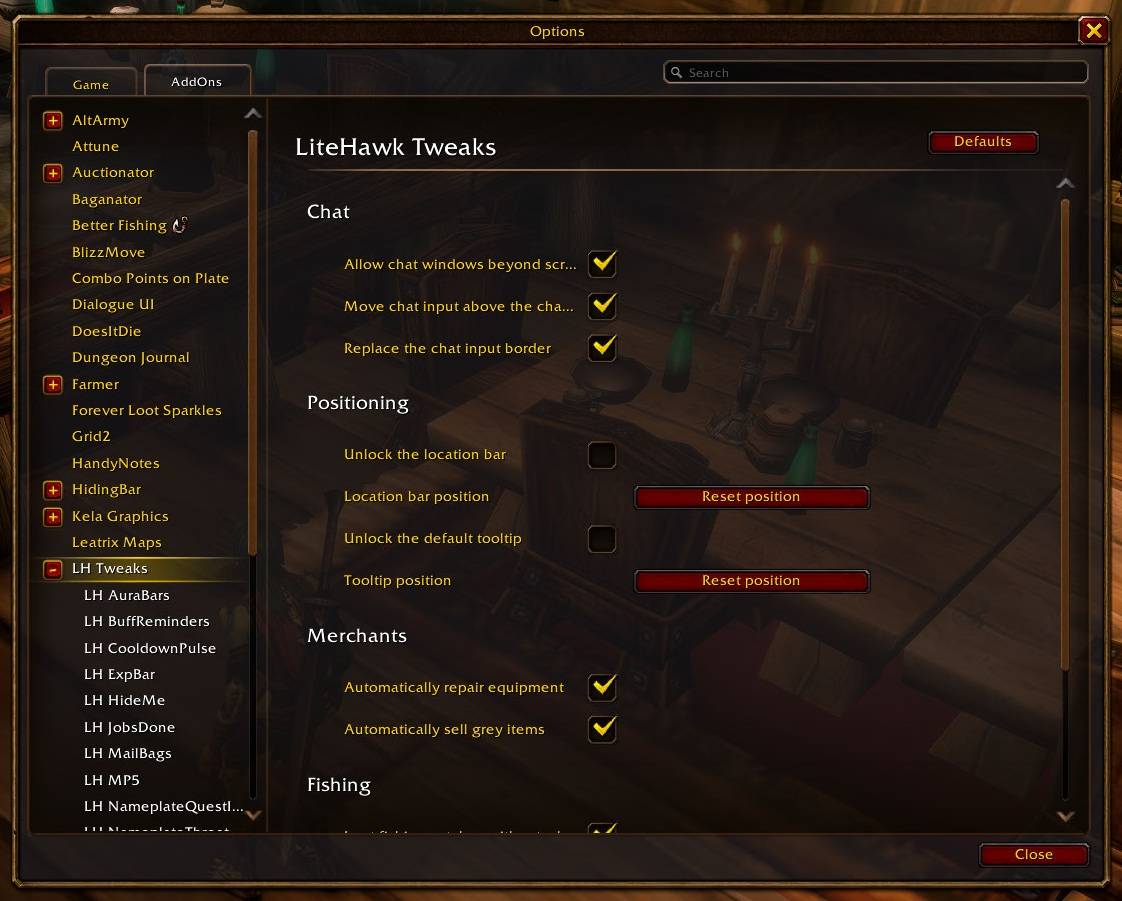
- Chat window freedom: Move standard chat windows beyond the screen edges and hide their scrollbars. Place the chat input above the window and give it a simple dark background with a muted gold border.
- Move the location bar and tooltip: Unlock and drag the zone name bar with its attached buttons, or move the default tooltip using its small drag handle. Lock either one at its saved position or reset it.
- Merchant chores: Automatically repair your gear with your own gold when you can afford it, and sell grey items from your bags. If Leatrix Plus already handles either action, LH Tweaks leaves that action to it.
- Fishing loot: Pick up fishing catches without briefly opening the loot window. If something remains, the normal loot window appears so you can collect it yourself. Other loot works as usual.
Find these options under Options → AddOns → LH Tweaks. Settings are saved per character. Use Enable all or Disable all there, or type /lh_tweaks all on or /lh_tweaks all off. Type /lh_tweaks help for individual commands. Merchant options take effect on your next merchant visit.
The companion addons
Each of these is a separate download and uses LH Tweaks for its settings:
- LH AuraBars: Compact bars for buffs, debuffs and spell cooldowns across classes, races and factions.
- LH CooldownPulse: Flashes an ability icon near the center of the screen when its cooldown finishes.
- LH ExpBar: A minimal experience bar, including rested XP, sized to match the minimap.
- LH HideMe: Hides selected parts of the default UI, with individual switches and a Hide all button.
- LH JobsDone: Plays the familiar Warcraft peasant voice when a quest is ready to turn in.
- LH MailBags: Opens your Blizzard bags or Baganator at a mailbox, with an optional close action.
- LH MP5: Shows an estimated five-second mana timer on the Blizzard player mana bar.
- LH NameplateQuestInfo: Adds quest markers and objective progress to relevant nameplates.
- LH NameplateThreatColors: Colors Blizzard nameplate health bars by threat for your role while grouped.
- LH PetStats: Shows pet loyalty by the pet portrait, with a matching small progress bar.
- LH Range: Shows melee range, with additional spell-range zones for Shamans and Hunters.
- LH BuffReminders: Reminds you when class buffs are missing.
- LH Skills: Shows profession skills in a compact, movable display with rank colors and skill-up flashes.
- LH Stats: Keeps your money, free bag slots and remaining ammo visible below the minimap.
- LH SwingTimer: Adds minimal main-hand and ranged swing timers beneath the player cast bar.
- LH TinyDPS: A compact damage and healing display using the game's built-in meter data.
Installation
Install LH Tweaks first, then add whichever companion addons you want. Each companion requires LH Tweaks. For a manual installation, keep each addon in its own Interface/AddOns folder and restart the game after adding new addons.
Feedback
I'd love to hear what works for you and what could be better. If you have feedback, an idea for an improvement or a feature request, please leave a comment here on CurseForge.
Thank you
Thanks to Woffle of Dark Iron [US] and discoteq for Doom_CooldownPulse, and to Sideshow and Talyrius for TinyDPS. Their work deserves recognition. LH CooldownPulse carries that pulse idea forward for this UI; LH TinyDPS is my own compact display for WoW's built-in meter data.
* These addons were implemented with the help of Codex and GPT-6-SOL. I've tested them myself in the WoW beta client as thoroughly as I could, but some features may not yet work for every class or race. If you notice anything that doesn't work as expected, please report it in the CurseForge comments so I can take a look.
LH Tweaks Team